UPDF
UPDF
 UPDF for Windows
 UPDF for Mac
 UPDF for iPhone/iPad
 UPDF for Android
 Nomostar
 UPDF AI Online
 UPDF Sign
 IvyCraft
 Edit PDF
 Annotate PDF
 Create PDF
 PDF Form
 Edit links
 Convert PDF
 OCR
OCR PDF to Word
 PDF to Image
 PDF to Excel
 Organize PDF
 Merge PDF
 Split PDF
 Crop PDF
 Rotate PDF
 Protect PDF
 Sign PDF
 Redact PDF
 Sanitize PDF
 Remove Security
 Read PDF
 UPDF Cloud
 Compress PDF
 Print PDF
 Batch Process
 About UPDF AI
 UPDF AI Solutions
 AI User Guide
 FAQ about UPDF AI
 Summarize PDF
 Translate PDF
 Chat with PDF
 Chat with AI
 Chat with image
 PDF to Mind Map
 Explain PDF
 PDF AI Tools
 Image AI Tools
 AI Chat Tools
 AI Writing Tools
 AI Study Tools
 AI Working Tools
 Other AI Tools
 AI Bookmark Generation
 AI Bookmark Summary
 AI Watermark Generation
 AI Background Generation
 AI Sticker Generation
 AI Stamp Generation
 AI Editing Suite
 UPDF Copilot
 AI Page Management
 AI Semantic Search
 PDF to Word
 PDF to Excel
 PDF to PowerPoint
 Enterprise Solution
 Enterprise Sign
 Enterprise AI
 Enterprise Plan
 Enterprise User Guide
 Enterprise Webinar
 IT
IT Education
 Construction
 Financial Service
 Healthcare
 Insurance
 Legal
Legal Manufacturing
 Government
 Researchers & PhDs
 Solopreneurs & Freelancers
 Lawyers & Legal Professionals
 Real Estate Agents & Brokers
 Education Solution
 Customer Stories
 User Guide
 UPDF Tricks
 FAQs
FAQs UPDF Reviews
 Download Center
 Blog
Blog Newsroom
 Tech Spec
 Updates
 UPDF vs. Adobe Acrobat
 UPDF vs. Foxit
 UPDF vs. PDF Expert

 UPDF AI
UPDF AI Bank Statement Analyzer
Tired of reviewing bank statements line by line? Analyze PDF bank statements with AI, uncover spending trends, detect anomalies, and generate clear financial summaries fast.
Powered by
 GPT-5 |
 DeepSeek R1
5000+ Reviews
 4.8
4.8
UPDF AI available on


 Desktop & mobile app

4M+ Users, 27M+ Bank Statements Analyzed, Trusted by Leading Media:






How to Analyze Bank Statements Online for Free?
-
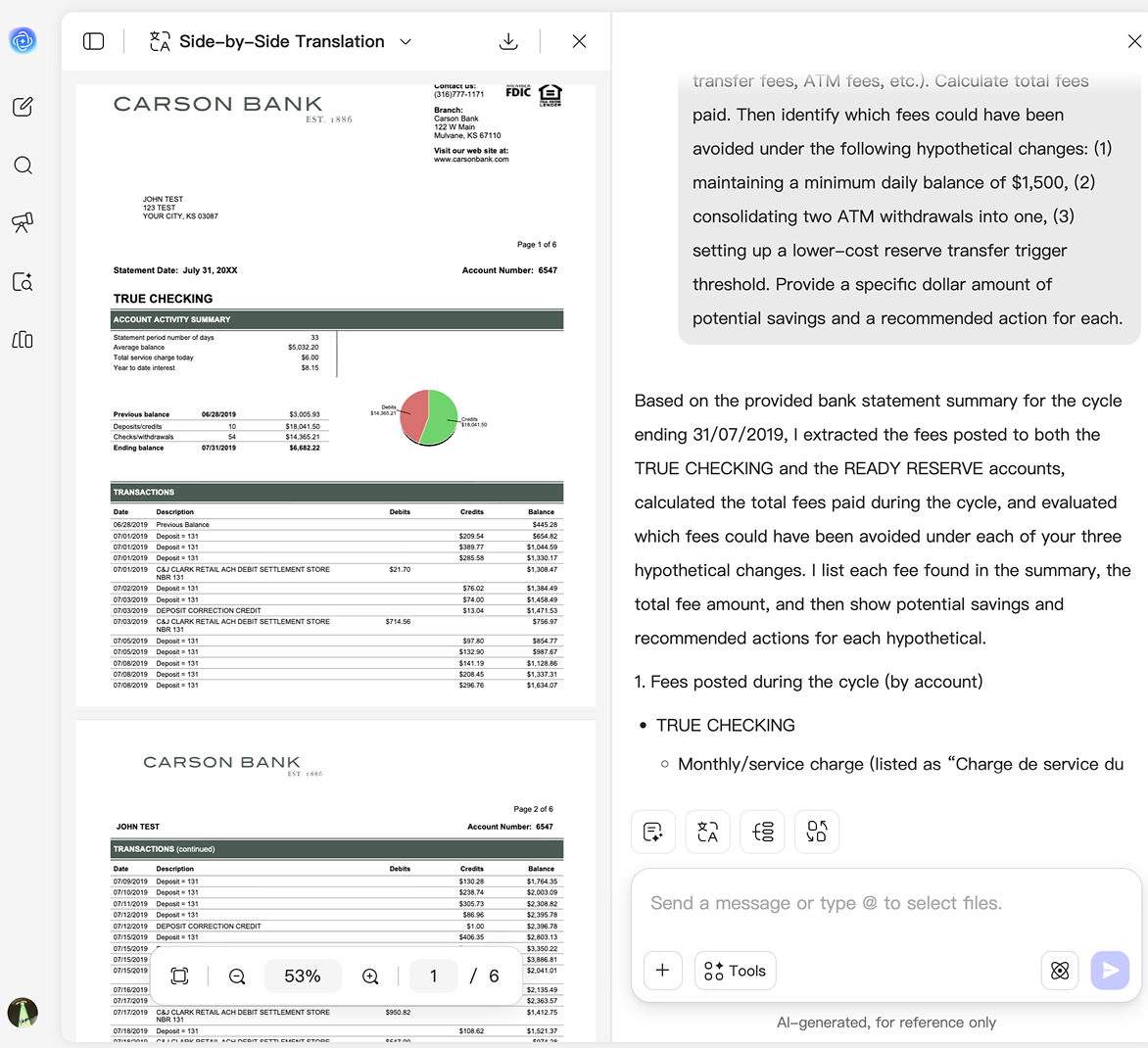
Upload Your Bank Statement: Upload scanned document, or image to UPDF AI. Whether it's a personal account, business account, credit card statement, or loan-related document, UPDF AI can process and understand the financial data instantly.
-
Ask Questions or Request Analysis: Tell UPDF AI what you'd like to learn from the statement. You can ask questions such as "What are my biggest spending categories?", "How much did I save last month?", "Identify recurring subscriptions," or "Analyze my cash flow trends." You can also request financial summaries, expense breakdowns, or personalized budgeting suggestions.
-
Receive Personalized Financial Insights: Instead of just showing transactions, UPDF AI turns financial data into actionable recommendations. Discover where your money goes, identify opportunities to save, and receive tailored suggestions based on your actual spending behavior.

Who Should Use UPDF AI Bank Statement Analyzer?
Small Business Owners & Entrepreneurs
Sarah receives payments from multiple clients and struggles to track her earnings when tax season arrives, so she turns to UPDF AI, which can automatically analyze multiple bank statements simultaneously to summarize her income, cross-reference expenses, and give her a clear picture of her finances in seconds.

Banking & Financial Analysis
UPDF AI goes beyond simple transaction extraction. It helps you:
* Analyze income and expenses
* Track cash flow and spending trends
* Identify recurring payments and subscriptions
* Detect unusual or high-value transactions
* Generate easy-to-read financial summaries
* Compare financial activity across periods

Anyone Applying for Universities or Visas
Reviewing months of bank statements for a visa application can be exhausting, but UPDF AI takes the stress out of the process by analyzing multiple files simultaneously to cross-reference and summarize your data, instantly giving you the exact figures needed to prove your financial stability.

Personal Finance Users
UPDF AI goes beyond simply listing transactions. It analyzes your bank statements to uncover spending patterns, recurring subscriptions, income trends, and unusual expenses. Instead of manually reviewing hundreds of entries, you get clear financial insights that help you budget smarter, reduce unnecessary spending, and stay in control of your money.

UPDF AI Bank Statement Analyzer vs. Other AI Tools
UPDF AI
Other AI Tools
Handwritten & Low-
Quality OCR

Statement-Based Answer
Sometimes AI
hallucination
Enterprise-Grade Security
Traceable Source
Attribution

AI Model
ChatGPT-5 &
DeepSeek R1
ChatGPT-4o/4.1
Personalized Financial
Recommendations
Generic advice
All-in-One Financial
Analysis
Invoices, receipts, tax documents...
Limited
FAQs About Using UPDF AI Bank Statement Analyzer
Q1.Is my banking data secure when using UPDF AI?
Q2. How fast can UPDF AI analyze my bank statements?
Q3. How do I know the AI isn't making up numbers? Can I verify its calculations?
Q4. Can your AI recognize statements from my specific bank (Chase, BNP, HSBC, Barclays, etc.)?
Q5. I need to process foreign-language bank statements (e.g., French, German, Spanish, Chinese). Will translation break the table layout or cause formatting errors?
Other Popular UPDF AI Tools