UPDF
UPDF
 UPDF for Windows
 UPDF for Mac
 UPDF for iPhone/iPad
 UPDF for Android
 Nomostar
 UPDF AI Online
 UPDF Sign
 IvyCraft
 Edit PDF
 Annotate PDF
 Create PDF
 PDF Form
 Edit links
 Convert PDF
 OCR
OCR PDF to Word
 PDF to Image
 PDF to Excel
 Organize PDF
 Merge PDF
 Split PDF
 Crop PDF
 Rotate PDF
 Protect PDF
 Sign PDF
 Redact PDF
 Sanitize PDF
 Remove Security
 Read PDF
 UPDF Cloud
 Compress PDF
 Print PDF
 Batch Process
 About UPDF AI
 UPDF AI Solutions
 AI User Guide
 FAQ about UPDF AI
 Summarize PDF
 Translate PDF
 Chat with PDF
 Chat with AI
 Chat with image
 PDF to Mind Map
 Explain PDF
 PDF AI Tools
 Image AI Tools
 AI Chat Tools
 AI Writing Tools
 AI Study Tools
 AI Working Tools
 Other AI Tools
 AI Bookmark Generation
 AI Bookmark Summary
 AI Watermark Generation
 AI Background Generation
 AI Sticker Generation
 AI Stamp Generation
 AI Editing Suite
 UPDF Copilot
 AI Page Management
 AI Semantic Search
 PDF to Word
 PDF to Excel
 PDF to PowerPoint
 Enterprise Solution
 Enterprise Sign
 Enterprise AI
 Enterprise Plan
 Enterprise User Guide
 Enterprise Webinar
 Banking
 Healthcare
 Insurance
 Legal
Legal Manufacturing
 Government
 Researchers & PhDs
 Solopreneurs & Freelancers
 Lawyers & Legal Professionals
 Real Estate Agents & Brokers
 Education Solution
 Customer Stories
 User Guide
 UPDF Tricks
 FAQs
FAQs UPDF Reviews
 Download Center
 Blog
Blog Newsroom
 Tech Spec
 Updates
 UPDF vs. Adobe Acrobat
 UPDF vs. Foxit
 UPDF vs. PDF Expert

 UPDF AI
Streamline Your Learning with UPDF AI Study Guide Maker
Turn complex teaching materials into clear, structured plans—then let UPDF AI refine your learning with organized content, practical activities, and an instant AI study guide maker to keep you ahead.
Powered by
 GPT-5 |
 DeepSeek R1
5000+ Reviews
 4.8
4.8
UPDF AI available on


 Desktop & mobile app

5M+ Users, 20M+ Study Guides Generated, Trusted by Leading Media:






How to Use UPDF AI for Making Study Guides?
-
Upload Materials or Enter Your Text:
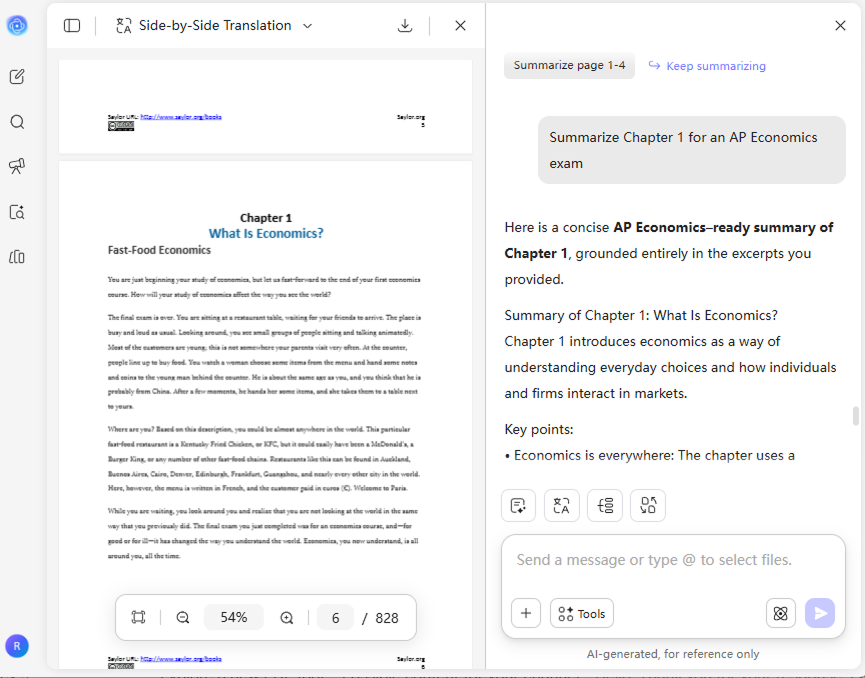
Upload PDF documents, images, or paste your text. UPDF AI instantly parses your content—from files to simple text—to identify the core concepts. -
Generate a Structured Study Outline:
Tell the AI study guide maker your goal. Specify your grade level or focus (e.g., "Summarize Chapter 1 for an AP Economics exam or generate 10 flashcards") for the most accurate results. -
Choose AI Mode & Specialized Outputs:
Select between GPT-5 or DeepSeek R1 to control the precision of your content. From there, let the study guide maker AI generate active recall tools like knowledge summaries, or mind maps to solidify your mastery.

The UPDF AI Advantage in Making Study Guides
Visual Knowledge Mapping
Don’t just read—visualize. UPDF AI instantly transforms dense chapters into clear, hierarchical mind maps. You can select specific page ranges to focus on key sections, then download your custom map as a high-quality image for your notes.

Multi-File Folder Analysis
Break the limits of a single document. Upload multiple textbooks, lecture slides, and notes into a folder for unified analysis. UPDF AI identifies cross-document connections, creating a cohesive study guide that covers your entire syllabus in one go.

Cross-Language & Subject Mastery
Bridge the gap between languages and disciplines. UPDF AI seamlessly translates and analyzes documents in multiple languages, instantly decoding complex terminology and specialized knowledge. Whether it's a foreign research paper or a technical manual, it translates complexity into clarity while preserving academic precision.

Smart Assessment & Feedback
Refine your knowledge with AI essay grading and intelligent quizzes. By providing step-by-step explanations for every wrong answer, UPDF AI transforms your mistakes into a customized, high-yield study guide for final mastery.

UPDF AI vs. Other AI Tools
UPDF AI
Other AI Tools
Free

Upload Files
GPT-5

Mind Maps
Multi-File Analysis
Platform Supported
Online, Windows, macOS, iOS, Android
Online
UPDF AI for Making Study Guides FAQs
Q1. Can I edit the study guides after they are generated?
Q2. Is the AI Study Guide Maker suitable for educators?
Q3. Can I use UPDF AI as a study notes generator?
Q4. What is the difference between the Free and Paid plans?
Other Popular UPDF AI Tools