UPDF
UPDF
 UPDF for Windows
 UPDF for Mac
 UPDF for iPhone/iPad
 UPDF for Android
 UPDF AI Online
 UPDF Sign
 Edit PDF
 Annotate PDF
 Create PDF
 PDF Form
 Edit links
 Convert PDF
 OCR
OCR PDF to Word
 PDF to Image
 PDF to Excel
 Organize PDF
 Merge PDF
 Split PDF
 Crop PDF
 Rotate PDF
 Protect PDF
 Sign PDF
 Redact PDF
 Sanitize PDF
 Remove Security
 Read PDF
 UPDF Cloud
 Compress PDF
 Print PDF
 Batch Process
 About UPDF AI
 UPDF AI Solutions
 AI User Guide
 FAQ about UPDF AI
 Summarize PDF
 Translate PDF
 Chat with PDF
 Chat with AI
 Chat with image
 PDF to Mind Map
 Explain PDF
 PDF AI Tools
 Image AI Tools
 AI Chat Tools
 AI Writing Tools
 AI Study Tools
 AI Working Tools
 Other AI Tools
 PDF to Word
 PDF to Excel
 PDF to PowerPoint
 Enterprise Solution
 Enterprise Sign
 Enterprise AI
 Enterprise Plan
 Enterprise User Guide
 Enterprise Webinar
 Banking
 Healthcare
 Insurance
 Legal
Legal Manufacturing
 Government
 Education Solution
 Customer Stories
 User Guide
 UPDF Tricks
 FAQs
FAQs UPDF Reviews
 Download Center
 Blog
Blog Newsroom
 Tech Spec
 Updates
 UPDF vs. Adobe Acrobat
 UPDF vs. Foxit
 UPDF vs. PDF Expert

PDF editors are a requirement of every industry nowadays, and as a result, many PDF editors are available in the market. This article is about the Kofax Power PDF vs. UPDF comparison, the two popular PDF editors.
We'll compare Kofax Power and UPDF from different aspects, which will help you choose the best PDF editor that suits your needs. Read on to learn more.
Part 1: Introduction
Kofax Power PDF, previously known as Nuance Power PDF, is a PDF editor released in 2014 and is owned by Kofax. It provides features like create, edit, convert, protect, sign, etc., for PDF files and is available for Windows, macOS, iOS, and Android.
UPDF is a lightweight PDF editor released in 2022 by Superace Software Technology Co., Ltd. It is an excellent PDF editor used to edit, annotate, organize, compress, OCR, and secure your PDF documents. You can use it on Windows, Mac, Android, and iOS devices.
Unlike Kofax Power PDF, UPDF offers a more convenient way to edit and annotate PDFs with its various tools. UPDF features a more intuitive interface and is also integrated with AI technology, helping users read and understand their PDF documents better.
Wanna try the amazing features of UPDF? Click the button below!
Windows • macOS • iOS • Android 100% secure
Let's continue discussing the comparative overview of both PDF tools.
Part 2: Features, Pricing, and Ratings of Kofax and UPDF
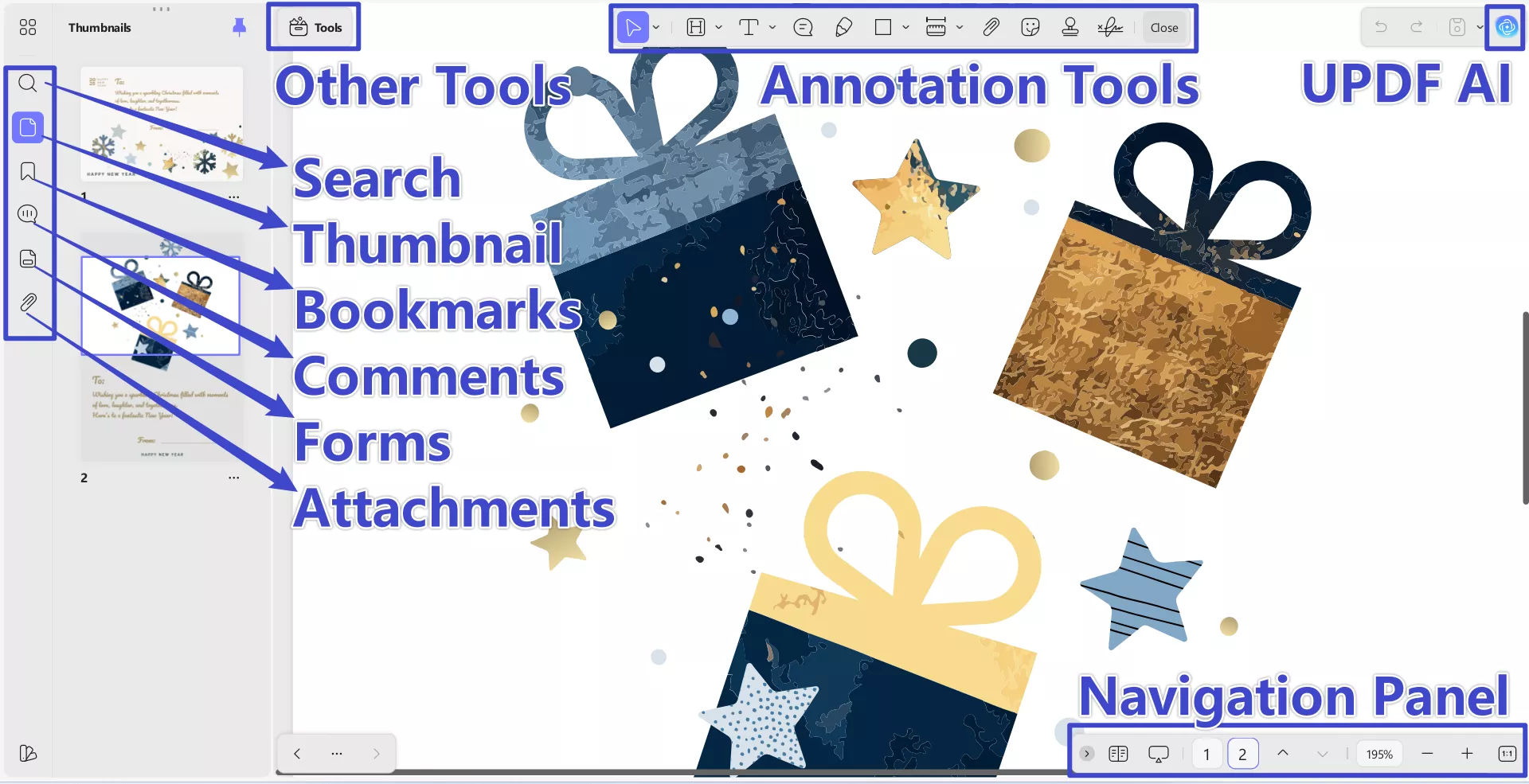
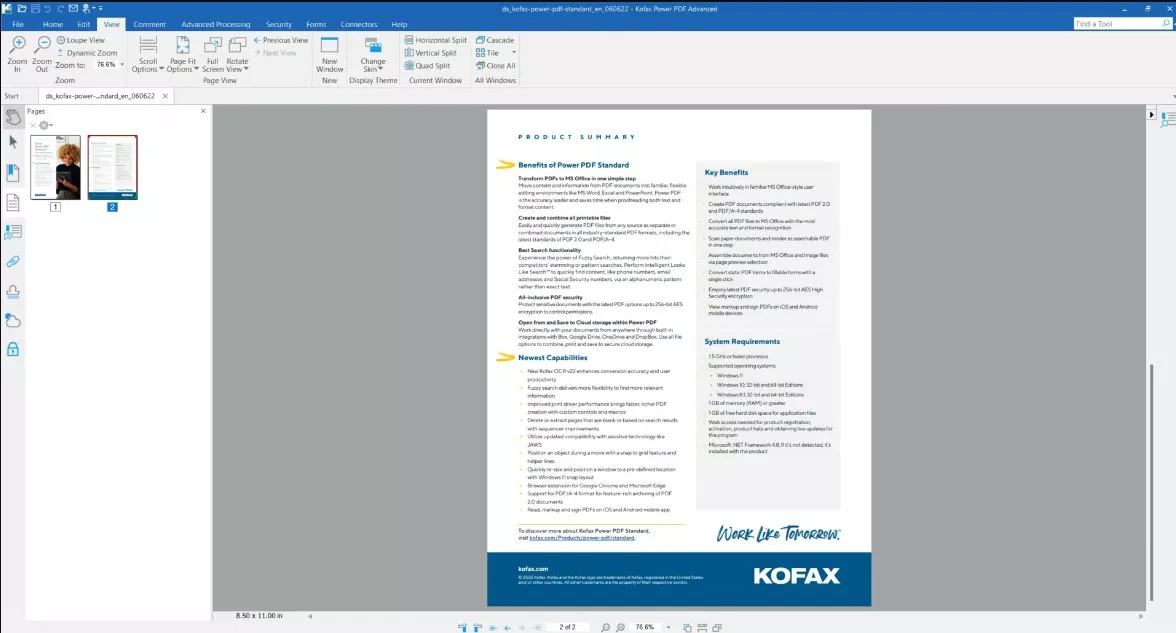
The difference in their user interface is the biggest difference you will find during the Kofax or Nuance Power PDF vs. UPDF comparison. While UPDF supports a sleek and straightforward design, Kofax Power PDF uses the old-fashioned ribbon-style user interface. Kofax Power PDF's user interface greatly resembles Microsoft Office. It might attract hard-core Office users, but not everyone.
Many people have found Office's ribbon bar, loaded with tools, very overwhelming. The same could be said about Kofax Power PDF. UPDF, on the other hand, focuses on user-friendliness and has designed its interface so that even new or non-technical users won't face any issues using it.
Pricing and Ratings of Kofax and UPDF
| Items | Kofax | UPDF |
|---|---|---|
| Pricing Plans | 1. Standard for Windows: US$129/One-Time 2. Advanced for Windows: US$179/One-Time 3. Standard for Mac: US$129/One-Time | 1. UPDF Pro: US$59.99/Year; US$89.99/Lifetime 2. AI Assistant: US$79/Year |
| Systems | Windows, Mac, iOS, Android (You need to purchase separately for Windows and Mac devices) | Windows, Mac, iOS, Android (One purchase for all platforms) |
| Rating for UI Design | 3.5 | 4.8 |
| Rating for Performance Speed | 3.7 | 4.8 |
| Rating for Stability | 4.0 | 4.9 |
For Kofax Power PDF’s perpetual license, you only get the version available at the time of purchase, and official download links for older installers may not be provided if you lose them or need to reinstall later, which can limit your ability to recover the software.
In contrast, UPDF’s lifetime plan is a one-time fee that includes lifetime updates and upgrades, so you pay once and continue receiving future improvements without recurring costs, giving you long-term value and peace of mind.
In addition, for Kofax Power PDF, a single license is meant for one primary computer (with an optional second machine for backup) and can only be used on one device at a time — you must deactivate and uninstall it on an old machine before installing it on a new one, which can be inconvenient if you switch devices often. However, UPDF's license can be used across multiple devices and platforms (Windows, macOS, iOS, Android) so you don’t have to juggle activations when changing computers.
For Kofax Power PDF, the free trial lasts only 15 days, after which you must purchase a license to continue using the full software. In contrast, UPDF lets you use most core PDF tools for free without a strict time-limited trial; you can edit, annotate, convert, and organize PDFs indefinitely with the free version, though trial watermarks are added on saved files and some limits (like conversion counts per day) apply. There’s no fixed expiration on this free access, so you can test UPDF at your own pace before deciding to upgrade. Click the button below to have a try and buy UPDF today to get the plan that matches your needs and unlock powerful PDF editing tools across all your devices!
Windows • macOS • iOS • Android 100% secure
Features of Kofax and UPDF
If you want to learn the differences between Kofax Power PDF and UPDF, please check the chart below:
| Features | Kafox Power PDF Advanced | UPDF |
|---|---|---|
| Read PDFs | ||
| Annotate PDFs | ||
| Edit PDFs (Text, Image, Watermark, Background, Header & Footer) | ||
| Convert PDFs to Word, Excel, PowerPoint, HTML, XML, Text, RTF, and Images | ||
| OCR Recognition | ||
| Add Passwords to PDFs | ||
| Compress PDFs | ||
| Save PDF as PDF/A | ||
| Flatten Annotations and Forms | ||
| Advanced Flatten Feature (Flatten watermark and cropped pages) | ||
| Convert PDF to CSV | ||
| Beautifully-designed Stickers | ||
| Add Rich Text by Dragging and Dropping | ||
| PDF Slideshow with Presenter View | ||
| Fill, Create and Edit PDF Forms | ||
| Combine Files |
Windows • macOS • iOS • Android 100% secure
Part 3. Kofax Power PDF vs. UPDF: User Interface
As described above, the user interface is what divides both tools. In the Kofax Power PDF, all tools are provided in the ribbon on top of the document. It not only follows the same ribbon style as MS Office, but its overall working is also similar to Office apps. You might find it acceptable if you have used any Office app like Word before, but the monotone interface can bore you much quicker when viewing PDF files.
The interface of UPDF is beautifully designed and dynamic and provides a colorful outlook. All the tools are spread out appropriately on the screen with the right font and size. You will not have any issues locating or understanding the tool you need to use. There is no cramming of tools to confuse or overwhelm you. When modifying PDF files on UPDF, all procedures are designed to be simple, easy to follow, and quick.
Windows • macOS • iOS • Android 100% secure
UPDF's User Interface

Kofax Power PDF's User Interface
Part 4: Kofax Power PDF vs. UPDF: Updates and Support
In the Kofax Power PDF vs. UPDF comparison, UPDF is a clear winner when it comes to updates. The tool is updated on a weekly basis, and new features are continuously added. Kofax Power PDF, on the other hand, receives updates every year. It means if a feature is missing in Power PDF or there is some glitch, you have to wait a whole year for a new version.
The reason behind this could be the respective company's priorities. UPDF is owned by a dedicated PDF company that exclusively focuses on UPDF to enhance it by adding more PDF solutions. Kofax, the parent company of Kofax Power PDF, has a lot of software to manage, and the PDF industry is not its main priority. It makes UPDF a better long-term choice as you are more likely to receive better support and updates.
Free download UPDF to experience its newest updates:
Windows • macOS • iOS • Android 100% secure
Part 5: Kofax Power PDF vs. UPDF: Speed and Usability
The next metrics to judge which tool is best on this Kofax or Nuance Power PDF vs. UPDF showdown are their speed and usability. Both tools have small sizes compared to other PDF editors, but UPDF is comparatively more lightweight than Kofax Power PDF. You can read more about their speed and usability performance below:
1. UPDF is Blazing-Fast
After testing both tools with different-sized PDF files and workloads, we have found UPDF to be a much faster tool than Kofax Power PDF. Its processing speed when opening PDF files and when working on multiple files outshines the Power PDF's speed. When using the text-search function in PDF documents, UPDF provides quick and better results than its competitor.
2. UPDF is More User-Friendly
We have already established that UPDF has a more user-friendly interface than Kofax Power PDF. However, the procedures to do different modifications in a PDF, like editing, annotating, and organizing, are also simpler and shorter in UPDF. Almost all procedures require only a couple of clicks to get completed. Compared to Kofax Power PDF, the targeted tools are also easier to access and use in UPDF.
Windows • macOS • iOS • Android 100% secure
Part 6: FAQs on Kofax Power PDF vs. UPDF
Below we have answered the FAQs regarding Kofax Power PDF vs. UPDF, in case you have any questions:
1. Is Nuance Power PDF now Kofax?
Yes, Nuance Power PDF is now known as Kofax Power PDF. Nuance Power PDF was the product of the Document Imaging Division of Nuance Communications, which Kofax acquired in 2018. After the acquisition, the Nuance Power PDF was rebranded as Kofax Power PDF.
2. What's the free trial policy of Kofax and UPDF?
UPDF can be downloaded without registration, and you can perform 5 free PDF converts with OCR. You can use all of its premium tools, though some will add a watermark to your document.
To use the free Kofax Power PDF trial, you must register first. It offers you a 15-day free trial period for its tools.
3. How do I choose between Kofax and UPDF?
Regarding functionalities, both Kofax Power PDF and UPDF are almost similar, but UPDF has a clear edge in user-friendliness, speed, usability, etc. That's why we recommend you go for UPDF, which is much easier to use.
Conclusion
It is time to conclude the Kofax or Nuance Power PDF vs. UPDF showdown and announce the winner. In our view, UPDF is the clear winner of this comparison due to its dynamic interface, remarkable efficiency, and better useability. UPDF also provides many excellent unique features that aren't available in its competitors. Thus, we recommend you choose UPDF as your PDF editor over Kofax Power PDF - download UPDF to try it now!
Windows • macOS • iOS • Android 100% secure
Note: The information on this page is based on UPDF writers’ testing and publicly available product details at the time of writing. Features and pricing may change over time. If you notice any inaccuracies, please contact us at [email protected]

 Engelbert White
 Enid Brown