 UPDF
UPDF
 UPDF for Windows
 UPDF for Mac
 UPDF for iPhone/iPad
 UPDF for Android
 UPDF AI Online
 UPDF Sign
 Edit PDF
 Annotate PDF
 Create PDF
 PDF Form
 Edit links
 Convert PDF
 OCR
OCR PDF to Word
 PDF to Image
 PDF to Excel
 Organize PDF
 Merge PDF
 Split PDF
 Crop PDF
 Rotate PDF
 Protect PDF
 Sign PDF
 Redact PDF
 Sanitize PDF
 Remove Security
 Read PDF
 UPDF Cloud
 Compress PDF
 Print PDF
 Batch Process
 About UPDF AI
 UPDF AI Solutions
 AI User Guide
 FAQ about UPDF AI
 Summarize PDF
 Translate PDF
 Chat with PDF
 Chat with AI
 Chat with image
 PDF to Mind Map
 Explain PDF
 PDF AI Tools
 Image AI Tools
 AI Chat Tools
 AI Writing Tools
 AI Study Tools
 AI Working Tools
 Other AI Tools
 AI Bookmark Generation
 AI Bookmark Summary
 AI Watermark Generation
 AI Background Generation
 AI Sticker Generation
 AI Stamp Generation
 AI Editing Suite
 UPDF Copilot
 AI Page Management
 AI Semantic Search
 PDF to Word
 PDF to Excel
 PDF to PowerPoint
 Enterprise Solution
 Enterprise Sign
 Enterprise AI
 Enterprise Plan
 Enterprise User Guide
 Enterprise Webinar
 Banking
 Healthcare
 Insurance
 Legal
Legal Manufacturing
 Government
 Education Solution
 Customer Stories
 User Guide
 UPDF Tricks
 FAQs
FAQs UPDF Reviews
 Download Center
 Blog
Blog Newsroom
 Tech Spec
 Updates
 UPDF vs. Adobe Acrobat
 UPDF vs. Foxit
 UPDF vs. PDF Expert


As someone who spends hours searching for academic papers, I know how frustrating the process can be. Finding papers is hard, but organizing them and synthesizing that information into a cohesive draft is even harder. Writing a proper literature review from scratch can feel like climbing a mountain with no clear path.That's exactly why tools like ResearchRabbit and UPDF AI have become so popular among researchers and students that make the workflow easier.
In this article, I will share my real experience with UPDF AI VS ResearchRabbit. Instead of treating them as competitors, I see them as tools that solve different parts of the same problem. ResearchRabbit helps me discover and explore papers visually, while UPDF AI helps me read, analyze, and turn that research into structured content.
Part 1. What is ResearchRabbit?
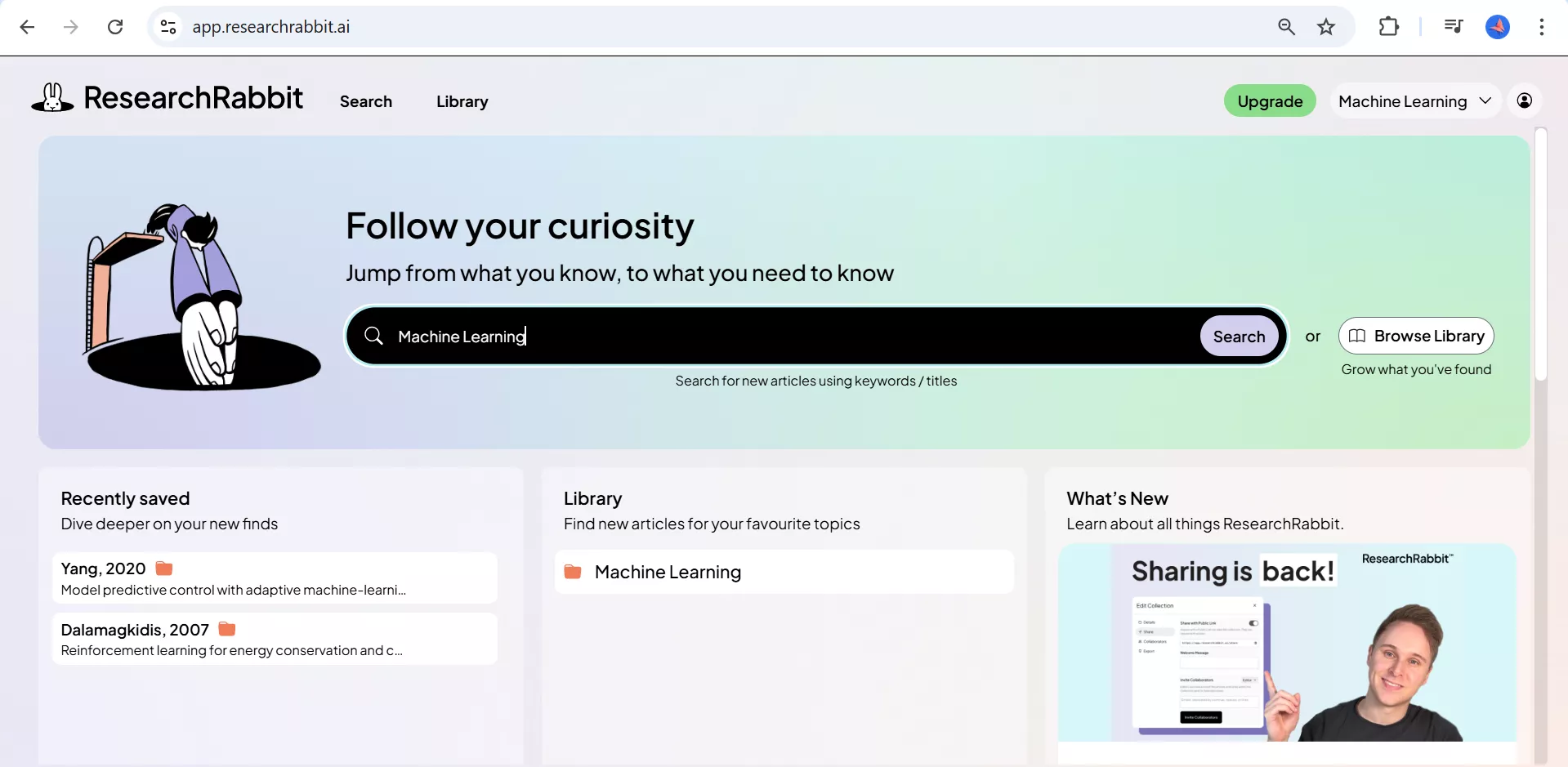
ResearchRabbit is a free AI-powered tool for discovering literature, helping researchers, students, and academics explore academic papers visually. It charts the relationships between papers through citations, shared authors, and linked topics. Trusted by over 1,000,000 researchers worldwide and used at institutions such as Harvard, Stanford, and MIT.
Key Features
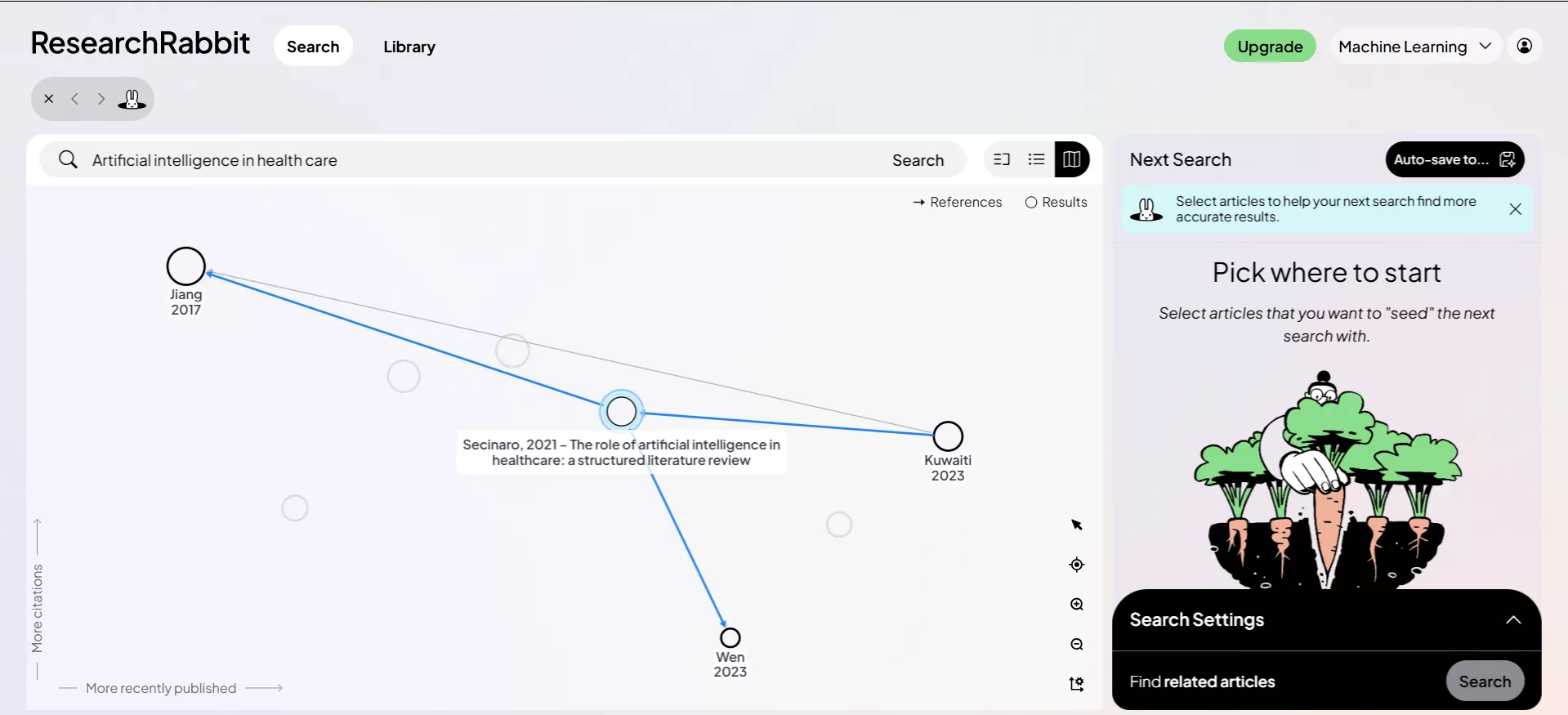
Visual Citation Networks and Relationship Maps:
What I love most about ResearchRabbit is how it maps the relationships between papers. This makes it easier to spot influential studies and understand how different research areas overlap through citations, references or shared research themes.
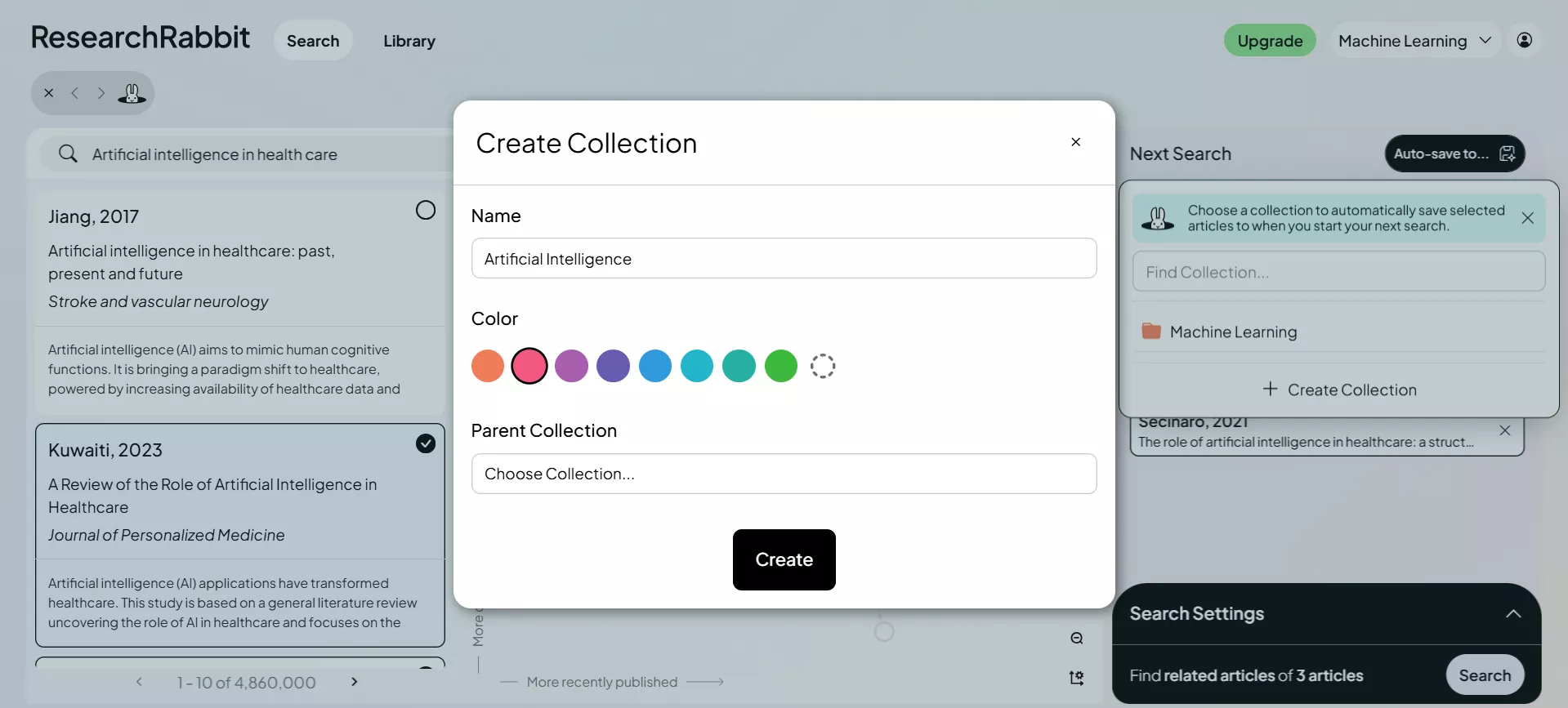
Collection Management:
I can organize papers into collections and share them with team members. I can build multiple "Collections," essentially making a playlist of papers for each of your distinct research topics.
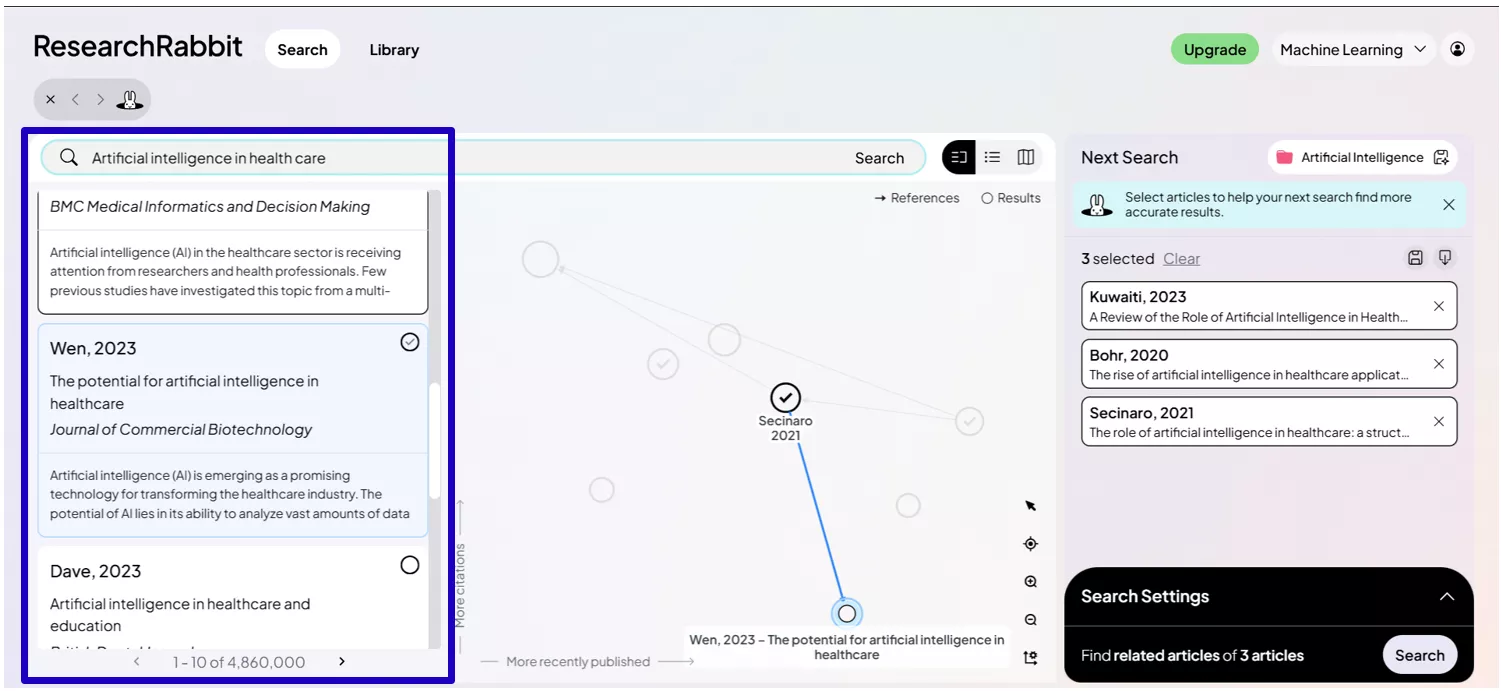
Paper Discovery Through Connected Research
Once you've added a paper to your collection, ResearchRabbit suggests "Similar Work" papers that share the same themes, cite the same sources, or come from the same research community.
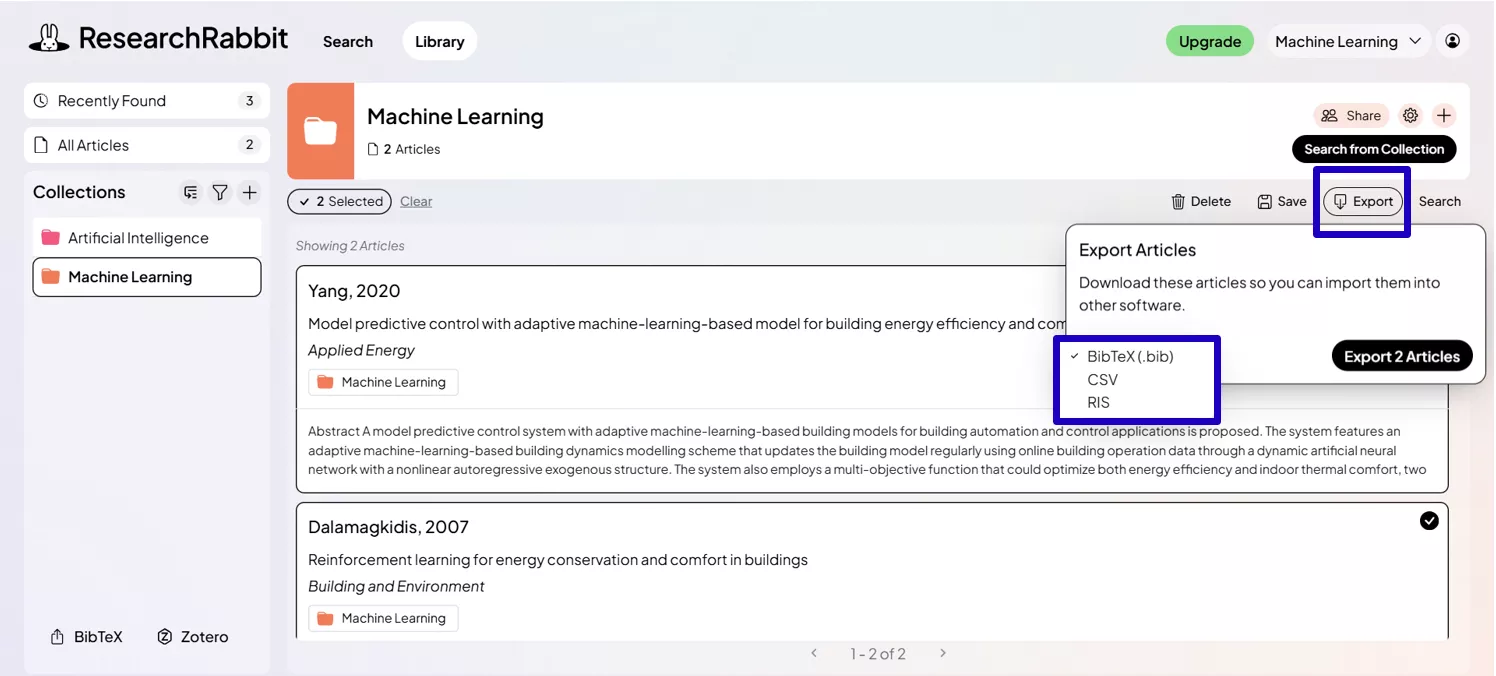
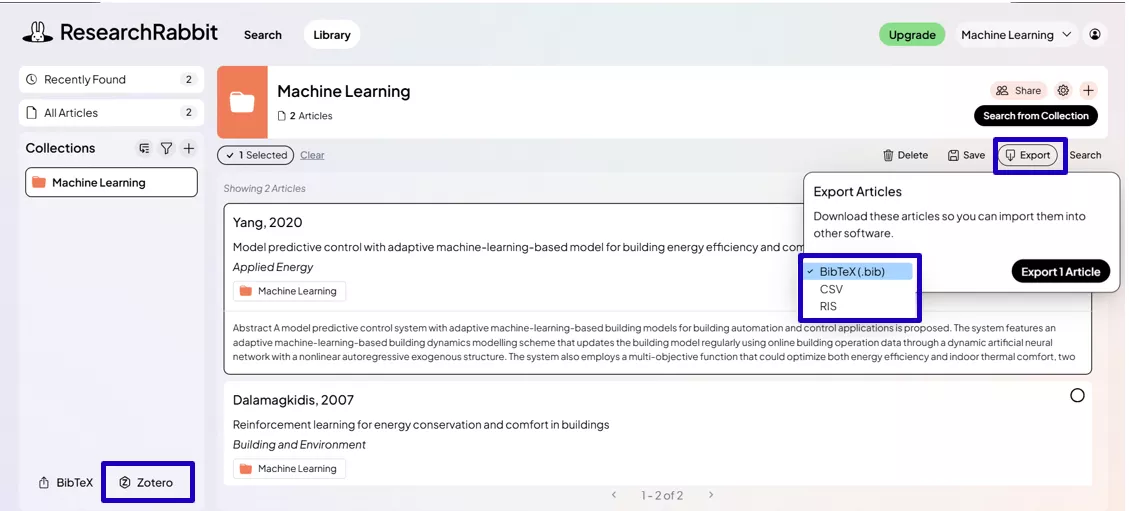
Export Options: Once you’ve built your library, you can export citations in BibTeX, RIS, or CSV formats for reference managers. It even has a sync function to send your entire collection to Zotero, which automatically transfers titles, authors, DOIs, and abstracts.
Strengths and Limitations
Strengths
The biggest strength is its visual exploration unlike anything a traditional database offers. It makes exploring a new research field feel intuitive rather than overwhelming. It is particularly strong for PhD students and researchers who need a comprehensive literature search across multiple databases. Also It is completely free and the Zotero integration is a real time-saver for anyone who already uses a reference manager.
Limitations:
Some of the limitations I noticed while using ResearchRabbit are,
- The “Zombie” Database Issue: Much of ResearchRabbit’s data comes from the Microsoft Academic Graph (MAG), which stopped updating at the end of 2021. This means if I rely only on ResearchRabbit, I might miss newer publications from 2022 onward.
- The Black Box Algorithm & Bias: The “Similar Work” feature relies on a proprietary algorithm that isn’t transparent. It often favours highly cited papers (a “popularity bias”), which can reinforce mainstream views and overlook niche or novel perspectives.
- Lack of AI features: It does not offer AI-powered features for literature review generation, nor can it create structured reports or mind maps directly from a paper's text—tasks that require a different kind of tool.
Target Users
ResearchRabbit is a great fit for students, researchers and teams who are in the early phase of a project, discovering key papers, and building a solid reading list before diving into analysis and writing. It's also great for research teams who need to share and organize paper collections collaboratively.
Part 2. What UPDF AI Is–With a Focus on Paper Search and Scholar Research
UPDF AI has become my main tool whenever I’m working on research. Whether I need to read papers, understand them, or prepare a literature review, it saves me from switching between different apps. Instead of just helping me find papers like Research Rabbit, it actually helps me work through those papers in the same place, which makes my whole workflow smoother.
What UPDF AI Is and Its Value Position
UPDF AI feels like a smart research helper built directly into the UPDF PDF ecosystem. I can open any document, ask questions, get quick explanations, and break down complex ideas without losing focus. If I’m reading one paper or comparing several at once, it keeps everything simple and well‑organized.
Key Features and Capabilities
Let me walk you through the four features that have genuinely made the biggest difference in my works
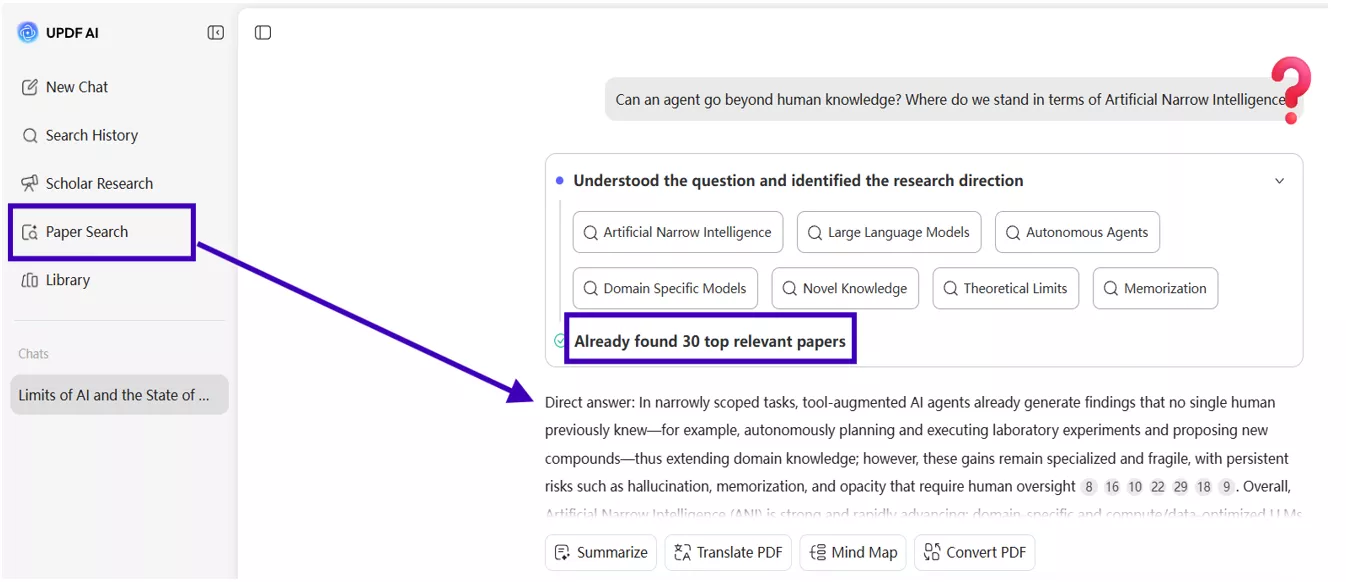
I used to have a hard time finding the right papers for my work, and it took longer than it should, but UPDF AI's Paper Search makes it easier and does the following:
- Search across 220M+ papers using keywords, titles, DOIs, or PMIDs.
- Choose between a simple keyword search or an AI‑powered search with combined insights.
- Each paper comes with a quick summary, main points, and a citation graph.
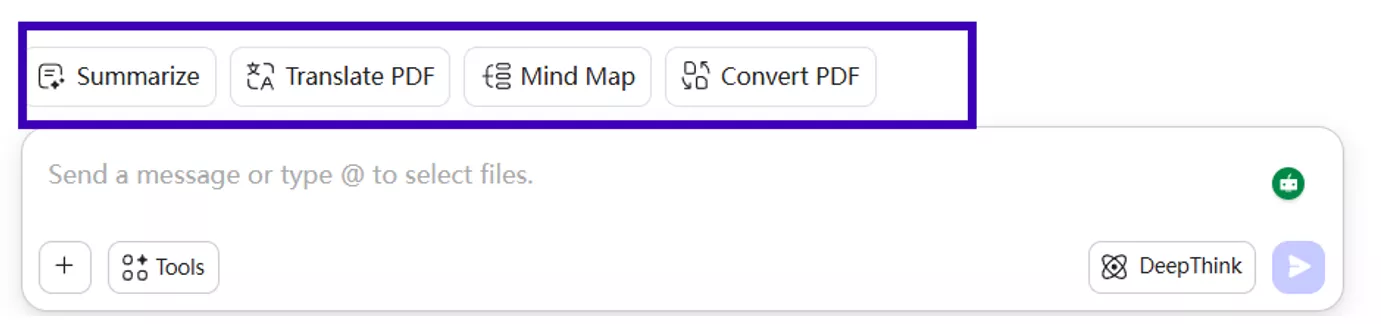
- Open, download, translate, or turn the paper into a mind map without switching apps.
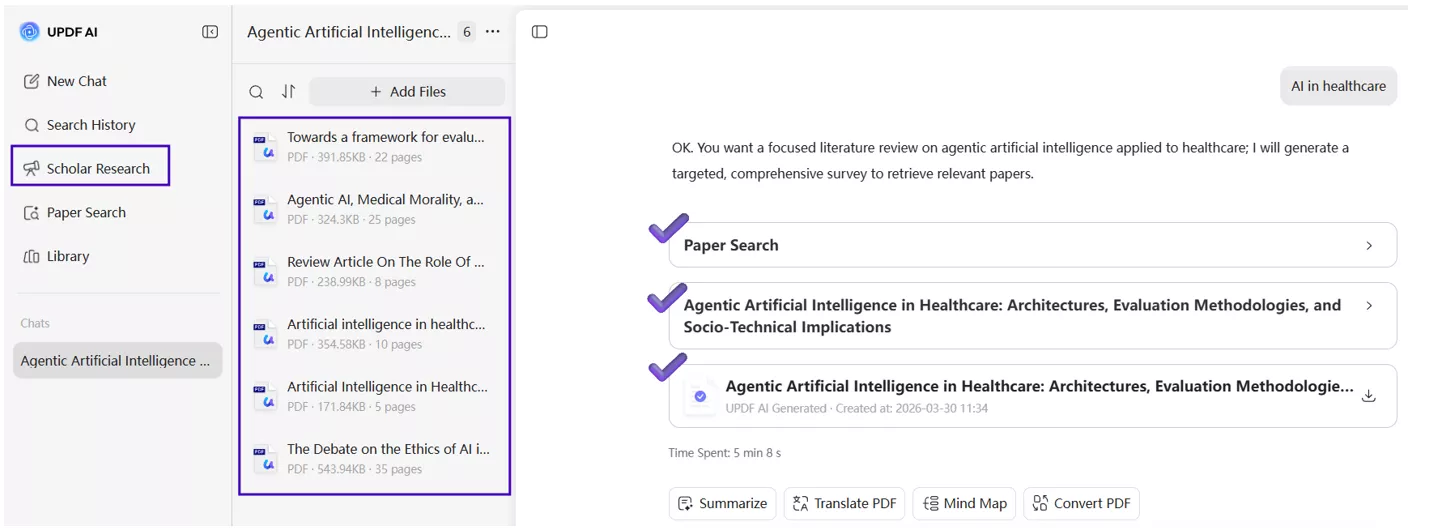
Once I have my papers, the next challenge is making sense of them all. Scholar Research handles exactly that
- Runs a deep research mode that builds a clear, structured literature review for me.
- Organizes the findings into readable sections so the review already has flow.
- Includes citations for every point, making it easy to track sources.
- Works inside the chat, so the reading and writing happen in the same place.
PDF Export
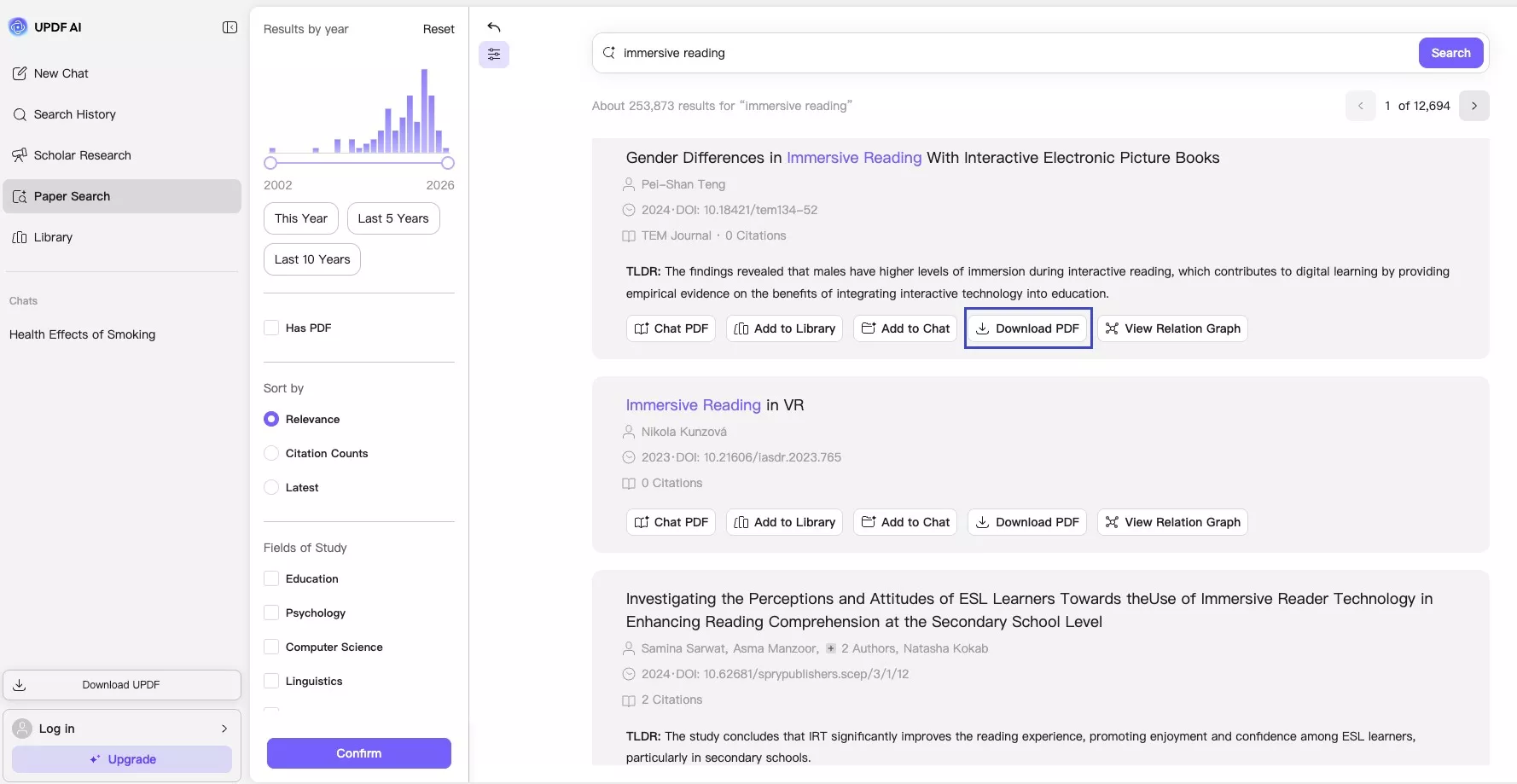
Downloading papers shouldn't be a separate task that breaks the research flow. With UPDF AI.
- Let’s me export any paper from search as a PDF with one click.
- Saved copies are clean and easy to read offline or share.
- No extra steps or third‑party tools needed.
AI Analysis
This is honestly the feature I rely on the most once I have my papers ready.
- Summarizes any uploaded PDF in seconds.
- Compares multiple papers to highlight similarities or differences.
- Creates mind maps to break down the structure of a paper visually.
- Answers my questions about the content with clear, helpful explanations.
Strengths and Limitations
The best thing about UPDF AI is that everything happens in one place — searching, analyzing, writing and editing. It’s also beginner‑friendly, unlike ResearchRabbit’s more technical interface.
The only downside is that UPDF AI doesn’t export citations to BibTeX, RIS, or CSV. If you rely heavily on a reference manager, you’ll handle that part manually.
Who UPDF AI Is Best For
From my experience, UPDF AI is a great fit for:
- Students working on theses, assignments, or dissertations who need to go from reading to writing quickly (and the education pricing helps).
- Researchers and academics who handle large volumes of PDFs and want AI‑assisted summaries, comparisons, and deep analysis.
- Anyone who wants literature review generation and document management in a single, streamlined tool instead of juggling multiple apps.
And the nice part is that there’s no pressure to commit right away — the free trial gives you 100 AI uses, which is more than enough to test the entire research workflow and see how it fits your needs.
Part 3. Head‑to‑Head: UPDF AI vs ResearchRabbit
Once I realized that ResearchRabbit handles discovery and UPDF AI handles analysis, my entire research workflow clicked into place. Here's the exact process I follow from start to finish.
Step 1: I Start With ResearchRabbit to Map the Field
Whenever I begin exploring a topic, I open ResearchRabbit first because it gives me a big‑picture view of the area.
- I drop in a seed paper and instantly see similar studies. I can quickly find “Similar Work” and build citation maps. The visual maps help me understand how authors, topics, and citations connect.
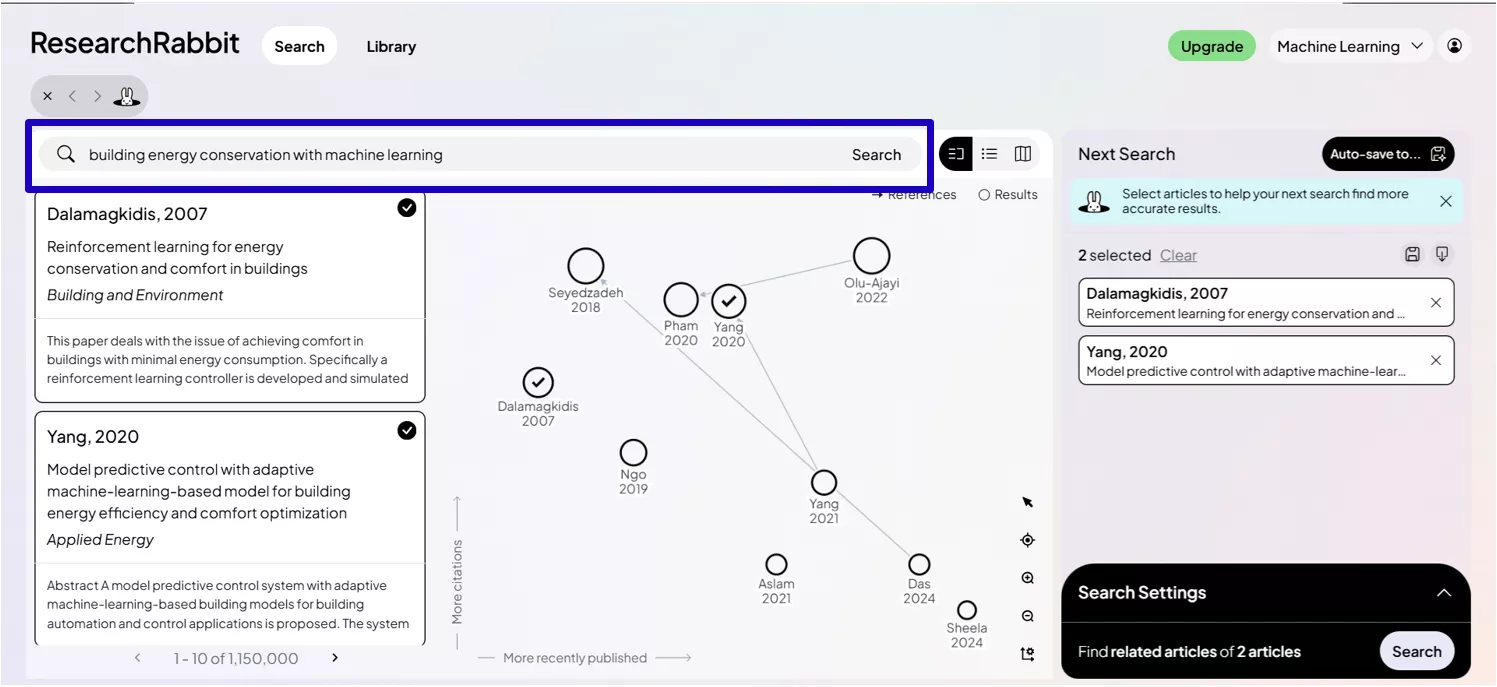
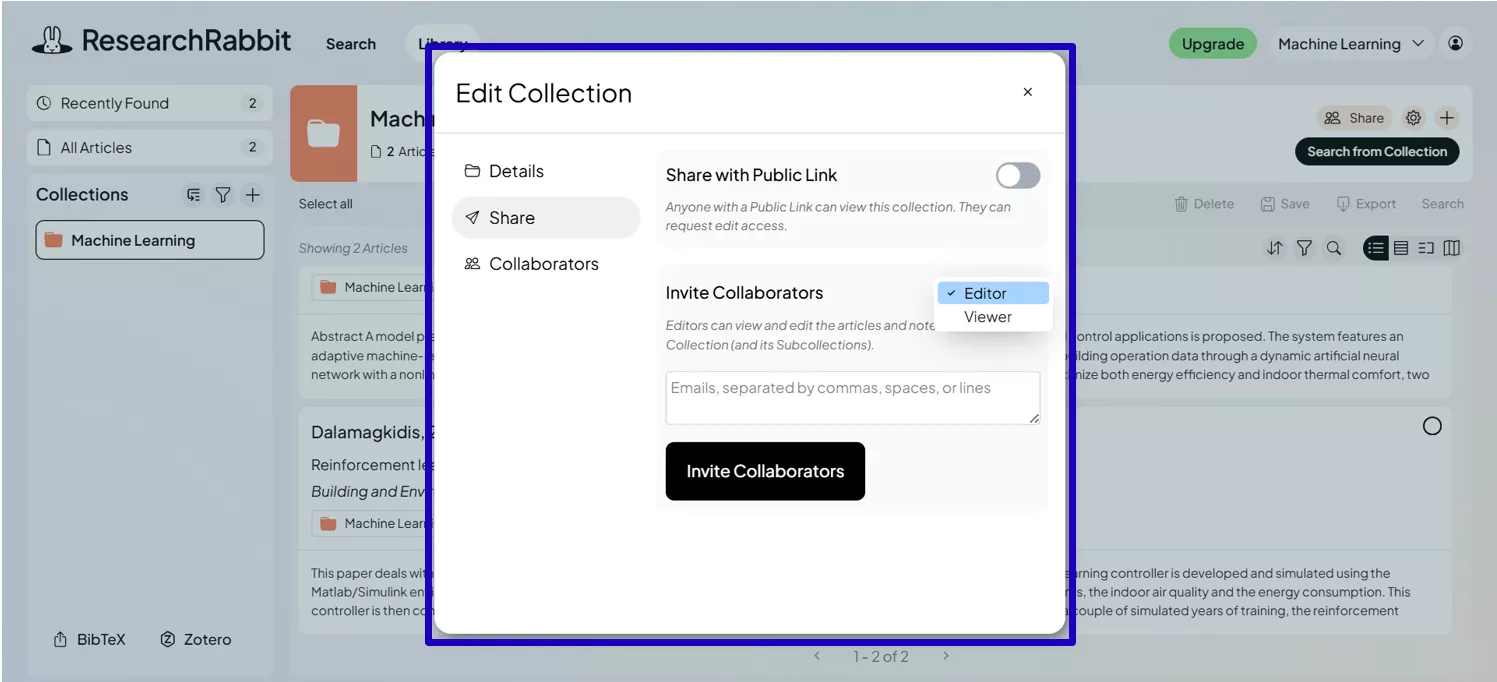
It’s great for spotting clusters of research and finding early or later works. I also create collections so my teammates or friends can see what I’m exploring, which makes collaboration easier. These steps feel like getting a roadmap before driving into a new area.
Step 2: I Bring Key Papers Into UPDF AI for Deeper Work
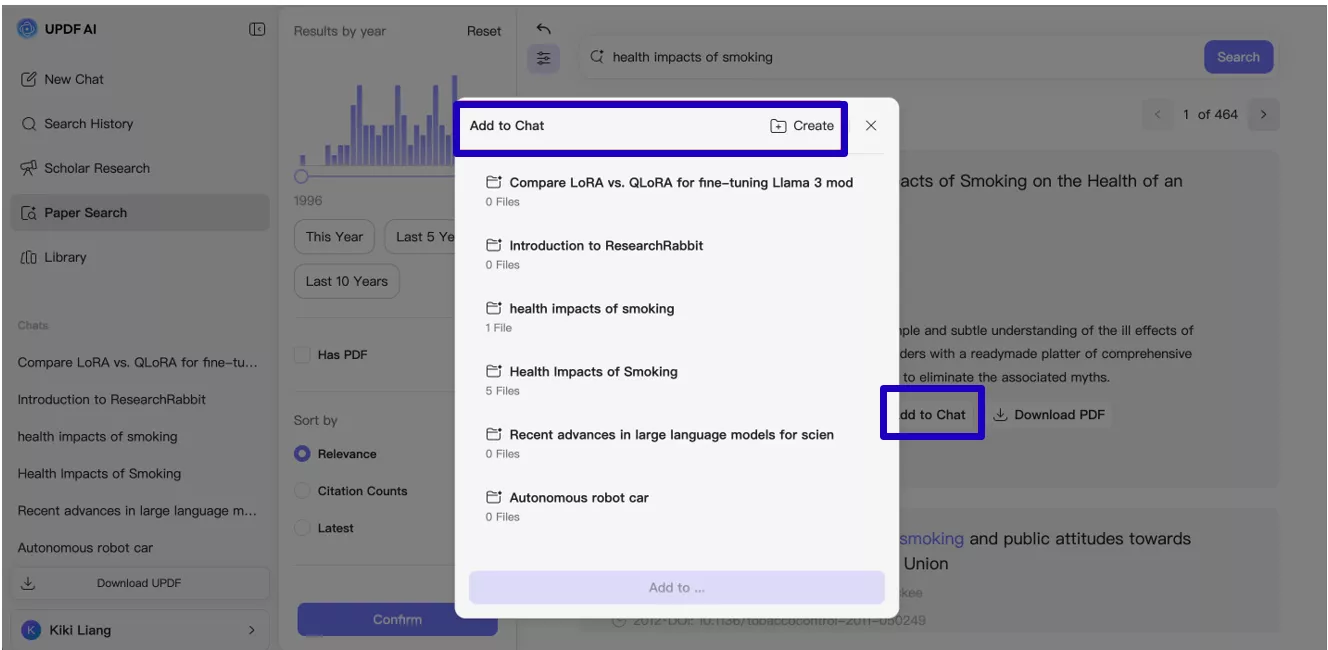
Once I know which papers matter, I move into UPDF AI because it helps me deal with the actual content. I use Paper Search for finding specific studies by DOI, PMID, or keyword. The PDFs can also be added into chat so everything stays in one place. And if something is unclear, I can ask UPDF AI to explain it in simple terms.
At this stage, I’m shifting from “exploring what’s out there” to “learning and analyzing what I found.”
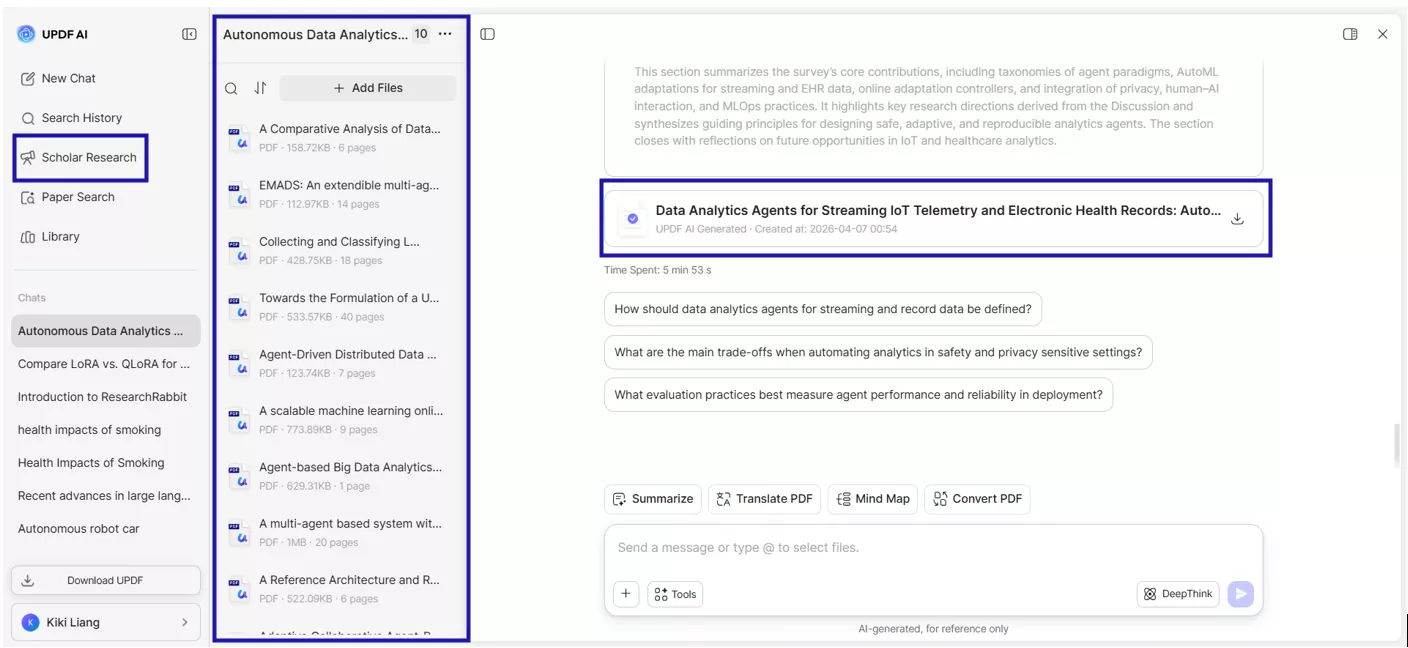
Step 3: I Use Scholar Research to Build My Literature Review
This is where UPDF AI really takes over the heavy work. It analyzes the papers I’ve collected and creates a structured, easy‑to‑read report. The findings are grouped into sections, so it already feels like a draft chapter and every point comes with proper citations, which saves me hours of manual checking.
Instead of staring at a blank page, I start with a clear, organized summary of the field
Step 4: I Finalize My Work and Organize Everything
Once UPDF AI generates the review, I copy or download it and begin polishing.
- I edit the AI‑generated draft to match my writing style.
- I use Zotero (or any reference manager) to store citations and format them as needed.
- And because I’ve used ResearchRabbit earlier, I already have well‑organized collections and citation graphs to refer back to.
By this point, I’ve moved from discovery → understanding → writing, all without unnecessary friction.
Part 4. ResearchRabbit vs UPDF AI at a Glance
By this point in my workflow, it becomes very clear that ResearchRabbit and UPDF AI play very different roles. ResearchRabbit helps me understand the landscape of a topic, while UPDF AI helps me understand the content of the papers themselves.
Here’s a simple side‑by‑side look at how they compare.
| Feature | ResearchRabbit | UPDF AI |
| Paper Discovery | Great for exploring related papers visually and finding new directions | Strong for targeted searches using keywords, DOIs, PMIDs, and AI‑supported retrieval |
| Citation Export | Supports BibTeX, RIS, and CSV | Not supported yet |
| PDF Export | Doesn’t export PDFs directly | Allows one‑click PDF export from search results |
| Literature Review | No built‑in literature review generator | Creates structured literature reviews using Scholar Research |
| Deep Analysis | Offers visual maps but no document‑level AI analysis | Summaries, comparisons, mind maps, and question‑answering for any PDF |
| Best For | Discovering connections and mapping research areas | Reading, analyzing, understanding, and writing the papers in an all-in-one ecosystem |
Recommendation
If you only choose one tool, you’ll miss out on a big part of the research process. ResearchRabbit is excellent for discovery, but it stops there. UPDF AI shines when it comes to understanding papers, analyzing them, and building actual written output.
Using both together gives me the smoothest and fastest workflow especially for academic writing, literature reviews, and complex research projects.
Part 5. FAQs
1. Is ResearchRabbit AI free?
Yes, ResearchRabbit is completely free to use. There are no paid tiers or premium plans. All features, including the visual citation maps, collection management, and Zotero sync, are available to every user at no cost. You simply create a free account at researchrabbit.ai and get started right away. They may add premium features in the future, but the core functions are currently free. An upgrade to the researchrabbit+ is also available for more scalable features with minimal cost.
2. Is ResearchRabbit legit?
Absolutely. ResearchRabbit is a well-established and widely trusted tool in the academic community. It's used by over 1,000,000 researchers worldwide and is trusted at institutions like Harvard, Stanford, Oxford, MIT, and many more. It's been around long enough to build a strong reputation among students, academics, and research professionals across multiple disciplines.
3. Can UPDF AI access the same papers as ResearchRabbit?
UPDF AI searches through 220M+ academic papers, covering major academic databases and sources. In my experience, most papers I find on ResearchRabbit also appear in UPDF AI’s Paper Search. The difference is that ResearchRabbit focuses on visual discovery, while UPDF AI focuses on analysis, summaries, and literature review generation.
Conclusion:
Both ResearchRabbit and UPDF AI are useful tools for academic research and literature reviews. ResearchRabbit helps explore the research landscape visually, discover connected papers, and organize collections with ease. UPDF AI steps in to handle the heavy work, deep analysis, structured summaries, and full literature review generation right inside my PDF workflow. When used together, they cover your entire research workflow from the very first paper you explore to the final draft you hand in. If you want to streamline your own research process, I strongly recommend giving UPDF AI a try, especially with its free trial and student‑friendly pricing.

 Delia Meyer

 Enya Moore
 Engelbert White