UPDF
UPDF
 UPDF for Windows
 UPDF for Mac
 UPDF for iPhone/iPad
 UPDF for Android
 Nomostar
 UPDF AI Online
 UPDF Sign
 IvyCraft
 Edit PDF
 Annotate PDF
 Create PDF
 PDF Form
 Edit links
 Convert PDF
 OCR
OCR PDF to Word
 PDF to Image
 PDF to Excel
 Organize PDF
 Merge PDF
 Split PDF
 Crop PDF
 Rotate PDF
 Protect PDF
 Sign PDF
 Redact PDF
 Sanitize PDF
 Remove Security
 Read PDF
 UPDF Cloud
 Compress PDF
 Print PDF
 Batch Process
 About UPDF AI
 UPDF AI Solutions
 AI User Guide
 FAQ about UPDF AI
 Summarize PDF
 Translate PDF
 Chat with PDF
 Chat with AI
 Chat with image
 PDF to Mind Map
 Explain PDF
 PDF AI Tools
 Image AI Tools
 AI Chat Tools
 AI Writing Tools
 AI Study Tools
 AI Working Tools
 Other AI Tools
 AI Bookmark Generation
 AI Bookmark Summary
 AI Watermark Generation
 AI Background Generation
 AI Sticker Generation
 AI Stamp Generation
 AI Editing Suite
 UPDF Copilot
 AI Page Management
 AI Semantic Search
 PDF to Word
 PDF to Excel
 PDF to PowerPoint
 Enterprise Solution
 Enterprise Sign
 Enterprise AI
 Enterprise Plan
 Enterprise User Guide
 Enterprise Webinar
 IT
IT Education
 Construction
 Financial Service
 Healthcare
 Insurance
 Legal
Legal Manufacturing
 Government
 Researchers & PhDs
 Solopreneurs & Freelancers
 Lawyers & Legal Professionals
 Real Estate Agents & Brokers
 Education Solution
 Customer Stories
 User Guide
 UPDF Tricks
 FAQs
FAQs UPDF Reviews
 Download Center
 Blog
Blog Newsroom
 Tech Spec
 Updates
 UPDF vs. Adobe Acrobat
 UPDF vs. Foxit
 UPDF vs. PDF Expert

 UPDF AI
AI Paralegal for Reviewing Complex Case Files
Use UPDF AI to review lengthy case files, identify important details, summarize evidence, and surface the information that matters most—ideal for paralegals, junior legal professionals, and lean legal teams.
Powered by
 GPT-5 |
 DeepSeek R1
5000+ Reviews
 4.8
4.8
UPDF AI available on


 Desktop & mobile app

4M+ Users, 29M+ Cases Analyzed, Trusted by Leading Medias:






How to Use UPDF AI for AI Paralegal?
-
Upload Your Case Files
Bring together judgments, pleadings, witness statements, contracts, and evidence PDFs in UPDF AI. Analyze hundreds of pages at once without jumping between documents. -
Guide the AI with Clear Instructions
Give instructions like “summarize case facts, extract key evidence, identify legal issues, and flag contradictions,” and @your documents so UPDF AI can help you quickly uncover the most important details across your case files. -
Turn Complex Documents into Clear Insights
Instantly understand lengthy legal materials through concise summaries, mind map, translations, and multi-document analysis—helping paralegals and legal teams prepare cases more efficiently.

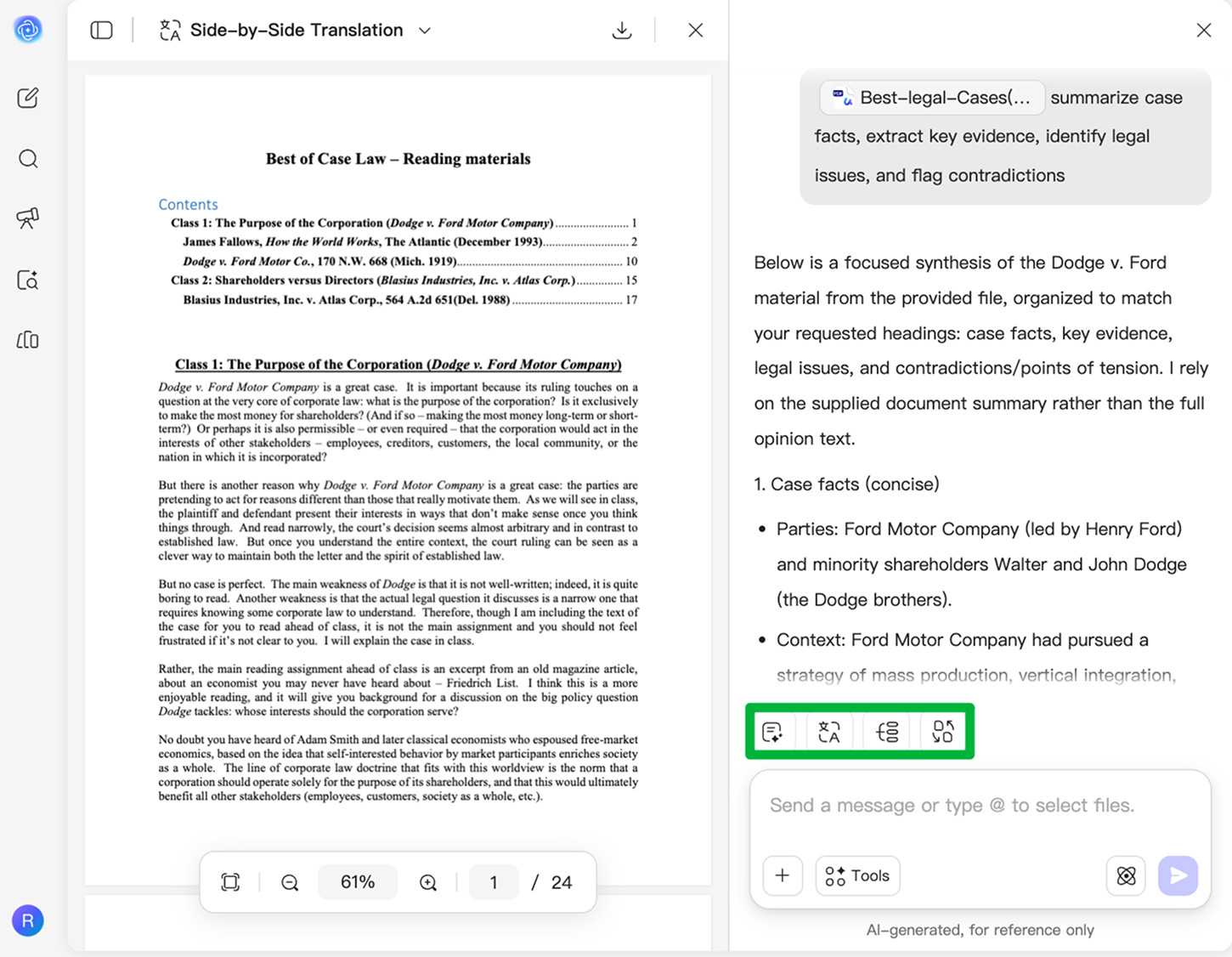
Why UPDF AI for AI Paralegal
Review Case Files Faster
Sifting through hundreds of pages of judgments, pleadings, and evidence can be exhausting and error-prone. UPDF AI helps you quickly identify key facts, important dates, and critical issues—so you can focus on the insights that matter most.

Extract Key Facts and Evidence
Manually hunting for contradictions or overlooked details in case files slows you down. UPDF AI highlights essential facts, witness statements, and supporting evidence, making complex documents easier to understand.

Generate Structured Case Briefs Instantly
Turn lengthy judgments, pleadings, and evidence PDFs into clear, structured case briefs with UPDF AI Case Brief Generator. It automatically organizes facts, issues, arguments, and rulings into a concise format—helping you prepare faster for reviews, meetings, or court presentations.

Make Legal Review Smarter and Easier
Without dedicated legal support, reviewing contracts or case files can feel overwhelming. UPDF AI uses semantic search to understand meaning rather than exact wording, so even when the same issue is expressed in different ways across documents, you can quickly locate relevant clauses, pinpoint risks, and extract the key information you need with confidence.

UPDF AI vs. Other AI Tools
UPDF AI
Other AI Tools
Free

Upload Files
Analyze Scanned Case Files

Multi-File Case Review
Build Legal Timelines
Convert Case Files to Mind Maps
Platform Supported
Online, Windows, macOS, iOS, Android
Online
UPDF AI for AI Paralegal FAQs
1. What is an AI paralegal?
2. Will AI replace paralegals?
3. Can AI review legal documents?
4. What is the difference between the Free and Paid plans?
Other Popular UPDF AI Tools