UPDF
UPDF
 UPDF for Windows
 UPDF for Mac
 UPDF for iPhone/iPad
 UPDF for Android
 Nomostar
 UPDF AI Online
 UPDF Sign
 IvyCraft
 Edit PDF
 Annotate PDF
 Create PDF
 PDF Form
 Edit links
 Convert PDF
 OCR
OCR PDF to Word
 PDF to Image
 PDF to Excel
 Organize PDF
 Merge PDF
 Split PDF
 Crop PDF
 Rotate PDF
 Protect PDF
 Sign PDF
 Redact PDF
 Sanitize PDF
 Remove Security
 Read PDF
 UPDF Cloud
 Compress PDF
 Print PDF
 Batch Process
 About UPDF AI
 UPDF AI Solutions
 AI User Guide
 FAQ about UPDF AI
 Summarize PDF
 Translate PDF
 Chat with PDF
 Chat with AI
 Chat with image
 PDF to Mind Map
 Explain PDF
 PDF AI Tools
 Image AI Tools
 AI Chat Tools
 AI Writing Tools
 AI Study Tools
 AI Working Tools
 Other AI Tools
 AI Bookmark Generation
 AI Bookmark Summary
 AI Watermark Generation
 AI Background Generation
 AI Sticker Generation
 AI Stamp Generation
 AI Editing Suite
 UPDF Copilot
 AI Page Management
 AI Semantic Search
 PDF to Word
 PDF to Excel
 PDF to PowerPoint
 Enterprise Solution
 Enterprise Sign
 Enterprise AI
 Enterprise Plan
 Enterprise User Guide
 Enterprise Webinar
 IT
IT Education
 Construction
 Financial Service
 Healthcare
 Insurance
 Legal
Legal Manufacturing
 Government
 Researchers & PhDs
 Solopreneurs & Freelancers
 Lawyers & Legal Professionals
 Real Estate Agents & Brokers
 Education Solution
 Customer Stories
 User Guide
 UPDF Tricks
 FAQs
FAQs UPDF Reviews
 Download Center
 Blog
Blog Newsroom
 Tech Spec
 Updates
 UPDF vs. Adobe Acrobat
 UPDF vs. Foxit
 UPDF vs. PDF Expert

 UPDF AI
Create Clear Reports with Project Status Reporter
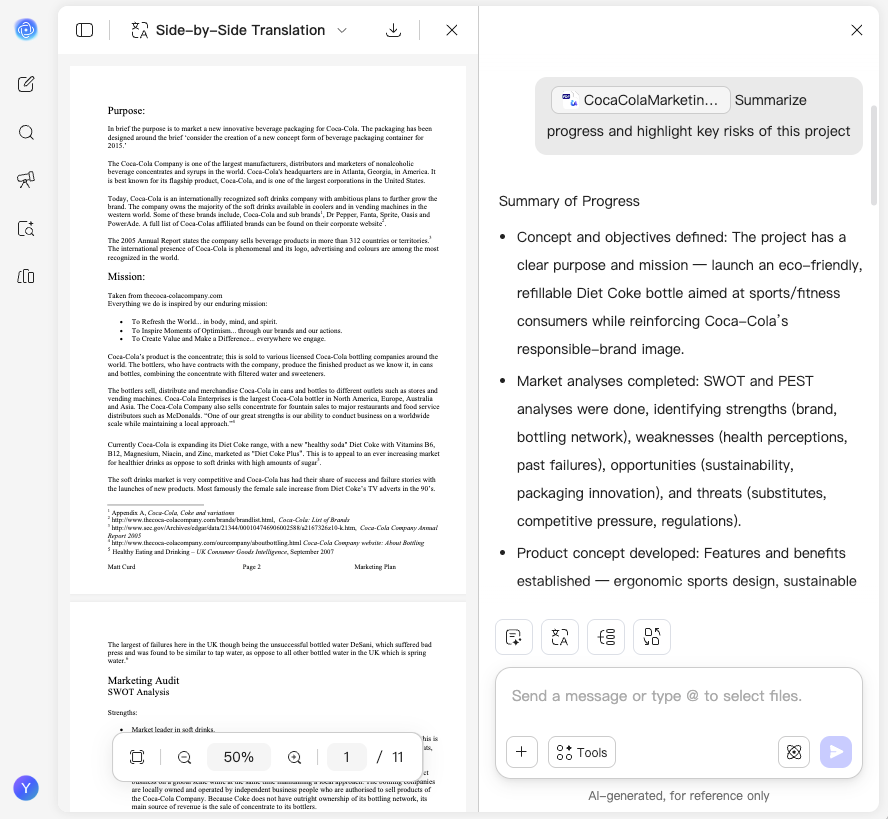
Powered by ChatGPT-5 and DeepSeek R1, UPDF AI Project Status Reporter generates clear, structured reports in seconds. Upload project files or meeting notes to instantly summarize progress, milestones, risks, and next steps.
Powered by
 GPT-5 |
 DeepSeek R1
5000+ Reviews
 4.8
4.8
UPDF AI available on


 Desktop & mobile app

4M+ Users, 16M+ Reports Generated, Trusted by Leading Media:






How to Use UPDF AI to Create Project Status Reports
-
Upload Project Files
Upload PDFs, meeting notes, images, or paste your text. UPDF AI instantly parses your content—from multiple files to simple notes—to identify key updates, milestones, and risks. -
Generate a Project Status Report
Tell the UPDF AI what type of report you need. Specify your reporting period, project phase, or focus (e.g., “Summarize progress and highlight key risks of this project”) for the most accurate and actionable output. -
Review and Export Your Report
Check the generated project status report carefully. If needed, adjust your instructions and regenerate the report for more precise results. Once satisfied, you can download or copy the report to share with your team or stakeholders.

Why Choose UPDF AI Project Status Reporter
Accurate Project Insights
UPDF AI extracts key updates, milestones, and risks with high precision, ensuring your project status reports reflect the most relevant and reliable information for decision-making.

Multi-File Data Synthesis
UPDF AI can analyze and combine information from multiple PDFs, meeting notes, and documents, turning scattered inputs into one clear and structured project status report.

Actionable Risk Identification
Beyond summarizing progress, UPDF AI highlights potential risks and blockers, helping teams quickly identify issues and take informed actions to keep projects on track.

Ready-to-Share Professional Reports
Generate clean, well-structured reports that are instantly ready for stakeholders, whether for internal updates, client communication, or executive summaries.

UPDF AI Project Status Reporter vs. Other AI Tools
UPDF AI Project Status Reporter
Other AI Tools
Progress Clarity
Clear & structured
Vague
Multi-File Input

Limited
Risk Detection
Auto-highlighted
Manual
Ready to Share
Needs editing
Refinement
Easy regenerate
Limited
Speed
Fast
Variable
Data Privacy

Free to Try
, 100 questions
No Word Limits
AI Model Options
ChatGPT-5 & DeepSeek R1
Limited to one AI model
Platform Supported
Online, Windows, Mac, Android, iOS
Online
FAQs About Using UPDF AI Project Status Reporter
Q1. Is UPDF AI suitable for different types of projects?
Q2. Can I update reports as my project progresses?
Q3. Does UPDF AI support weekly or recurring reporting workflows?
Q4. Can UPDF AI help summarize long or complex project updates?
Q5. Do I need technical or project management expertise to use it?
Q6. Is my project data secure when using UPDF AI?
Other Popular UPDF AI Tools