 UPDF
UPDF
 UPDF for Windows
 UPDF for Mac
 UPDF for iPhone/iPad
 UPDF for Android
 UPDF AI Online
 UPDF Sign
 Edit PDF
 Annotate PDF
 Create PDF
 PDF Form
 Edit links
 Convert PDF
 OCR
OCR PDF to Word
 PDF to Image
 PDF to Excel
 Organize PDF
 Merge PDF
 Split PDF
 Crop PDF
 Rotate PDF
 Protect PDF
 Sign PDF
 Redact PDF
 Sanitize PDF
 Remove Security
 Read PDF
 UPDF Cloud
 Compress PDF
 Print PDF
 Batch Process
 About UPDF AI
 UPDF AI Solutions
 AI User Guide
 FAQ about UPDF AI
 Summarize PDF
 Translate PDF
 Chat with PDF
 Chat with AI
 Chat with image
 PDF to Mind Map
 Explain PDF
 PDF AI Tools
 Image AI Tools
 AI Chat Tools
 AI Writing Tools
 AI Study Tools
 AI Working Tools
 Other AI Tools
 PDF to Word
 PDF to Excel
 PDF to PowerPoint
 Enterprise Solution
 Enterprise Sign
 Enterprise AI
 Enterprise Plan
 Enterprise User Guide
 Enterprise Webinar
 Banking
 Healthcare
 Insurance
 Legal
Legal Manufacturing
 Government
 Education Solution
 Customer Stories
 User Guide
 UPDF Tricks
 FAQs
FAQs UPDF Reviews
 Download Center
 Blog
Blog Newsroom
 Tech Spec
 Updates
 UPDF vs. Adobe Acrobat
 UPDF vs. Foxit
 UPDF vs. PDF Expert

When I started comparing different AI tools for research, I kept seeing discussions about UPDF AI vs SciMaster, especially as SciMaster began gaining attention in the scientific community. As someone who works with academic papers, research reports, and complex documents almost every day, I wanted to understand how these two tools actually differ in real use. I have tested both platforms myself, and in this article, I’ll walk you through everything I’ve learned. Whether you’re a student, a researcher, or someone who simply deals with a lot of PDFs, you will find this comparison helpful
Read until the end, and you will see how I combine these tools to build a smoother, more efficient research environment. Before diving into SciMaster, I should also mention that I’ve been using UPDF AI for a long time as part of my daily academic workflow. If you want to try it yourself, here’s the official link:
Part 1. What SciMaster Is
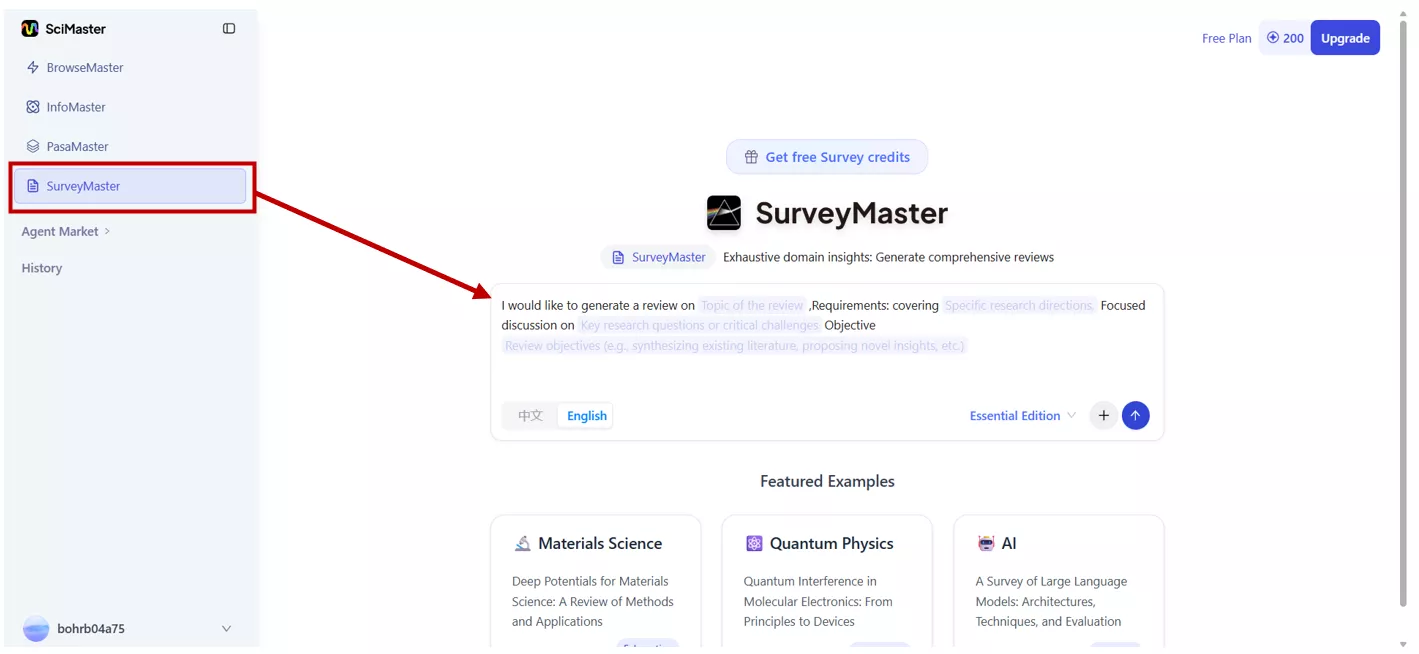
SciMaster is a general-purpose scientific AI agent ecosystem built on Bohrium infrastructure. The idea is to automate and scale intelligent scientific production, making it possible to handle complex workflows across multiple disciplines. You can access it directly through SciMaster’s platform. It's not just a chatbot you ask questions like other tools but it's designed to work as a full scientific production system.
One of its standout features is that you can edit the generated report directly inside SciMaster, rather than having to ask the AI to regenerate it.
Key Features and Capabilities
Here’s what stood out to me when I tested SciMaster:
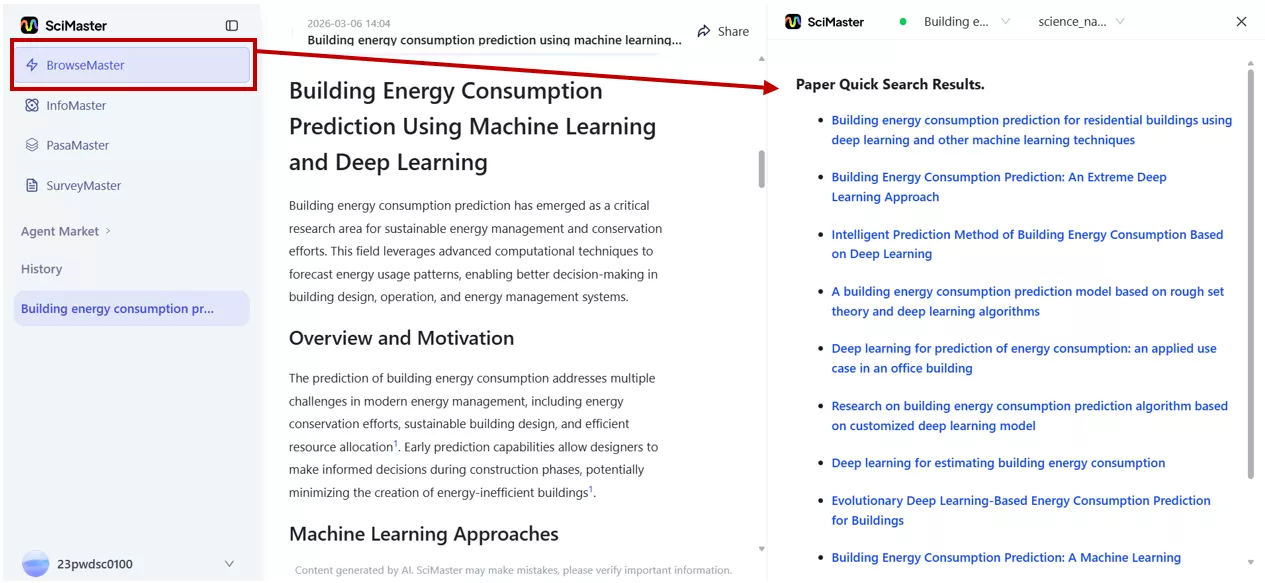
- BrowseMaster: Lets me search globally across academic knowledge and track real-time research hotspots. I found this useful for spotting emerging trends in fields like materials science.
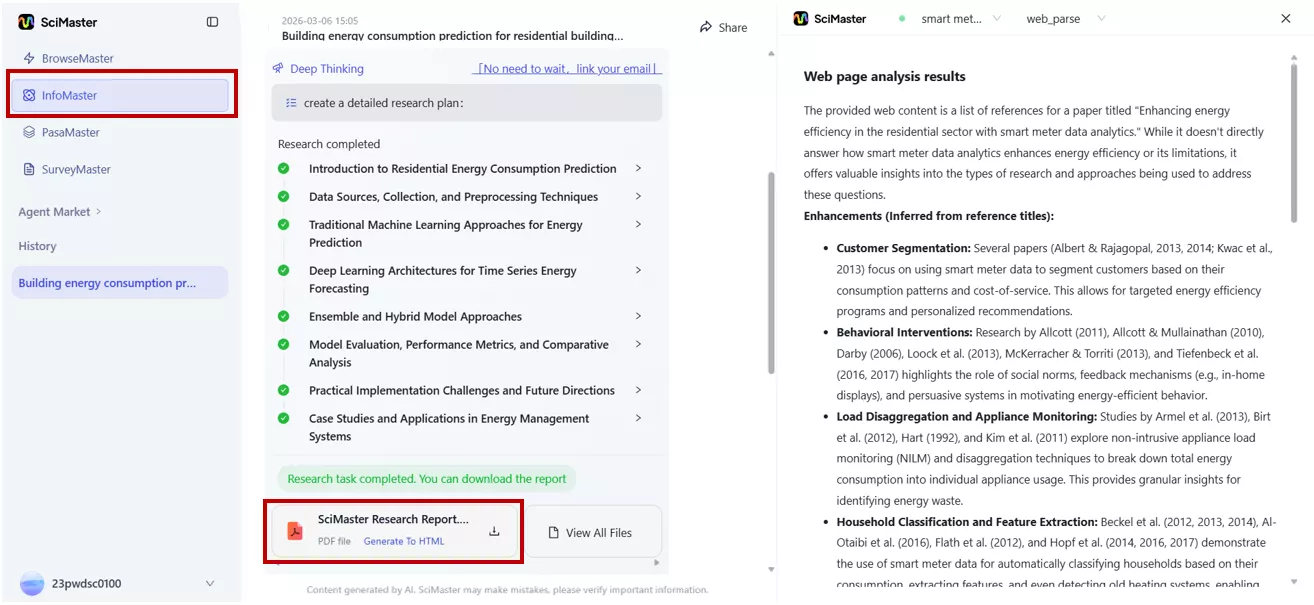
- InfoMaster: Generates detailed research reports (10+ pages) by integrating multi-source information. The reports are logically structured, which makes them a strong starting point for deeper study.
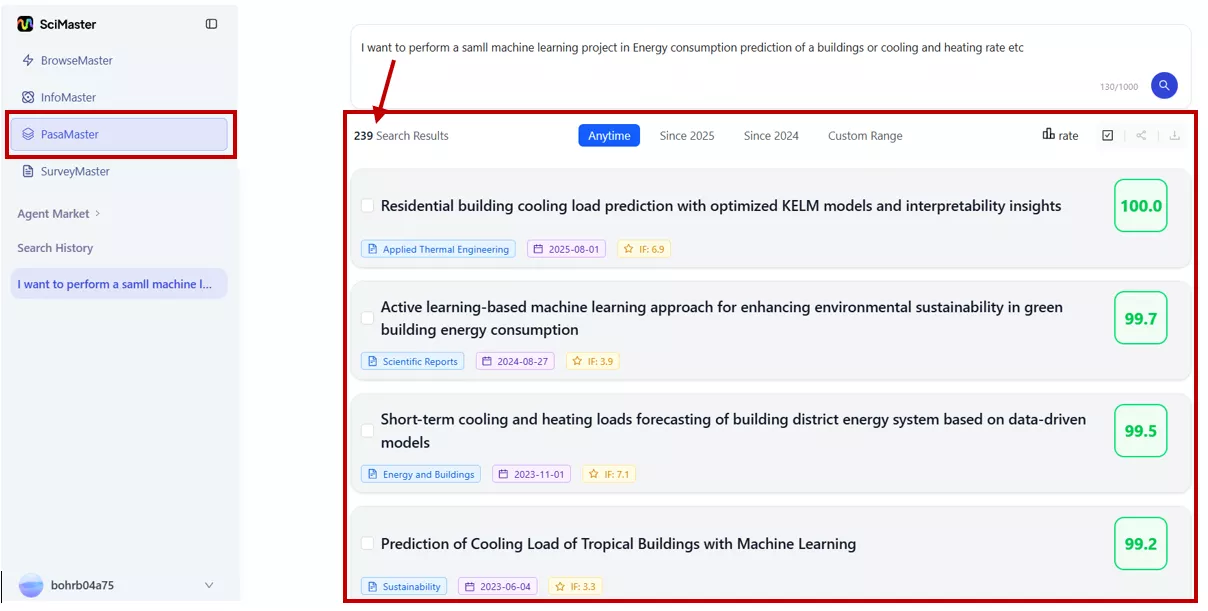
- PasaMaster: Allows me to describe the type of paper I’m looking for in natural language. It then ranks search results by relevance and explains why each paper was recommended. I could view, share, and download papers, and even open them directly on Bohrium for further study.
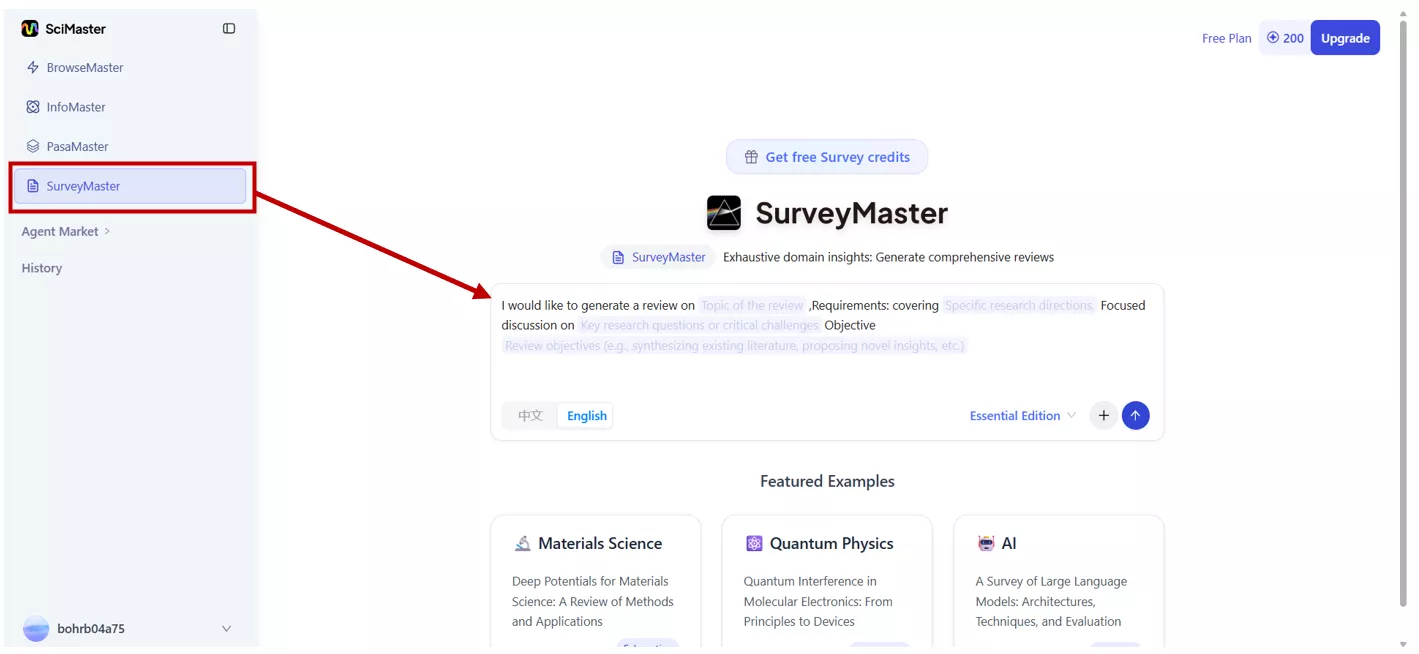
- SurveyMaster: Helps conduct in-depth literature reviews. It retrieves and screens papers, reorganizes findings into a logical structure, and produces a preliminary draft with standardized citations, charts, and figures.
Limitations I Noticed
Despite its strengths, SciMaster does have challenges:
- Weak Memory Capability: Each project is completely independent. You can't carry context from one session to another, so I often need to present all your requirements at once.
- Delays on complex tasks: When you give it something particularly heavy, it can slow down. I have experienced significant delays and sometimes stop mid-execution.
- High Complexity: It has a steep learning curve compared to more document-centric tools. Using SciMaster effectively requires familiarity with scientific methodology and workflows.
People’s Review & Pricing:
Early users from research institutions have reported strong time savings. One materials research group at Shanghai Jiao Tong University noted that SciMaster helped them generate a research overview on two-dimensional materials applications in just 5 minutes. This task would normally take considerably longer.
SciMaster offers a Free plan (often starting with around 1,500 credits), with premium tiers available for more intensive research needs. SciMaster offers access through Bohrium, but pricing details depend on institutional or individual arrangements.
Before I began exploring SciMaster, I had already been using UPDF AI to assist with my academic research, which is more approachable for everyday tasks. In the next section, I’ll introduce UPDF AI and compare how it stacks up against SciMaster.
Part 2. What UPDF AI Is–With a Focus on Paper Search and Scholar Research
As I have already been using UPDF AI for my academic work, which not only helps me find research but also helps me work with the documents afterwards. This “documentation-centered” approach is what makes UPDF AI feel practical for everyday research tasks.
What UPDF AI Is and Its Value Position
UPDF AI is designed to boost academic productivity by combining AI research tools with a full PDF editor. Instead of switching between multiple apps, I can search for papers, generate literature reviews, annotate PDFs, translate pages, and chat with documents all in one place. This makes it especially useful for students, researchers, and professionals who deal with large amounts of reading and writing.
Key Features and Capabilities
UPDF AI has two specialized modules that have completely changed how I handle my literature reviews:
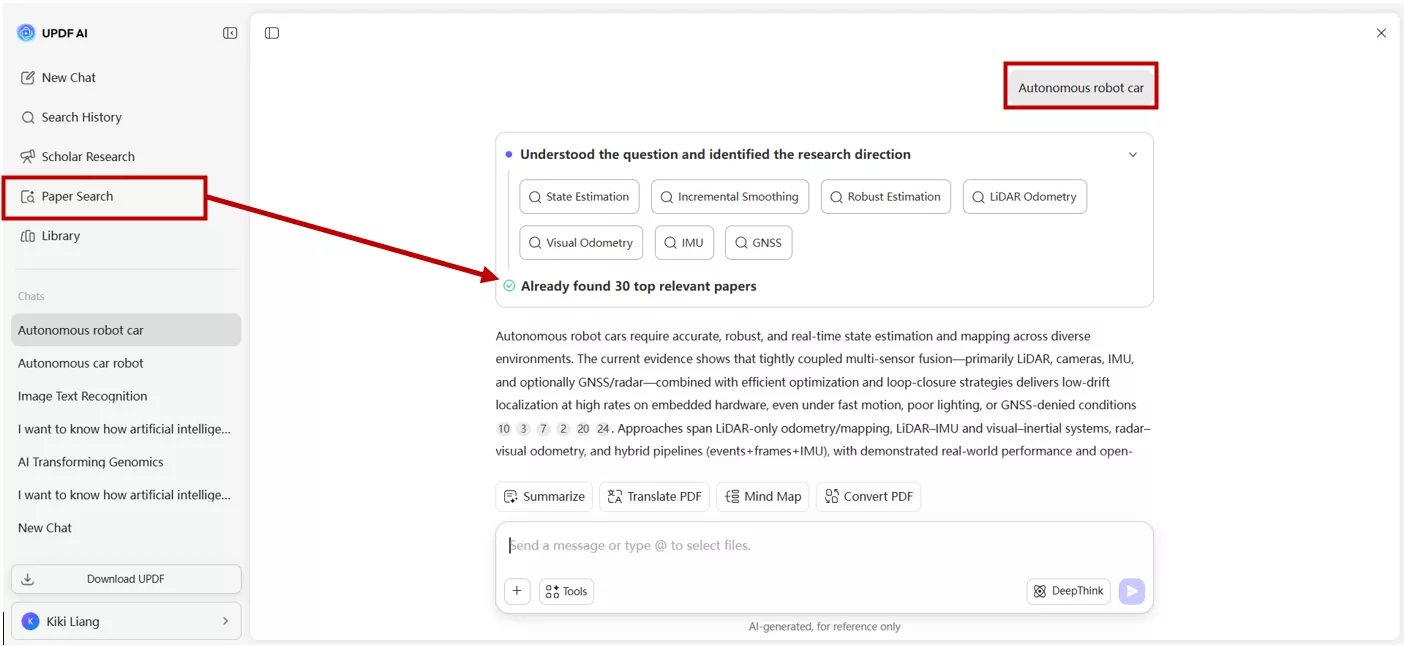
Paper Search
This is one of the features I use the most. UPDF AI lets me:
- Search across 220+ million peer-reviewed papers using keywords, DOI, or by uploading a PDF.
- Choose between Keyword Mode (classic search) and AI Mode, which synthesizes answers from multiple papers with citations.
- View summaries, key insights, and even citation graphs that show which papers are central in a field.
- Download papers directly, chat with them, translate them side-by-side, or generate mind maps for quick understanding.
This makes the discovery process smooth and intuitive, especially when I’m exploring a new topic.
Scholar Research
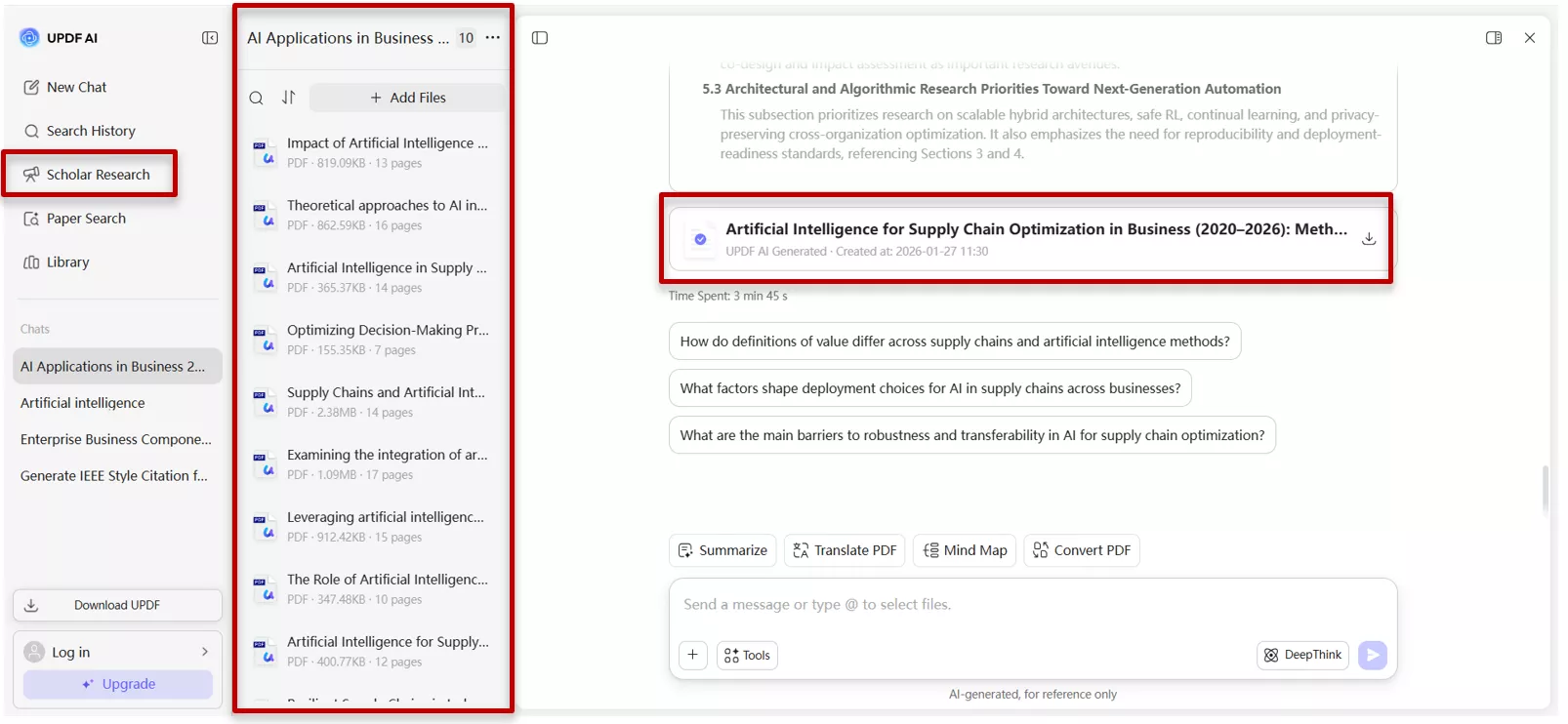
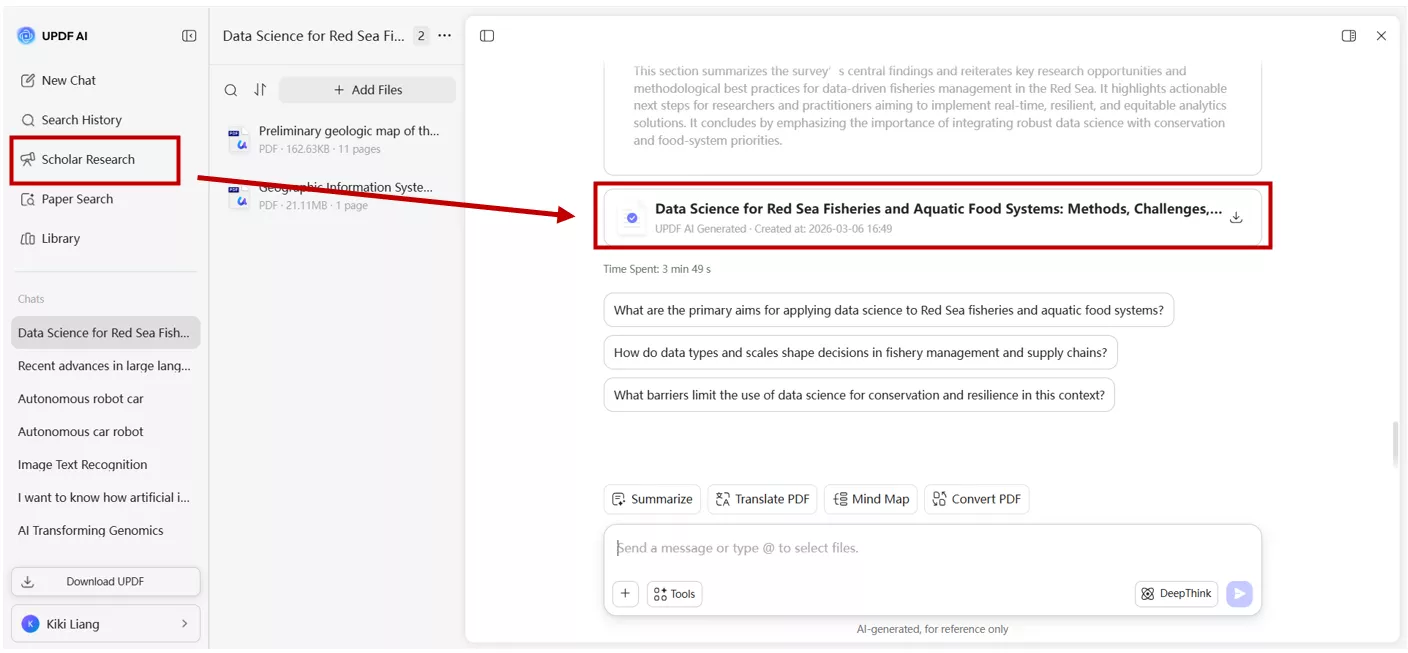
Scholar Research is like having an AI assistant that builds a structured literature review for me. It:
- Uses Paper Search to gather relevant documents.
- Extracts key findings, citations, and themes.
- Organizes everything into a structured PDF with headings and logical flow.
Instead of manually stitching together notes from multiple papers, I get a clean, exportable review that I can refine further.
Limitations
The main limitation is that UPDF AI operates within a relatively closed ecosystem. While it is incredibly deep and efficient, the features and extensions rely primarily on the official UPDF team rather than community-contributed scientific plugins.
People’s Reviews & Pricing
Many users praise UPDF AI for being easy to use and surprisingly powerful for academic tasks. I’ve seen comments highlighting how it simplifies literature reviews and makes PDF work much faster.
UPDF AI offers a free plan with 100 uses to get you started. For more unlimited usage, UPDF provide paid plans with annual or lifetime options. Considering the features, I personally find it cost-effective, especially since it replaces several separate tools I used before.
Part 3. Head-to-Head: UPDF AI vs SciMaster
I have used both tools side by side, and this is where things get interesting. When it comes to choosing between UPDF AI vs SciMaster, it’s not necessarily about which tool is "better," but which one fits your specific mission. Their goals, design philosophies, and ideal use cases are completely different, and once I understood that, the comparison became much clearer.
1. Target User Group Segmentation
Here’s how I personally see the differences after using both tools:
| Dimensions | UPDF AI | SciMaster |
| Core Users | Students, scholars, everyday researchers, and professionals (legal, HR, sales, business analysts). | Frontier scientists, AI for Science developers, research labs, and policymakers. |
| Core Use Cases | Paper reading, writing, summarizing, literature reviews, document processing, learning assistance. | Complex scientific workflows, hypothesis generation, simulations, multi step research pipelines. |
| Professional Fields | Broad and versatile—works across all disciplines. | Deep focus on life sciences, chemistry, physics, materials science, computational science. |
| Learning Curve | Easy — intuitive, beginner-friendly. | Hard — requires scientific methodology knowledge and technical background. |
From my experience, UPDF AI feels like a tool I can use every day without thinking too much. SciMaster, on the other hand, feels like a powerful research workstation.
2. Actual Practice: My Hands-On Comparison
Paper Search: PasaMaster vs UPDF AI Paper Search
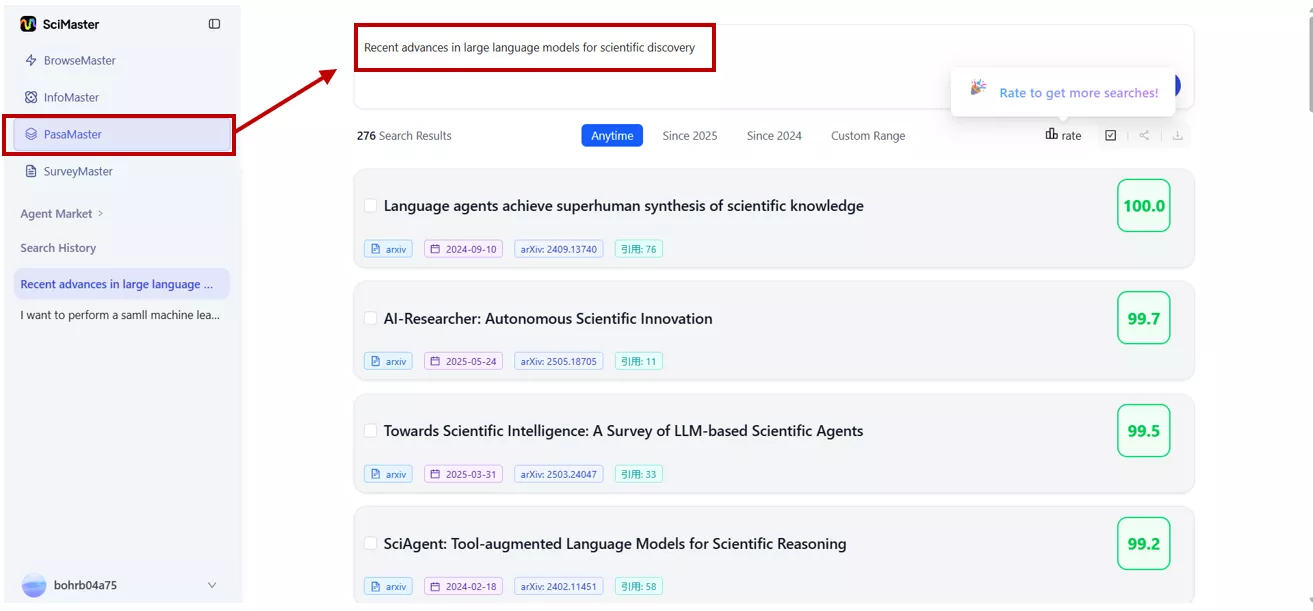
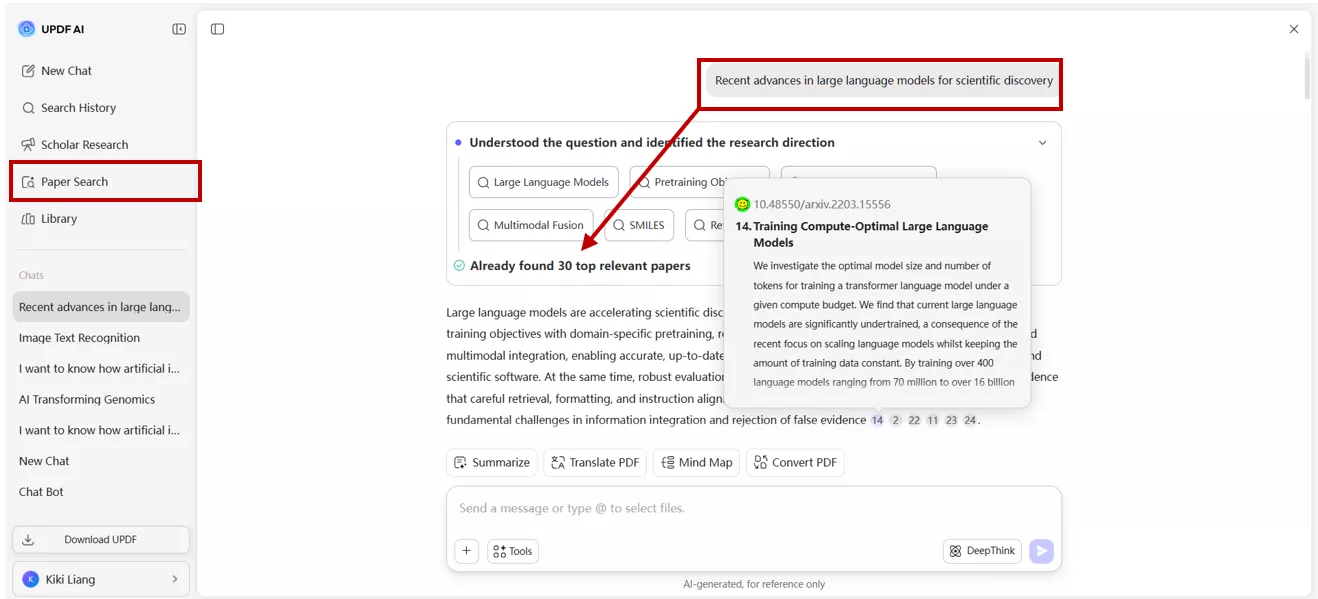
I searched for the same topic in both tools, such as” recent advances in large language models for scientific discovery”.
PasaMaster gave me a ranked list of papers with short relevance summaries, which I found genuinely useful for quickly deciding what was worth reading. The natural language search felt intuitive, and the ranking logic made sense most of the time.
UPDF AI Paper Search returned results faster and gave me more to work with immediately summaries, citation graphs, key insights, and the ability to chat directly with any paper right from the results page. For someone who wants to go from search to understanding quickly, UPDF AI felt more complete out of the box.
Literature Review: SurveyMaster vs UPDF AI Scholar Research
This is where the difference in complexity really showed up.
SurveyMaster produced a detailed, well-structured review draft, and its ability to let you edit the output directly inside the platform is a genuine advantage. For a researcher who knows exactly what they want and how to guide the tool, the output is impressive.
UPDF AI Scholar Research was simpler to set up and faster to get started. The review it produced was clean, well-organized, and came with proper citations. It won't match SurveyMaster's depth for highly specialized scientific fields, but for most research workflows, it delivers a very solid result without requiring any technical setup.
3. Competitive Advantages
UPDF AI Advantages
- Strong Document Foundation: AI OCR, AI conversion, mind maps, side-by-side translation etc. Everything happens inside one PDF ecosystem.
- Predictable Pricing: Subscription model with unlimited queries, no credit-based stress.
- Broad User Base: Works for students, researchers, and professionals across industries.
- Complete Ecosystem : As part of the UPDF ecosystem, UPDF AI enhances your workflow with AI-powered analysis while UPDF provides powerful tools for editing, annotating, organizing, and securing documents..
- Cost Effective: Replaces multiple tools at once.
SciMaster Advantages
- Infrastructure-Level Positioning: Not just an app, an AI-for-Science developers (AI4S) ecosystem built for scientific production.
- Academic Backing: Co-launched by Shanghai Jiao Tong University and DP Technology having high credibility.
- Bohrium + SciMaster Architecture: Enables complex scientific workflows and “Science-as-a-Service.”
- Editable Reports: SurveyMaster reports can be edited directly inside SciMaster.
Part 4. Application Scenario Selection Guide
After spending time with both tools, I realized that UPDF AI vs SciMaster isn’t about choosing one over the other but it’s about knowing which tool fits your situation. Each has strengths that shine in different contexts.
Choose UPDF AI if…
- You’re a student, researcher, or professional who needs quick access to papers, structured literature reviews, and everyday PDF handling.
- You want a tool that’s easy to learn, integrates directly into your document workflow, and saves time with features like annotation, translation, and mind map generation.
- You value cost-effective pricing and predictable usage without worrying about credits or complex setup.
Choose SciMaster if…
- You’re working in frontier science fields like physics, chemistry, or computational research.
- You need advanced, multi-step workflows for hypothesis generation, simulations, or automated experiments.
- You’re comfortable with a steeper learning curve and want infrastructure-level tools backed by academic institutions.
These two tools are not mutually exclusive. In fact, I’ve found they can complement each other. Together, they create a more comprehensive and efficient digital research environment.
Conclusion
AI is making research faster and more accessible than ever before. Both UPDF AI and SciMaster are genuinely useful tools for doing research. SciMaster is a powerful platform for specialized scientists who need deep, infrastructure-level support. UPDF AI is the smarter choice for anyone who wants fast, accessible, and reliable research and document tools without the complexity.
For me, UPDF AI has been the more practical choice in daily research and document handling. It’s easy to use, cost-effective, and integrates everything I need into one platform. If you’re looking for a reliable tool to streamline your academic workflow, I’d recommend giving UPDF AI a try.


 Engelbert White
 Enrica Taylor
 Enola Miller