 UPDF
UPDF
 UPDF for Windows
 UPDF for Mac
 UPDF for iPhone/iPad
 UPDF for Android
 UPDF AI Online
 UPDF Sign
 Edit PDF
 Annotate PDF
 Create PDF
 PDF Form
 Edit links
 Convert PDF
 OCR
OCR PDF to Word
 PDF to Image
 PDF to Excel
 Organize PDF
 Merge PDF
 Split PDF
 Crop PDF
 Rotate PDF
 Protect PDF
 Sign PDF
 Redact PDF
 Sanitize PDF
 Remove Security
 Read PDF
 UPDF Cloud
 Compress PDF
 Print PDF
 Batch Process
 About UPDF AI
 UPDF AI Solutions
 AI User Guide
 FAQ about UPDF AI
 Summarize PDF
 Translate PDF
 Chat with PDF
 Chat with AI
 Chat with image
 PDF to Mind Map
 Explain PDF
 PDF AI Tools
 Image AI Tools
 AI Chat Tools
 AI Writing Tools
 AI Study Tools
 AI Working Tools
 Other AI Tools
 AI Bookmark Generation
 AI Bookmark Summary
 AI Watermark Generation
 AI Background Generation
 AI Sticker Generation
 AI Stamp Generation
 AI Editing Suite
 UPDF Copilot
 AI Page Management
 AI Semantic Search
 PDF to Word
 PDF to Excel
 PDF to PowerPoint
 Enterprise Solution
 Enterprise Sign
 Enterprise AI
 Enterprise Plan
 Enterprise User Guide
 Enterprise Webinar
 Banking
 Healthcare
 Insurance
 Legal
Legal Manufacturing
 Government
 Education Solution
 Customer Stories
 User Guide
 UPDF Tricks
 FAQs
FAQs UPDF Reviews
 Download Center
 Blog
Blog Newsroom
 Tech Spec
 Updates
 UPDF vs. Adobe Acrobat
 UPDF vs. Foxit
 UPDF vs. PDF Expert

When I started relying more on AI tools for research, I noticed that not all tools are quite the same, depending on their functionality. I also realized that not all the tools fit naturally into my workflow. Searching for papers is one thing, but reading, organizing, and turning that research into something usable is a completely different challenge. I have been using UPDF and its AI to assist with my documents and research. Recently, I came across Elicit AI, which also had a very positive side on its own end. That’s when I began comparing UPDF AI vs Elicit AI more seriously.
Elicit is famous because it is considered the best research assistant, while UPDF AI approaches the problem from a document-first perspective. To handle my PDFs and connect search with document management, I tried UPDF AI inside UPDF, especially its “Paper Search” and “Scholar Research” features that promised AI-powered access to millions of academic papers. In this article, I’ll share my hands-on experience, starting with what Elicit AI offers, before moving into how UPDF AI fits into a broader research workflow.
Part 1. What Elicit AI Is
What Is The Elicit AI Tool?
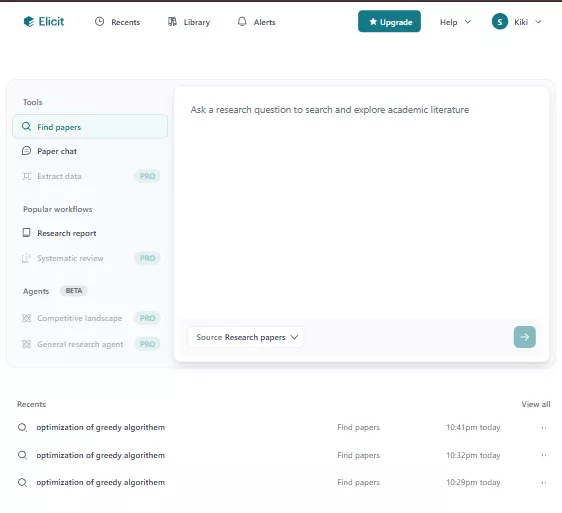
Elicit is a browser-based research assistant designed to help academics, students, and analysts find scientific literature faster and also chat with 125 million papers. Before this tool, we would have to search the databases and then end up opening a dozen tabs, and now I simply type a research question, and the Elicit AI tool pulls together relevant papers into a structured format.
What stood out to me early on is that Elicit isn’t trying to replace academic judgment; rather, it focuses on speeding up the mechanical parts of research, you know, like discovery and extraction.
Key Features And Capabilities
I have used Elicit AI, and for me, its strongest feature is that Elicit organizes the information visually. Because once I enter a question, it returns a table of papers with columns such as title, abstract, method, and key findings. What makes this useful is that I can customise these columns to what matters for my research.
Elicit also supports workflows that resemble a lightweight systematic review. I can screen papers, apply inclusion and exclusion criteria, extract structured data from PDFs, and summarise findings across multiple studies. This multi-step flow is why many Elicit AI review articles highlight its usefulness for early-stage literature exploration.
Key Highlights
Some highlights that shaped my experience include:
- Research Agent Workflows: Elicit can guide me through stages like finding papers, screening them, extracting variables, and summarizing results in a single flow.
- Keyword Search: Beyond question-based prompts, keyword search helps narrow results when I already know the terminology of a field.
- Strict Screening: I can filter papers more aggressively, which is helpful when dealing with large result sets.
These features make Elicit feel focused and intentional, especially for structured academic tasks.
How I Use Elicit AI
I don’t need to learn every feature to get value from Elicit. My typical flow looks like this:
- I ask a research question
- Elicit gathers relevant papers
- I screen and refine the results
- Elicit extracts key insights
- I review summaries or generate a report
This simplicity makes onboarding easy, especially for new users.
People’s Review
From what I’ve seen in user comments:
- “Elicit saves me hours during literature review.”
- “It’s great for organizing papers, but I still export results elsewhere.”
These comments aligned closely with my own experience.
Pricing And Value Position
Elicit offers a limited free tier, often called Elicit AI free, that allows a certain number of uses before requiring an upgrade. For focused research projects, this free access can be enough, but frequent users may need a paid plan.
Ratings
Across review platforms, Elicit generally receives strong ratings for usability and research structure, especially among academic users.
Transition To UPDF AI
While Elicit works well as a standalone research assistant in the browser, I found myself switching tools once papers were downloaded. That gap between searching, reading, annotating, and synthesizing is where UPDF AI started to feel fit for me, given the nature of the work.
Part 2. What UPDF AI Is – With A Focus On Paper Search And Scholar Research
What Is UPDF AI?
UPDF AI is an AI assistant embedded within the ecosystem of UPDF. It is built with a goal to help the research process from discovery to document editing. Instead of releasing as a search engine, it links paper discovery with reading, annotation, and synthesis in the same environment.
Windows • macOS • iOS • Android 100% secure
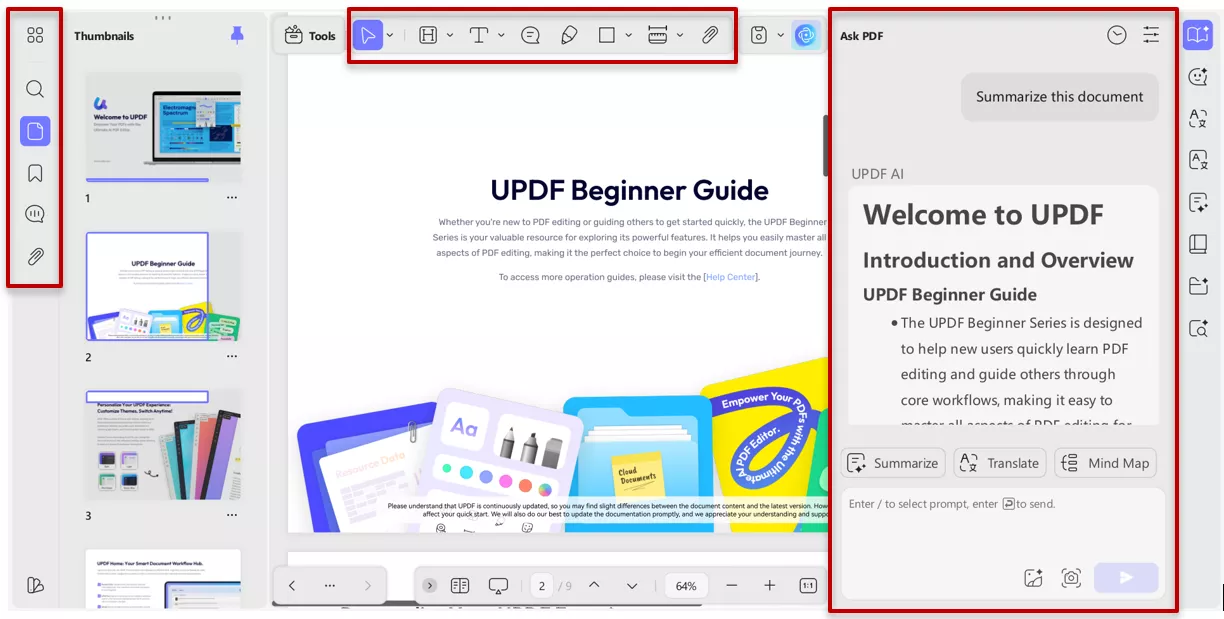
Using UPDF AI felt less like “using another AI tool” and more like extending my existing PDF workflow. I accessed it through UPDF and also tested it online via the the button below:
Paper Search Capabilities
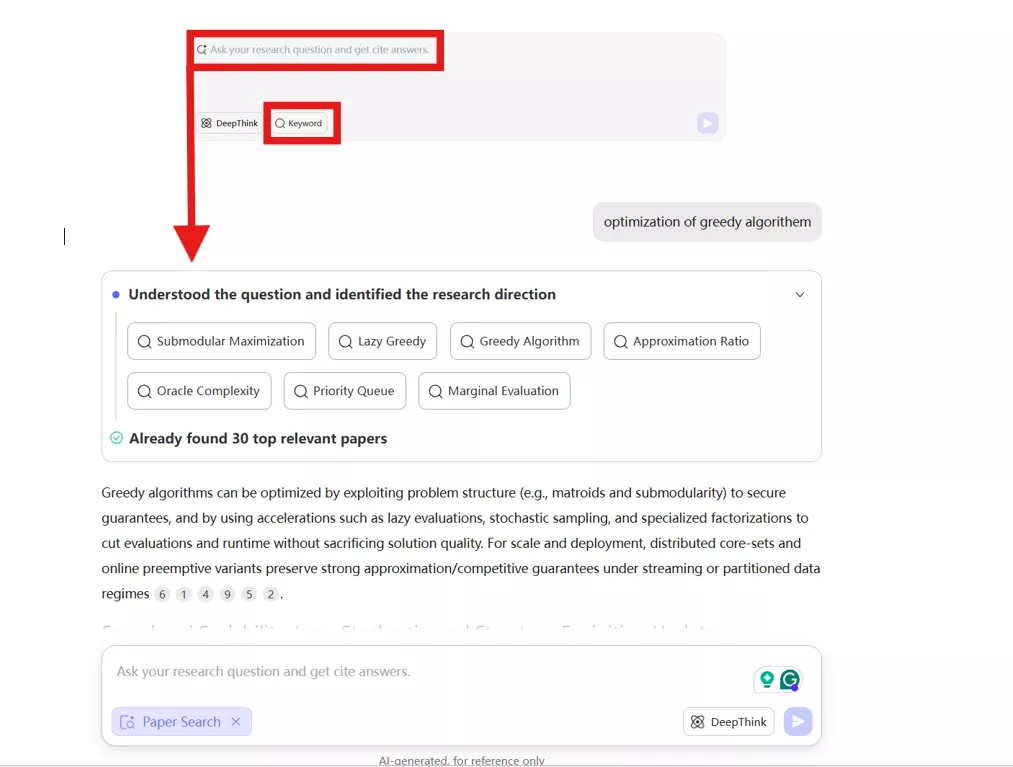
UPDF AI Paper Search allows me to explore over 220 million peer-reviewed papers. I can search by keyword or even upload a PDF to find related research. There are two modes that I use often:
- Keyword Mode: Traditional search with filters and relation graphs.
- AI Mode: Question-based synthesis across multiple papers, complete with citations.
This dual approach helps me move quickly from exploration to understanding.
Scholar Research Features
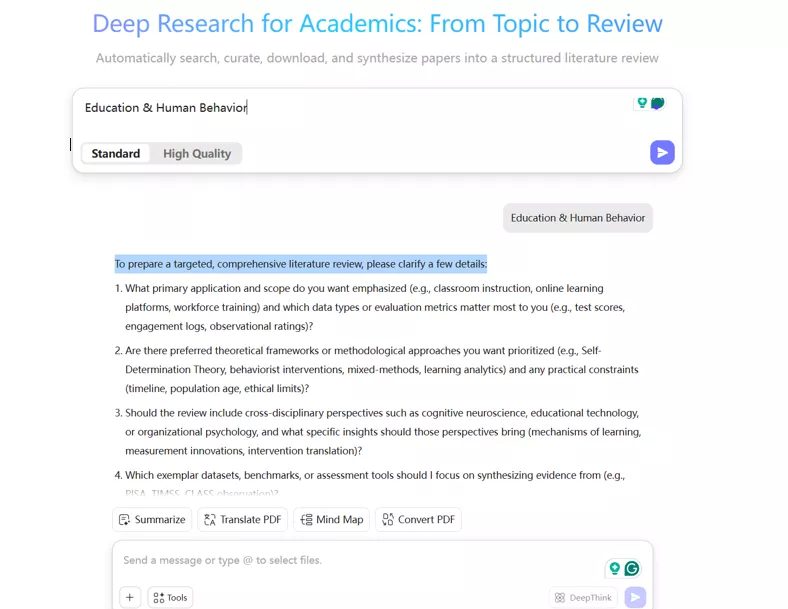
Scholar Research takes things a step further. After gathering papers, UPDF AI automatically extracts key details and builds a structured literature review inside a PDF. What I like most is that the output isn’t just text , it’s a document I can edit, annotate, and export.
Instead of juggling notes and summaries across tools, I get a single, organized report that clearly reflects the research.
How I Use UPDF AI
My workflow with UPDF AI is straightforward:
- I access UPDF AI online or on a desktop
- I open Paper Search or Scholar Research
- I ask my research question
- UPDF AI generates results and structured outputs
People’s Review
From user feedback I’ve seen:
- “UPDF AI feels like research and writing in one place.”
- “The Scholar Research feature saves time after paper search.”
These reactions matched how I felt using it.
Pricing And Value Position
UPDF AI is bundled into the broader UPDF ecosystem, which makes its value clearer if I already work heavily with PDFs. Instead of paying separately for search and document tools, I get everything in one place.
Ratings
UPDF AI continues to gain strong ratings for usability, especially among users who want research tools embedded directly into document workflows.
Part 3. Head-to-Head: UPDF AI vs Elicit AI:
After testing both tools in my own workflow, I realized they solve similar problems, finding and organizing academic papers, but each tool does it in different ways. Let me walk you through to see how well they actually perform in the real world of research.
Actual Practice Comparison
Elicit Generate Reports vs UPDF AI Scholar Research feature
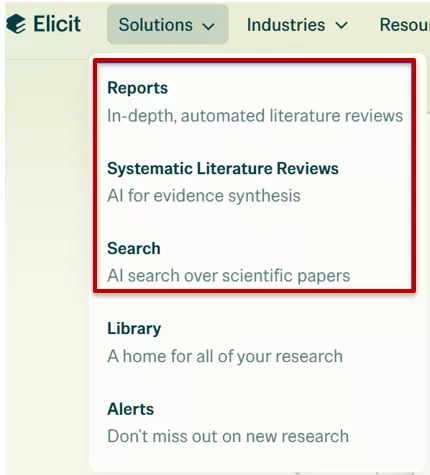
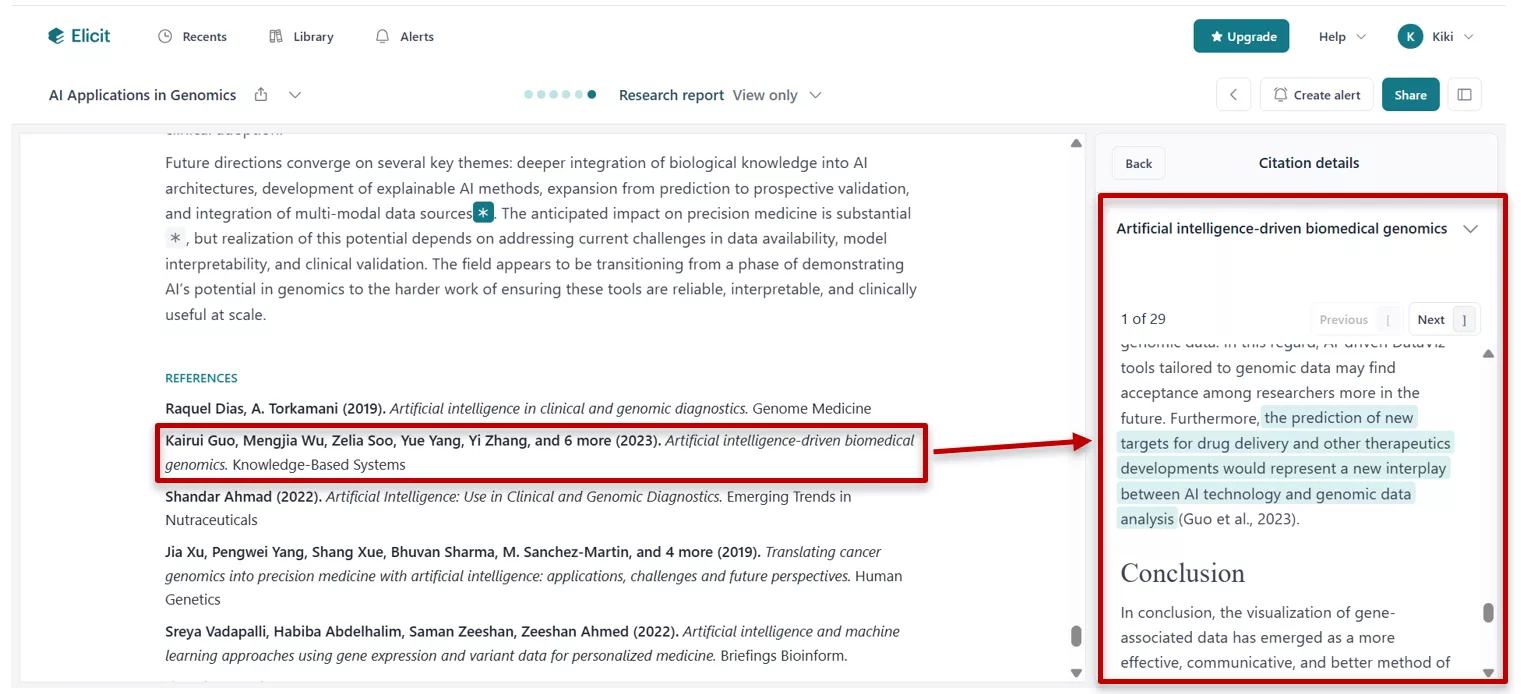
When I used the Elicit AI tool to generate a report, I noticed it is incredibly careful about where it gets its information. Elicit clearly indicates which specific section of a paper each conclusion is drawn from. This transparency is useful for systematic reviews.
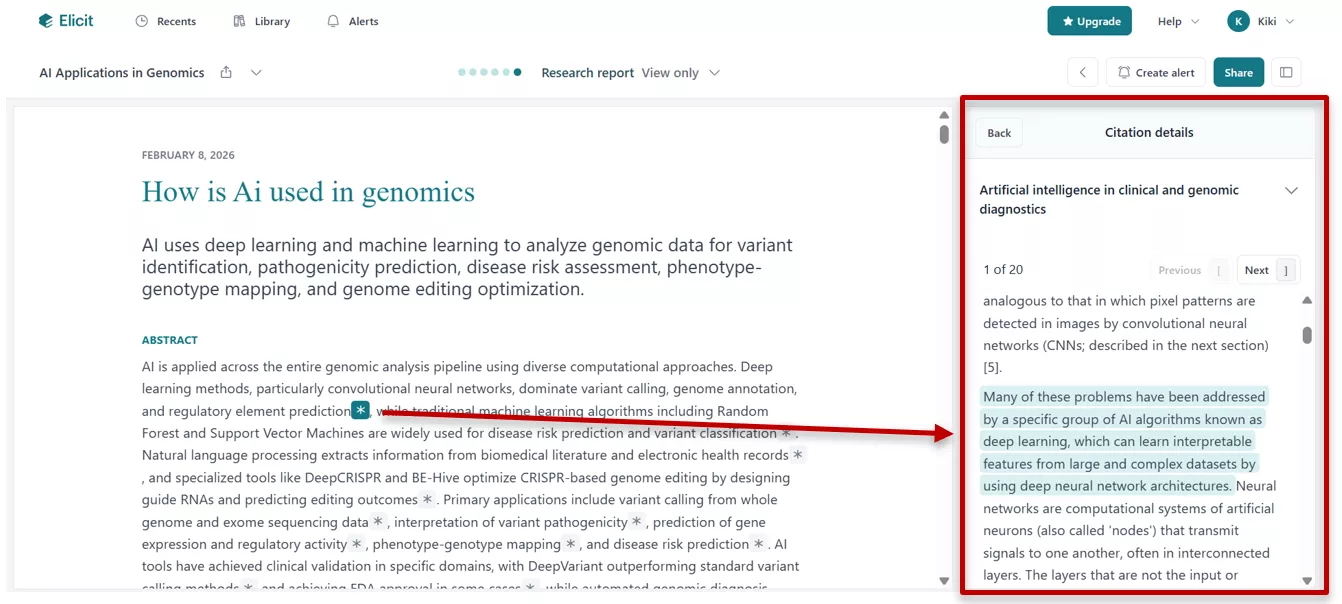
However, the workflow felt a bit fragmented. To see the metadata for a citation, I had to scroll down, and clicking on a paper didn't allow me to chat with it directly. In Elicit, I need to scroll down for a citation, and when I click, it does not allow me to chat directly with the paper.
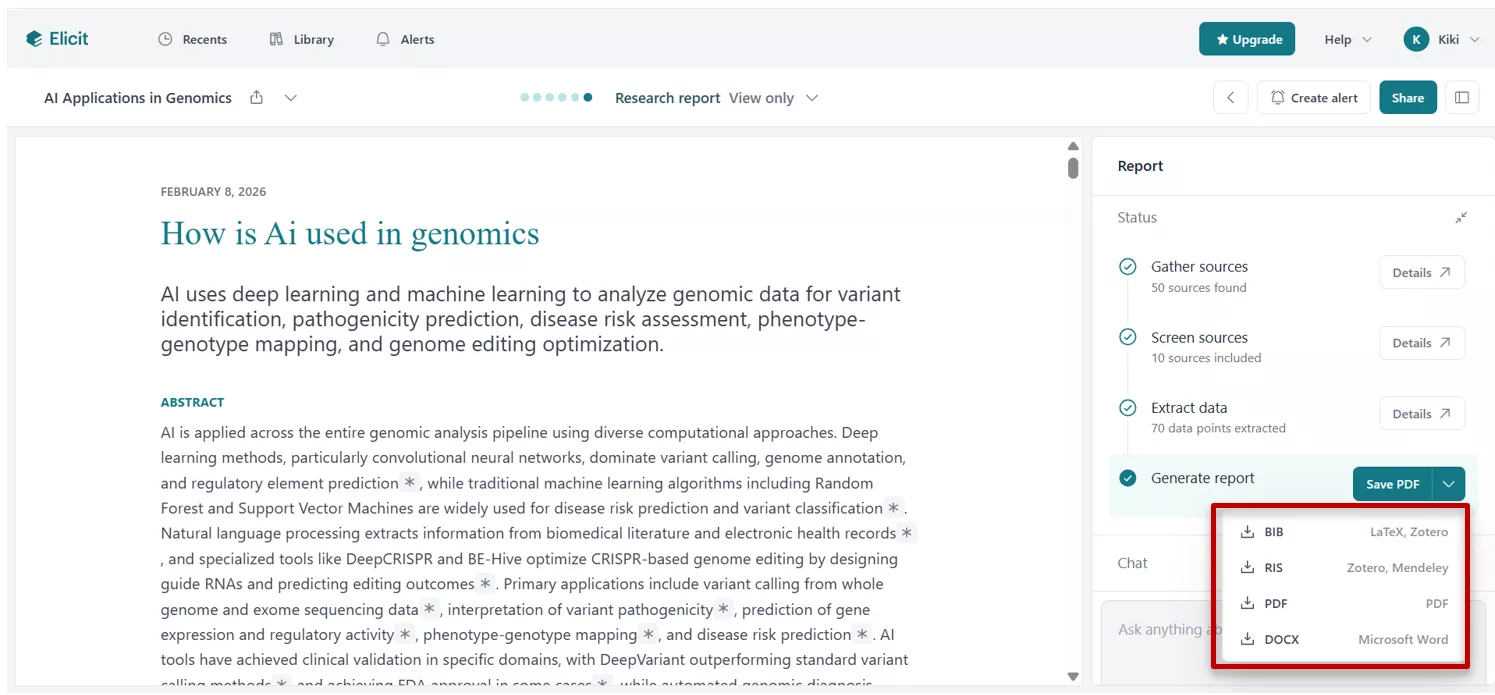
One major plus for Elicit is that it can export academic reports in multiple formats, which is great for different software needs.
In contrast, UPDF AI Scholar Research feels like it was designed for someone who never wants to leave their document.
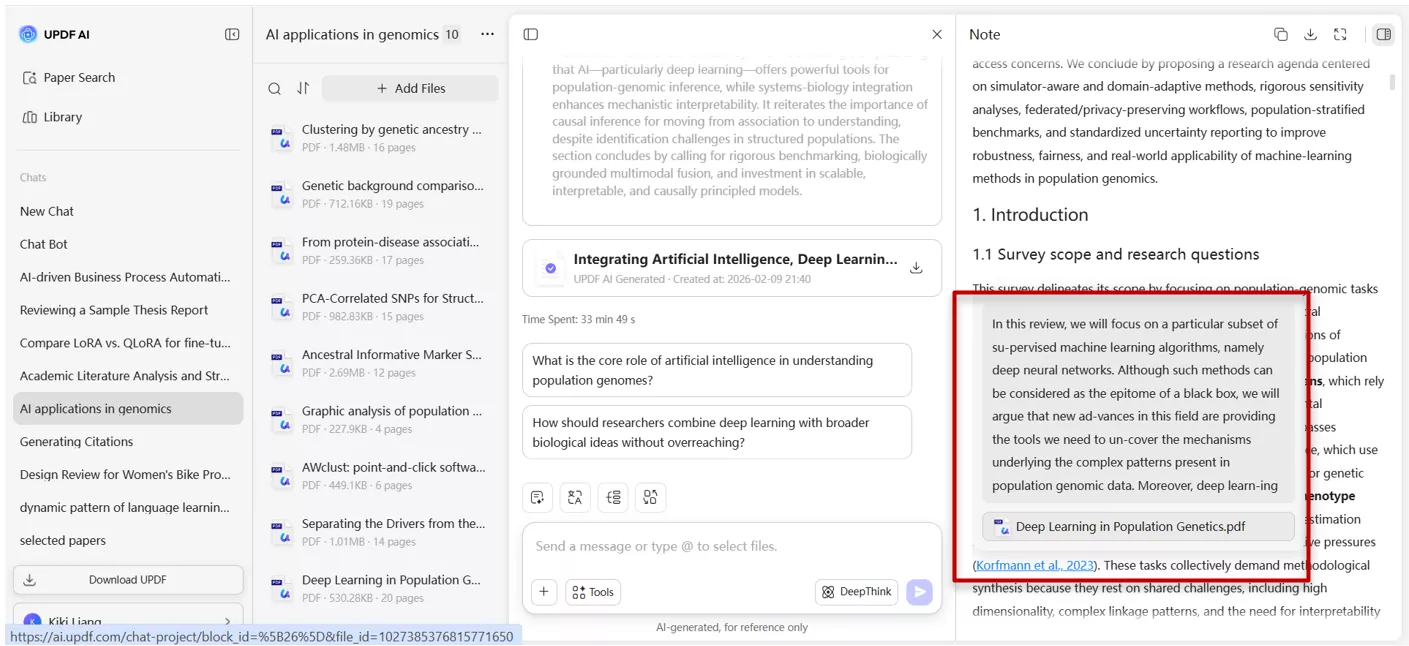
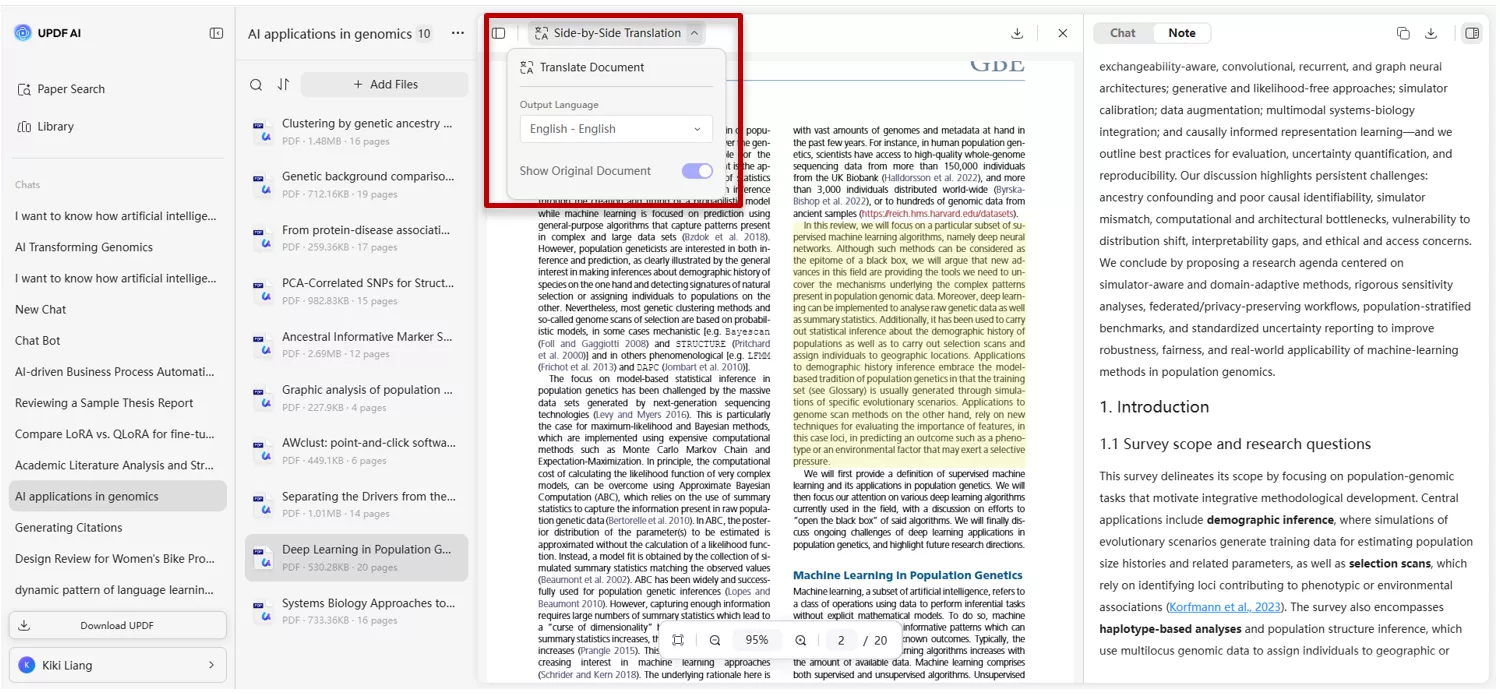
UPDF AI doesn’t show the section breakdown the same as “Elicit”, but integration is superior; it lets me click citations to open the paper directly. Once inside UPDF, I can translate, annotate, convert, or even merge the paper with my notes.
I can use side-by-side translation, or even start a chat with that specific paper to clarify a point.
UPDF AI focuses on its strength: it exports everything as a perfectly structured PDF report, which is ready for professional presentation and immediate use or further annotation within the app.
Elicit Paper Search vs. UPDF AI Paper Search
Both tools allow you to find papers by asking natural language questions. However, the way they present that information is different.
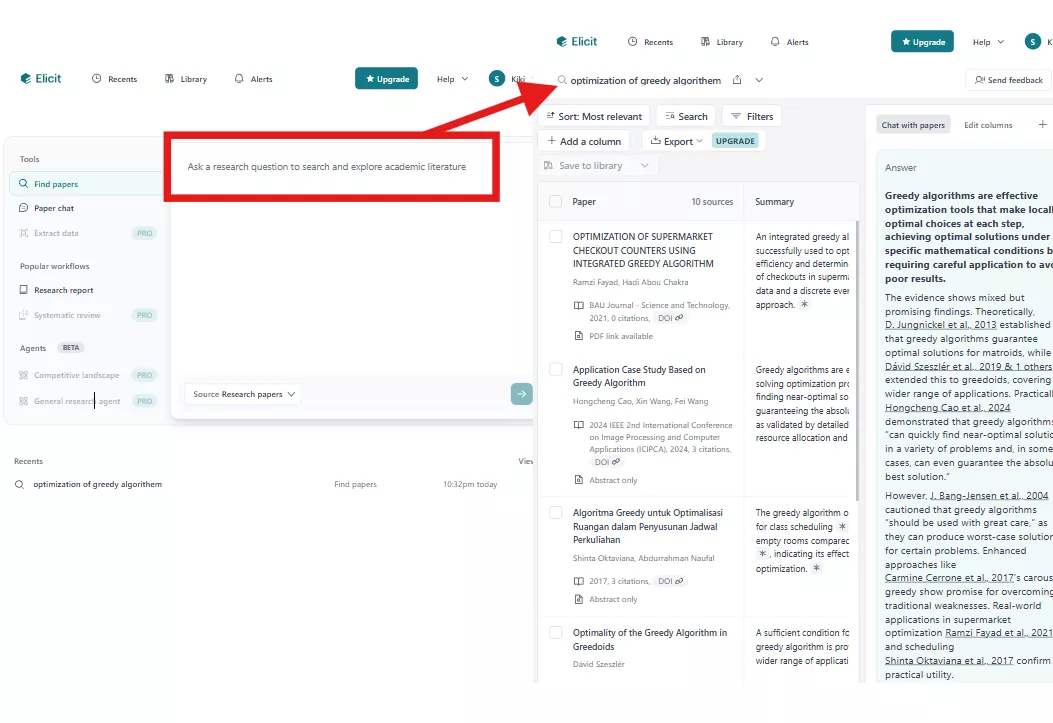
Elicit's Layout: Elicit divides the response into two parts. On the left, you get a list of papers in a table that includes summaries and customizable columns. The summary covers the key conclusions of the paper. On the right, it gives a direct, summarized answer to your research question.
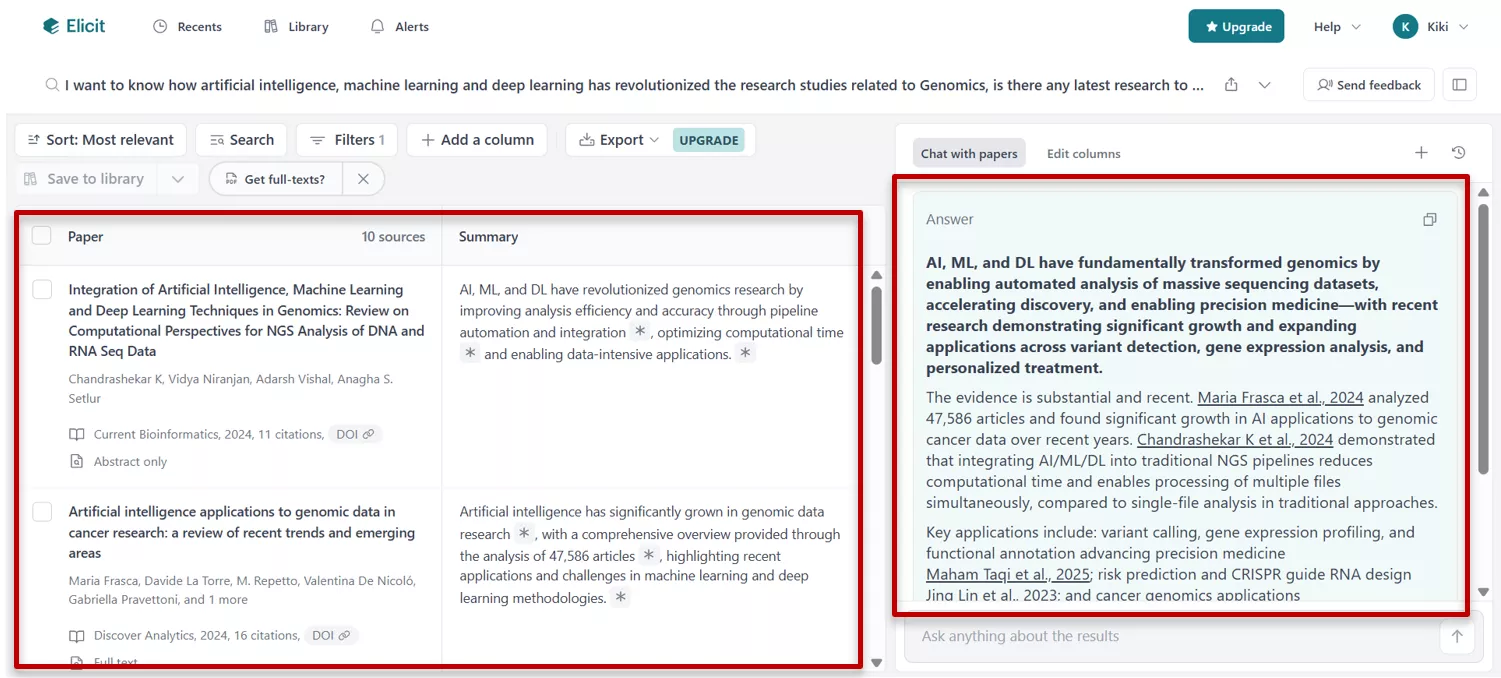
The table columns can be customized ( eg, sort by latest or most cited, etc.) to show the results you need. I can also add columns (eg, "Main Findings" or "Sample Size").
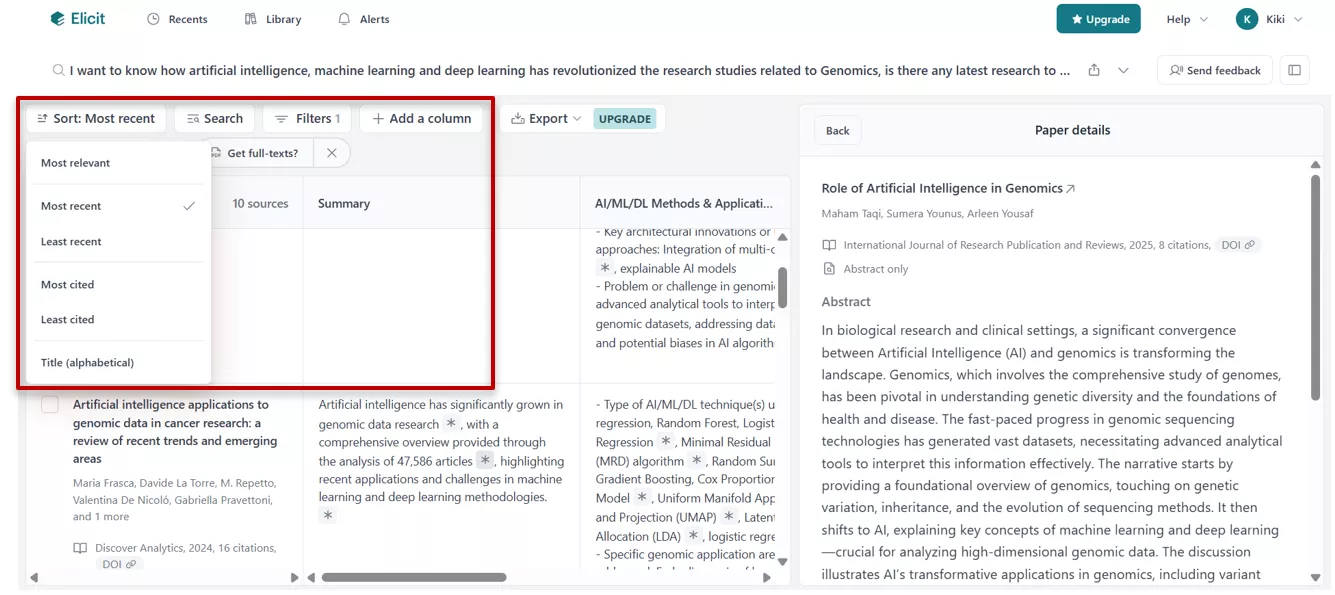
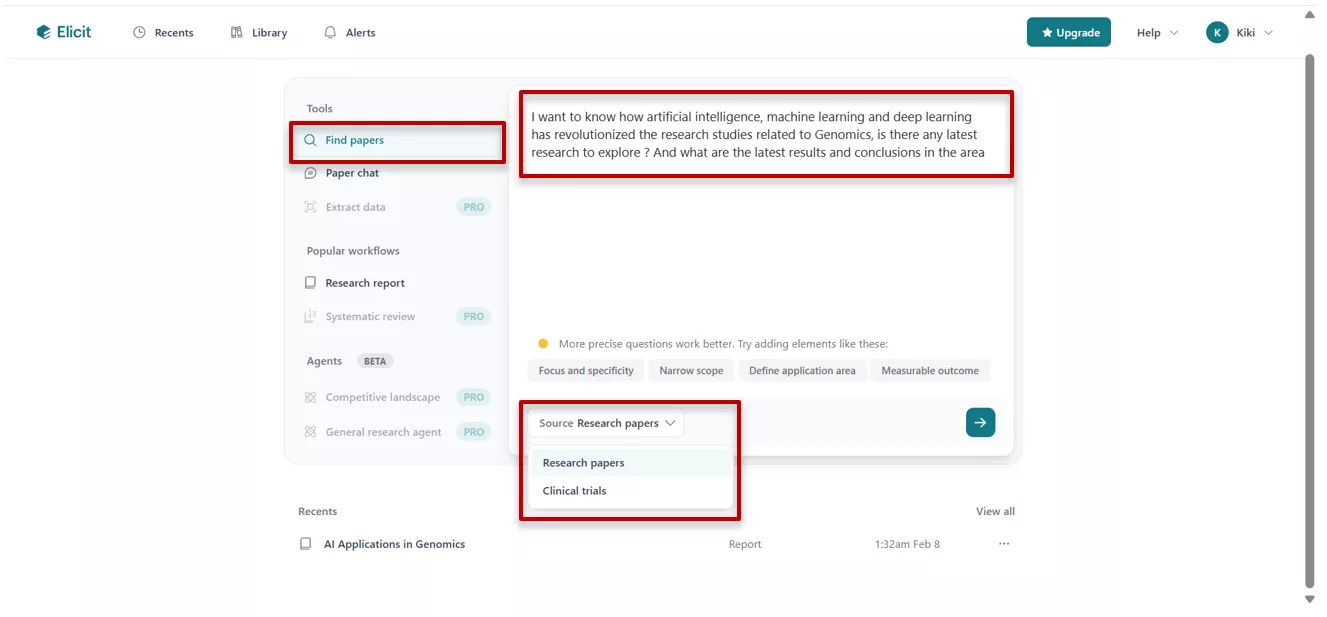
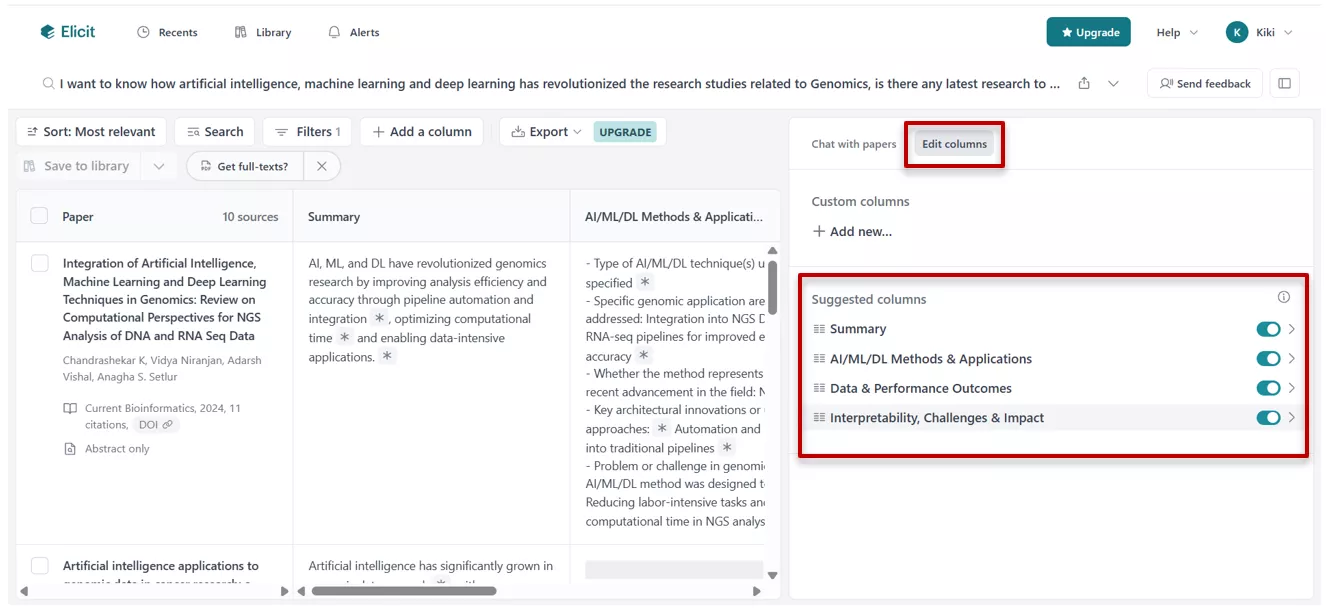
In Elicit, for downloading a paper, I often need to install browser extensions or leave the site.
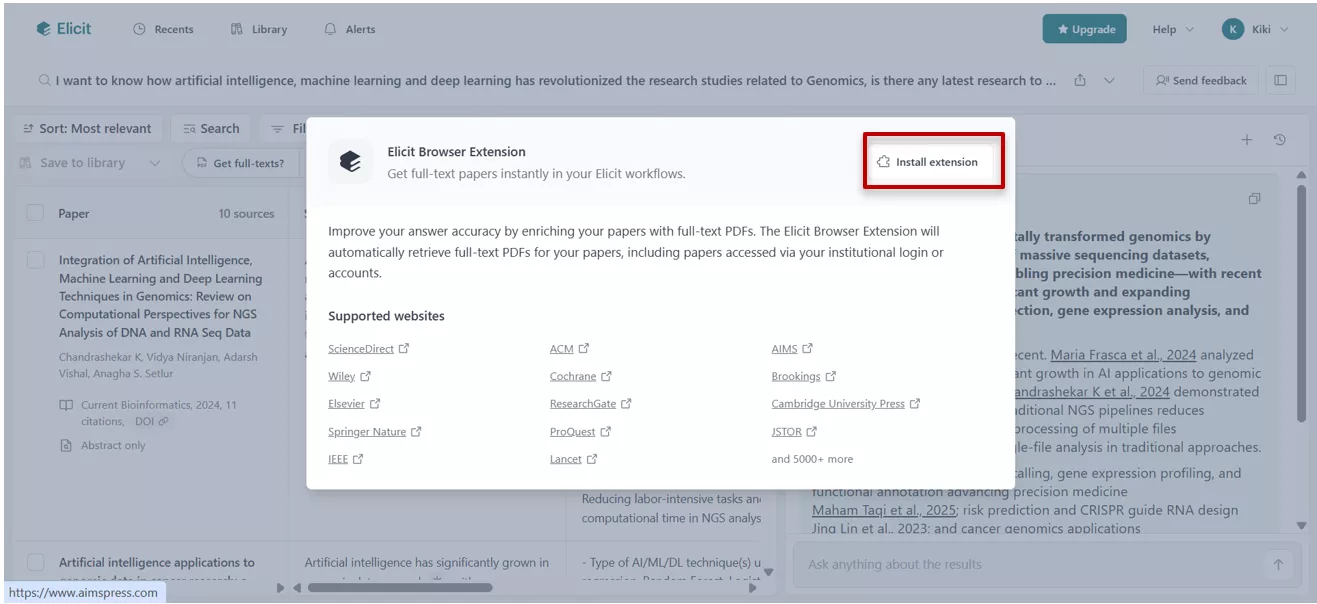
With UPDF AI, I can see the metadata (like the abstract) and download the paper directly with one click. Once downloaded, I can immediately use UPDF’s tools to edit, merge with my own notes, or organize the pages that “Elicit” doesn't have.
UPDF AI's Layout:
UPDF AI offers DeepThink mode and Keyword mode in “Paper Search”. Select one of the options to start your paper search; otherwise, UPDF AI will default to DeepThink mode.
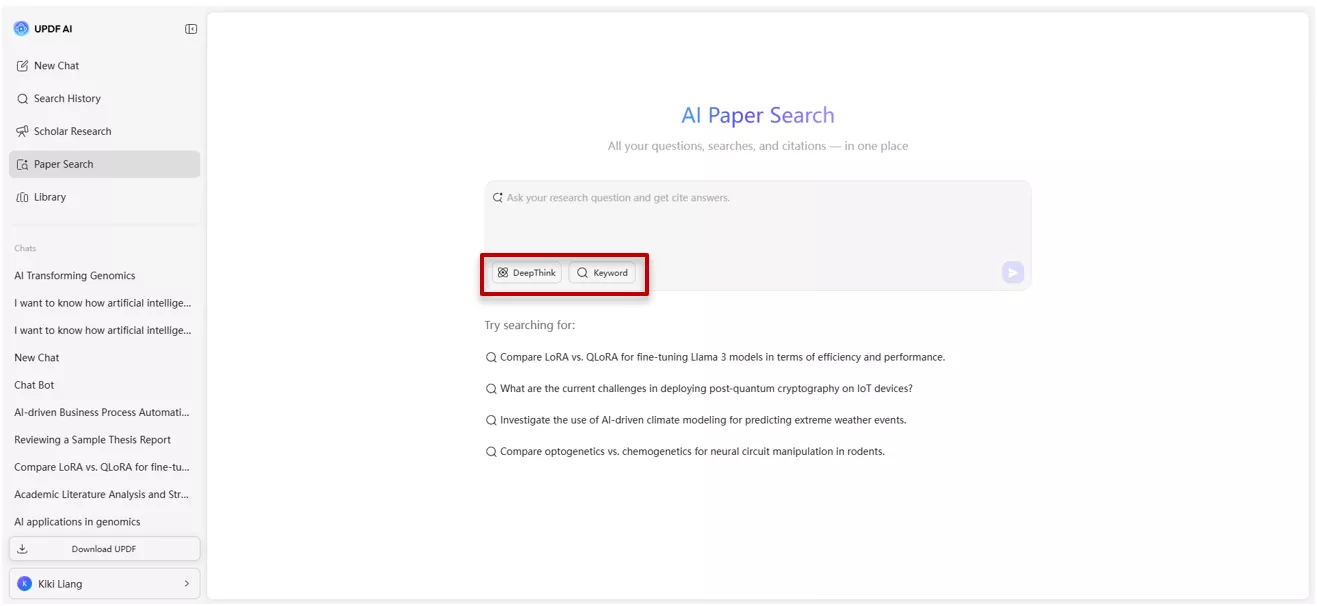
Keyword Mode, which is a traditional search mode where you input specific terms to find papers. It also provides multiple filter options( results by year, sort by, field of study). And something I find incredibly useful is the Relation Graph, which helps me visually see how different research papers are connected.
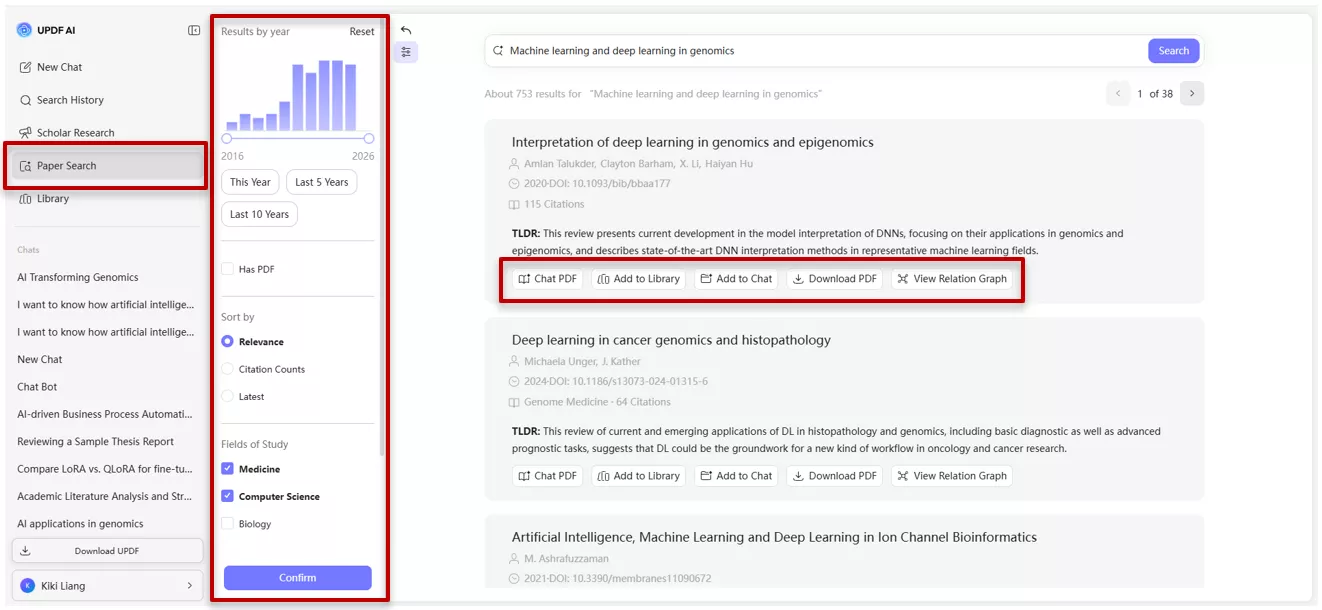
The user can also click the paper to get the metadata, like the abstract, and download the paper directly.
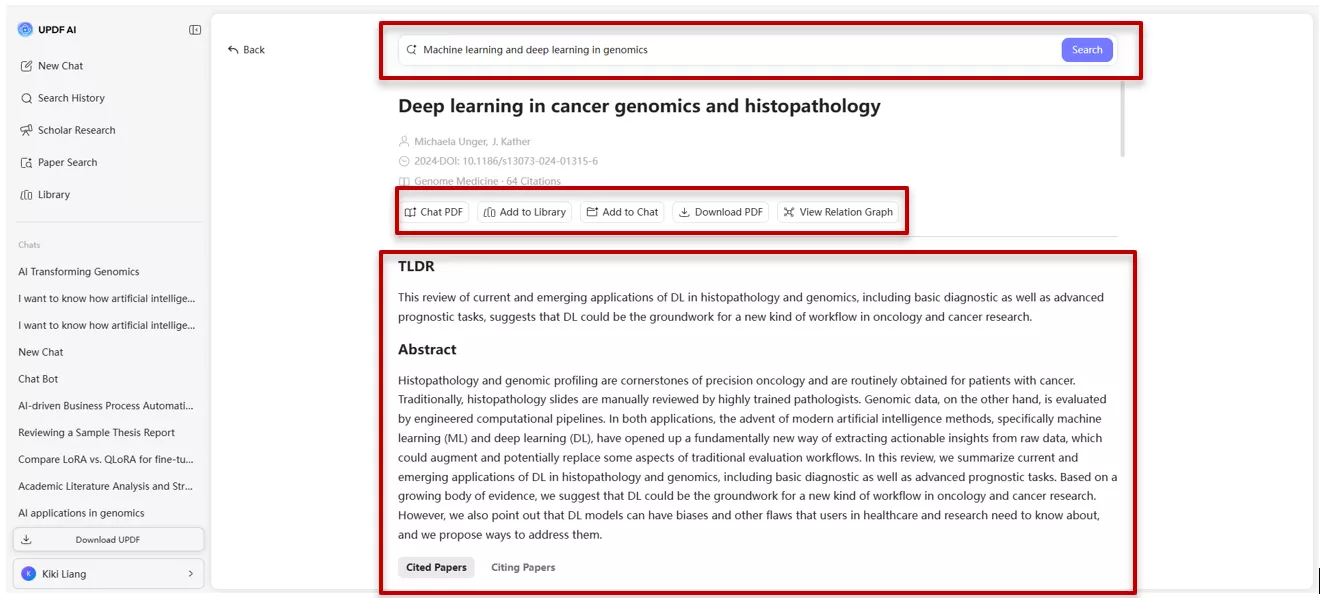
In “Deepthink” Mode, you can enter your research question, and UPDF AI will then analyze your research question and find the most relevant papers. It generates structured, detailed insights with citations across multiple papers at once.
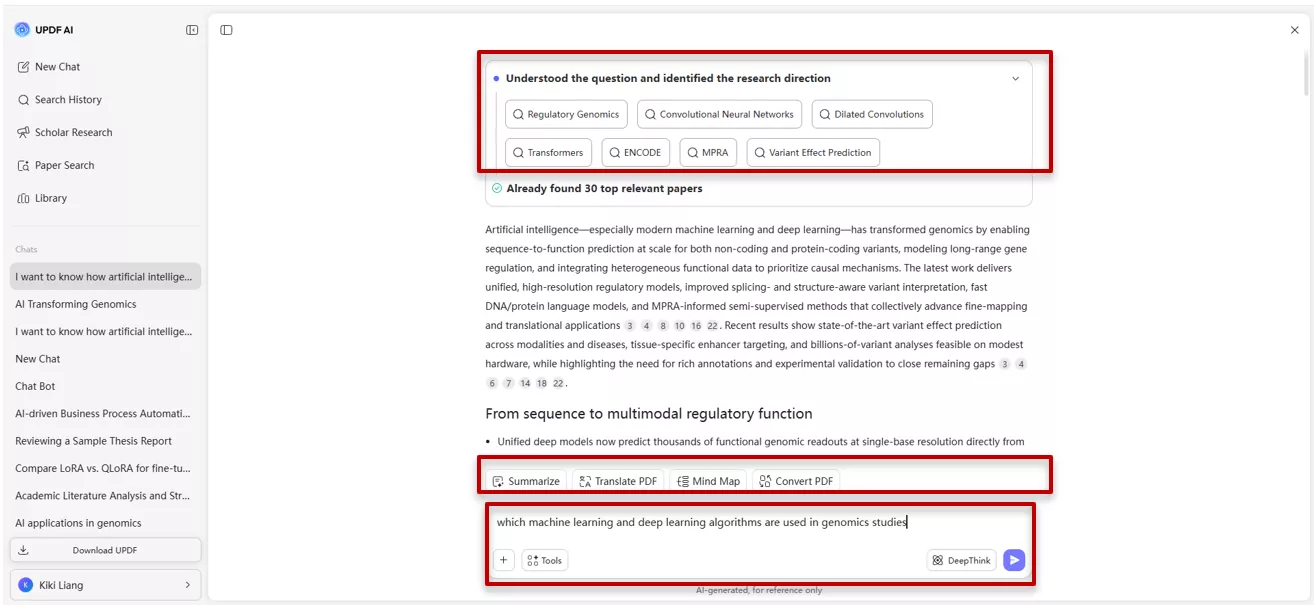
After downloading the paper, I can import it into UPDF for annotation, editing, merging with other documents, or citation generation.
Windows • macOS • iOS • Android 100% secure
My User Experience
I tested both tools by asking different questions related to genomics(medicine-related). Both tools provide relevant answer however, UPDF AI is a winner due to its structured insights and other PDF features beyond research.
My UPDF AI Experience
UPDF AI is better when I need to go beyond search and synthesis →into reading → annotating and citations all in one place. It truly bridges the gap between searching and working. For me, this felt more complete because I didn’t have to leave my workflow.
My Elicit Review
Elicit AI is great for data extraction; it returned a neat table of papers with methods and outcomes. It was easy to compare studies side by side, but I felt limited when need extension for downloading papers and the inability to annotate within the tool. I found Elicit excellent for systematic reviews and structured comparisons.
Comparison Table
| Aspect | Elicit AI Tool | UPDF AI |
| Core purpose in my workflow | Browser-based research agent for systematic reviews | AI-powered ecosystem for academic search + PDF-centric research |
| Database / Coverage | Indexed papers (coverage varies) | Access to 220M+ peer-reviewed papers via keyword, DOI, or PDF upload |
| Interface Style | Web app: research question → table of papers + customizable columns | Integrated into UPDF: Paper Search panel + Scholar Research panel for synthesis |
| Best At… | Generating systematic tables and screening papers | Combining search, synthesis, and PDF annotation in one place |
| Strengths for Me | Transparent section references, customizable tables | Seamless workflow: search, download, annotate, cite, and merge |
| Limitations I Feel | Limited PDF interaction requires extensions for downloads | Reports only export as PDF (not CSV/Excel) |
Part 4. Who Wins? Choosing the Right Tool for You
Together, Elicit AI and UPDF AI can simplify different stages of academic work. Elicit for structured discovery and UPDF AI for integrated reading and synthesis.
Choose UPDF AI if:
- You want an all-in-one hub where you can find papers, generate reviews, and then immediately annotate or edit them.
- You prefer a visual approach to research, using “Relation Graphs” to see how papers connect.
- UPDF’s “Paper Search” and “Scholar Research” let you move from discovery to a polished PDF review quickly.
- You need a "Deep Think" mode that provides structured insights across multiple documents at once.
- Since one license covers your laptop, phone, and browser, it is ideal for researchers who start their day at a desk but read papers on a tablet later.
Choose Elicit AI if:
- You are performing a systematic literature review and need to extract specific variables into a table.
- You need to know exactly which section of a paper every claim came from.
- You want to quickly gather, screen, and organize information into structured tables or compare studies.
- You need data exporting. Elicit’s ability to export research briefs and tables as CSV or BibTeX files makes it a better choice if you use external reference managers like Zotero or EndNote.
Conclusion:
Looking back at the comparison between Elicit AI and UPDF AI, it’s clear that both tools bring valuable support to the research process. Both tools are designed to save you from the "manual labor" of traditional research, but they approach the problem differently. Elicit AI is a powerful search and extraction agent for the browser. UPDF AI, on the other hand, focuses on the full document workflow, searching millions of papers, downloading them directly, and then letting you read, annotate, translate, and generate citations without leaving the platform.
Note: The information on this page is based on UPDF writers’ testing and publicly available product details at the time of writing. Features and pricing may change over time. If you notice any inaccuracies, please contact us at [email protected]


 Enola Miller
 Enrica Taylor