 UPDF
UPDF
 UPDF for Windows
 UPDF for Mac
 UPDF for iPhone/iPad
 UPDF for Android
 UPDF AI Online
 UPDF Sign
 Edit PDF
 Annotate PDF
 Create PDF
 PDF Form
 Edit links
 Convert PDF
 OCR
OCR PDF to Word
 PDF to Image
 PDF to Excel
 Organize PDF
 Merge PDF
 Split PDF
 Crop PDF
 Rotate PDF
 Protect PDF
 Sign PDF
 Redact PDF
 Sanitize PDF
 Remove Security
 Read PDF
 UPDF Cloud
 Compress PDF
 Print PDF
 Batch Process
 About UPDF AI
 UPDF AI Solutions
 AI User Guide
 FAQ about UPDF AI
 Summarize PDF
 Translate PDF
 Chat with PDF
 Chat with AI
 Chat with image
 PDF to Mind Map
 Explain PDF
 PDF AI Tools
 Image AI Tools
 AI Chat Tools
 AI Writing Tools
 AI Study Tools
 AI Working Tools
 Other AI Tools
 AI Bookmark Generation
 AI Bookmark Summary
 AI Watermark Generation
 AI Background Generation
 AI Sticker Generation
 AI Stamp Generation
 AI Editing Suite
 UPDF Copilot
 AI Page Management
 AI Semantic Search
 PDF to Word
 PDF to Excel
 PDF to PowerPoint
 Enterprise Solution
 Enterprise Sign
 Enterprise AI
 Enterprise Plan
 Enterprise User Guide
 Enterprise Webinar
 Banking
 Healthcare
 Insurance
 Legal
Legal Manufacturing
 Government
 Education Solution
 Customer Stories
 User Guide
 UPDF Tricks
 FAQs
FAQs UPDF Reviews
 Download Center
 Blog
Blog Newsroom
 Tech Spec
 Updates
 UPDF vs. Adobe Acrobat
 UPDF vs. Foxit
 UPDF vs. PDF Expert

 UPDF AI
AI Study Flashcards Generator Online Free
Transform your study materials into effective flashcards instantly with UPDF AI. Simply upload your PDF notes, PDF textbooks, or lecture images, and our intelligent system will generate personalized flashcards to help you master any subject efficiently.
Powered by
 GPT-5 |
 DeepSeek R1
5000+ Reviews
 4.8
4.8
Use UPDF AI Study Flashcards Generator Anywhere:


 Desktop & mobile app

4M+ Users, 5M+ Study Flashcards Generated, Trusted by Leading Medias:






How to Use UPDF AI Study Flashcards Generator Online for free?
-
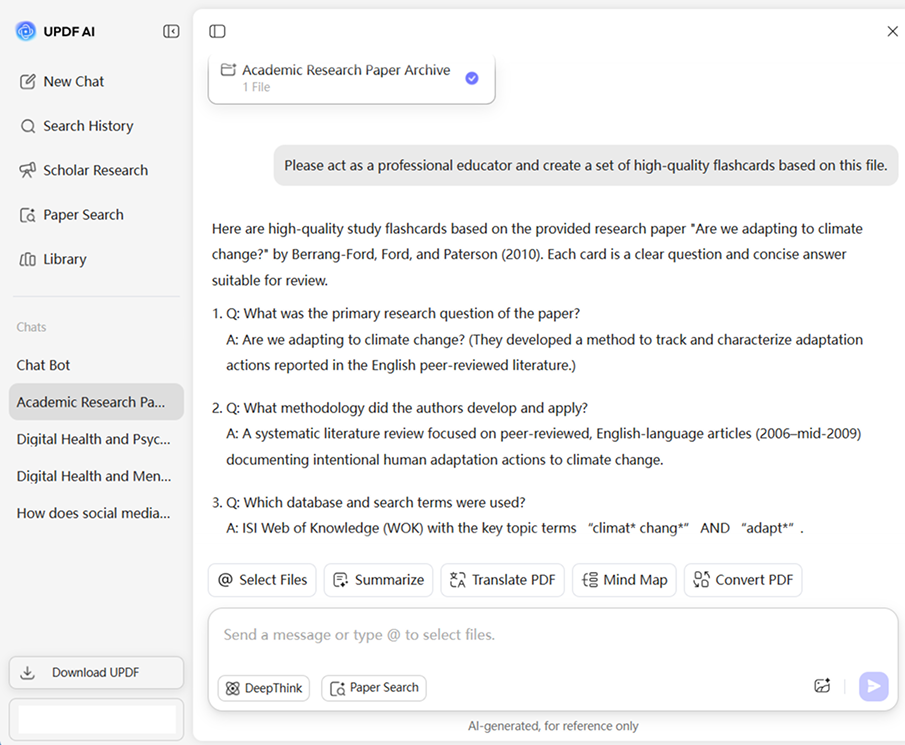
Upload:
Specify the educator role, input the prompt like: “Please act as a professional educator and create a set of high-quality flashcards based on this file”. -
Prompt:
ChatGPT-5 is selected by default. To switch to DeepSeek R1, click the “DeepThink” button for an alternative reasoning style. -
Select your AI model:
ChatGPT-5 is selected by default. To switch to DeepSeek R1, click the “DeepThink” button for alternative reasoning and output styles. -
Generate structured study flashcards:
Click “Send,” and UPDF AI will generate study flashcards and present it in a clear, well-organized format.

Why Choose UPDF AI Study Flashcards Generator?
Efficiency and Filtering
Using AI to generate flashcards is primarily about saving time and reducing the cognitive load required to filter through massive amounts of information. UPDF AI acts as a high-speed "content curator" that can scan hundreds of pages and instantly identify high-yield facts that are likely to appear on an exam.

Atomic Q&A for Active Recall
UPDF AI can break complex concepts into bite-sized Q&A formats ideal for memory retention. With targeted prompts, it transforms a large topic into punchy, focused questions, engaging your brain in Active Recall—the proven method of retrieving specific facts from memory.

Bridge the "Understanding Gap"
UPDF AI acts as a creative tutor by bridging the gap between theory and application. Even if it is just providing text, the AI can instantly generate a unique real-world scenario or a practice problem for a technical formula that isn't in your textbook.

UPDF AI Study Flashcards Generator
vs. Other AI Tools
UPDF AI
Other AITools
Create from PDFs/Images

Limited
Multiple Question Types
Limited
Adjustable Difficulty Level
Limited
Structured Export (Markdown)

Example Generation
Handling Scanned/Old PDFs
AI Model Options
ChatGPT-5 & DeepSeek R1
Limited to one AI model
Language Supported
100+
Less than 20
Platform Supported
Online, Windows, Mac, Android, iOS
Online
FAQs About Using UPDF AI Study Flashcards Generator
Q1. How can I prevent UPDF AI "hallucination" when using a large textbook PDF?
Q2. What can I do to ensure AI-generated flashcard answers are clear?
Q3. What can I do to make technical flashcards more useful for learning?
Q4. How does UPDF AI handle data privacy and confidentiality?
Q5. Is UPDF AI Study Flashcards Generator free to use?
Other Popular UPDF AI Tools











 " alt />

