 UPDF
UPDF
 UPDF for Windows
 UPDF for Mac
 UPDF for iPhone/iPad
 UPDF for Android
 UPDF AI Online
 UPDF Sign
 Edit PDF
 Annotate PDF
 Create PDF
 PDF Form
 Edit links
 Convert PDF
 OCR
OCR PDF to Word
 PDF to Image
 PDF to Excel
 Organize PDF
 Merge PDF
 Split PDF
 Crop PDF
 Rotate PDF
 Protect PDF
 Sign PDF
 Redact PDF
 Sanitize PDF
 Remove Security
 Read PDF
 UPDF Cloud
 Compress PDF
 Print PDF
 Batch Process
 About UPDF AI
 UPDF AI Solutions
 AI User Guide
 FAQ about UPDF AI
 Summarize PDF
 Translate PDF
 Chat with PDF
 Chat with AI
 Chat with image
 PDF to Mind Map
 Explain PDF
 PDF AI Tools
 Image AI Tools
 AI Chat Tools
 AI Writing Tools
 AI Study Tools
 AI Working Tools
 Other AI Tools
 AI Bookmark Generation
 AI Bookmark Summary
 AI Watermark Generation
 AI Background Generation
 AI Sticker Generation
 AI Stamp Generation
 AI Editing Suite
 UPDF Copilot
 AI Page Management
 AI Semantic Search
 PDF to Word
 PDF to Excel
 PDF to PowerPoint
 Enterprise Solution
 Enterprise Sign
 Enterprise AI
 Enterprise Plan
 Enterprise User Guide
 Enterprise Webinar
 Banking
 Healthcare
 Insurance
 Legal
Legal Manufacturing
 Government
 Education Solution
 Customer Stories
 User Guide
 UPDF Tricks
 FAQs
FAQs UPDF Reviews
 Download Center
 Blog
Blog Newsroom
 Tech Spec
 Updates
 UPDF vs. Adobe Acrobat
 UPDF vs. Foxit
 UPDF vs. PDF Expert

 UPDF AI
Free AI Linkedin Post Generator
Save time with the UPDF AI LinkedIn Post Generator. Easily create posts that boost your company’s visibility and reach more audiences—whether it’s for news, special events, or updates. Just enter your key ideas and requirements, and let UPDF AI generate the perfect LinkedIn post for you.
Powered by
 GPT-5 |
 DeepSeek R1
5000+ Reviews
 4.8
4.8
UPDF AI available on


 Desktop & mobile app

4M+ Users, 13M+ LinkedIn Posts Created, Trusted by Leading Medias:






How to Use UPDF AI LinkedIn Post Generator?
-
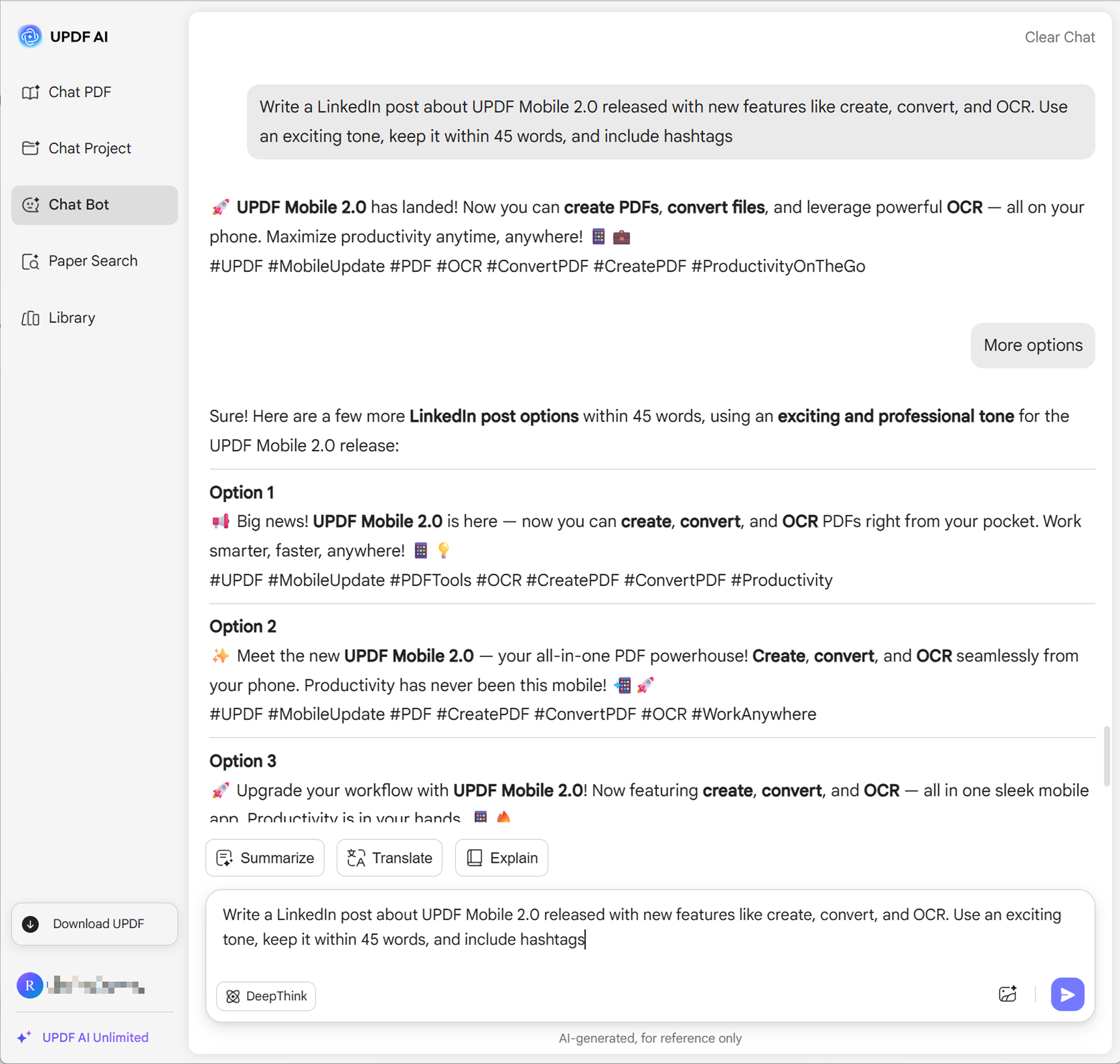
Enter Your Prompt. Write down the key ideas for your LinkedIn post along with any requirements—such as tone, style, language, length, or whether you’d like hashtags included. For example: “Write a LinkedIn post about UPDF Mobile 2.0 released with new features like create, convert, and OCR. Use an exciting tone, keep it within 45 words, and include hashtags.”
-
Choose Your AI Model. By default, UPDF AI uses ChatGPT-5. If you prefer, you can switch to DeepSeek R1 by clicking DeepThink.
-
Generate Your Post. Click Send to get your LinkedIn post. Not satisfied? Refine your prompt, resend, or request more variations until you find the perfect result.

Who Should Use LinkedIn Post Generator?
Business Owners & Marketers
Getting your company news, events, and campaigns seen by more people is often tough. UPDF AI LinkedIn Post Generator helps by producing ready-to-publish posts instantly. With options to customize tone, length, and hashtags, you’ll grab attention and increase your audience reach.

Job Seekers & Professionals
For job seekers and professionals unfamiliar with LinkedIn posting or ranking rules, UPDF AI LinkedIn Post Generator helps showcase skills, highlight achievements, and create optimized posts effortlessly. It boosts visibility, increases job opportunities, and makes building a strong professional presence simple and effective.

HR & Recruiters
For HR professionals and recruiters, LinkedIn is a powerful platform to share hiring updates, company culture, and activities to attract top talent. UPDF AI LinkedIn Post Generator makes it easy to create professional, engaging posts quickly, helping you reach more job seekers effectively.

Why Use UPDF AI LinkedIn Post Generator?
Powered by Two Cutting-Edge AI Models
UPDF AI LinkedIn Post Generator uses ChatGPT 5.1 and DeepSeek R1 to craft posts tailored to your needs. Easily generate professional, engaging content that meets your requirements and captures your audience’s attention, ensuring each LinkedIn post delivers maximum impact.
Custom Inputs for Perfect Posts
Input templates, key points, or style instructions into UPDF AI LinkedIn Post Generator, and let the AI produce posts in your desired format. You can also upload images for AI-generated posts, offering versatile ways to get the content you need.
More Than a LinkedIn Post Generator
UPDF AI doesn’t just generate LinkedIn posts—it also helps craft LinkedIn profiles, YouTube scripts, video descriptions, emails, and more. With all these capabilities in one tool, you can streamline content creation, save time, and produce professional, engaging materials for work and social media.
UPDF AI
vs. Other LinkedIn Post Generators
UPDF AI
LinkedIn Post Generator
Other AI LinkedIn Post Generators
Free Version

Image Uploaded

Enter Templates
Certain Tools Supported
Control Tone
Certain Tools Supported
Control Word Length
Certain Tools Supported
Define Output Language
Certain Tools Supported
Control Output Quantity
Language Supported
100+
Less than 20
Platform Supported
Online, Windows, Mac, Android, iOS
Online
FAQs About Using UPDF AI LinkedIn Post Generator
Q1. How do I upload an image and generate a LinkedIn post with UPDF AI LinkedIn Post Generator?
Q2. How can I use templates to generate the LinkedIn post I want?
Q3. How can I make AI-generated LinkedIn posts sound more human?
Q4. Can LinkedIn detect AI-generated content?
Other Popular UPDF AI Tools











 " alt />

