 UPDF
UPDF
 UPDF for Windows
 UPDF for Mac
 UPDF for iPhone/iPad
 UPDF for Android
 UPDF AI Online
 UPDF Sign
 Edit PDF
 Annotate PDF
 Create PDF
 PDF Form
 Edit links
 Convert PDF
 OCR
OCR PDF to Word
 PDF to Image
 PDF to Excel
 Organize PDF
 Merge PDF
 Split PDF
 Crop PDF
 Rotate PDF
 Protect PDF
 Sign PDF
 Redact PDF
 Sanitize PDF
 Remove Security
 Read PDF
 UPDF Cloud
 Compress PDF
 Print PDF
 Batch Process
 About UPDF AI
 UPDF AI Solutions
 AI User Guide
 FAQ about UPDF AI
 Summarize PDF
 Translate PDF
 Chat with PDF
 Chat with AI
 Chat with image
 PDF to Mind Map
 Explain PDF
 PDF AI Tools
 Image AI Tools
 AI Chat Tools
 AI Writing Tools
 AI Study Tools
 AI Working Tools
 Other AI Tools
 AI Bookmark Generation
 AI Bookmark Summary
 AI Watermark Generation
 AI Background Generation
 AI Sticker Generation
 AI Stamp Generation
 AI Editing Suite
 UPDF Copilot
 AI Page Management
 AI Semantic Search
 PDF to Word
 PDF to Excel
 PDF to PowerPoint
 Enterprise Solution
 Enterprise Sign
 Enterprise AI
 Enterprise Plan
 Enterprise User Guide
 Enterprise Webinar
 Banking
 Healthcare
 Insurance
 Legal
Legal Manufacturing
 Government
 Education Solution
 Customer Stories
 User Guide
 UPDF Tricks
 FAQs
FAQs UPDF Reviews
 Download Center
 Blog
Blog Newsroom
 Tech Spec
 Updates
 UPDF vs. Adobe Acrobat
 UPDF vs. Foxit
 UPDF vs. PDF Expert

 UPDF AI
Free Online AI Excel Formula Generator
The AI Excel Formula Generator lets you quickly create clear, accurate, and efficient Excel formulas. Ideal for spreadsheets, reports, and data analysis, it saves time while ensuring formulas are reliable and tailored to your dataset.
Powered by
 GPT-5 |
 DeepSeek R1
5000+ Reviews
 4.8
4.8
UPDF AI available on


 Desktop & mobile app

4M+ Users, 6.9M+ Excel Formulas Generated, Trusted by Leading Medias:






How to Generate Excel Formula Online for Free?
-
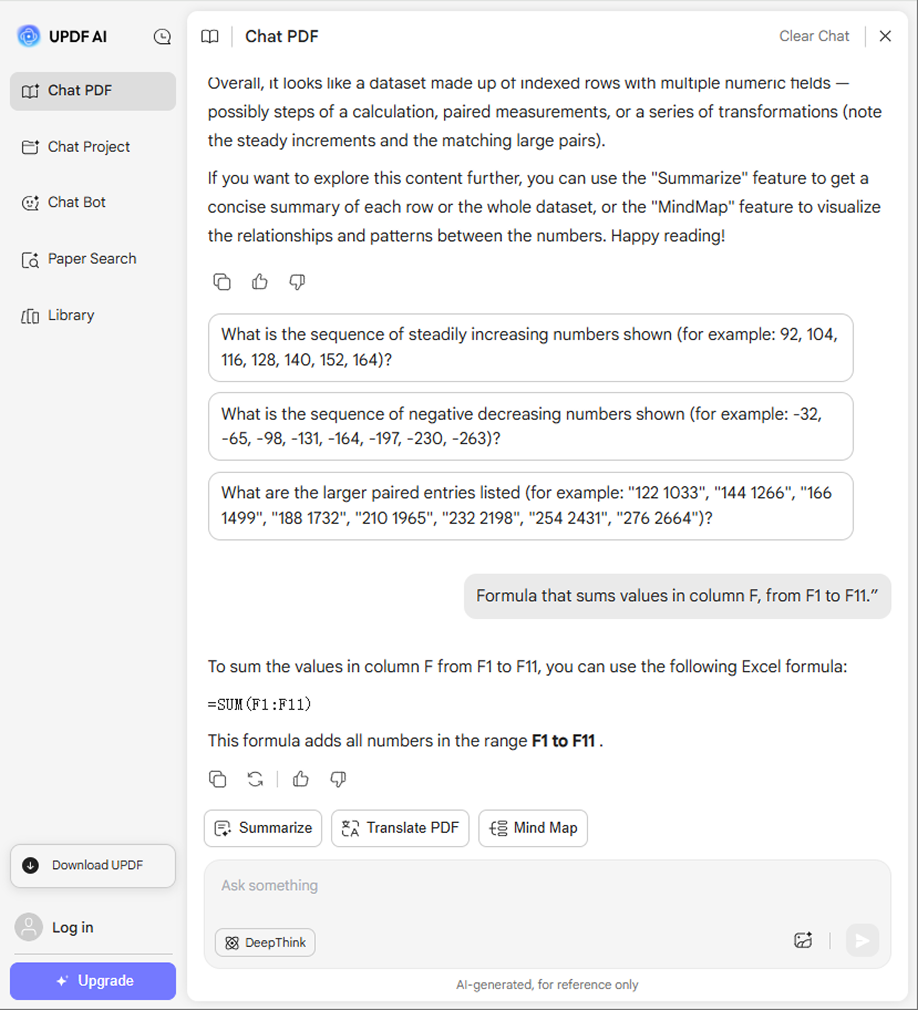
Step 1. You can enter the prompt like “Formula that sums values in column F, from F1 to F11.”
-
Step 2. By default, you are using the ChatGPT- 5 mode, if you want to use DeepSeek R1, click on the “DeepThink” to enable it.
-
Step 3. Now, you can click on the “Send” button. In seconds, you can get the result.

How Can You Benefit From UPDF AI Excel Formula Generator?
Create Formulas Quickly
Use plain text prompts to instantly generate accurate Excel or Google Sheets formulas. This tool simplifies complex calculations, saves time, and reduces errors, making spreadsheet tasks faster and more efficient for users of any skill level.

Boost Productivity
Quickly create complex Excel formulas with AI, saving time and effort. Automate repetitive calculations and tailor formulas to different datasets effortlessly, reducing manual work and minimizing errors while increasing overall efficiency in spreadsheet management.

Simplify Complex Formulas
Easily decode complicated Excel or Google Sheets formulas with AI assistance. This tool breaks down each part of a formula, clarifying its purpose and function, so users can understand and apply it correctly without confusion or trial-and-error.

Why Use UPDF AI Excel Formula Generator?
Improved Accuracy
AI-generated formulas reduce human errors like typos or logic mistakes. By ensuring correct syntax and reliable calculations, it delivers consistent results across large or complex datasets, helping users maintain precision and confidence in their spreadsheet work without manually double-checking each formula.
Easier Access for Beginners
UPDF AI Excel Formula Generator simplifies advanced Excel tasks, enabling users without deep expertise to perform complex data analysis. By generating formulas and providing examples, it serves as both a practical tool and a learning resource, helping users improve their skills and confidently handle sophisticated spreadsheet functions.
Scalable Data Management
UPDF Excel Formula Generator streamlines handling large or changing datasets, reducing errors and manual effort. Formulas can be quickly updated as data evolves, making it ideal for dynamic environments. This ensures accurate, efficient analysis even when dealing with complex or frequently changing spreadsheet information.
UPDF AI Excel Formula Generator
vs. Other AI Excel Formula Generators
UPDF AI
Excel Formula Generator
Other AIExcel Formula Generators
Free

Generate formulas for basic functions
Support for non-English Excel versions
Limited
Explain complex formulas

Provide multiple solutions
Generate formulas for advanced functions
Platform Supported
Online, Windows, Mac, Android, iOS
Online
FAQs About Using UPDF AI Excel Formula Generator
Q1. Is the AI for Excel Formula Generation free?
Q2. How Reliable Is the UPDF AI Excel Formula Generator?
Q3. Can UPDF AI Excel Formula Generator Handle All Excel Functions?
Q4. What to Do If a Generated Formula Fails?
Q5. Is the Generator Compatible with Non-English Excel Versions?
Other Popular UPDF AI Tools













 " alt />

