 UPDF
UPDF
 UPDF for Windows
 UPDF for Mac
 UPDF for iPhone/iPad
 UPDF for Android
 UPDF AI Online
 UPDF Sign
 Edit PDF
 Annotate PDF
 Create PDF
 PDF Form
 Edit links
 Convert PDF
 OCR
OCR PDF to Word
 PDF to Image
 PDF to Excel
 Organize PDF
 Merge PDF
 Split PDF
 Crop PDF
 Rotate PDF
 Protect PDF
 Sign PDF
 Redact PDF
 Sanitize PDF
 Remove Security
 Read PDF
 UPDF Cloud
 Compress PDF
 Print PDF
 Batch Process
 About UPDF AI
 UPDF AI Solutions
 AI User Guide
 FAQ about UPDF AI
 Summarize PDF
 Translate PDF
 Chat with PDF
 Chat with AI
 Chat with image
 PDF to Mind Map
 Explain PDF
 PDF AI Tools
 Image AI Tools
 AI Chat Tools
 AI Writing Tools
 AI Study Tools
 AI Working Tools
 Other AI Tools
 AI Bookmark Generation
 AI Bookmark Summary
 AI Watermark Generation
 AI Background Generation
 AI Sticker Generation
 AI Stamp Generation
 AI Editing Suite
 UPDF Copilot
 AI Page Management
 AI Semantic Search
 PDF to Word
 PDF to Excel
 PDF to PowerPoint
 Enterprise Solution
 Enterprise Sign
 Enterprise AI
 Enterprise Plan
 Enterprise User Guide
 Enterprise Webinar
 Banking
 Healthcare
 Insurance
 Legal
Legal Manufacturing
 Government
 Education Solution
 Customer Stories
 User Guide
 UPDF Tricks
 FAQs
FAQs UPDF Reviews
 Download Center
 Blog
Blog Newsroom
 Tech Spec
 Updates
 UPDF vs. Adobe Acrobat
 UPDF vs. Foxit
 UPDF vs. PDF Expert

 UPDF AI
Free Online AI Email Writer
Powered by ChatGPT 5 and DeepSeek R1, the UPDF AI Email Writer makes crafting emails effortless. Simply enter your prompt with the necessary email details, and get your polished email instantly.
Powered by
 GPT-5 |
 DeepSeek R1
5000+ Reviews
 4.8
4.8
UPDF AI available on


 Desktop & mobile app

4M+ Users, 67M+ Emails Written, Trusted by Leading Medias:






How to Use UPDF AI Email Writer Online for Free?
-
To begin, enter a prompt that includes the recipient’s name, key points, email type, tone, language, and more.
-
Select the AI model. By default, results are generated using ChatGPT 5. To switch to DeepSeek, just click the “DeepThink” button.
-
Then, hit “Send” to receive your email in seconds. Now, you can copy the email, customize it if needed, and paste to send.

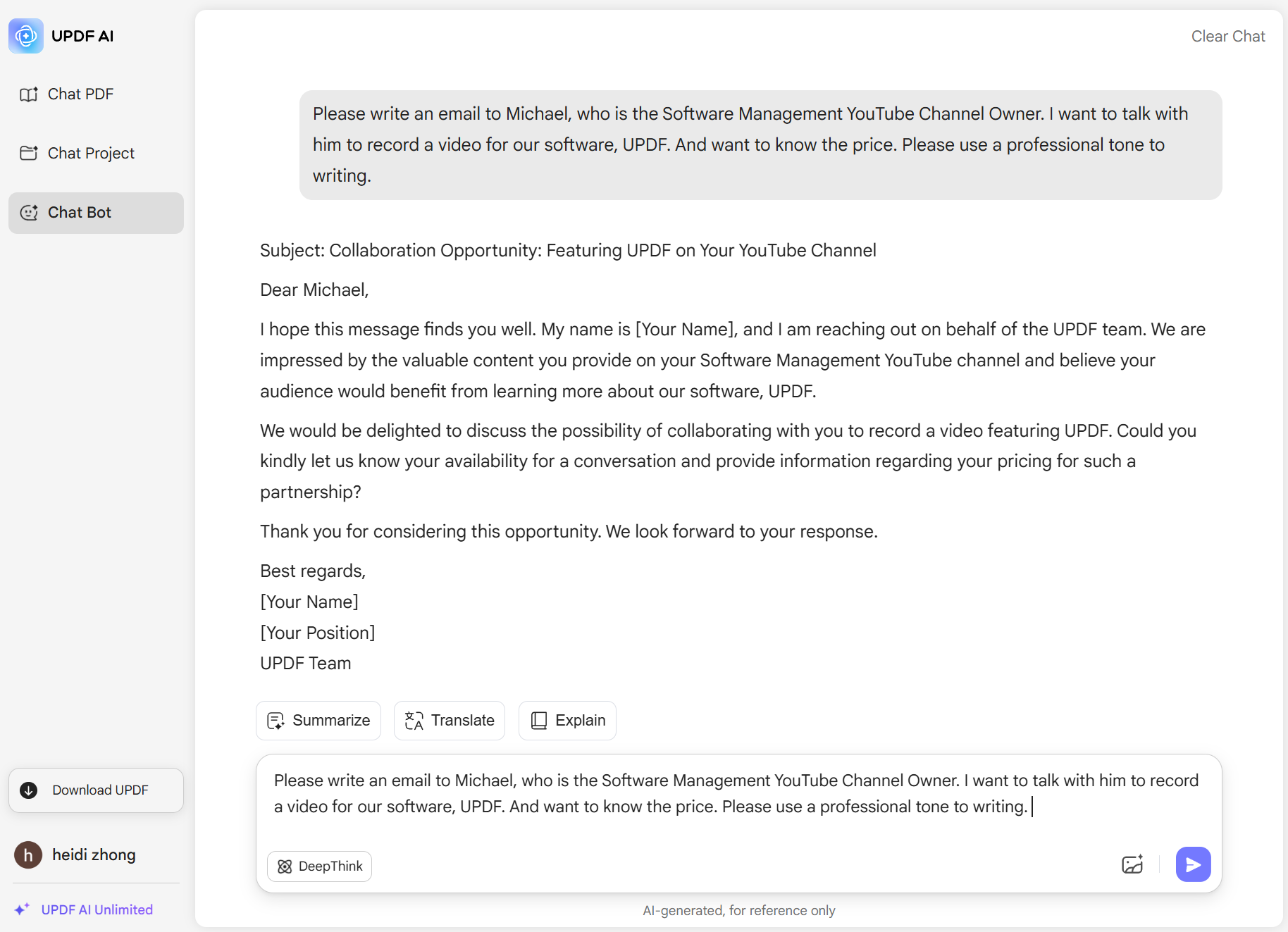
Who Should Use UPDF AI Email Writer?
Business Professionals
UPDF AI Email Writer helps business professionals craft business emails for requests, invitations, project follow-ups, task announcements, assignments, and more—ensuring clear, professional, and effective communication every time.

Customer Support Teams
Customer support teams regularly communicate with customers via email. UPDF AI Email Writer makes it easy to handle complaints, feedback, and inquiries with a polite, helpful tone. It also helps create email templates for faster responses, boosting customer satisfaction.

Marketers and Sales Teams
UPDF AI Email Writer helps marketers and sales teams craft persuasive emails to customers and detailed, professional messages to influencers and partners. It boosts work efficiency and increases your chances of reaching successful agreements.

Why Use UPDF AI Email Writer?
Customizable Input
UPDF AI Email Writer lets you enter the recipient’s name, key email points, tone, output language, writer’s name, and whether you need a subject line. You can also paste a previous email for the AI to mimic your style or paste a customer’s email for an accurate reply. Add any specific requirements to get the perfect email written.
Accuracy and Efficiency
UPDF AI Email Writer combines the power of ChatGPT 5 and DeepSeek R1 to deliver accurate, tailored emails based on your instructions. It produces emails much faster than writing manually, helping you save valuable time and significantly boost your productivity and overall work efficiency.
All Languages Supported
UPDF AI Email Writer supports all languages. Simply type your prompt in the language you understand, and the AI will generate the email in the language you need. Even if you don’t know the target language, UPDF AI makes it easy to write emails by allowing you to input instructions in your native language and receive a polished email in the desired language.
UPDF AI Email Writer
vs. Other Email Writers
UPDF AI
Email Writer
Other AIEmail Writers
Free

Accuracy
99%
94%
No Word Limits
No Sign Up Required
Customization

Privacy
Language Supported
100+
Less than 20
Platform Supported
Online, Windows, Mac, Android, iOS
Online
FAQs About Using UPDF AI Email Writer
Q1. Is UPDF AI Email Writer Suitable for All Types of Emails?
Q2. Is UPDF AI Email Writer Better than ChatGPT?
Q3. Is There a Limit to How Many Emails I Can Write per Day with UPDF AI Email Writer?
Q4. Are There Any Tips to Get Satisfying Emails with UPDF AI Email Writer?
Other Popular UPDF AI Tools









 " alt />

