 UPDF
UPDF
 UPDF for Windows
 UPDF for Mac
 UPDF for iPhone/iPad
 UPDF for Android
 UPDF AI Online
 UPDF Sign
 Edit PDF
 Annotate PDF
 Create PDF
 PDF Form
 Edit links
 Convert PDF
 OCR
OCR PDF to Word
 PDF to Image
 PDF to Excel
 Organize PDF
 Merge PDF
 Split PDF
 Crop PDF
 Rotate PDF
 Protect PDF
 Sign PDF
 Redact PDF
 Sanitize PDF
 Remove Security
 Read PDF
 UPDF Cloud
 Compress PDF
 Print PDF
 Batch Process
 About UPDF AI
 UPDF AI Solutions
 AI User Guide
 FAQ about UPDF AI
 Summarize PDF
 Translate PDF
 Chat with PDF
 Chat with AI
 Chat with image
 PDF to Mind Map
 Explain PDF
 PDF AI Tools
 Image AI Tools
 AI Chat Tools
 AI Writing Tools
 AI Study Tools
 AI Working Tools
 Other AI Tools
 AI Bookmark Generation
 AI Bookmark Summary
 AI Watermark Generation
 AI Background Generation
 AI Sticker Generation
 AI Stamp Generation
 AI Editing Suite
 UPDF Copilot
 AI Page Management
 AI Semantic Search
 PDF to Word
 PDF to Excel
 PDF to PowerPoint
 Enterprise Solution
 Enterprise Sign
 Enterprise AI
 Enterprise Plan
 Enterprise User Guide
 Enterprise Webinar
 Banking
 Healthcare
 Insurance
 Legal
Legal Manufacturing
 Government
 Education Solution
 Customer Stories
 User Guide
 UPDF Tricks
 FAQs
FAQs UPDF Reviews
 Download Center
 Blog
Blog Newsroom
 Tech Spec
 Updates
 UPDF vs. Adobe Acrobat
 UPDF vs. Foxit
 UPDF vs. PDF Expert

 UPDF AI
Free Online AI Lawyer
Powered by ChatGPT-5 and DeepSeek R1, UPDF AI Lawyer provides fast and reliable legal guidance instantly. Just enter your legal question or upload a document to get clear, actionable advice, contract drafts, or summaries in seconds.
Powered by
 GPT-5 |
 DeepSeek R1
5000+ Reviews
 4.8
4.8
UPDF AI available on


 Desktop & mobile app

4M+ Users, 5M+ Legal Questions Solved, Trusted by Leading Medias:






How to Use UPDF AI Lawyer Online for Free?
-
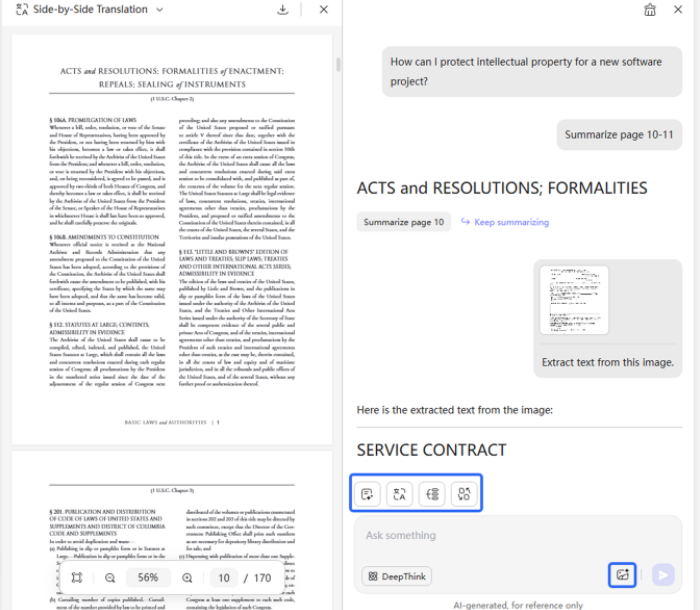
Chat Bot: Enter legal-related questions in the chat box to get instant assistance or contract drafts. For example: “How can I protect intellectual property for a new software project?” or “Explain the key obligations in this lease agreement.”
-
Chat with PDF: When you need to quickly review, summarize, or translate legal documents, simply upload your file and click options “Summarize” or “Translate PDF” to get instant results.
-
Chat with Image: If you receive images containing legal information—such as contract photos, invoices, or chat screenshots—click the image icon in the lower-right corner and enter your prompt, e.g., “Extract text from this image.”

Who Should Try UPDF AI Lawyer?
Freelancers & Entrepreneurs
Easily draft or review contracts, proposals, and partnership agreements. Maintain clarity, fairness, and professionalism while protecting your business interests without constant legal costs.

HR & Hiring Teams
Quickly create employment contracts, NDAs, or internship agreements. Ensure consistency, compliance, and professionalism while saving valuable time on repetitive legal work.

Legal Professionals & Consultants
Simplify the drafting and review of legal documents. Use UPDF AI Lawyer to boost efficiency, reduce manual effort, and focus more on complex and strategic legal tasks.

Why Use UPDF AI Lawyer?
Instant Legal Drafts
Generate accurate and professional contracts, agreements, or legal summaries in seconds. Skip long drafting hours and get ready-to-use documents instantly.
Clear Guidance
Understand complex legal terms and clauses quickly. UPDF AI Lawyer simplifies legal language, helping you make informed decisions with confidence.
Time & Cost Efficient
Save time and reduce legal expenses by letting AI handle routine drafting and review tasks, so you can focus on what matters most.
UPDF AI Lawyer vs. Other AI Lawyers
UPDF AI Lawyer
Other AI Lawyers
PDF Analysis


Draft Documents
Edit & Sign
(Offline only)
Compare Files
(Offline only)
OCR
Usability
Simple
Complex
Guidance
Insightful
Basic
Data Security
Free to Try
100 questions
AI Model Options
ChatGPT-5 & DeepSeek R1
Limited to one AI model
Language Supported
100+
Less than 20
Platform Supported
Online, Windows, Mac, Android, iOS
Online
FAQs About Using UPDF AI Lawyer
Q1. How does UPDF AI Lawyer ensure legal accuracy?
Q2. How customizable are AI-generated legal documents?
Q3. Is my information safe when using UPDF AI Lawyer?
Q4. Can I edit, finalize, or sign documents after generating them?
Q5. Does UPDF AI Lawyer explain legal terms?
Q6. Is there a limit to using UPDF AI Lawyer?
Other Popular UPDF AI Tools






 " alt />

