UPDF
UPDF
 UPDF für Windows
 UPDF für Mac
 UPDF für iPhone/iPad
 UPDF für Android
 Nomostar
 UPDF AI Online
 UPDF Sign
 IvyCraft
 PDF bearbeiten
 PDF kommentieren
 PDF erstellen
 PDF-Formular
 Links bearbeiten
 PDF konvertieren
 OCR
OCR PDF in Word
 PDF in Bild
 PDF in Excel
 PDF organisieren
 PDFs zusammenführen
 PDF teilen
 PDF zuschneiden
 PDF drehen
 PDF schützen
 PDF signieren
 PDF schwärzen
 PDF bereinigen
 Sicherheit entfernen
 PDF lesen
 UPDF Cloud
 PDF komprimieren
 PDF drucken
 Stapelverarbeitung
 Über UPDF AI
 UPDF AI Lösungen
 KI-Benutzerhandbuch
 FAQ zu UPDF AI
 PDF zusammenfassen
 PDF übersetzen
 Chatten mit PDF
 Chatten mit AI
 Chatten mit Bild
 PDF zu Mindmap
 PDF erklären
 PDF-KI-Tools
 Bild-KI-Tools
 KI-Chat-Tools
 KI-Schreibtools
 KI-Lerntools
 KI-Arbeitstools
 Weitere KI-Tools
 KI-Lesezeichen-Generierung
 KI-Lesezeichen-Zusammenfassung
 KI-Wasserzeichen-Generierung
 KI-Hintergrund-Generierung
 KI-Sticker-Generierung
 KI-Stempel-Generierung
 KI-Schreibtools
 UPDF Copilot
 KI-Seitenverwaltung
 KI-Semantische Suche
 PDF in Word
 PDF in Excel
 PDF in PowerPoint
 Unternehmenslösung
 Unternehmen Sign
 Unternehmen AI
 Unternehmensplan
 Benutzerhandbuch für Unternehmen
 Unternehmens-Webinar
 IT
IT Bildung
 Bauwesen
 Finanzdienstleistungen
 Gesundheitswesen
 Versicherung
 Rechtlich
 Fertigung
 Regierung
 Forschende & Doktoranden
 Solopreneure
 Anwälte & Kanzleien
 Immobilienprofis
 Bildungsbereich-Lösung
 Kundengeschichten
 Tutorials
 UPDF Tipps
 FAQs
FAQs UPDF Bewertungen
 Downloadcenter
 Blog
Blog Newsroom
 Technische Daten
 Updates
 UPDF vs. Adobe Acrobat
 UPDF vs. Foxit
 UPDF vs. PDF Expert

 UPDF AI
Kostenloser Online KI-Angebotsgenerator
Der UPDF AI Angebotsgenerator nutzt GPT-5 und DeepSeek R1 und ist für Ausschreibungen sowie RFP-Konformität optimiert. Geben Sie Ihre Ausschreibungsanforderungen und Projektdetails ein und erhalten Sie KI-generierte Angebotsvorschläge mit professioneller Struktur und standardisierter, konsistenter Formulierung.
Angetrieben von
 GPT-5 |
 DeepSeek R1
5000+ Bewertungen
 4.8
4.8
UPDF AI verfügbar auf


 Desktop- & Mobile-App

4M+ Nutzer, 18M+ erstellte Angebotsvorschläge, vertrauenswürdig in führenden Medien:






So verwenden Sie den UPDF AI Angebotsgenerator
-
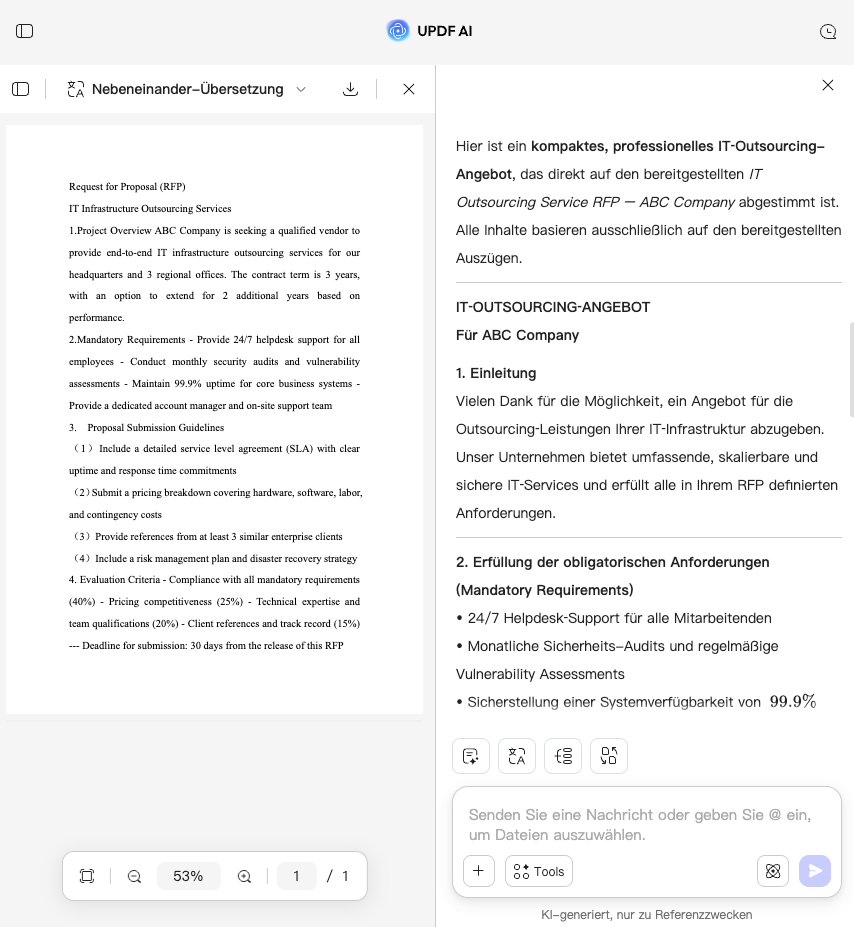
Ihre Anforderungsdatei hochladen oder KI direkt anweisen: Laden Sie Ihre RFP- oder Ausschreibungsdokumente (PDF/Word) hoch und referenzieren Sie die Datei direkt in Ihrer Eingabe. Alternativ können Sie Ihre Anforderungen beschreiben (z. B. „IT-Outsourcing-Angebot“).
-
KI-Modell auswählen: Wählen Sie GPT-5 für breit kontextbezogene Entwürfe oder DeepSeek R1 für eine strikt regelbasierte, RFP-konforme Prüfung.
-
Ergebnis generieren: Die KI erstellt ein vollständiges Angebotsdokument basierend auf Ihren Anforderungen. Sie können das Ergebnis iterativ verfeinern oder direkt speichern.

Warum den UPDF AI Angebotsgenerator verwenden?
Plattformübergreifendes Speichern mit UPDF Cloud: Nie wieder Workflow verlieren
Sie haben einen Angebotsentwurf am Desktop begonnen und müssen plötzlich das Büro verlassen – bedeutet das, dass Ihr Fortschritt verloren ist? UPDF Cloud speichert und synchronisiert Ihre Entwürfe automatisch über alle Geräte hinweg. So können Sie nahtlos vom Desktop auf Laptop oder Tablet wechseln, ohne Datenverlust oder Unterbrechung Ihres Workflows.

Mehrformat-Unterstützung: Kein Stress mit Dateiformaten
Ihre Ausschreibung liegt als gescanntes Dokument vor und Sie müssen erst mühsam konvertieren, bevor Sie starten können – warum sollte das Dateiformat Ihren Angebotsprozess blockieren? UPDF unterstützt direkte Uploads von RFP-Dateien im PDF- oder Bildformat oder ermöglicht die Eingabe in natürlicher Sprache, sodass Sie sofort mit dem Schreiben beginnen können.

Deadline-Druck: Die letzten 24 Stunden vor der Abgabe
Nur noch wenige Stunden bis zur Abgabefrist – wie erkennen Sie kritische Lücken in hunderten Seiten RFP-Dokumenten, ohne jede Zeile manuell zu lesen? UPDF AI liefert sofortige Zusammenfassungen und Risikoanalysen und extrahiert wichtige Fristen und Vertragsstrafen in Sekunden, damit Sie Risiken rechtzeitig vermeiden können.

UPDF AI vs. andere KI-Tools
UPDF AI
Andere KI-Tools
Kostenlose Testphase
100 kostenlose Eingaben für neue Nutzer
5–10 kostenlose Anfragen oder keine Testversion
Dokumenten-Upload & Analyse


Geräteübergreifende Synchronisation
UPDF Cloud – automatische Speicherung und Synchronisation über Windows, Mac, iOS, Android und Web
Keine Cloud-Synchronisation; manuelle Dateiübertragung erforderlich
Dual-KI-Modus
GPT-5 für strategische Entwürfe + DeepSeek R1 für Compliance-Prüfung
Nur ein KI-Modell, keine Modusauswahl
Tiefgehende Anpassung
Unterstützte Plattformen
Online, Windows, macOS, iOS, Android
Online
Mehrsprachige Unterstützung
100+ Sprachen
Meist weniger als 20 Sprachen
FAQs zum UPDF AI Angebotsgenerator
1. Wie stelle ich sicher, dass die mit UPDF AI erstellten Angebote RFP-konform sind?
2. Was ist besser: manuelle Angebotserstellung oder KI-Tools?
3. Bietet der UPDF AI Angebotsgenerator ein kostenloses Nutzungskontingent?
4. Kann ich meine Entwürfe speichern und geräteübergreifend nutzen?
Andere beliebte UPDF KI-Tools