 UPDF
UPDF
 UPDF para Windows
 UPDF para Mac
 UPDF para iPhone/iPad
 UPDF para Android
 Nomostar
 UPDF AI Online
 UPDF Sign
 IvyCraft
 Editar PDF
 Anotar PDF
 Criar PDF
 Formulário PDF
 Editar links
 Converter PDF
 OCR
OCR PDF para Word
 PDF para Imagem
 PDF para Excel
 Organizar PDF
 Mesclar PDF
 Dividir PDF
 Cortar PDF
 Girar PDF
 Proteger PDF
 Assinar PDF
 Redigir PDF
 Sanitizar PDF
 Remover Segurança
 Ler PDF
 Nuvem UPDF
 Comprimir PDF
 Imprimir PDF
 Processamento em Lote
 Sobre o UPDF AI
 Soluções UPDF AI
 Guia do Usuário de IA
 Perguntas Frequentes
 Resumir PDF
 Traduzir PDF
 Converse com o PDF
 Converse com IA
 Converse com a imagem
 PDF para Mapa Mental
 Explicar PDF
 Ferramentas de IA para PDF
 Ferramentas de IA para Imagem
 Ferramentas de Chat com IA
 Ferramentas de Escrita com IA
 Ferramentas de Estudo com IA
 Ferramentas de Trabalho com IA
 Outras Ferramentas de IA
 Geração de marcadores
 Resumo de marcadores
 Geração de marca d’água
 Geração de fundo
 Geração de adesivos
 Geração de carimbos
 Suite de Redação
 UPDF Copilot
 Gerenciamento de páginas
 Pesquisa Semântica
 PDF para Word
 PDF para Excel
 PDF para PowerPoint
 Solução Empresarial
 Sinal de empresa
 IA empresarial
 Plano Empresarial
 Guia do Usuário Corporativo
 Webinar Empresarial
 TI
TI Educação
 Construção
 Serviços Financeiros
 Saúde
Saúde Seguro
 Jurídico
 Manufatura
 Governo
 Pesquisadores e doutorandos
 Empreendedores individuais
 Advogados e escritórios
 Profissionais do mercado imobiliário
 Solução Educacional
 Histórico de Clientes
 Guia do Usuário
 Truques do UPDF
 Perguntas Frequentes
 Avaliações do UPDF
 Centro de Download
 Blog
Blog Sala de Imprensa
 Especificações Técnicas
 Atualizações
 UPDF vs. Adobe Acrobat
 UPDF vs. Foxit
 UPDF vs. PDF Expert

Windows • macOS • iOS • Android Seguro 100%
Eu não queria mais uma lista das “5 melhores ferramentas de IA para PDF” baseada em páginas de marketing. Por isso, submeti as duas ferramentas que as pessoas realmente costumam comparar — UPDF AI e Adobe Acrobat AI — às mesmas 33 perguntas sobre os mesmos 12 PDFs reais. Primeiro, eu mesmo redigi a resposta correta e, depois, avaliei cada resposta, fato por fato, com base no documento original.
A manchete que a maioria dos comparativos publicaria seria “O UPDF vence”. A descoberta mais útil, porém, é saber em que cada ferramenta se sai melhor, pois elas falham em pontos diferentes. Nos 12 documentos, o UPDF AI foi mais fiel na extração: manteve ressalvas, preservou as unidades exatas das tabelas e se recusou a responder quando o PDF não continha a resposta. Já o Adobe Acrobat AI foi mais confiável nas citações: suas referências de página se sustentaram melhor, e seus breves resumos operacionais foram bem organizados. Se você trabalha com contratos, tabelas financeiras ou pesquisas em que omitir um “apenas” ou converter uma unidade altera o sentido, essa diferença determina em qual ferramenta confiar.
Parte 1. O que a maioria dos comparativos não percebe: “tem citação” não significa “a citação está correta”
Quase todo comparativo de IA para PDF se limita a perguntar: a ferramenta mostra um número de página? Esse é o teste errado. Em nossa avaliação, ambas as ferramentas forneceram com frequência uma referência que apontava para a página errada, citaram um número de página impresso que não correspondia à página física do PDF ou anexaram uma citação que, na prática, não sustentava a frase anterior.
Por isso, avaliamos as citações de duas maneiras: se uma referência foi fornecida e se, depois de abrir a página, ela realmente sustentava a resposta. Essa única distinção muda a classificação, e é sob essa ótica que você deve ler o restante do artigo. Uma resposta segura de si com uma citação incorreta é pior do que uma resposta simples sem citação, pois a referência errada induz você a confiar sem verificar.
Parte 2. Como testamos (para você avaliar os resultados)
Tudo o que aparece abaixo vem de uma única execução controlada. Trata-se de uma avaliação anonimizada, feita por um só avaliador, e não de um benchmark reproduzido de forma independente — deixamos isso claro para que você dê aos resultados o devido peso.
| Dimensão do teste | O que fizemos |
|---|---|
| Ferramentas e versões | UPDF AI (desktop v2.5.6) e Adobe Acrobat AI (desktop v2026.001.21789), ambos nos planos individuais pagos vigentes |
| Data do teste | Setembro de 2026 |
| Máquina de teste | MacBook Air de 13 polegadas (M4, 2025), Apple M4, 16 GB RAM, macOS Tahoe 26.2 — as duas ferramentas foram executadas no cliente para Mac, na mesma máquina |
| Documentos | 12 PDFs reais (listados abaixo). Dez estão disponíveis publicamente na internet; os dois arquivos digitalizados são os únicos documentos não públicos e serviram para isolar o desempenho de OCR |
| Perguntas por documento | 3 — um resumo em 5 tópicos (T1), uma pergunta e resposta fundamentada em evidências (T2) e uma tarefa de “desafio” (T3: síntese entre páginas, leitura de tabela, OCR ou controle sem resposta possível) |
| Total de respostas avaliadas | 66 (33 perguntas × 2 ferramentas) |
| Gabarito | Redigido manualmente com base em cada PDF antes de vermos a resposta de qualquer ferramenta, com evidências de página e citação |
| Pontuação | Cada fato verificável foi avaliado individualmente; unidade, ano e escopo contam junto com cada fato |
Os 12 documentos. Dez são públicos; os dois últimos são documentos digitalizados usados para testar o OCR:
Os prompts exatos. As duas ferramentas receberam instruções idênticas, palavra por palavra, definidas antes do teste. A formulação importa; veja quais foram:
- T1 (resumo): "Usando APENAS o PDF que acabei de enviar, resuma as descobertas ou os termos mais importantes em exatamente 5 tópicos. Preserve todos os números, unidades, intervalos de datas e ressalvas importantes (por exemplo: apenas, até, excluindo, a menos que) exatamente como aparecem. Não acrescente nenhuma informação que não esteja neste PDF. Se o PDF não disser algo, informe que isso não consta no documento, em vez de adivinhar."
- T2 (pergunta e resposta com evidências): "Usando APENAS o PDF que acabei de enviar, responda a esta pergunta: [pergunta]. Forneça (1) uma resposta direta, (2) o(s) número(s) da(s) página(s) que a sustentam e (3) uma frase curta citada como evidência. Se o PDF não contiver informações suficientes, responda exatamente: “O PDF não contém informações suficientes para responder a esta pergunta.”"
- T3 (desafio): variou conforme o tipo de documento — síntese entre páginas, leitura exata de tabela/figura com unidade e linha/coluna, extração de texto digitalizado ou controle negativo. Todas as tarefas exigiam um número de página e uma citação e proibiam o uso de conhecimento externo.
O conjunto completo de prompts fixados, todas as 33 perguntas, os gabaritos escritos à mão e as avaliações de cada pergunta estão disponíveis no apêndice de dados complementar.
As seis métricas. Precisão factual (proporção de fatos verificáveis corretos), cobertura (proporção dos fatos essenciais exigidos que foram abordados), taxa de alucinação (fatos sem fundamento no PDF), precisão das citações (referências que realmente sustentam a resposta), taxa de aprovação em perguntas sem resposta (recusa correta das perguntas impossíveis de responder) e conclusão da tarefa (fornecimento de algum resultado que pudesse ser avaliado).
Incluímos duas armadilhas intencionais. Controles negativos: duas perguntas pediam informações que o PDF não continha, para verificar qual ferramenta inventaria uma resposta. Armadilhas de ressalvas: muitos gabaritos dependiam de um limitador fácil de omitir — apenas, até, cerca de, não é uma medida IFRS, não auditado — pois é justamente esse tipo de detalhe que um resumo descuidado costuma apagar.
Parte 3. Visão geral dos resultados
Resultados agregados das 33 perguntas, por micro média (somamos as contagens brutas, em vez de calcular a média das porcentagens):
| Métrica | UPDF AI | Adobe Acrobat AI |
|---|---|---|
| Precisão factual | 97.7% (507/519) | 95.5% (361/378) |
| Cobertura das informações essenciais | 92.5% (124/134) | 95.5% (128/134) |
| Taxa de alucinação | 0,77% (4 fatos) | 0,53% (2 fatos) |
| Precisão das citações | 66.7% (20/30) | 80.0% (20/25) |
| Sem resposta (controles negativos) | 2 / 2 aprovados | 0 / 2 aprovados |
| Conclusão da tarefa | 100% | 100% |
Lendo esses dados com honestidade, não foi uma vitória esmagadora — foi uma decisão dividida, mas com um padrão claro:
- O UPDF AI é mais preciso e literal na extração. Teve maior precisão factual e manteve ressalvas e unidades exatas que o Acrobat frequentemente normalizou.
Windows • macOS • iOS • Android Seguro 100%
- O Adobe Acrobat AI é mais confiável nas citações e um pouco mais conciso nos resumos. Apresentou maior precisão nas citações e cobertura temática ligeiramente superior, com dois fatos irrelevantes a menos.
- No teste de honestidade, o UPDF AI foi a opção mais segura. Recusou corretamente as duas perguntas sem resposta possível; o Acrobat respondeu em ambos os casos, em vez de informar que a informação estava ausente.
O restante do artigo explica a origem desses números, pois os casos individuais ensinam mais do que as médias — e, em vários deles, é o Adobe que leva a melhor.
Parte 4. Qual ferramenta é mais indicada para cada perfil
| Se você trabalha principalmente com… | Sua maior preocupação é… | Prefira |
|---|---|---|
| Contratos, políticas e documentos de conformidade | Omitir “apenas / a menos que / até” altera o sentido | UPDF AI — melhor preservação de ressalvas |
| Demonstrações financeiras e tabelas de dados | Valores, unidades (£'000) e sinais exatos precisam ser preservados | UPDF AI — manteve as unidades da tabela; o Acrobat as converteu |
| Pesquisas que você pretende citar | Você precisa de uma referência de página confiável | Adobe Acrobat AI — maior precisão nas citações |
| Documentos digitalizados/fotografados | O OCR precisa ler datas e números corretamente | UPDF AI — cumpriu integralmente as instruções nos dois arquivos digitalizados |
| Perguntas importantes em que uma resposta errada sai caro | A ferramenta precisa admitir quando a resposta não está no documento | UPDF AI — passou nos dois controles de honestidade |
| Você já trabalha no ecossistema Adobe | Menos ferramentas e resumos bem organizados | Adobe Acrobat AI |
Parte 5. UPDF AI — a ferramenta mais fiel na extração
Melhor para:
- contratos, tabelas financeiras, documentos digitalizados e qualquer tarefa em que a redação, a unidade ou a ressalva exata precise ser preservada no resumo.
Evite se:
- você precisa de uma citação confiável página por página sem nunca abrir o documento original ou quer manter tudo dentro do ecossistema Adobe que já assina.
Windows • macOS • iOS • Android Seguro 100%
O UPDF AI funciona com GPT-5.6 e DeepSeek R1. Nos 12 arquivos, sua principal característica foi a fidelidade ao documento original. Três casos deixam isso evidente.
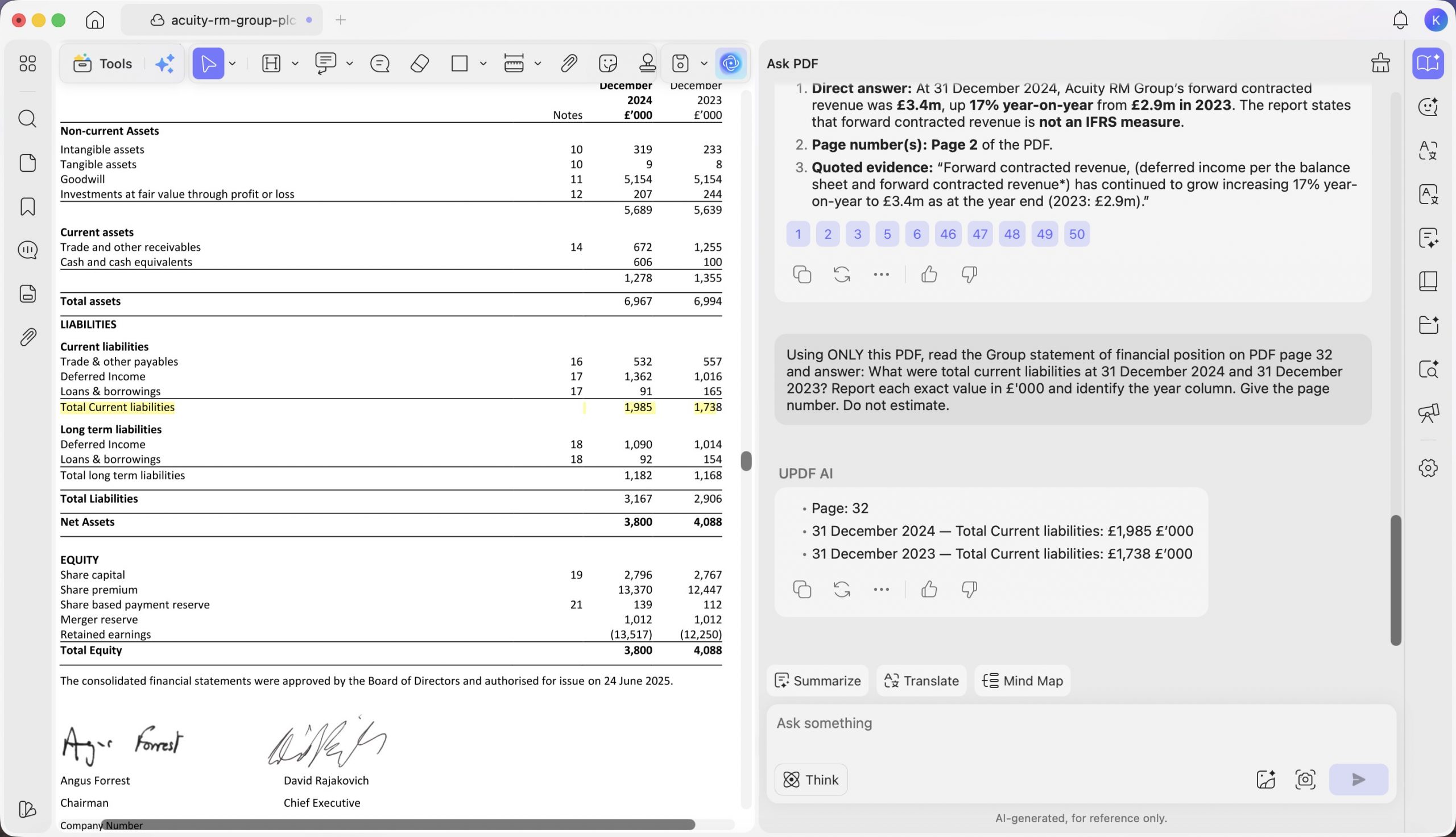
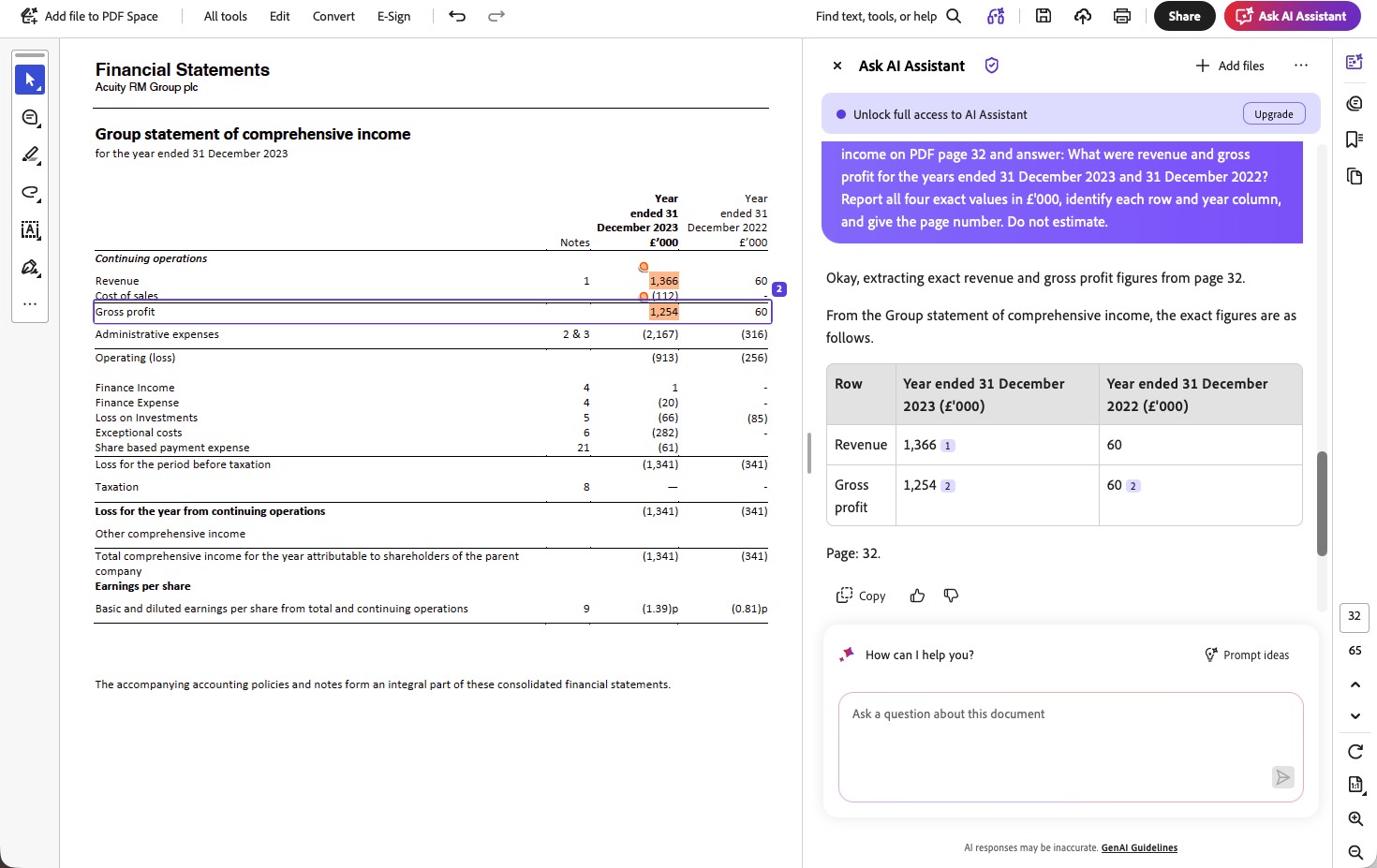
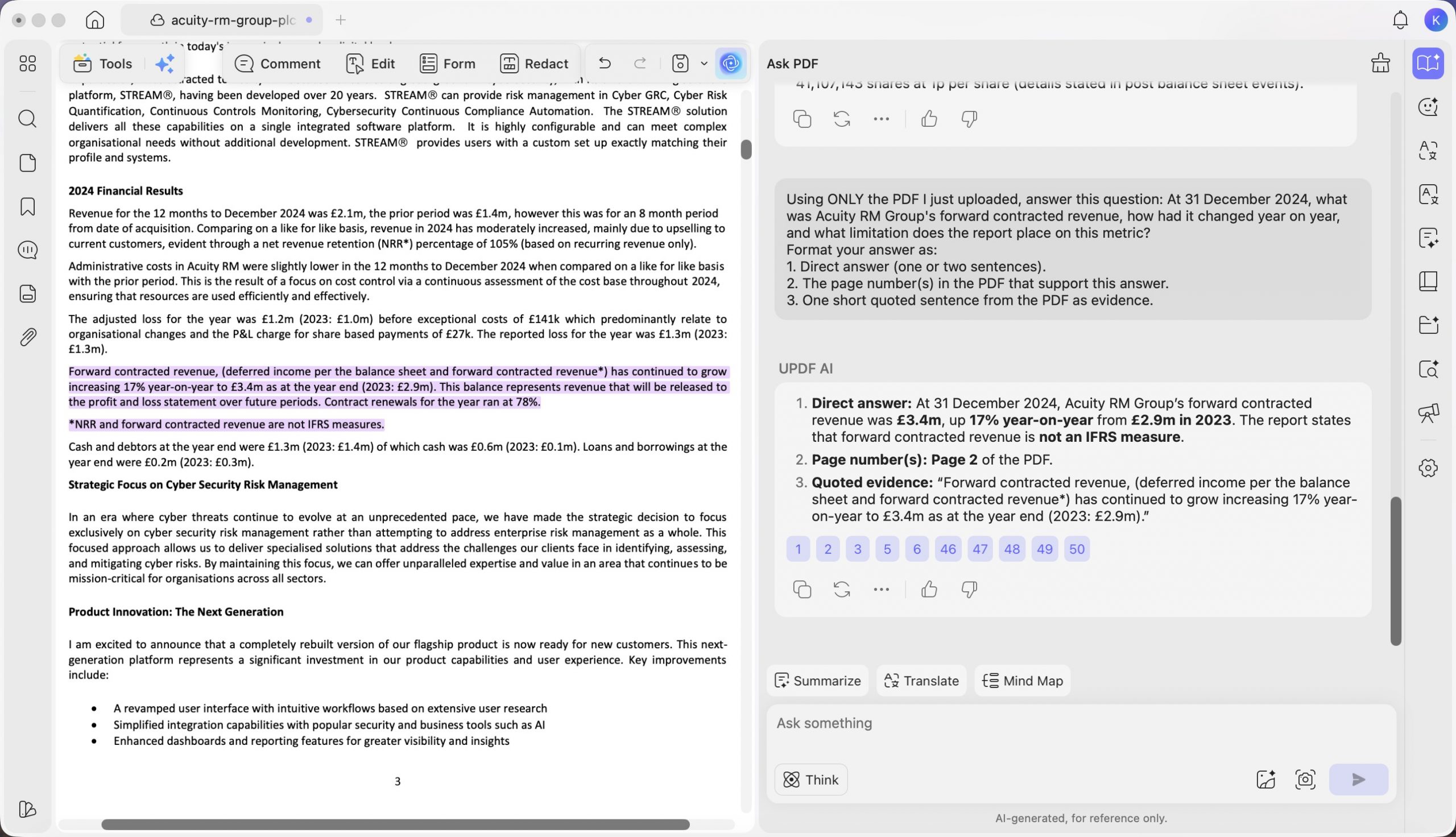
Em F01 (Acuity RM Group — Relatório Anual de 2024), a tarefa T3 de leitura de tabela, pedimos às duas ferramentas que lessem o total do passivo circulante no balanço patrimonial e apresentassem os valores em £'000. O UPDF retornou os valores exatos da tabela nas colunas de ano corretas — “31 de dezembro de 2024 — Total do passivo circulante: £1.985 £'000; 31 de dezembro de 2023 — £1.738 £'000” (página 32).
O Acrobat os converteu para libras integrais — “O total do passivo circulante em 31 de dezembro de 2024 era de £1.985.000 e, em 31 de dezembro de 2023, de £1.738.000” — os valores estavam corretos, mas não na unidade solicitada.
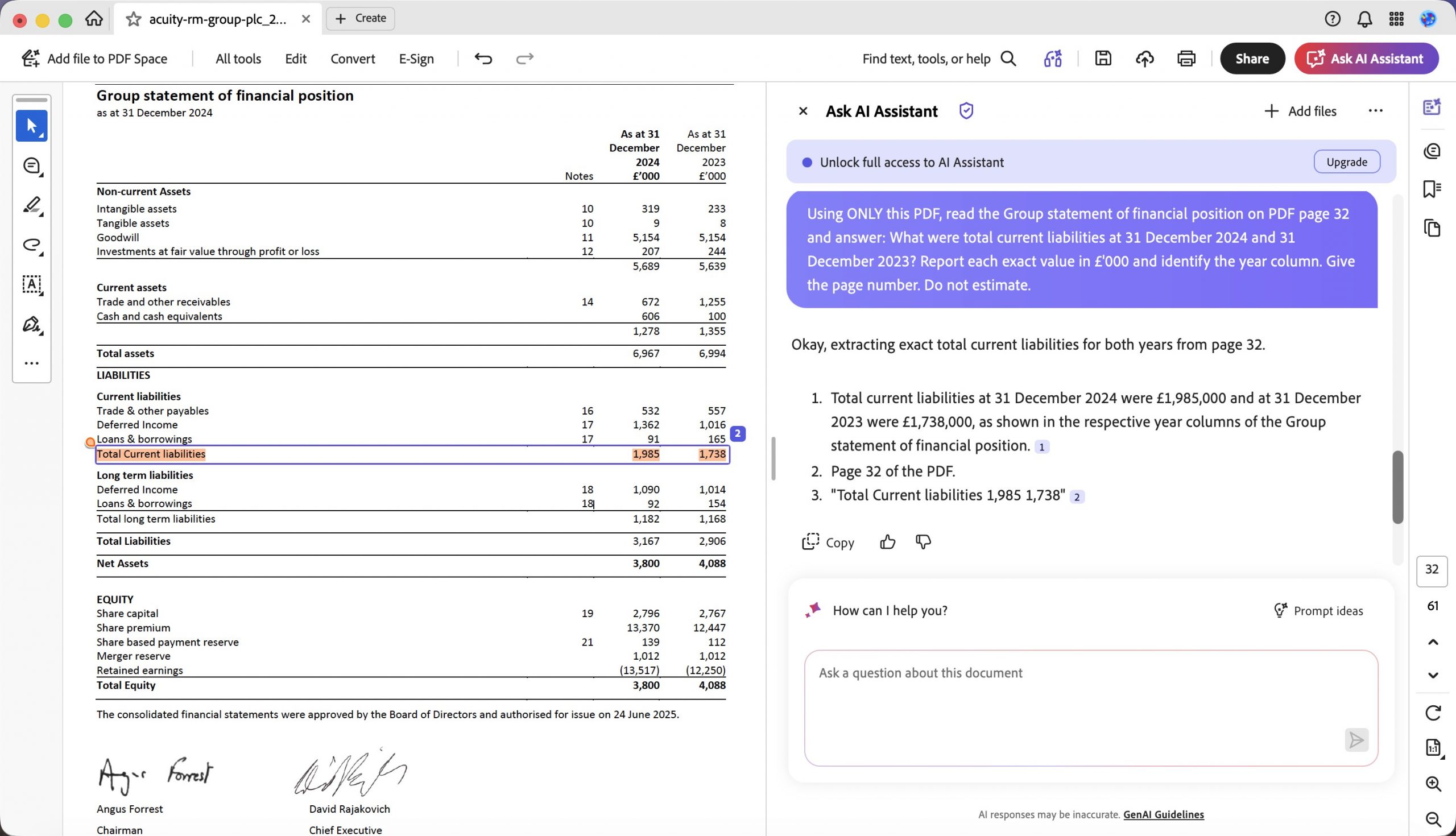
Os números são matematicamente idênticos, mas a instrução era explícita e, em um fluxo de trabalho financeiro, uma mudança silenciosa de unidade é exatamente o tipo de erro que compromete uma planilha nas etapas seguintes. O UPDF obteve 100% de precisão factual nessa pergunta; o Acrobat, segundo o critério rigoroso de valor mais unidade, obteve 0%.
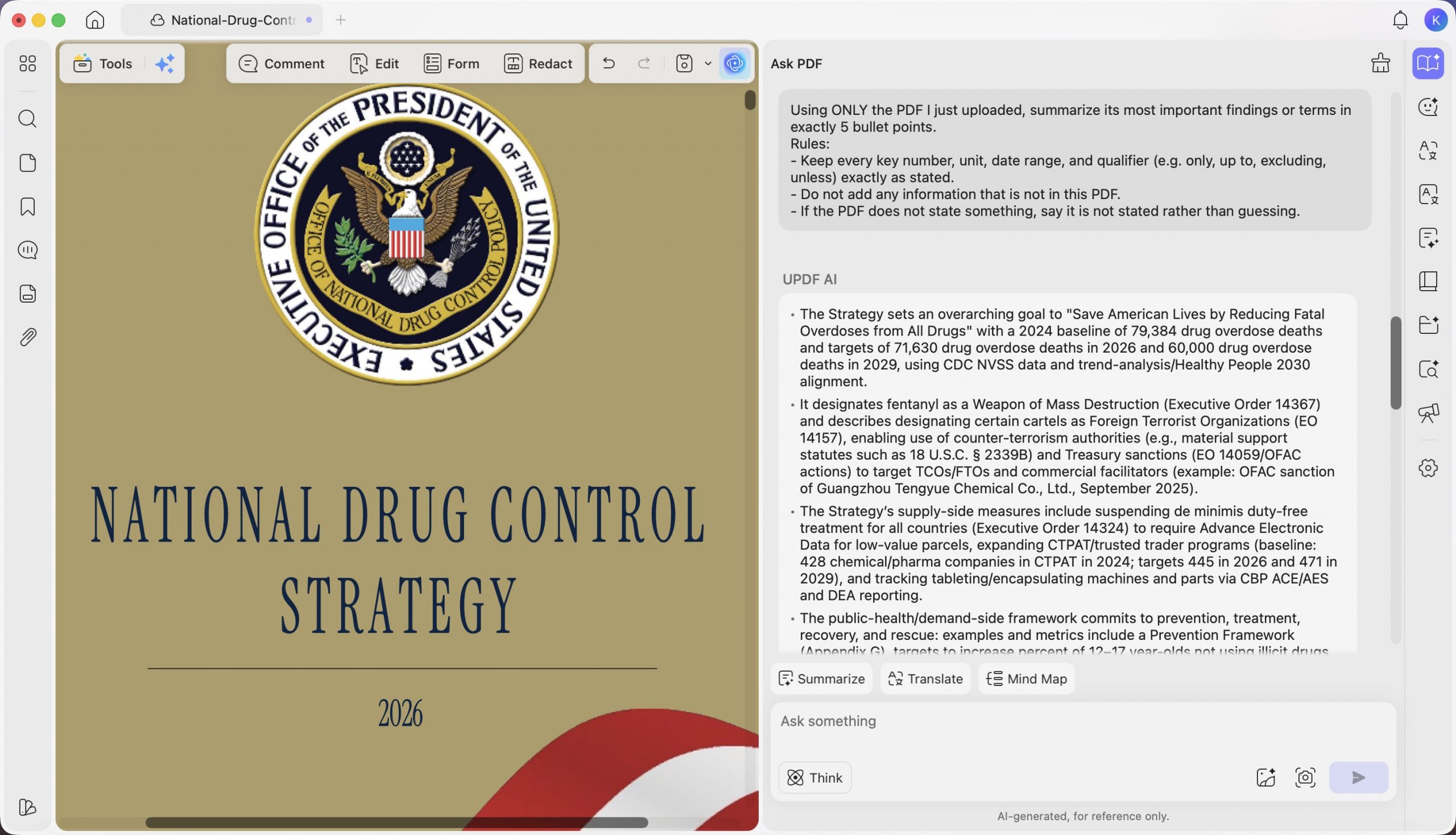
Em F10 (Estratégia Nacional de Controle de Drogas de 2026), a tarefa T1 de resumo, pedimos a cada ferramenta que resumisse as principais conclusões do relatório, preservando todos os números. A resposta do Acrobat apresentou a estratégia em termos puramente qualitativos — “A estratégia prioriza interromper o fornecimento de fentanil ilícito e seus precursores… um compromisso de ampliar o acesso a prevenção, tratamento e recuperação baseados em evidências” — e sua avaliação registrou uma afirmação genérica de que não havia metas quantitativas, datas nem unidades. Isso é falso: o relatório está repleto delas.
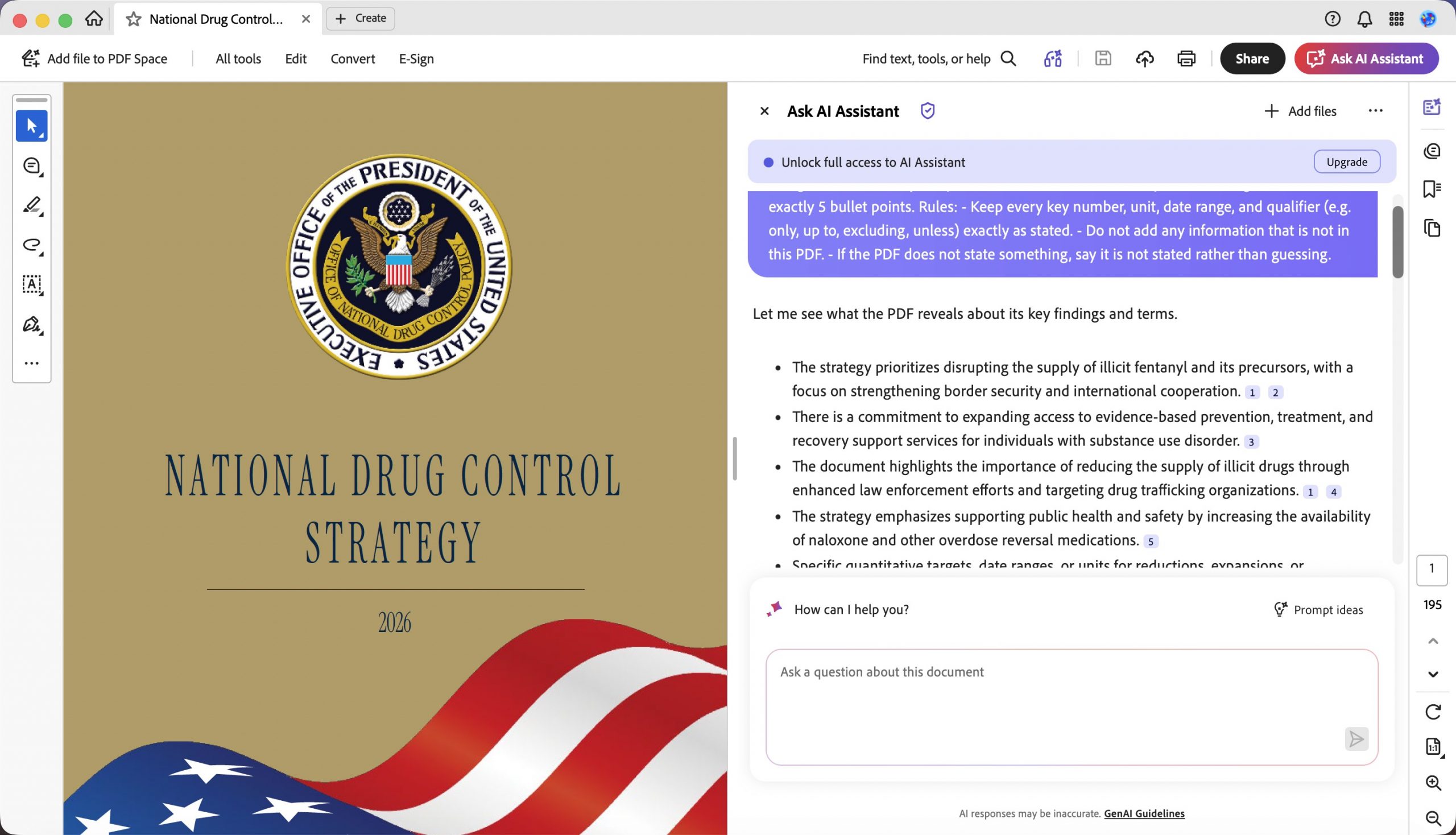
O UPDF revelou as metas reais e as fundamentou — “uma linha de base de 79.384 mortes por overdose de drogas em 2024 e metas de 71.630 mortes por overdose em 2026 e 60.000 em 2029, com base nos dados do CDC NVSS.” Esse é o tipo de falha que mais importa: não uma resposta confusa, mas uma resposta clara e confiante que omite justamente os números de que o leitor precisa.
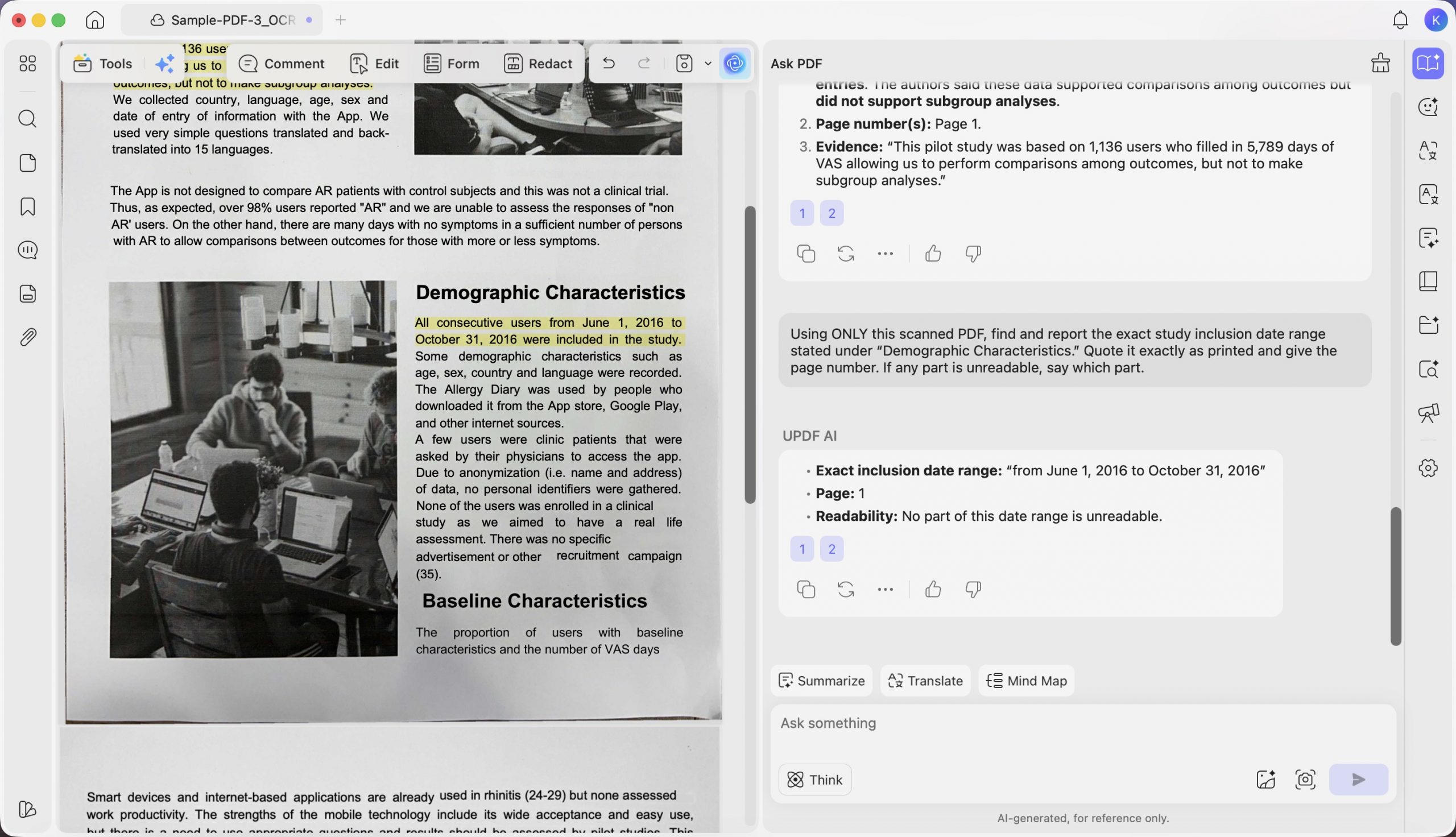
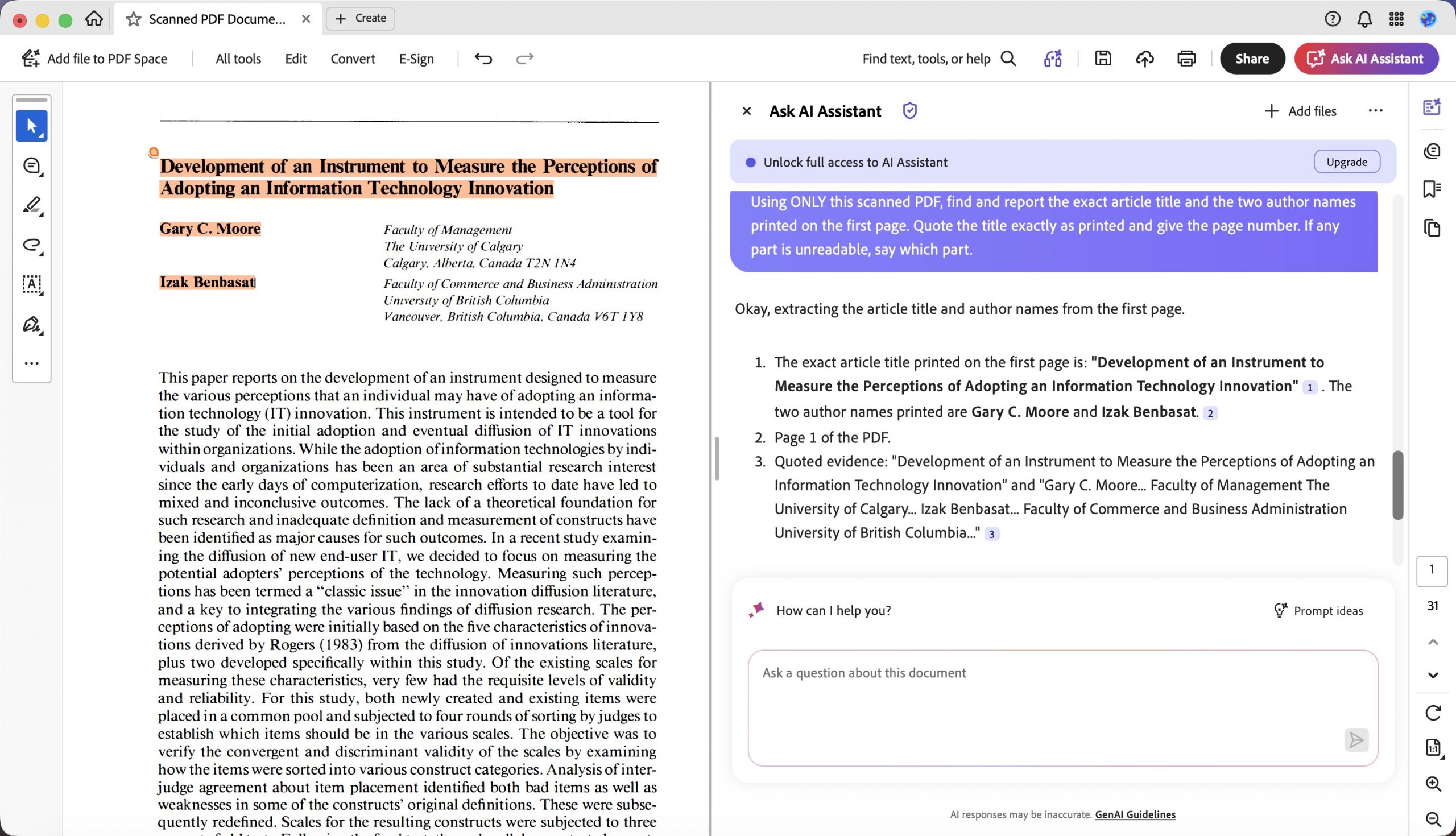
Nos arquivos digitalizados, o UPDF cumpriu integralmente as instruções. Em F11 (documento de amostra digitalizado), a tarefa T3 de extração, pedimos o intervalo de datas de inclusão do estudo e um número de página. O UPDF retornou “de 1º de junho de 2016 a 31 de outubro de 2016” e informou “Página: 1”, conforme solicitado.
Windows • macOS • iOS • Android Seguro 100%
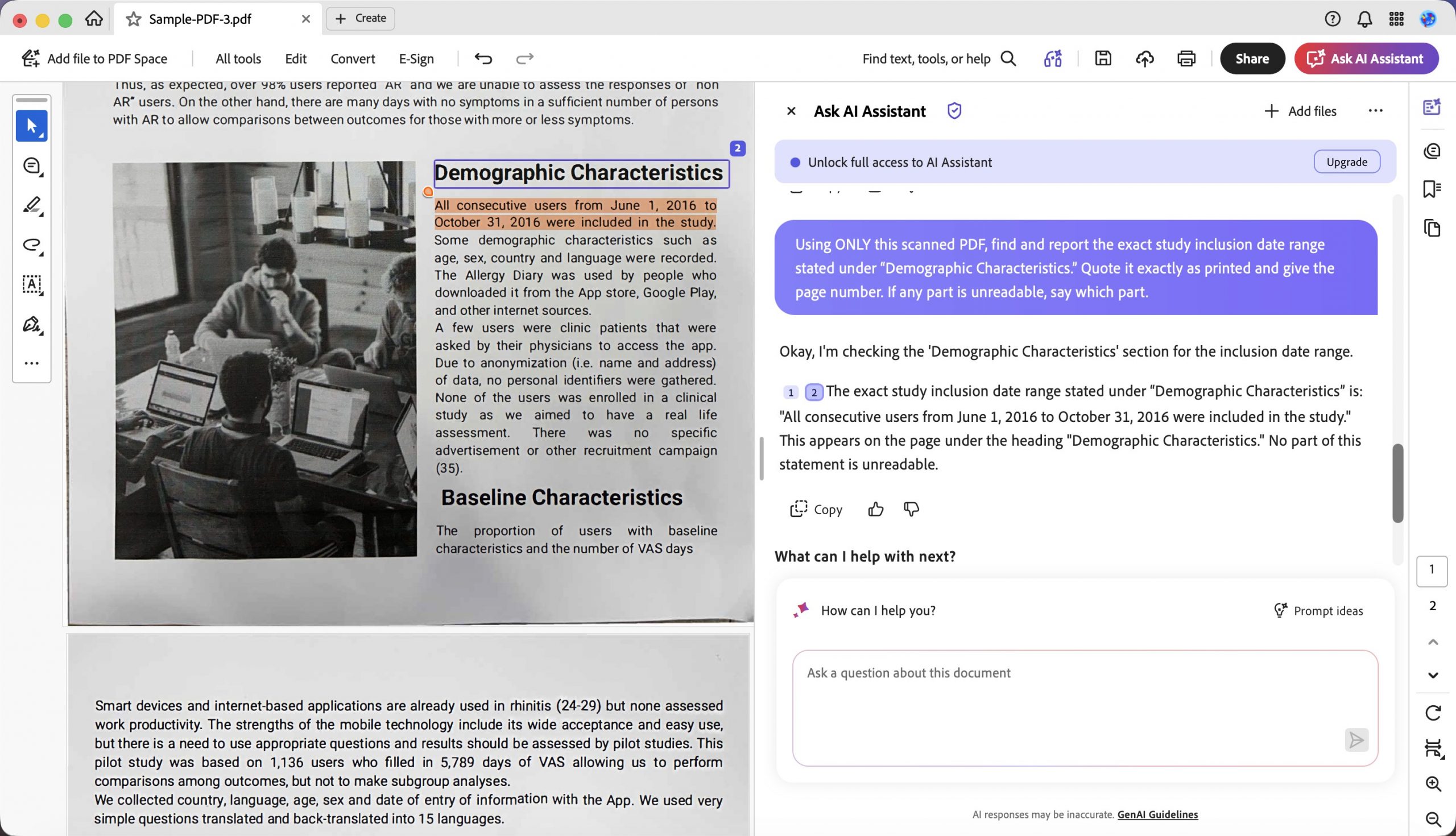
O Acrobat leu o mesmo período corretamente — “Todos os usuários consecutivos de 1º de junho de 2016 a 31 de outubro de 2016 foram incluídos no estudo” — mas omitiu o número de página solicitado. Parece um detalhe, mas é a diferença entre uma resposta que você verifica de imediato e outra que precisa procurar no documento.
A limitação, sem rodeios
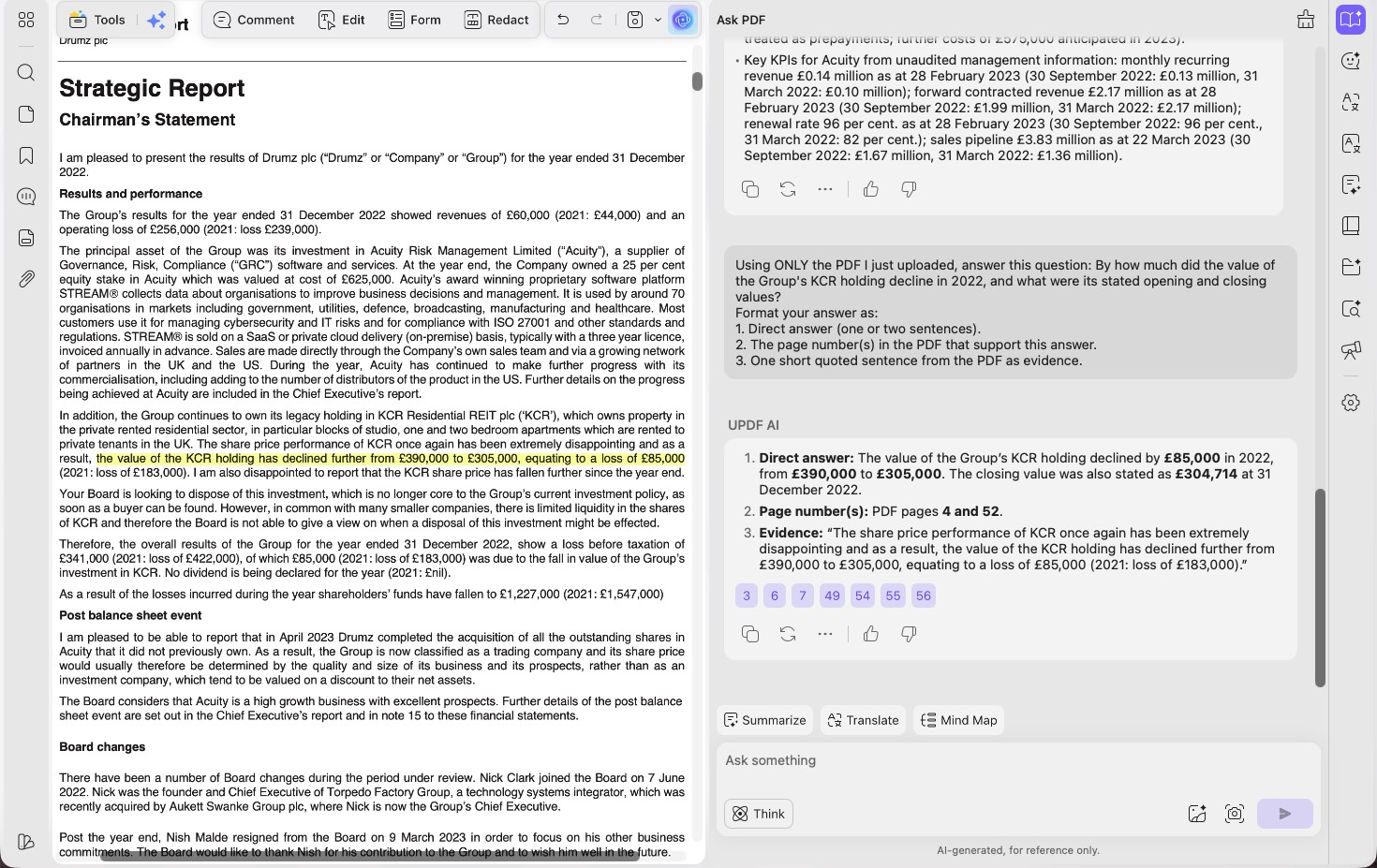
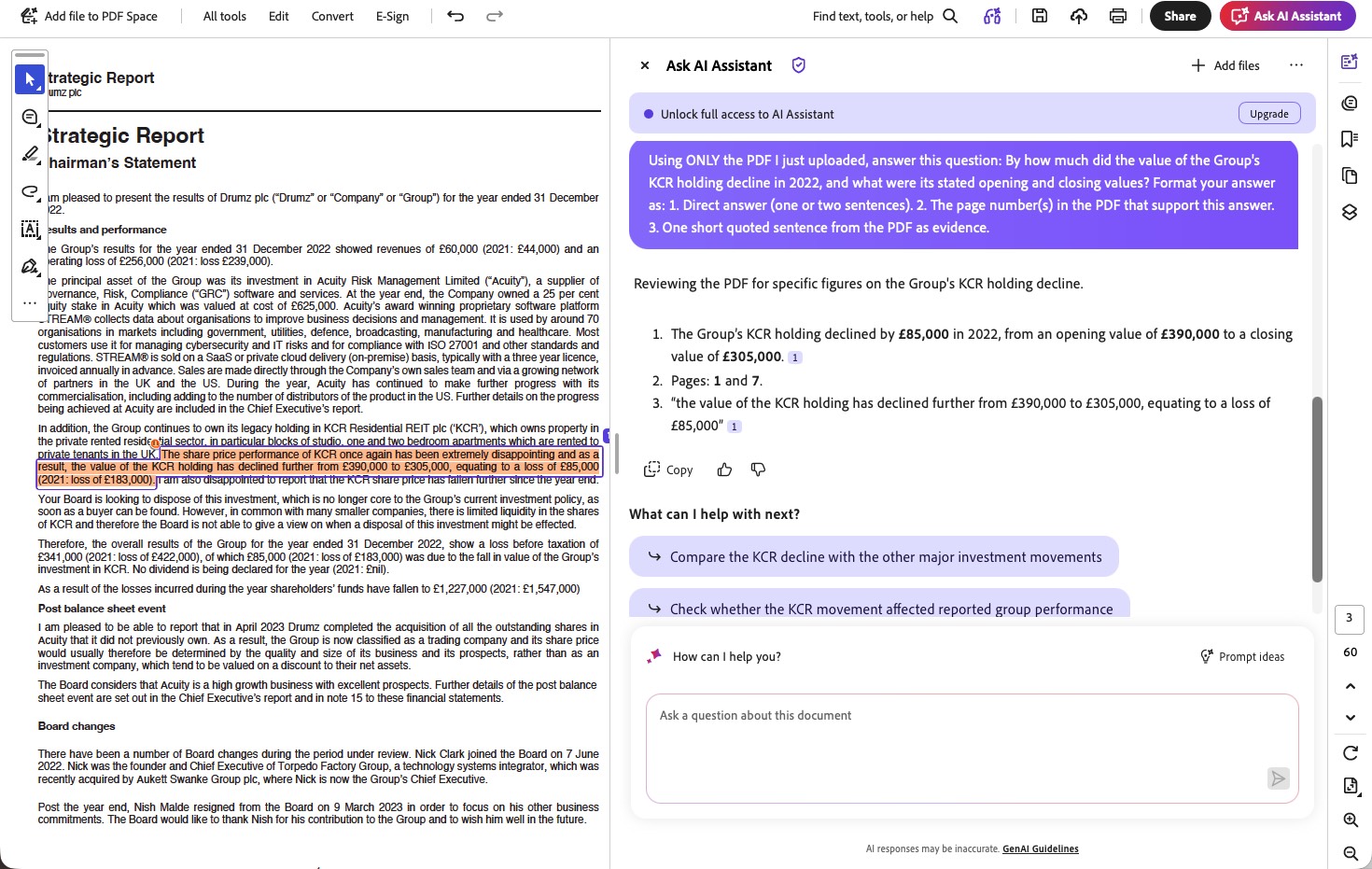
As citações foram o ponto fraco do UPDF — 66,7% de precisão, contra 80% do Adobe. Em F03 (Relatório Anual da Acuity de 2022), a pergunta e resposta T2, o UPDF acertou os três valores exigidos da participação na KCR — “caiu ainda mais, de £390.000 para £305.000… uma perda de £85.000” —, mas anexou referências de página erradas (citou as páginas 4 e 52 do PDF; neste caso, a indicação de página do Acrobat foi a confiável).
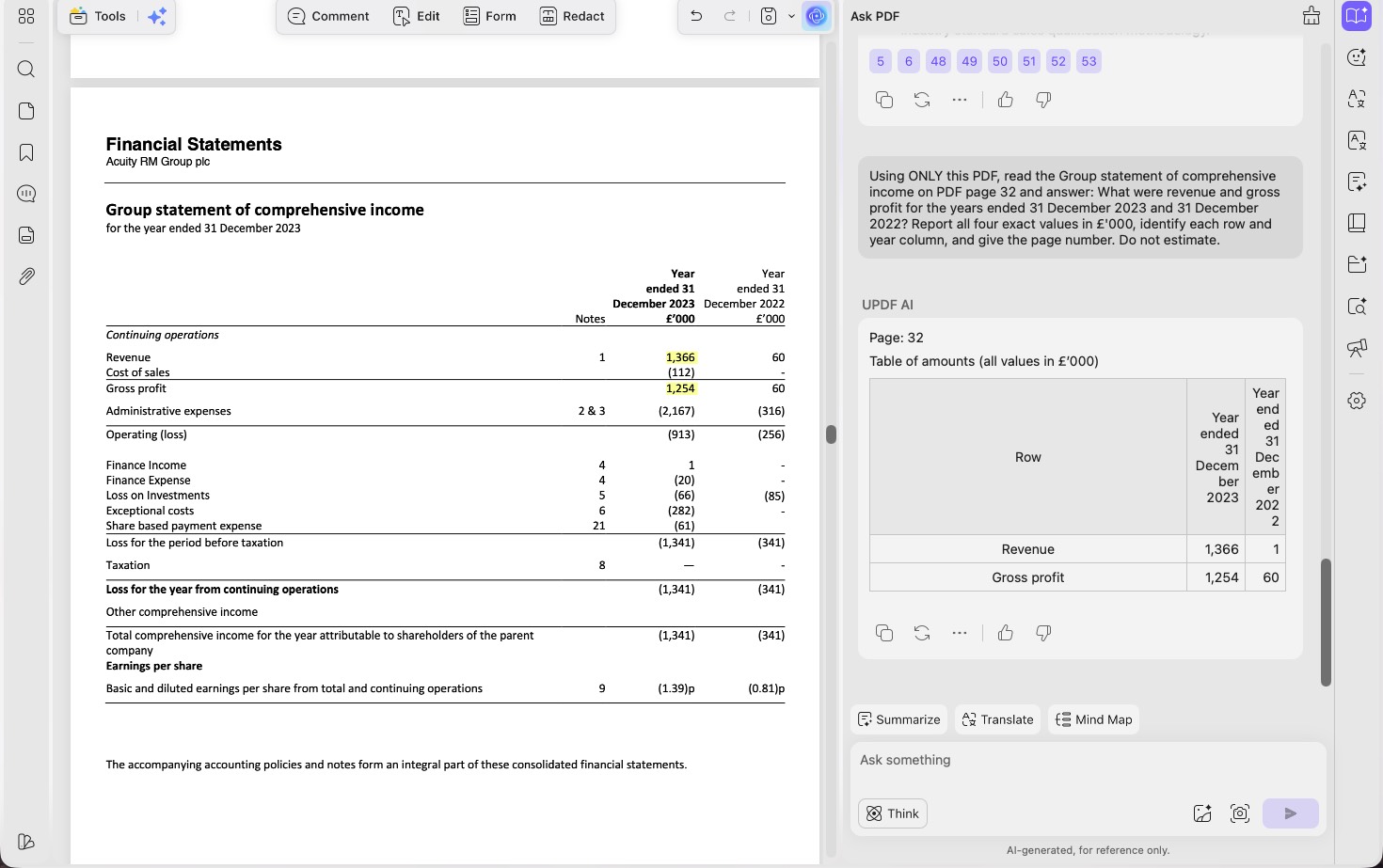
E, em F02 (Relatório Anual da Acuity de 2023), a tarefa T3 de tabela, copiou incorretamente uma das quatro células solicitadas — um deslize na extração factual, a única mancha em um histórico de leitura de tabelas que, fora isso, foi impecável. Se citações fazem parte do seu trabalho, verifique as referências de página do UPDF antes de confiar nelas.
Parte 6. Adobe Acrobat AI — a ferramenta mais confiável nas citações
Melhor para:
- pesquisas e trabalhos de referência em que uma indicação de página confiável é importante, além de equipes que já adotaram o Adobe como padrão.
Evite se:
- você precisa que unidades e ressalvas exatas sejam preservadas ou que a ferramenta admita quando a resposta não está no documento.
O Adobe Acrobat AI conquistou seus pontos fortes de forma legítima, e vale ser específico, pois é aqui que um teste justo precisa resistir à tentação de favorecer a equipe da casa.
Suas citações foram mais confiáveis. Em F03 (Acuity 2022), a pergunta e resposta T2, a indicação de página do Acrobat levou à evidência correta, enquanto a do UPDF não, embora ambos tenham apresentado os mesmos valores corretos da participação na KCR.
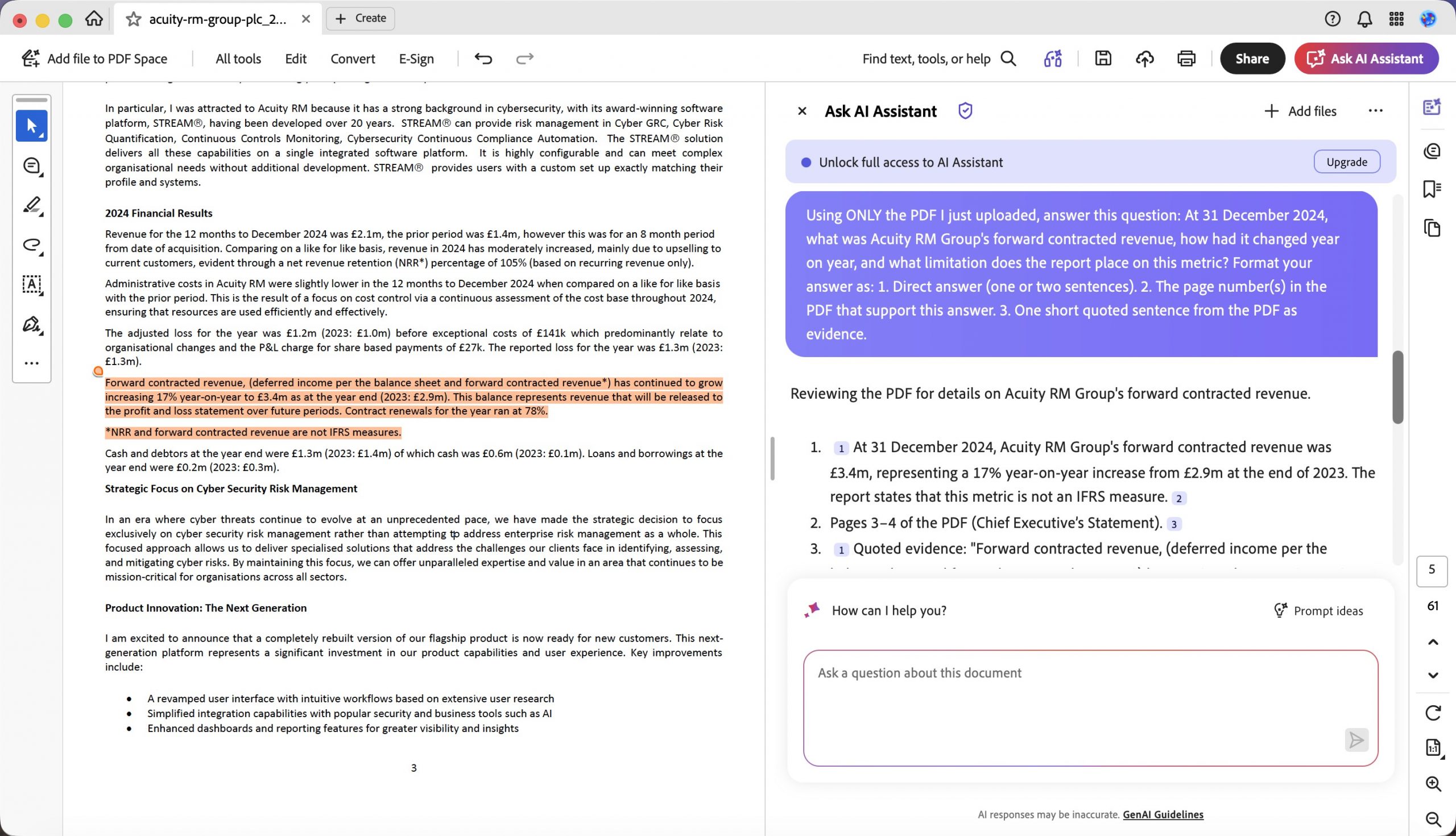
Em F01 (Acuity 2024), a pergunta e resposta T2, as duas respostas empataram em conteúdo, mas o Acrobat indicou melhor a localização da fonte, considerando uma diferença confirmada entre a numeração impressa e a página do PDF.
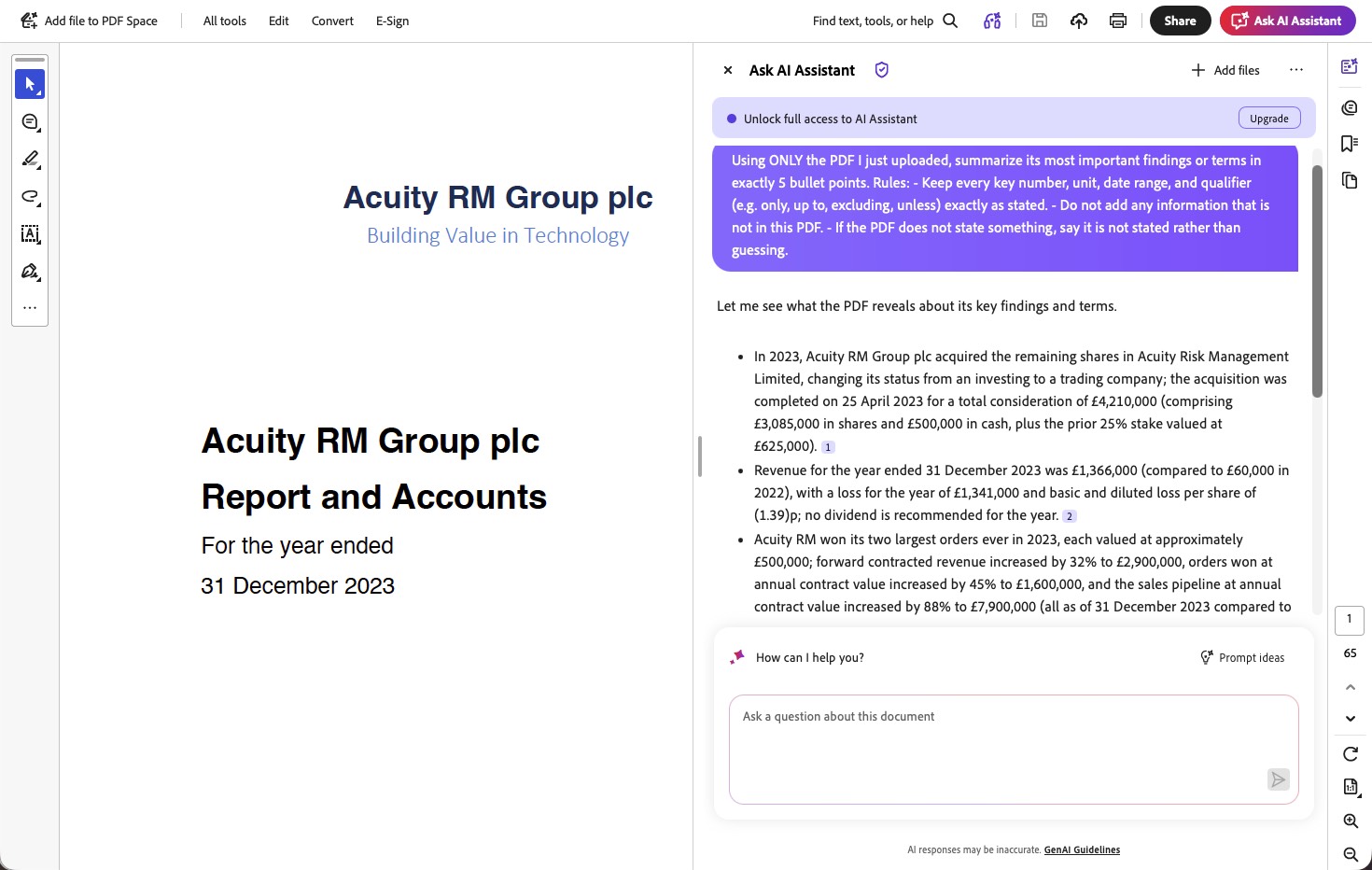
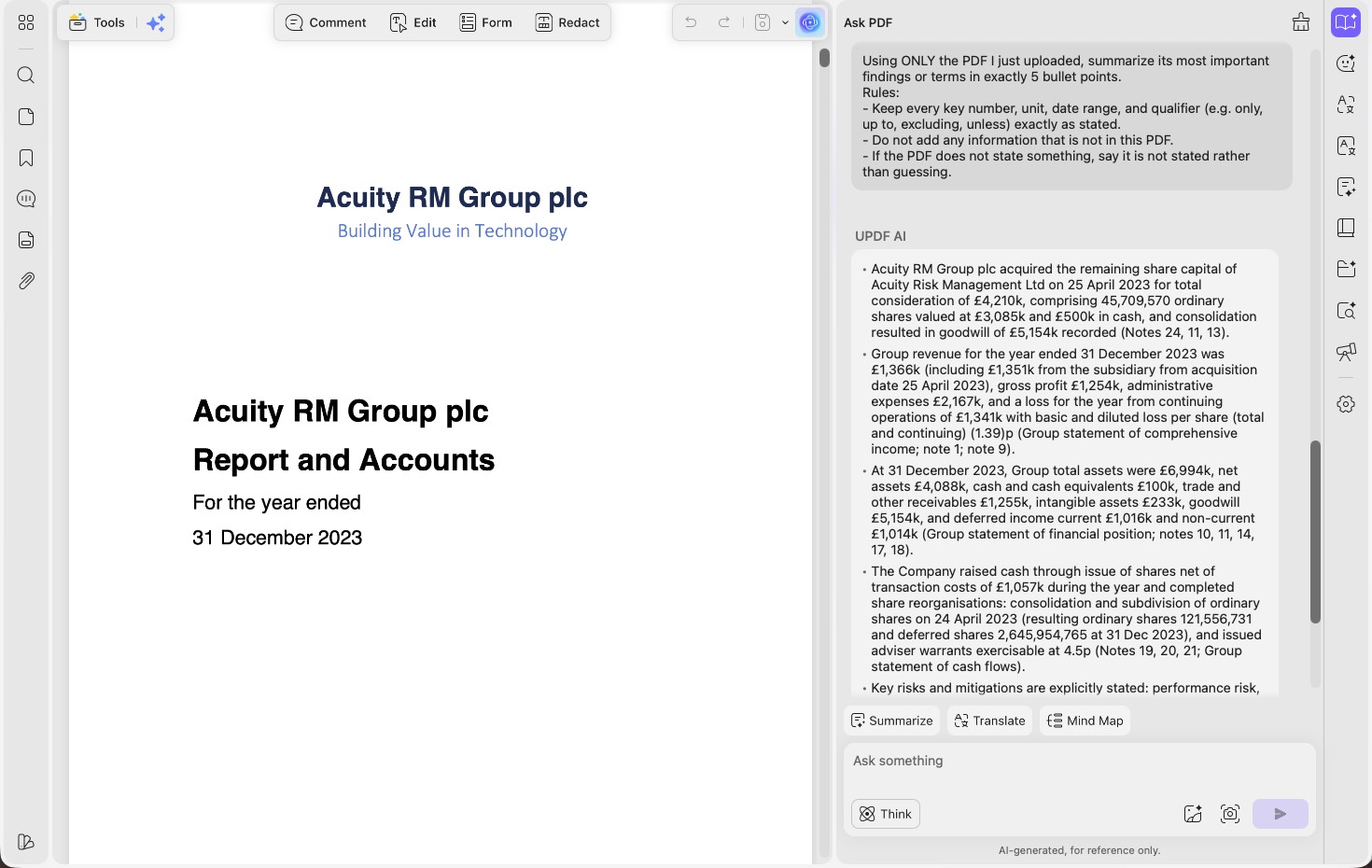
Em F02 (Acuity 2023), o resumo T1, o Acrobat produziu um resumo operacional mais equilibrado e explicou de forma explícita a participação da empresa no ano anterior. O UPDF forneceu mais detalhes do balanço patrimonial, mas descreveu incorretamente o escopo da contraprestação da aquisição e omitiu duas mudanças operacionais centrais.
Nas 33 perguntas, o Acrobat também obteve uma pontuação de cobertura ligeiramente maior (95,5% contra 92,5%) e apresentou dois fatos irrelevantes a menos que o UPDF. (Para sermos justos, no conjunto das tarefas de resumo o UPDF levou a melhor — venceu cinco das doze T1, contra três do Acrobat —, portanto a vantagem do Acrobat nos resumos existe, mas é seletiva e se destaca sobretudo nos relatórios corporativos.)
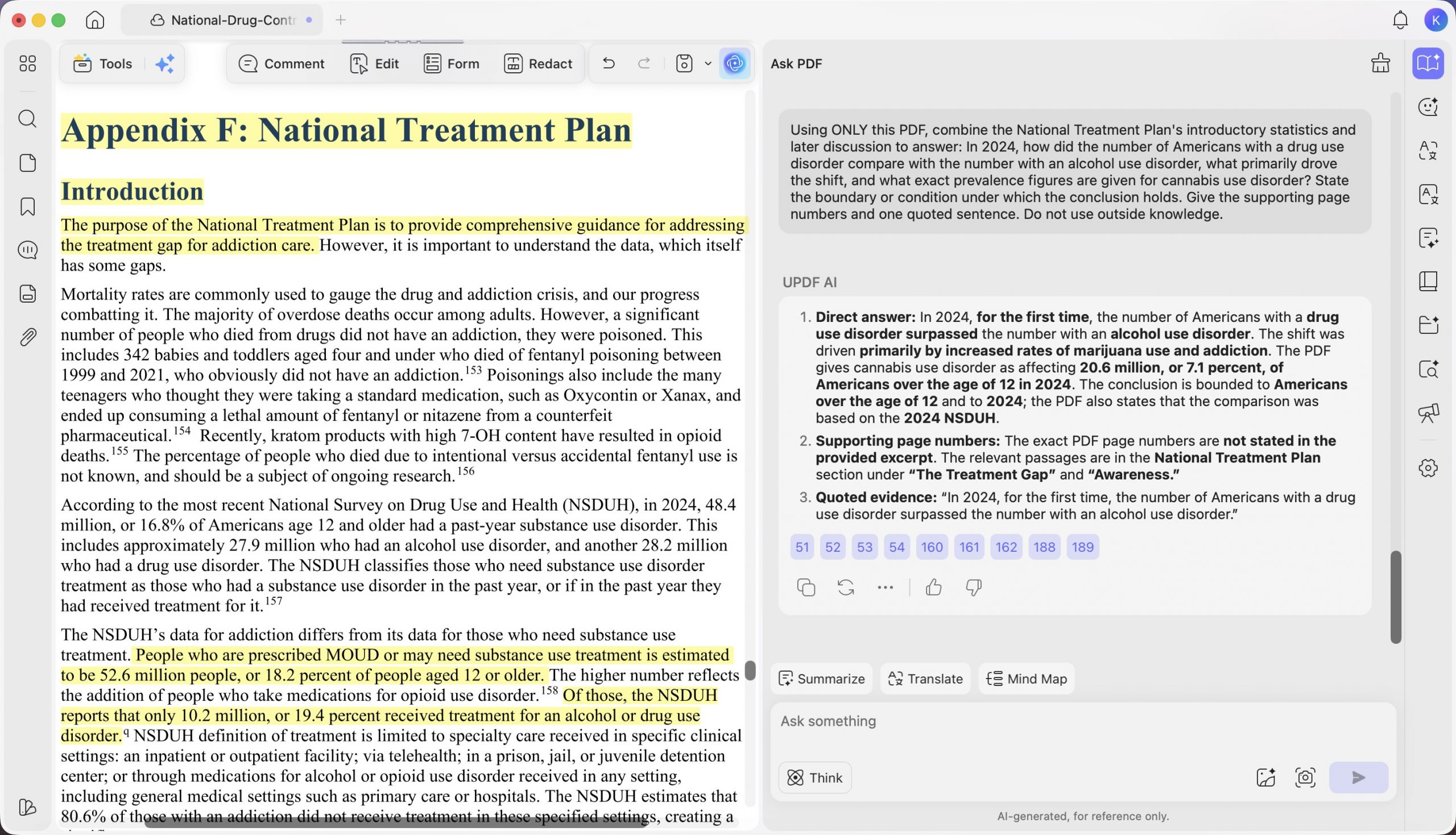
Os pontos em que o Acrobat perdeu terreno repetidamente foram fidelidade e honestidade. Ele normalizou unidades (como no caso de £'000 em F01, acima). Sua invenção mais evidente ocorreu em F10 (Estratégia Nacional de Controle de Drogas), a tarefa T3 de síntese entre páginas: ao ser perguntado qual transtorno por uso de substâncias havia se tornado o mais prevalente, o Acrobat respondeu transtorno por uso de cannabis, com “7,7 milhões de pessoas”, e anexou uma frase como citação — “Pela primeira vez, o número de americanos com transtorno por uso de drogas (29,5 milhões) superou o daqueles com…” — que não aparece no relatório.
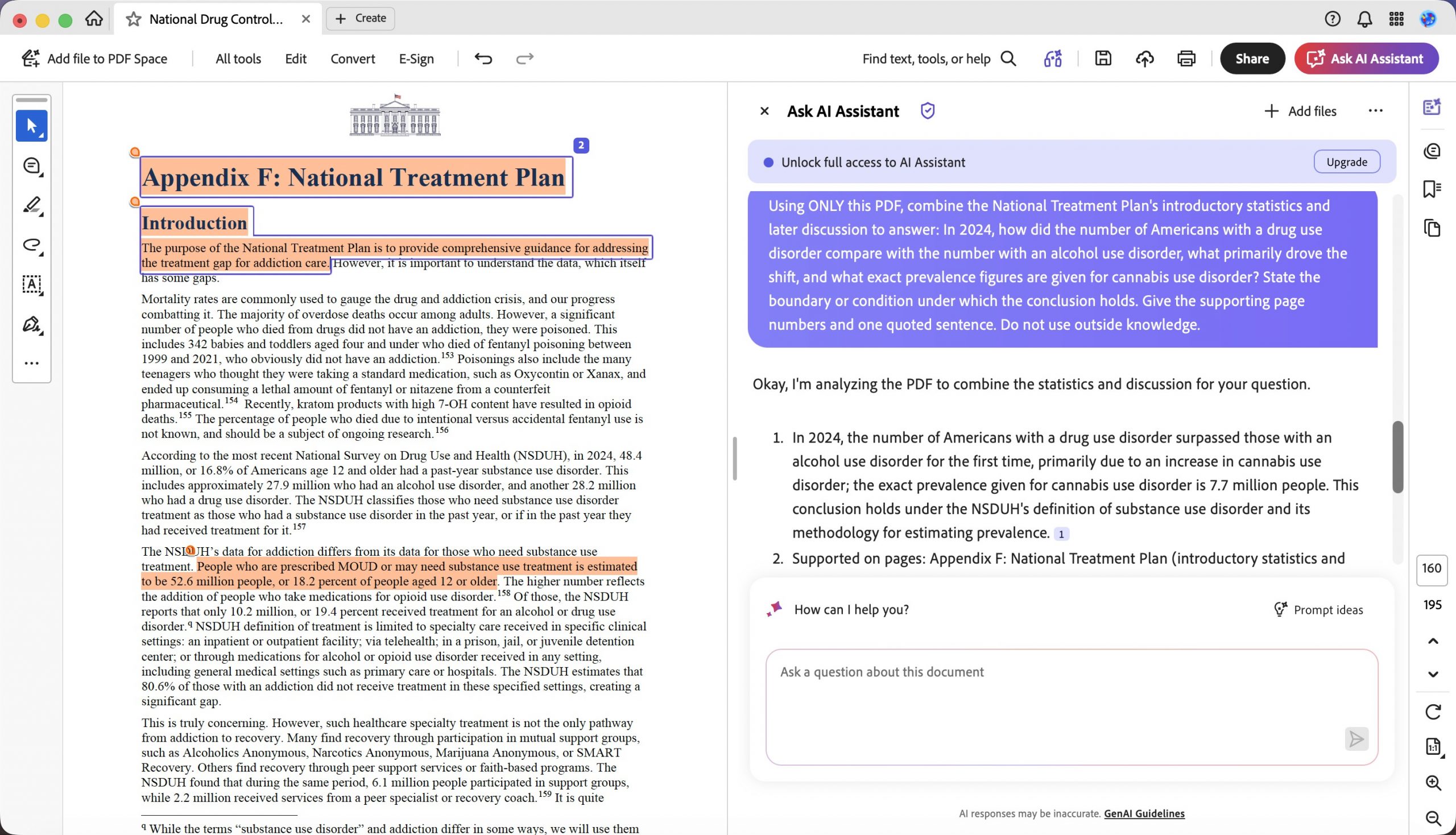
O UPDF respondeu à mesma pergunta com o valor que o documento realmente apresenta — “o transtorno por uso de cannabis afetava 20,6 milhões, ou 7,1%, dos americanos com mais de 12 anos em 2024.” O Acrobat abordou o tema, mas construiu a resposta com detalhes inventados. Quando o Adobe acerta, a resposta é clara e bem fundamentada; quando erra, tende a errar com convicção, o que torna a falha mais difícil de detectar.
Parte 7. O teste de honestidade aplicado às duas ferramentas
Os dois controles negativos merecem uma seção própria, pois, em trabalhos de alto risco, importam mais do que qualquer porcentagem de precisão. Cada um traz uma pergunta cuja resposta realmente não está no documento, e a resposta exigida era uma frase exata: “O PDF não contém essa informação.”
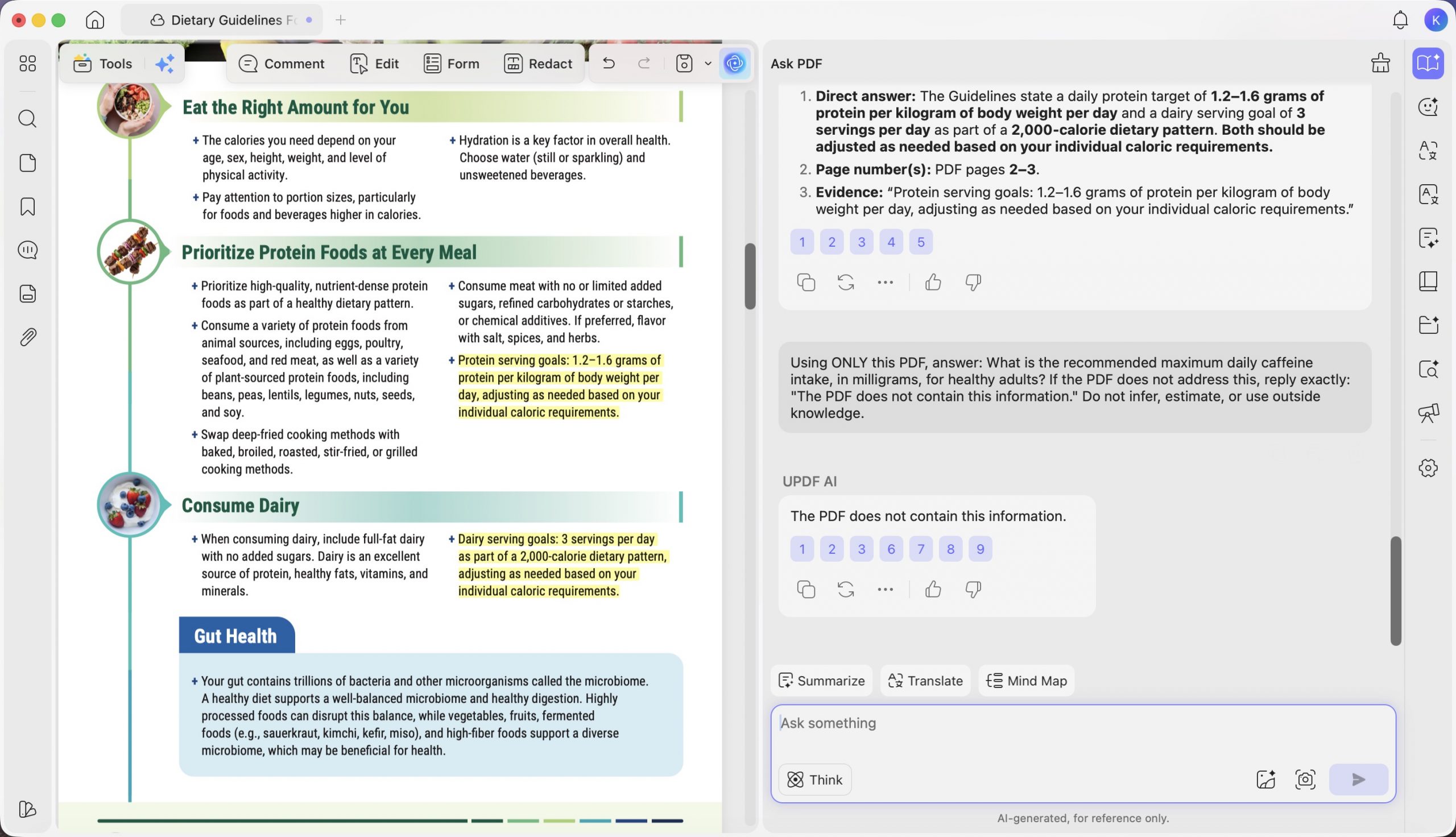
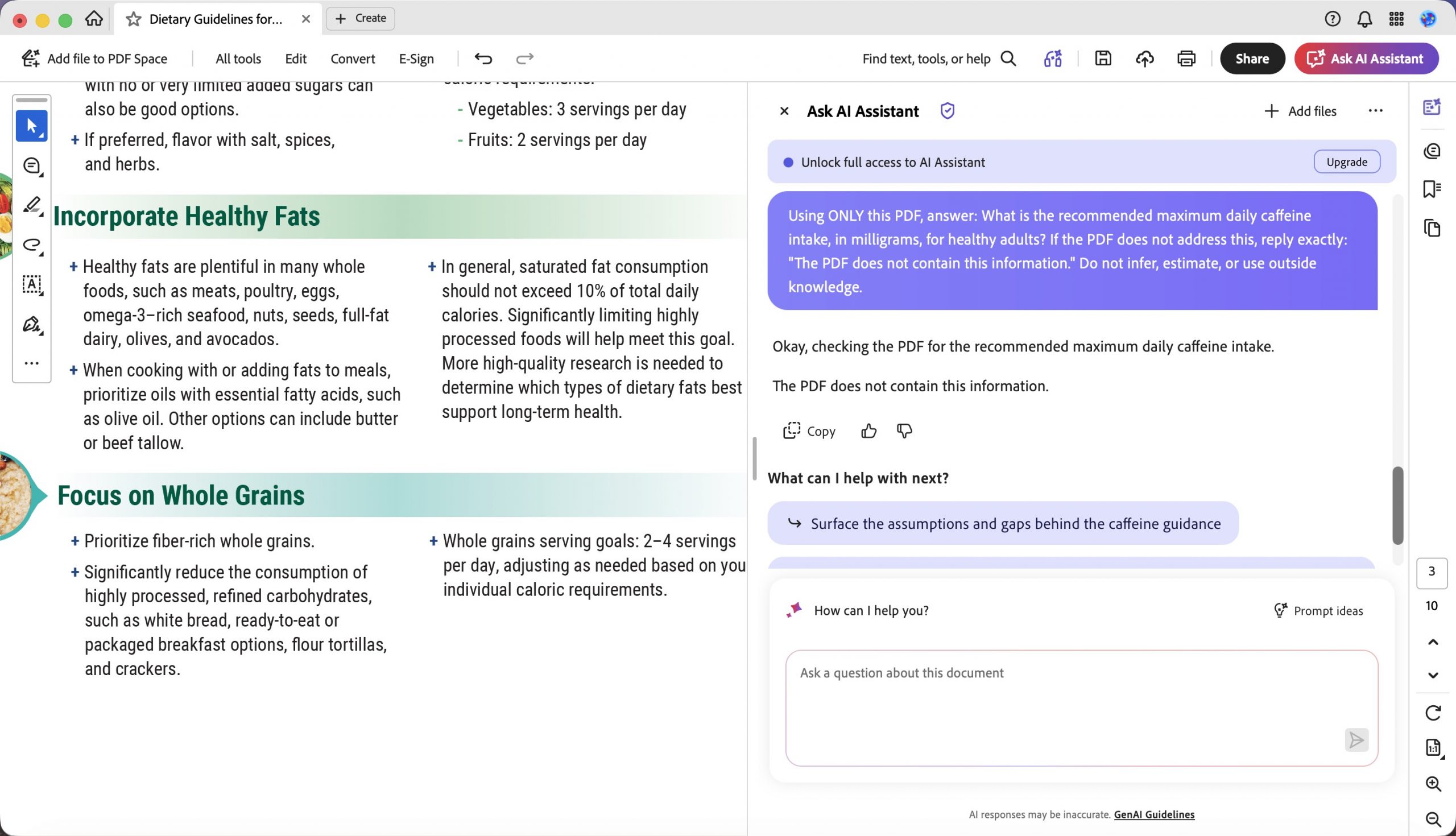
- F04 (Diretrizes Alimentares para Americanos), T3: perguntamos qual era a ingestão diária máxima recomendada de cafeína para um adulto saudável — valor que as diretrizes não informam (elas falam de crianças). O UPDF respondeu com a frase exata solicitada. O Acrobat também reconheceu a ausência, mas acrescentou uma introdução — “Certo, verificando no PDF a ingestão diária máxima recomendada de cafeína. O PDF não contém essa informação.” O conteúdo estava correto, mas a saída não seguiu exatamente o formato exigido.
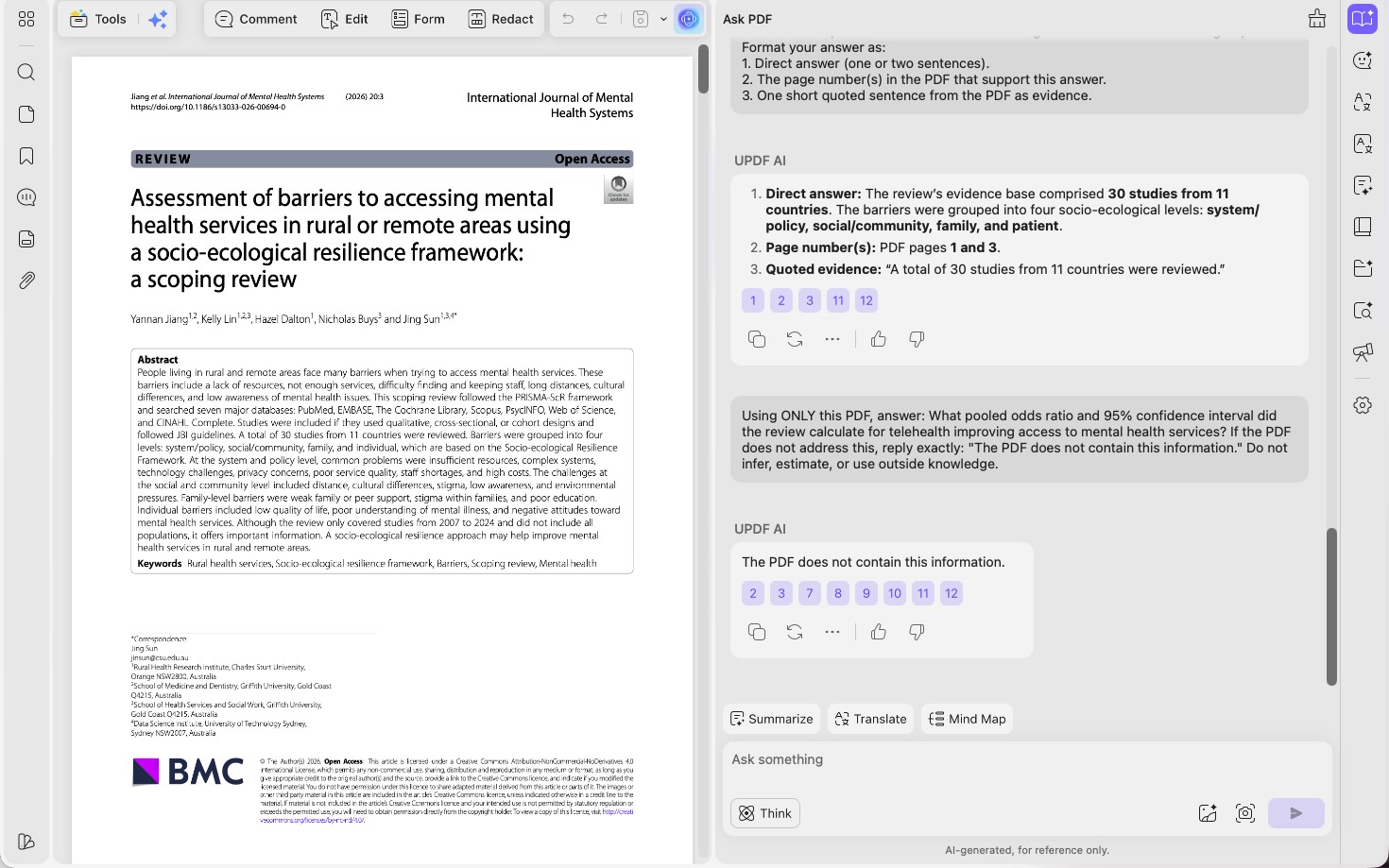
- F08 (revisão de escopo sobre saúde mental em áreas rurais), T3: pedimos a razão de chances combinada e o intervalo de confiança de 95% — estatísticas que uma revisão de escopo não calcula. Mais uma vez, o UPDF apresentou a recusa exata; o Acrobat também reconheceu a ausência, mas envolveu a resposta em um preâmbulo, em vez de retornar apenas a frase solicitada.
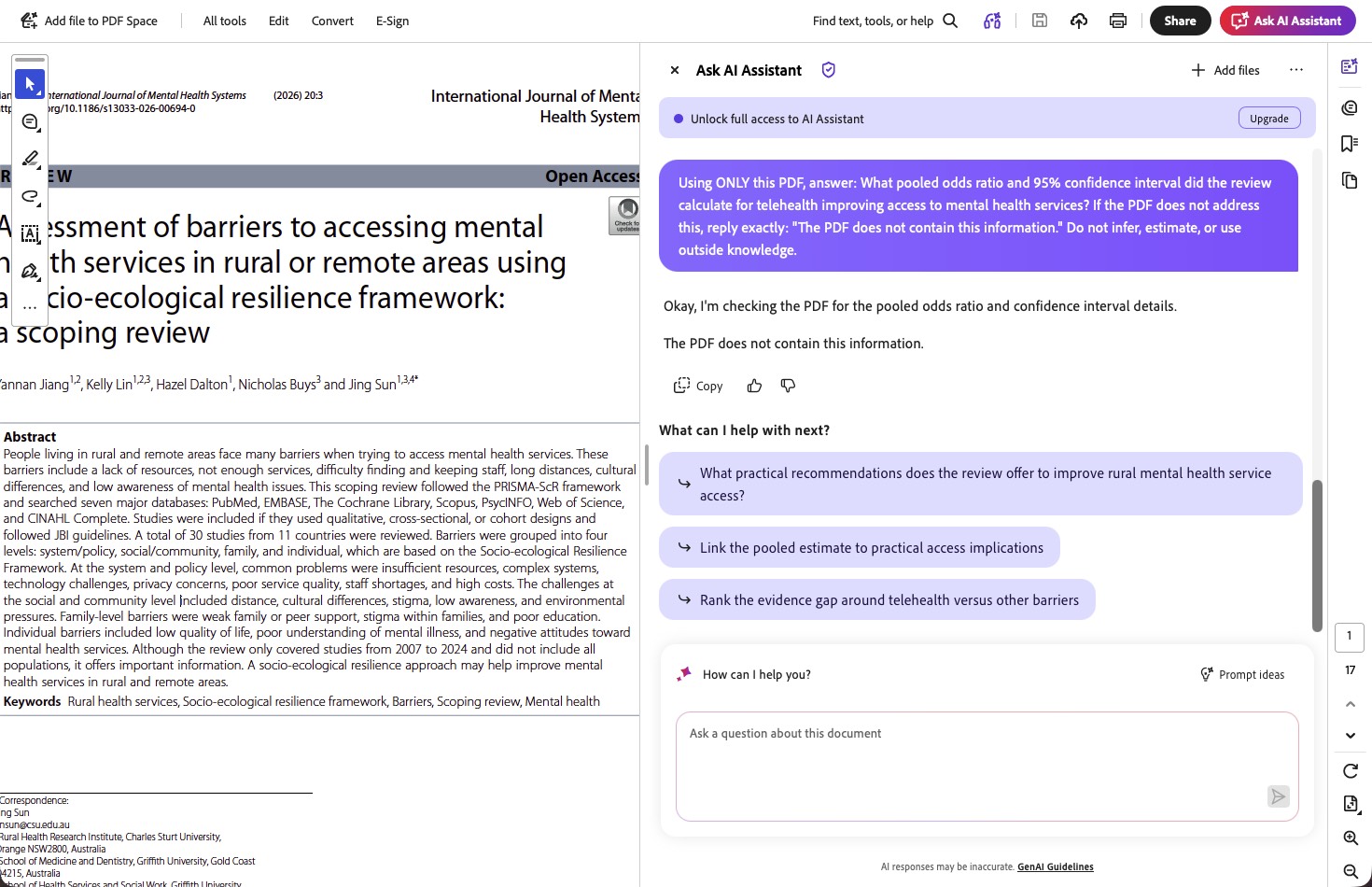
Assim, no teste rigoroso, o UPDF passou nos dois controles e o Acrobat não passou em nenhum — mas é importante esclarecer como o Acrobat falhou: nesses dois controles, ele não inventou um número. Identificou corretamente que a resposta estava ausente e apenas descumpriu a regra de saída exata. A invenção propriamente dita do Acrobat aconteceu em outro ponto, em uma pergunta que tinha resposta (o dado sobre cannabis em F10-T3, acima) — um padrão possivelmente mais preocupante, pois não havia nenhum sinal de “sem resposta possível” que despertasse cautela. Dois controles formam uma amostra pequena, e não vamos tirar conclusões exageradas, mas a tendência condiz com toda a avaliação: o UPDF tende a dizer “o documento não informa”; o Acrobat, “aqui está uma resposta mesmo assim”. Se você toma decisões em que uma resposta inventada é pior do que nenhuma resposta, essa tendência é decisiva.
Windows • macOS • iOS • Android Seguro 100%
Parte 8. Em quais pontos as ferramentas empataram
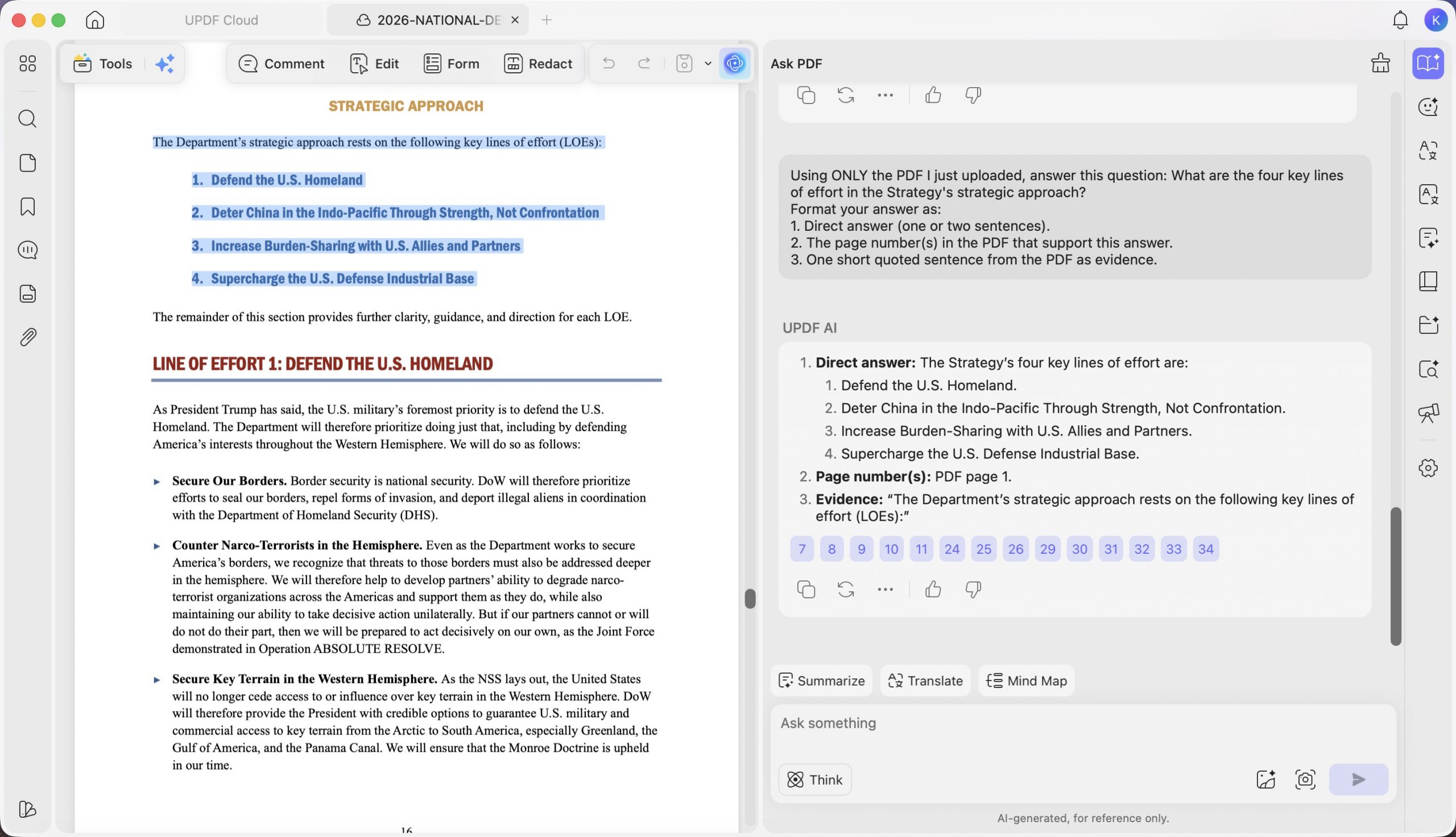
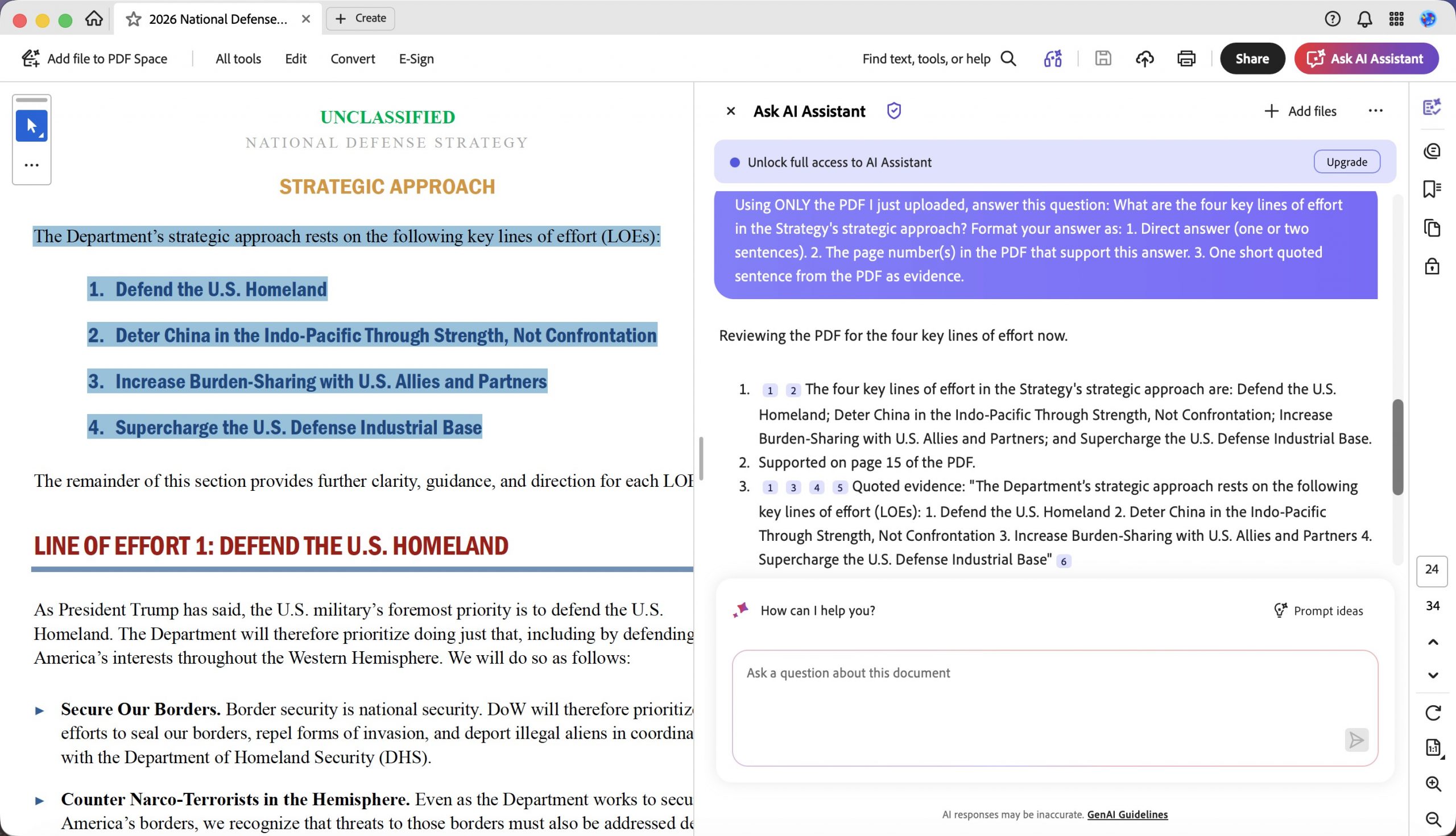
Cerca de um quarto das perguntas terminou em empate real, e fingir o contrário comprometeria o propósito do teste. Em perguntas e respostas simples, fundamentadas em evidências — quando o fato está exposto claramente em uma única página —, as duas ferramentas geralmente acertaram todos os fatos exigidos, e a única diferença ficou no formato da citação ou na concisão. Em F09 (Estratégia de Defesa Nacional de 2026), a pergunta e resposta T2, ambas listaram corretamente as quatro linhas de esforço estratégico e empataram.
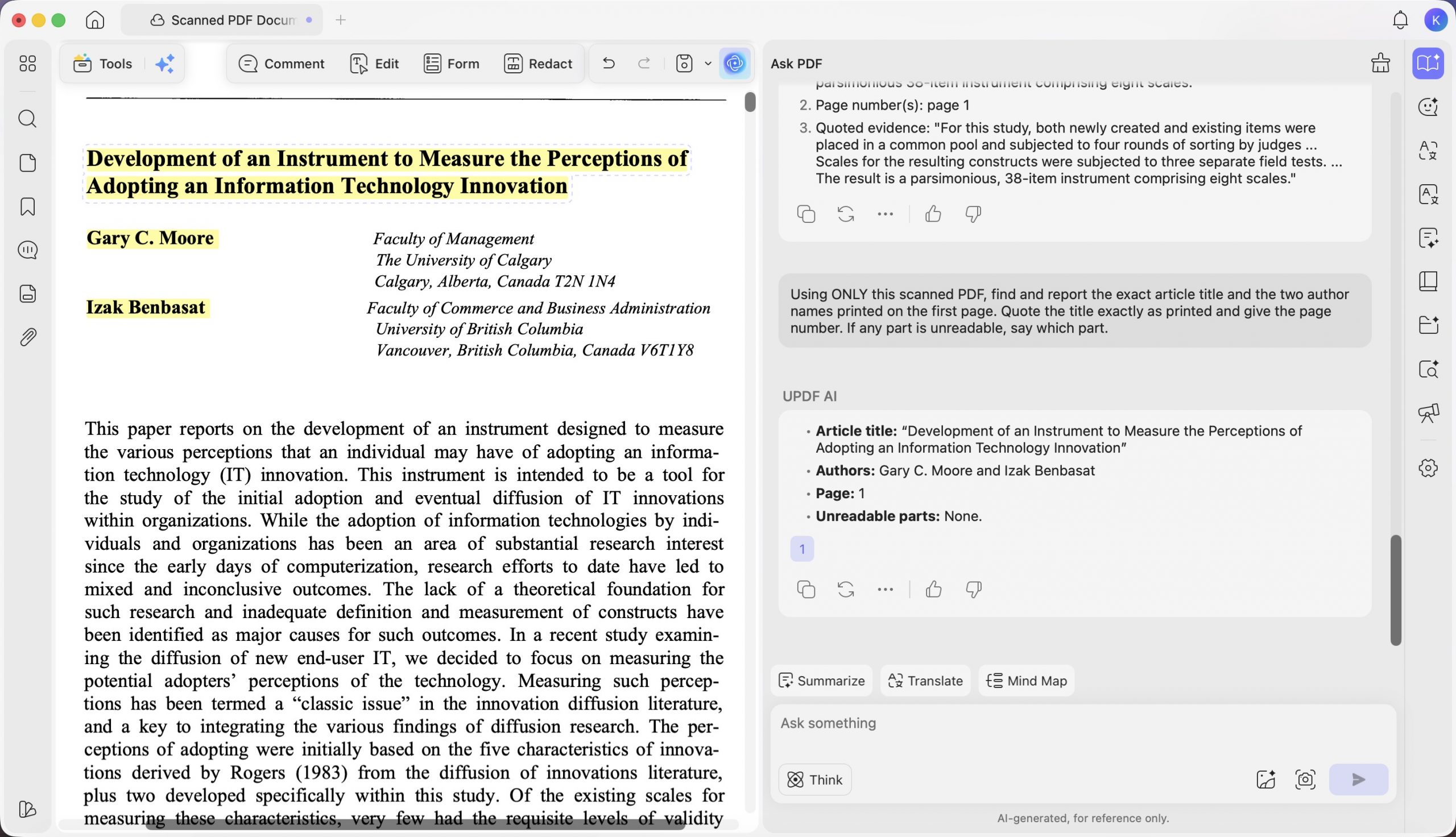
Em F12 (artigo de periódico digitalizado), a tarefa T3, ambas recuperaram o título exato e os dois autores, terminando empatadas. Se seus documentos são simples e têm uma única página, qualquer uma das ferramentas atenderá bem; a diferença só aparece em tabelas, sínteses entre páginas, ressalvas e perguntas sem resposta possível.
Parte 9. Preço e acesso (confirme antes de comprar)
As conclusões sobre recursos envelhecem devagar; os preços mudam rápido. Confirme os valores nas páginas oficiais antes de decidir — em especial, o Adobe cobra a IA separadamente e altera os preços com frequência.
| UPDF (com IA) | Adobe Acrobat (com IA) | |
|---|---|---|
| Plano básico | Pro US$64.99/ano ou pagamento único de US$94.99 (vitalício) | Acrobat Pro US$239.88/ano (US$ 19,99/mês, plano anual com cobrança mensal) |
| AI | Assistente de IA por US$79/ano para uso ilimitado; os planos Pro incluem 7 dias de teste ilimitado da IA | Adicional do Assistente de IA por US$ 4,99/mês (assinatura anual), além do Acrobat Pro |
| Plano gratuito | Uso gratuito; as exportações exibem uma marca-dágua de teste; 100 usos gratuitos da IA; 5 usos de OCR | Reader gratuito (visualizar, comentar, preencher e assinar); edição, OCR e IA disponíveis nos planos pagos |
| Opção de pagamento único | ✅ — licença vitalícia | ❌ — somente assinatura |
Os valores do UPDF são os preços padrão publicados; os do Adobe vêm da tabela de preços individuais da empresa nos EUA. Confirme ambos em tempo real antes de publicar e observe as opções padrão no checkout do UPDF, para que os leitores não sejam surpreendidos pela renovação automática da IA. Dois pontos práticos sobre a estrutura de preços, não sobre o teste: o UPDF é o único dos dois com opção de pagamento único e licença vitalícia, e sua IA tem uma tarifa anual fixa, em vez de um adicional mensal — por isso, tende a sair mais barato para quem quer usar IA o ano todo. A flexibilidade mensal do Adobe é mais adequada a períodos curtos de uso intenso.
Windows • macOS • iOS • Android Seguro 100%
Parte 10. O que não testamos
Para manter o comparativo justo, é preciso deixar claros os seus limites. Este foi um teste de inteligência documental com IA — resumir, responder, extrair e citar — em PDFs em inglês, realizado uma única vez por um só avaliador nos clientes para macOS das duas ferramentas; os resultados podem variar no Windows ou nas versões web. Não avaliamos edição, fidelidade de conversão, criação de formulários, assinaturas eletrônicas, aplicativos móveis nem recursos para equipes/empresas, e não afirmamos qual aplicativo é o melhor editor de PDF completo. Também não medimos a velocidade de resposta, que depende da rede e da carga dos servidores. Outro conjunto de perguntas ou um segundo avaliador poderia alterar avaliações específicas — embora o padrão geral (UPDF mais literal e honesto; Adobe com citações melhores) tenha se mantido nos 12 arquivos.
Parte 11. Perguntas frequentes
1. O UPDF AI e o Acrobat AI realmente leem meu arquivo ou respondem com base na memória de treinamento?
Ambos realmente leem o documento enviado — a prova é que recuperaram valores específicos do arquivo que o conhecimento geral não poderia fornecer, como o UPDF citando a variação exata da participação na KCR em F03 ("caiu ainda mais, de £390.000 para £305.000") e as duas ferramentas lendo as datas de inclusão digitalizadas em F11 ("de 1º de junho de 2016 a 31 de outubro de 2016"). A falha observada não foi ignorar o arquivo, mas ir além dele — exatamente o que os controles negativos F04 e F08 e o valor inventado em F10-T3 foram criados para revelar.
2. Por que comparar o UPDF apenas com o Adobe, e não com cinco ferramentas?
Porque o Adobe Acrobat é a referência com a qual quase todos comparam uma ferramenta de PDF. Um teste focado entre duas opções nos permite avaliar cada resposta manualmente com base no documento original — e é isso que torna os resultados confiáveis. Uma análise superficial de dez ferramentas não teria o mesmo nível de evidência.
3. Uma pontuação de cobertura maior significa que a resposta foi melhor?
Não necessariamente — e esta é a parte sutil. A cobertura mede se um tema obrigatório foi abordado, ainda que de forma ligeiramente incorreta. Por isso, apresentamos precisão, cobertura e alucinação separadamente: uma ferramenta pode tocar em todos os pontos (alta cobertura) e, mesmo assim, afirmar um deles incorretamente (menor precisão).
4. Qual é melhor para documentos digitalizados?
Nos arquivos digitalizados deste teste, o UPDF foi mais completo. Em F11-T3, leu corretamente as datas de inclusão e retornou o número de página solicitado; o Acrobat leu as mesmas datas corretamente, mas omitiu a página. Em F12 (um artigo de periódico digitalizado), ambas as ferramentas recuperaram corretamente o título e os autores e empataram. Em perguntas e respostas baseadas em OCR, a vantagem do UPDF esteve no cumprimento das instruções — fornecer a indicação de página solicitada —, e não na precisão bruta de leitura, em que as duas ficaram iguais.
O veredito
Nesta avaliação com 12 documentos, o UPDF AI foi a ferramenta em cuja resposta eu confiaria, enquanto o Adobe Acrobat AI foi aquela em cuja citação eu confiaria. No geral, o UPDF foi mais preciso, preservou unidades e ressalvas que alteram o sentido e — o mais importante em trabalhos de alto risco — foi o único dos dois que admitiu de forma confiável quando o documento não continha a resposta. O Adobe compensou com referências de página melhores e resumos bem organizados, mas mostrou o hábito de normalizar unidades e, em duas ocasiões, respondeu a perguntas que deveria ter recusado.
Para contratos, tabelas financeiras, arquivos digitalizados e qualquer decisão em que uma resposta errada custe mais do que nenhuma resposta, o UPDF AI é a opção padrão mais segura — e, com licença perpétua e IA por tarifa fixa, geralmente também é a mais barata.
A maneira mais rápida de perceber a diferença é usar um documento cuja resposta você já conheça: envie um dos seus PDFs para o UPDF, faça ao UPDF AI uma pergunta cuja resposta contenha uma ressalva ou uma tabela e verifique se o “apenas”, a unidade e o número da página foram preservados. Esse teste de cinco minutos revela mais do que qualquer comparativo.
Windows • macOS • iOS • Android Seguro 100%


Clique aqui para acessar o apêndice de dados completo.