UPDF
UPDF
 UPDF pour Windows
 UPDF pour Mac
 UPDF pour iPhone/iPad
 updf android
 Nomostar
 UPDF AI en ligne
 UPDF Sign
 IvyCraft
 Modifier le PDF
 Annoter le PDF
 Créer un PDF
 Formulaire PDF
 Modifier les liens
 Convertir le PDF
 OCR
OCR PDF en Word
 PDF en Image
 PDF en Excel
 Organiser les pages PDF
 Fusionner les PDF
 Diviser le PDF
 Rogner le PDF
 Pivoter le PDF
 Protéger le PDF
 Signer le PDF
 Rédiger le PDF
 Biffer le PDF
 Supprimer la sécurité
 Lire le PDF
 UPDF Cloud
 Compresser le PDF
 Imprimer le PDF
 Traiter par lots
 À propos de UPDF AI
 Solutions de UPDF AI
 Mode d'emploi d'IA
 FAQ sur UPDF AI
 Résumer le PDF
 Traduire le PDF
 Analyser le PDF
 Discuter avec IA
 Analyser l'image
 PDF vers carte mentale
 Expliquer le PDF
 Outils IA PDF
 Outils IA Image
 Outils de Chat IA
 Outils de Rédaction IA
 Outils d’Étude IA
 Outils Professionnels IA
 Autres Outils IA
 Génération de signets IA
 Résumé de signets IA
 Génération de filigranes IA
 Génération d’arrière-plans IA
 Génération d’autocollants IA
 Génération de tampons IA
 Suite de rédaction IA
 UPDF Copilot
 Gestion des pages IA
 Recherche sémantique IA
 PDF en Word
 PDF en Excel
 PDF en PowerPoint
 UPDF pour les entreprises
 UPDF Sign pour les entreprises
 UPDF AI pour les entreprises
 Plans pour les entreprises
 Mode d'emploi pour les entreprises
 Webinar d'Entreprise
 Informatique
 Éducatives
 Construction
 Services Financiers
 Santé
Santé Assurance
 Juridique
 Fabrication
 Gouvernement
 Chercheurs et doctorants
 Solopreneurs
 Avocats et cabinets
 Professionnels de l’immobilier
 Solution pour l'éducation
 Témoignages de clients
 Mode d'emploi
 Astuces UPDF
 FAQ
FAQ Avis sur UPDF
 Centre de téléchargement
 Blog
Blog Actualités
 Spécifications techniques
 Mises à jour
 UPDF vs. Adobe Acrobat
 UPDF vs. Foxit
 UPDF vs. PDF Expert

 UPDF AI
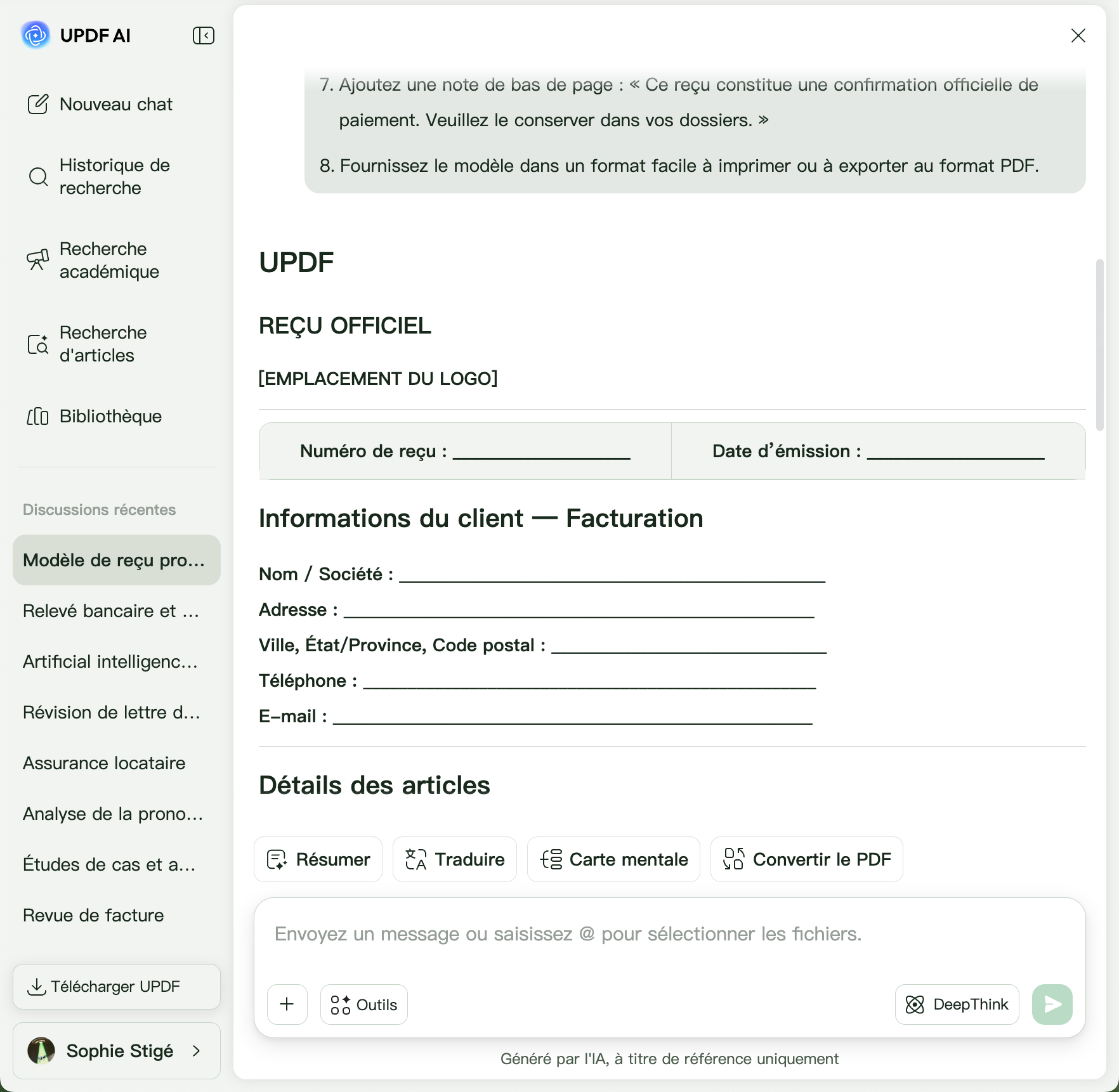
Générez des reçus professionnels avec UPDF AI
Transformez un simple prompt en reçu clair et professionnel. Personnalisez les articles, taxes, remises, modes de paiement et éléments de marque en quelques secondes.
Propulsé par
 GPT-5 |
 DeepSeek R1
5000+ avis
 4.8
4.8
UPDF AI disponible sur


 Application bureau et mobile

4M+ utilisateurs, 18M+ reçus générés, approuvé par les grands médias :






Comment utiliser UPDF AI Générateur de reçus ?
-
Étape 1. Créez ou importez : Décrivez le reçu que vous souhaitez créer en indiquant le nom de l’entreprise, le client, les articles, les prix, les taxes, le mode de paiement et la date. Vous pouvez aussi importer une photo, un reçu scanné ou un PDF. Grâce à l’OCR intégré, UPDF AI extrait le texte et convertit les reçus papier ou sous forme d’image en contenu numérique modifiable.
-
Étape 2. Générez avec l’IA : À partir de votre prompt ou du reçu importé, UPDF AI Générateur de reçus crée un reçu professionnel et bien formaté avec les frais détaillés, les taxes, les informations de paiement et les totaux. Vous pouvez aussi mettre à jour les informations, ajuster la mise en page, reformuler les descriptions ou ajouter l’identité visuelle de l’entreprise.
-
Étape 3. Modifiez et téléchargez : Vérifiez le reçu généré, apportez les modifications nécessaires et utilisez la version finale là où vous en avez besoin.

Qui devrait utiliser UPDF AI Générateur de reçus ?
Chefs d’entreprise
Créez des reçus professionnels pour les transactions quotidiennes.
Générez en quelques secondes des reçus personnalisés pour les ventes, services et paiements clients. UPDF AI Générateur de reçus aide les entreprises à produire des reçus précis et professionnels tout en réduisant la paperasse manuelle.

Commerçants et petites entreprises
Créez des reçus pour les ventes en magasin et en ligne.
Générez des reçus détaillés avec produits, remises, taxes et totaux. UPDF AI Générateur de reçus vous aide à fournir des reçus professionnels pour chaque achat client.

Freelances et prestataires
Émettez facilement des reçus pour les paiements clients.
Créez rapidement des reçus clairs et détaillés pour des projets, du conseil ou des services freelance. Personnalisez les informations de paiement, les taxes et les descriptions pour conserver des dossiers financiers précis.

Employés et voyageurs
Numérisez et organisez les reçus de dépenses.
Importez des reçus papier ou des photos pour extraire le texte par OCR, puis modifiez-les ou recréez-les au format numérique. Idéal pour les remboursements de frais, les dossiers de voyage et la comptabilité.

Générateur de reçus UPDF AI vs autres outils IA
UPDF AI
Autres outils IA
Méthode de création
Prompt IA + import OCR
Génération assistée par IA
Personnalisation
Modification et affinage flexibles
Personnalisation basique
Sécurité des données
 , certifié ISO 27001
Protection limitée
Gestion des fichiers
Créer, modifier et gérer des PDF
Génération de reçus uniquement
Modèle IA
ChatGPT-5 & DeepSeek R1
ChatGPT-4o/4.1
Sortie multilingue
, 25+ langues avec une fluidité native
, limité
FAQ sur l’utilisation d'UPDF AI Générateur de reçus
Q1. Puis-je utiliser gratuitement UPDF AI Générateur de reçus ?
Q2. Quels types de reçus UPDF AI Générateur de reçus peut-il créer ?
Q3. Puis-je personnaliser les reçus générés par UPDF AI ?
Q4. UPDF AI peut-il extraire des informations de reçus scannés ou papier ?
Q5. Puis-je traduire un document et le relire sans perdre la mise en forme ?
Autres outils de UPDF IA populaires