UPDF
UPDF
 UPDF pour Windows
 UPDF pour Mac
 UPDF pour iPhone/iPad
 updf android
 Nomostar
 UPDF AI en ligne
 UPDF Sign
 IvyCraft
 Modifier le PDF
 Annoter le PDF
 Créer un PDF
 Formulaire PDF
 Modifier les liens
 Convertir le PDF
 OCR
OCR PDF en Word
 PDF en Image
 PDF en Excel
 Organiser les pages PDF
 Fusionner les PDF
 Diviser le PDF
 Rogner le PDF
 Pivoter le PDF
 Protéger le PDF
 Signer le PDF
 Rédiger le PDF
 Biffer le PDF
 Supprimer la sécurité
 Lire le PDF
 UPDF Cloud
 Compresser le PDF
 Imprimer le PDF
 Traiter par lots
 À propos de UPDF AI
 Solutions de UPDF AI
 Mode d'emploi d'IA
 FAQ sur UPDF AI
 Résumer le PDF
 Traduire le PDF
 Analyser le PDF
 Discuter avec IA
 Analyser l'image
 PDF vers carte mentale
 Expliquer le PDF
 Outils IA PDF
 Outils IA Image
 Outils de Chat IA
 Outils de Rédaction IA
 Outils d’Étude IA
 Outils Professionnels IA
 Autres Outils IA
 Génération de signets IA
 Résumé de signets IA
 Génération de filigranes IA
 Génération d’arrière-plans IA
 Génération d’autocollants IA
 Génération de tampons IA
 Suite de rédaction IA
 UPDF Copilot
 Gestion des pages IA
 Recherche sémantique IA
 PDF en Word
 PDF en Excel
 PDF en PowerPoint
 UPDF pour les entreprises
 UPDF Sign pour les entreprises
 UPDF AI pour les entreprises
 Plans pour les entreprises
 Mode d'emploi pour les entreprises
 Webinar d'Entreprise
 Informatique
 Éducatives
 Construction
 Services Financiers
 Santé
Santé Assurance
 Juridique
 Fabrication
 Gouvernement
 Chercheurs et doctorants
 Solopreneurs
 Avocats et cabinets
 Professionnels de l’immobilier
 Solution pour l'éducation
 Témoignages de clients
 Mode d'emploi
 Astuces UPDF
 FAQ
FAQ Avis sur UPDF
 Centre de téléchargement
 Blog
Blog Actualités
 Spécifications techniques
 Mises à jour
 UPDF vs. Adobe Acrobat
 UPDF vs. Foxit
 UPDF vs. PDF Expert

 UPDF AI
Créateur de planning d’étude IA gratuit
Utilisez votre temps d’étude au mieux avec un planning personnalisé basé sur vos dates d’examen, vos matières, vos priorités et votre disponibilité quotidienne. UPDF AI crée un plan pratique que vous pouvez ajuster à tout moment si vos objectifs ou votre emploi du temps changent.
Propulsé par
 GPT-5.6 |
  DeepSeek R1
5000+ avis
 4.8
4.8
UPDF AI disponible sur


 Application bureau et mobile
4M+ utilisateurs, 45M+ plannings d’étude créés. Approuvé par des médias de référence :






Créer un planning d’étude personnalisé
Saisir les détails de l’examen
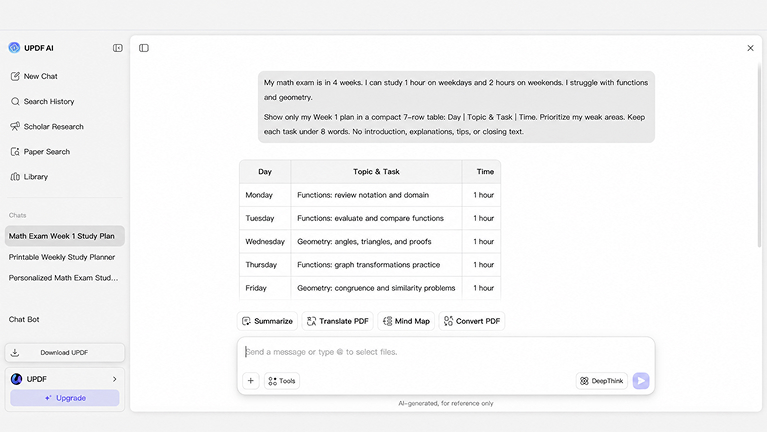
Partagez vos dates d’examen, matières, thèmes prioritaires et le temps que vous pouvez étudier chaque jour.Générer le planning quotidien
Demandez à UPDF AI de créer un plan réaliste selon votre calendrier et vos disponibilités. Les tâches sont organisées en sessions claires au lieu d’un planning générique.Vérifier et ajuster le plan
Demandez des changements lorsque vous manquez une session, avez besoin de plus de pratique sur un thème difficile ou disposez de moins de temps.

Transformer vos supports d’étude en plan d’action
Planifier à partir de vos documents
Téléversez des PDF de cours, notes ou syllabi. UPDF AI peut repérer les thèmes importants et vous aider à organiser les révisions.

Adapter le planning quand la situation change
Si vous manquez une journée ou modifiez votre objectif, demandez à UPDF AI de rééquilibrer le planning sans repartir de zéro.

Réviser et comprendre dans le même outil
Vous pouvez demander des résumés, des explications ou des questions d’entraînement sur les documents utilisés pour créer le planning.

UPDF AI vs autres planificateurs d’étude IA
UPDF AI
Autres planificateurs d’étude IA
Supports d’étude
Téléversement de PDF, notes et syllabi
Souvent saisie ou collage du syllabus
Modifications du planning
Affiner le plan par conversation
Modifier les entrées puis régénérer
Aide sur les thèmes difficiles
Questions directes sur vos PDF
Outil d’apprentissage séparé
Résumés de révision
Extraire les points clés dans le même chat
Outil de résumé séparé
FAQ sur le créateur de planning d’étude UPDF AI
1. Le créateur de planning d’étude UPDF AI est-il gratuit ?
2. Quelles informations dois-je fournir pour créer mon planning ?
3. Puis-je créer un planning pour plusieurs matières ?
4. Que faire si je manque une journée ?
5. Dois-je installer une application ?
Autres outils de UPDF IA populaires