UPDF
UPDF
 Windows版UPDF
 Mac版UPDF
 iPhone/iPad版UPDF
 Android版UPDF
 Nomostar
 UPDF AI オンライン
 UPDF Sign
 IvyCraft
 PDF編集
PDF編集 PDF注釈付け
 PDF作成
PDF作成 PDFフォーム
 リンクの編集
 PDF変換
PDF変換 OCR機能
OCR機能 PDFからWordへ
 PDFから画像へ
 PDFからExcelへ
 PDFのページ整理
 PDF結合
PDF結合 PDF分割
PDF分割 ページのトリミング
 ページの回転
 PDF保護
PDF保護 PDF署名
PDF署名 PDFの墨消し
 PDFサニタイズ
 セキュリティ解除
 PDF閲覧
PDF閲覧 UPDF クラウド
 PDF圧縮
PDF圧縮 PDF印刷
PDF印刷 PDFのバッチ処理
 UPDF AIについて
 UPDF AIソリューション
 AIユーザーガイド
 UPDF AIによくある質問
 PDF要約
PDF要約 PDF翻訳
PDF翻訳 PDF付きチャット
 AIでチャット
 画像付きチャット
 PDFからマインドマップへの変換
 PDF説明
PDF説明 PDF AIツール
 画像AIツール
 AIチャットツール
 AIライティングツール
 AI学習ツール
 AI業務ツール
 その他のAIツール
 AI ブックマーク生成
 AI ブックマーク要約
 AI 透かし生成
 AI 背景生成
 AI ステッカー生成
 AI スタンプ生成
 AI 編集スイート
 UPDF コパイロット
 AI ページ管理
 AI セマンティックサーチ
 PDFからWordへ
 PDFからExcelへ
 PDFからPowerPointへ
 ソリューション
 電子署名
電子署名 ビジネスAI
 料金プラン
料金プラン 導入・運用ガイド
 ウェビナー
ウェビナー IT
IT 教育
教育 建設
建設 金融サービス
 医療
医療 保険
保険 法務
法務 製造業
製造業 官公庁
官公庁 研究者・博士向け
 個人事業主・フリーランス向け
 弁護士・法務専門家向け
 不動産担当者・仲介業者向け
 教育機関向けソリューション
 導入事例
導入事例 ユーザーガイド
 公式ブログ
公式ブログ UPDF 活用術
 UPDF vs Adobe Acrobat
 UPDF vs Foxit
 UPDF vs PDF Expert
 よくある質問(FAQ)
 ダウンロードセンター
 動作環境・仕様
 お問い合わせ
 ニュースルーム
 アップデート履歴
 ユーザーレビュー
 会社概要
会社概要

 UPDF AI
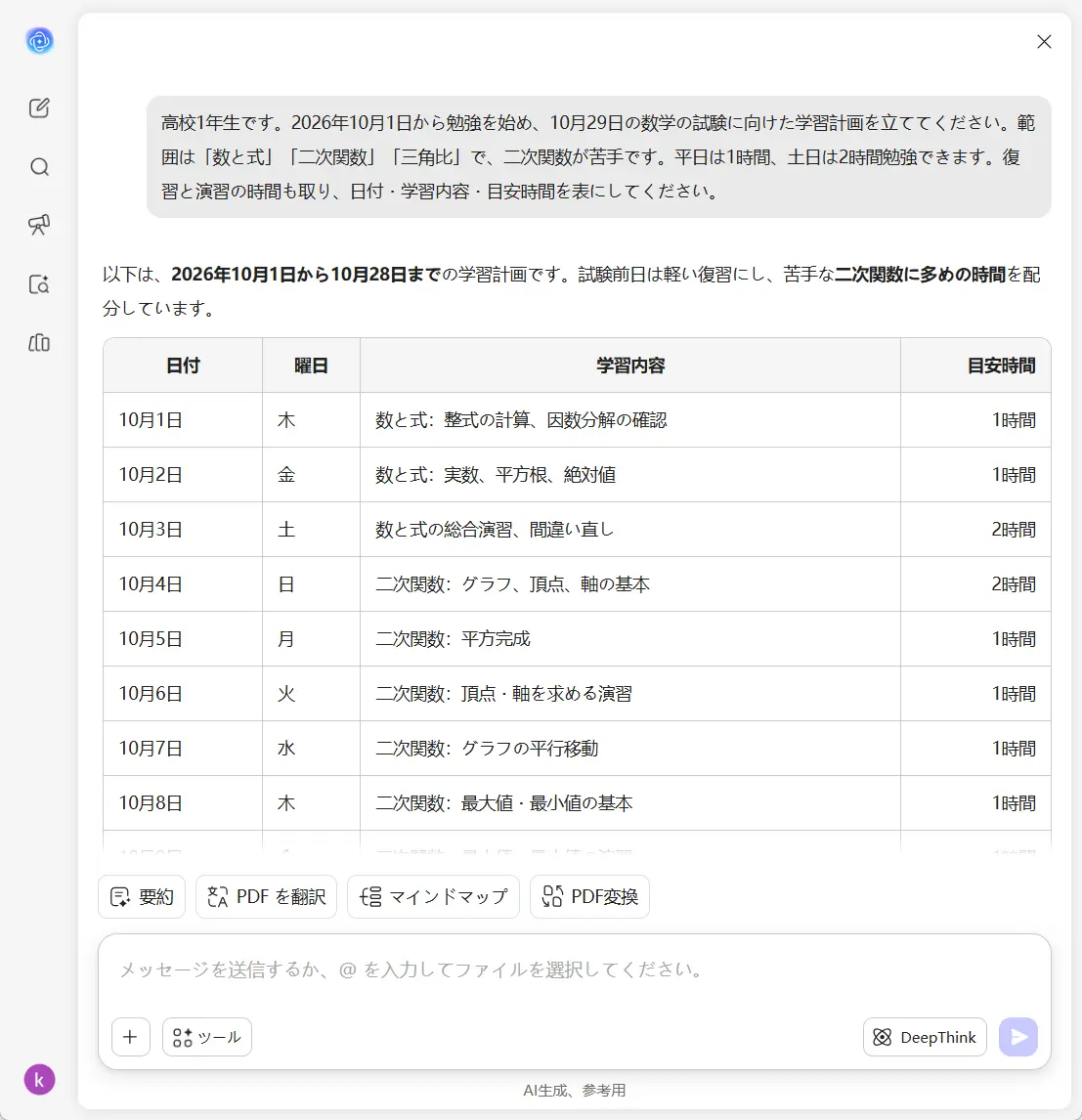
AIで学習計画を無料作成
試験日、科目、優先して取り組みたい内容、1日に使える時間に合わせて、自分に合った学習計画を作成。UPDF AIなら、目標や予定が変わっても調整できる、無理のない勉強スケジュールを立てられます。
搭載AIモデル
 GPT-5.6 |
  DeepSeek R1
5,000件以上のレビュー
 4.8
4.8
UPDF AIの対応プラットフォーム


400万人以上が利用、作成された学習計画は4,500万件以上。主要メディアでも紹介:






自分に合った学習計画を作成する3つのステップ
試験日や学習条件を入力
試験日、科目、重点的に学びたい分野、1日に勉強できる時間を伝えます。例えば「数学の試験は4週間後です。平日は1時間、土日は2時間ずつ勉強できます」のように入力します。毎日の学習スケジュールを作成
試験までの日数と使える時間に合わせて、無理のない学習計画をUPDF AIに作成してもらいます。自分の条件に沿って、毎日取り組む内容を具体的に整理できます。計画を確認して調整
予定どおりに勉強できなかったときや、苦手分野の練習を増やしたいとき、勉強時間が減ったときは、変更点を伝えます。最初から作り直さずに、残りの計画を調整できます。

教材を活かして、実践しやすい学習計画へ
教材と目標に合わせて計画を立てる
授業のPDF資料やノート、試験範囲の資料をUPDF AIにアップロード。試験日、学習に使える時間、優先したい分野を伝えると、苦手科目にも時間を配分した、自分に合ったスケジュールを作成できます。

計画づくりから日々の学習までサポート
計画を作成したAIチャットで、そのまま学習を進められます。要点の要約や授業のPDF資料に関する質問、難しい概念の解説を通じて、毎回の学習で押さえるべき内容に集中できます。

進み具合や予定の変化に合わせて調整
予定より早く1章を終えた、勉強できない日があった、演習を増やしたい。そんなときは、変わったことと残りの時間をUPDF AIに伝えましょう。進み具合や優先順位、試験日に合わせて学習量を配分し直せます。

UPDF AIと他のAI学習計画ツールの比較
UPDF AI
他のAI学習計画ツール
教材の入力
授業のPDF資料、ノート、シラバスをアップロード
通常はシラバスを入力・貼り付け
スケジュールの変更
対話しながら計画を調整
入力内容を変更して再生成
苦手分野の学習支援
PDFの内容について直接質問
別の学習ツールを利用
復習用の要約
同じチャットで要点を抽出
別の要約ツールを利用
UPDF AIの学習計画作成に関するよくある質問
1. UPDF AIで学習計画を無料で作成できますか?
2. 学習計画を作成するには、どんな情報が必要ですか?
3. 作成した学習計画は後から調整できますか?
4. アカウント登録やインストールは必要ですか?
5. 教材や個人情報はどのように保護されますか?
他の人気なUPDF AIツール