 UPDF
 UPDF for Windows
 UPDF for Mac
 UPDF for iPhone/iPad
 UPDF for Android
 Nomostar
 UPDF AI Online
 UPDF Sign
 IvyCraft
 Edit PDF
 Annotate PDF
 Create PDF
 PDF Form
 Edit links
 Convert PDF
 OCR
 PDF to Word
 PDF to Image
 PDF to Excel
 Organize PDF
 Merge PDF
 Split PDF
 Crop PDF
 Rotate PDF
 Protect PDF
 Sign PDF
 Redact PDF
 Sanitize PDF
 Remove Security
 Read PDF
 UPDF Cloud
 Compress PDF
 Print PDF
 Batch Process

 About UPDF AI
 UPDF AI Solutions
 AI User Guide
 FAQ about UPDF AI
 Summarize PDF
 Translate PDF
 Chat with PDF
 Chat with AI
 Chat with image
 PDF to Mind Map
 Explain PDF
 PDF AI Tools
 Image AI Tools
 AI Chat Tools
 AI Writing Tools
 AI Study Tools
 AI Working Tools
 Other AI Tools
 AI Bookmark Generation
 AI Bookmark Summary
 AI Watermark Generation
 AI Background Generation
 AI Sticker Generation
 AI Stamp Generation
 AI Editing Suite
 UPDF Copilot
 AI Page Management
 AI Semantic Search
 PDF to Word
 PDF to Excel
 PDF to PowerPoint
 Enterprise Solution
 Enterprise Sign
 Enterprise AI
 Enterprise Plan
 Enterprise User Guide
 Enterprise Webinar
 IT
 Education
 Construction
 Financial Service
 Healthcare
 Insurance
 Legal
 Manufacturing
 Government
 Researchers & PhDs
 Solopreneurs & Freelancers
 Lawyers & Legal Professionals
 Real Estate Agents & Brokers
 Education Solution
 Customer Stories
 User Guide
 UPDF Tricks
 FAQs
 UPDF Reviews
 Download Center
 Blog
 Newsroom
 Tech Spec
 Updates
 UPDF vs. Adobe Acrobat
 UPDF vs. Foxit
 UPDF vs. PDF Expert


UPDF Sign Plans, Benefits, and License Activation
Table of Contents
1. UPDF Sign Free Plan
UPDF Sign offers a free plan that allows users to sign documents and request signatures using both Basic and Certificate-Based eSignatures. However, the free plan comes with certain limitations:
- Basic eSignatures: Up to 5 signature requests in total.
- Certificate-Based eSignatures: Up to 2 signature requests in total.
- Maximum PDF Size: Up to 10 MB per PDF.
If you need higher signing limits or support for larger PDF files, you can upgrade to a paid plan. For more details, visit the UPDF Sign pricing page.
2. Purchase a Plan
UPDF Sign benefits are available through UPDF Pro, UPDF Pro + AI bundles, and standalone UPDF Sign plans. You can choose the option that best suits your signing needs.
Option 1. Get UPDF Sign Benefits with UPDF Pro or UPDF Pro + AI
Purchasing UPDF Pro or a UPDF Pro + AI bundle includes a certain number of Basic eSignature requests at no additional cost. The benefits depend on your selected plan:
- UPDF Pro Yearly Plan or UPDF Pro Yearly + AI Yearly Bundle: Includes 20 Basic eSignature requests per year.
- UPDF Pro Lifetime Plan or UPDF Pro Lifetime + AI Yearly Bundle: Includes 50 Basic eSignature requests in total.
Note: UPDF AI is available as an annual subscription only. In the UPDF Pro Lifetime + AI Yearly Bundle, the lifetime license applies to UPDF Pro, while UPDF AI is billed annually.
These benefits allow you to sign documents, request signatures, and track signing progress within UPDF Sign.
To purchase a plan, visit the UPDF pricing page, choose your preferred plan, and click Buy Now to complete your purchase.
Option 2. Purchase a Standalone UPDF Sign Plan
If you need more signature requests or regularly use Certificate-Based eSignatures, you can purchase a standalone UPDF Sign plan.
UPDF Sign offers the following paid plans:
- Monthly Plan: Unlimited Basic eSignatures, 20 Certificate-Based eSignature requests per month, and support for PDFs up to 30 MB.
- Annual Plan: Unlimited Basic eSignatures, 300 Certificate-Based eSignature requests per year, and support for PDFs up to 30 MB.
To purchase a standalone UPDF Sign plan, follow these steps:
Step 1. Visit the UPDF Sign pricing page and select your preferred plan.
Step 2. Click Buy Now to proceed to checkout.
Step 3. Review your order details, confirm the email address associated with your UPDF account, and select a payment method to complete your purchase.
Note: For the latest prices and detailed benefits, refer to the respective pricing pages before purchasing.
3. Activate Your UPDF Sign Benefits
Your UPDF Sign benefits are normally activated automatically after purchase, so no additional activation is required.
Simply access UPDF Sign through the UPDF desktop app or the web and log in using the same UPDF account associated with your purchase.
Check this guide: Sign Up and Log In to UPDF Sign
You can also view your current plan, remaining signature requests, and available benefits in the Plan and Benefits panel within UPDF Sign.
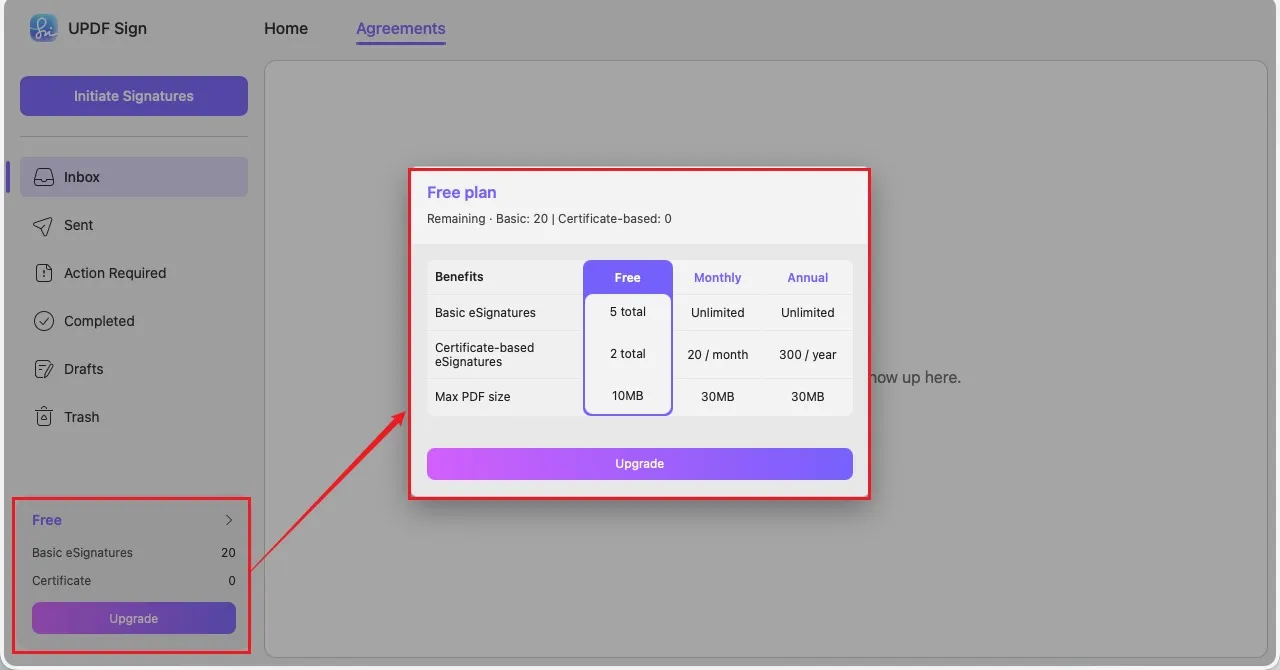
Note: If your purchased benefits are not displayed, make sure you are logged in with the correct UPDF account.
4. Redeem a License Code
If you have received a license code, you can redeem it through your UPDF account to activate the corresponding benefits.
Check this guide: Sign Up and Log In to UPDF Sign
Once redeemed successfully, the corresponding benefits will be linked to your UPDF account.

