 UPDF
UPDF
 UPDF para Windows
 UPDF para Mac
 UPDF para iPhone/iPad
 UPDF para Android
 Nomostar
 UPDF AI Online
 UPDF Sign
 IvyCraft
 Editar PDF
 Anotar PDF
 Criar PDF
 Formulário PDF
 Editar links
 Converter PDF
 OCR
OCR PDF para Word
 PDF para Imagem
 PDF para Excel
 Organizar PDF
 Mesclar PDF
 Dividir PDF
 Cortar PDF
 Girar PDF
 Proteger PDF
 Assinar PDF
 Redigir PDF
 Sanitizar PDF
 Remover Segurança
 Ler PDF
 Nuvem UPDF
 Comprimir PDF
 Imprimir PDF
 Processamento em Lote
 Sobre o UPDF AI
 Soluções UPDF AI
 Guia do Usuário de IA
 Perguntas Frequentes
 Resumir PDF
 Traduzir PDF
 Converse com o PDF
 Converse com IA
 Converse com a imagem
 PDF para Mapa Mental
 Explicar PDF
 Ferramentas de IA para PDF
 Ferramentas de IA para Imagem
 Ferramentas de Chat com IA
 Ferramentas de Escrita com IA
 Ferramentas de Estudo com IA
 Ferramentas de Trabalho com IA
 Outras Ferramentas de IA
 Geração de marcadores
 Resumo de marcadores
 Geração de marca d’água
 Geração de fundo
 Geração de adesivos
 Geração de carimbos
 Suite de Redação
 UPDF Copilot
 Gerenciamento de páginas
 Pesquisa Semântica
 PDF para Word
 PDF para Excel
 PDF para PowerPoint
 Solução Empresarial
 Sinal de empresa
 IA empresarial
 Plano Empresarial
 Guia do Usuário Corporativo
 Webinar Empresarial
 Bancário
 Saúde
Saúde Seguro
 Jurídico
 Manufatura
 Governo
 Solução Educacional
 Histórico de Clientes
 Guia do Usuário
 Truques do UPDF
 Perguntas Frequentes
 Avaliações do UPDF
 Centro de Download
 Blog
Blog Sala de Imprensa
 Especificações Técnicas
 Atualizações
 UPDF vs. Adobe Acrobat
 UPDF vs. Foxit
 UPDF vs. PDF Expert

 UPDF AI
Gerador de avaliação de desempenho com IA grátis
O período de avaliações não precisa virar horas encarando uma página em branco. O UPDF AI funciona como um gerador de avaliações de desempenho, transformando anotações e feedbacks em avaliações profissionais e bem estruturadas em poucos minutos.
Impulsionado pelo
 GPT-4.1 |
 DeepSeek R1
Mais de 5000 avaliações
 4.8
4.8
UPDF AI disponível em


 App para desktop e celular

4M+ usuários, 8M+ avaliações de desempenho criadas. Confiado por grandes mídias:






Como usar o UPDF AI para criar avaliações de desempenho
-
Passo 1: Envie feedbacks e anotações
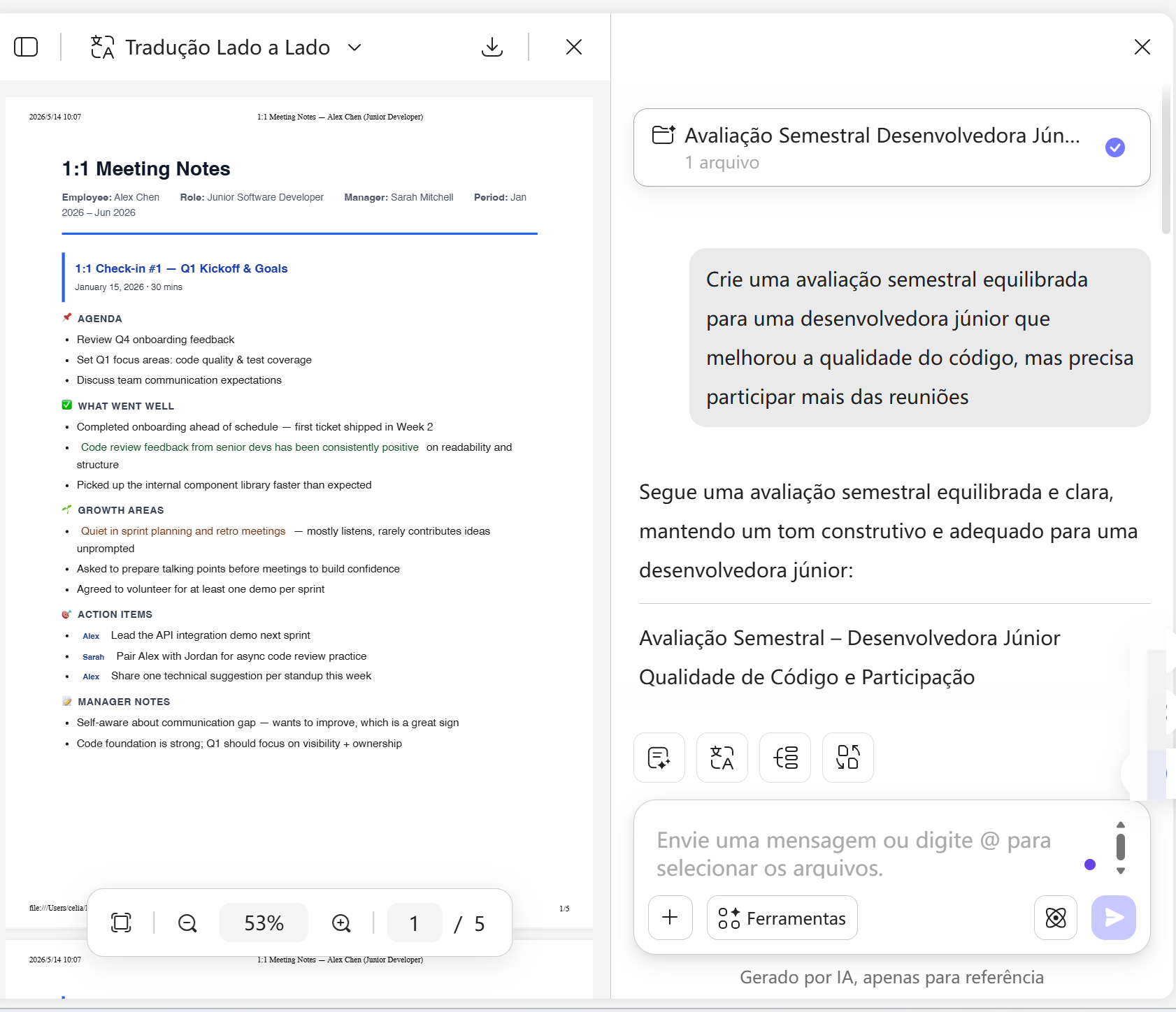
Envie notas de reuniões 1:1, resumos de projetos, feedbacks de colegas ou cole suas observações. O UPDF AI identifica pontos fortes, conquistas e áreas de melhoria em poucos segundos. -
Passo 2: Gere a avaliação
Diga que tipo de avaliação você precisa. Informe cargo, período e tom desejado, por exemplo: "Crie uma avaliação semestral equilibrada para uma desenvolvedora júnior que melhorou a qualidade do código, mas precisa participar mais das reuniões". -
Passo 3: Revise e use o resultado
Confira a avaliação gerada. Se quiser, ajuste as instruções e gere outra versão com foco ou tom mais preciso. Depois, copie o texto para RH, para a pessoa avaliada ou para seus registros.

Por que escolher o software de avaliação de desempenho UPDF AI
Avaliações justas e equilibradas
"Você lembra do erro do mês passado, mas esquece o projeto que a pessoa salvou no primeiro trimestre."
O UPDF AI reúne conquistas, feedbacks de colegas e pontos de desenvolvimento de todo o período, para que a avaliação mostre o cenário completo, não apenas a memória mais recente.

Síntese de feedbacks de várias fontes
"Seis abas abertas, histórico do Slack, um print... onde estava aquele feedback de março?"
O UPDF AI lê notas de 1:1, arquivos de projeto e autoavaliações juntos, transformando entradas espalhadas em uma avaliação coesa, sem caça manual por informações.

Planos de desenvolvimento acionáveis
"A avaliação diz 'continue com o bom trabalho'. A pessoa ainda não sabe o que melhorar."
Além de resumir o passado, o UPDF AI sugere próximos passos claros e oportunidades de crescimento, para que cada colaborador saiba como evoluir.

Avaliações profissionais prontas para compartilhar
"Você escreveu tudo à meia-noite. Agora o texto parece frio e genérico."
O UPDF AI entrega avaliações equilibradas e com tom humano, prontas para email, plataforma de RH ou formulário de avaliação, sem reescrever tudo depois.

Gerador de avaliação de desempenho UPDF AI
vs. outras ferramentas de IA
UPDF AI
Baixar UPDFOutras ferramentas de IA
Qualidade da avaliação
Equilibrada e específica
Muitas vezes vaga ou repetitiva
Entrada de várias fontes
Aponta riscos e lacunas
Limitada
Insights de crescimento
Próximos passos sugeridos automaticamente
Depende de análise manual
Pronta para compartilhar
Formato limpo e profissional
Exige muita edição
Ajuste de tom
Fácil de gerar outra versão
Difícil de ajustar após a geração
Privacidade dos dados


Grátis para testar
, 100 perguntas
Sem limite de palavras
Opções de modelo de IA
ChatGPT-5 & DeepSeek R1
Limitado a um modelo de IA
Plataformas compatíveis
Online, Windows, Mac, Android, iOS
Online
Perguntas frequentes sobre o software de avaliação de desempenho UPDF AI
P1. O UPDF AI serve para diferentes cargos e níveis de senioridade?
P2. O UPDF AI ajuda em ciclos trimestrais ou anuais?
P3. Os dados dos colaboradores ficam seguros no UPDF AI?
P4. O UPDF AI resume históricos longos de projetos ou feedbacks?
P5. Preciso ter experiência em RH para usar o gerador de avaliações?
Outras Ferramentas Populares de IA







