UPDF
UPDF
 UPDF para Windows
 UPDF para Mac
 UPDF para iPhone/iPad
 UPDF para Android
 Nomostar
 UPDF AI Online
 UPDF Sign
 IvyCraft
 Editar PDF
 Anotar PDF
 Criar PDF
 Formulário PDF
 Editar links
 Converter PDF
 OCR
OCR PDF para Word
 PDF para Imagem
 PDF para Excel
 Organizar PDF
 Mesclar PDF
 Dividir PDF
 Cortar PDF
 Girar PDF
 Proteger PDF
 Assinar PDF
 Redigir PDF
 Sanitizar PDF
 Remover Segurança
 Ler PDF
 Nuvem UPDF
 Comprimir PDF
 Imprimir PDF
 Processamento em Lote
 Sobre o UPDF AI
 Soluções UPDF AI
 Guia do Usuário de IA
 Perguntas Frequentes
 Resumir PDF
 Traduzir PDF
 Converse com o PDF
 Converse com IA
 Converse com a imagem
 PDF para Mapa Mental
 Explicar PDF
 Ferramentas de IA para PDF
 Ferramentas de IA para Imagem
 Ferramentas de Chat com IA
 Ferramentas de Escrita com IA
 Ferramentas de Estudo com IA
 Ferramentas de Trabalho com IA
 Outras Ferramentas de IA
 Geração de marcadores
 Resumo de marcadores
 Geração de marca d’água
 Geração de fundo
 Geração de adesivos
 Geração de carimbos
 Suite de Redação
 UPDF Copilot
 Gerenciamento de páginas
 Pesquisa Semântica
 PDF para Word
 PDF para Excel
 PDF para PowerPoint
 Solução Empresarial
 Sinal de empresa
 IA empresarial
 Plano Empresarial
 Guia do Usuário Corporativo
 Webinar Empresarial
 TI
TI Educação
 Construção
 Serviços Financeiros
 Saúde
Saúde Seguro
 Jurídico
 Manufatura
 Governo
 Pesquisadores e doutorandos
 Empreendedores individuais
 Advogados e escritórios
 Profissionais do mercado imobiliário
 Solução Educacional
 Histórico de Clientes
 Guia do Usuário
 Truques do UPDF
 Perguntas Frequentes
 Avaliações do UPDF
 Centro de Download
 Blog
Blog Sala de Imprensa
 Especificações Técnicas
 Atualizações
 UPDF vs. Adobe Acrobat
 UPDF vs. Foxit
 UPDF vs. PDF Expert

 UPDF AI
Revisão e feedback de documentos com IA
Mais do que análise. Uma revisão inteligente. Faça o upload de qualquer documento — contrato, relatório, tese ou currículo — e receba um feedback claro sobre o que está bom, o que precisa ser melhorado e os pontos que exigem atenção.
Desenvolvido por
 GPT-5 |
 DeepSeek R1
Mais de 5000 avaliações
 4.8
4.8
UPDF AI disponível em


 App para desktop e celular

4M+ Usuários, 16M+ Documentos revisados. Confiado por grandes mídias:






Como revisar contratos, relatórios, currículos...online grátis?
-
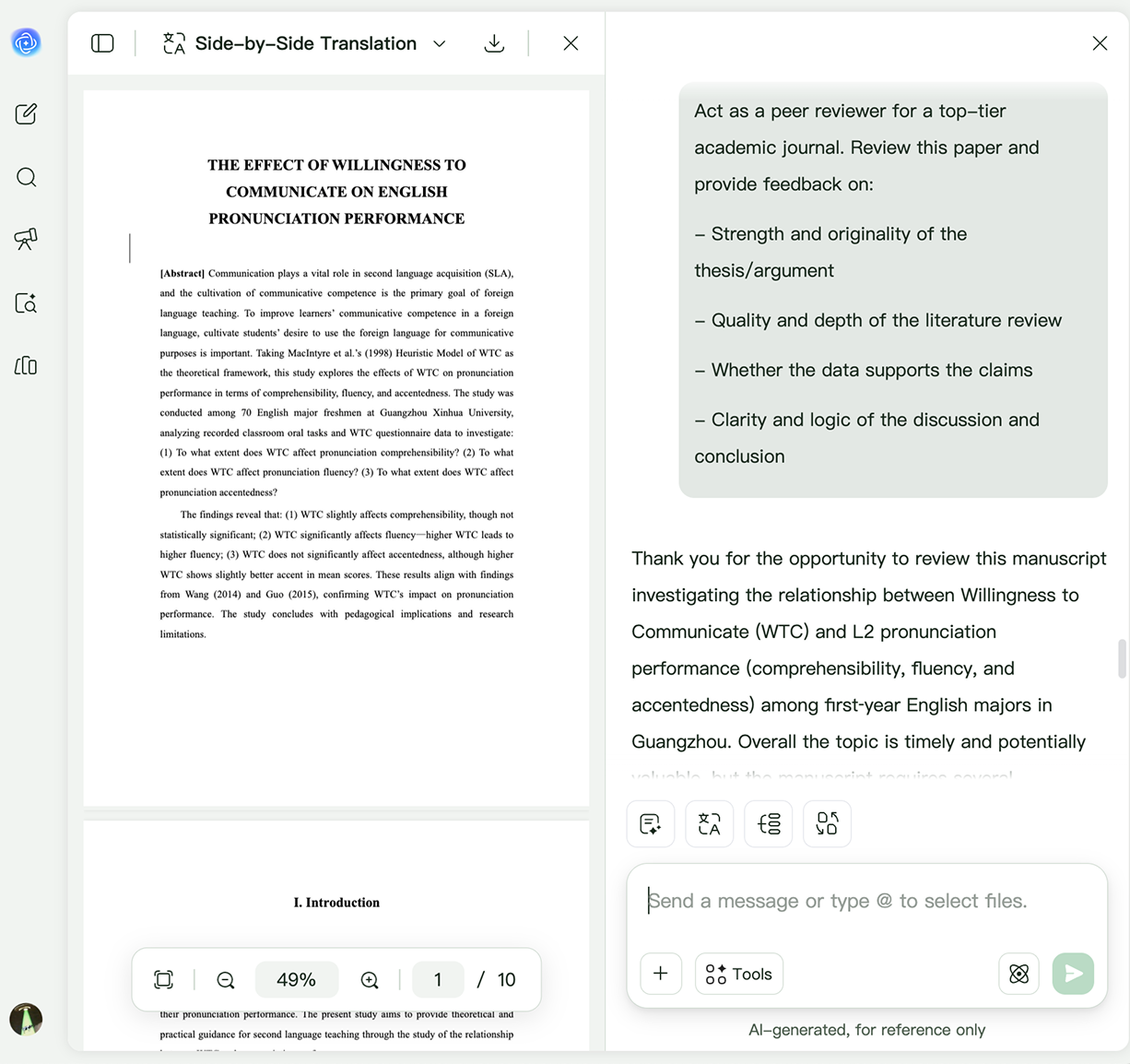
Etapa 1. Envie seu contrato, relatório, currículo, artigo acadêmico, redação, proposta ou qualquer outro documento para o UPDF AI. Seja PDF, documento digitalizado ou imagem, o UPDF AI entende rapidamente o conteúdo e o prepara para uma revisão completa.
-
Etapa 2. Especifique o que deseja que o UPDF AI verifique. Você pode pedir revisão de gramática e ortografia, melhoria de clareza e tom, identificação de inconsistências, avaliação de estrutura, detecção de riscos em contratos, fortalecimento de argumentos em relatórios, refinamento de currículos ou sugestões gerais de escrita. Também pode solicitar revisões por função, como recrutador, professor, editor ou profissional jurídico.
-
Etapa 3. Receba uma revisão acionável. O UPDF AI identifica possíveis problemas e fornece sugestões claras e práticas para melhorar seu documento.

Quem deve usar o Revisor de Documentos do UPDF AI?
Profissionais de negócios
Revise relatórios, propostas e documentos empresariais antes de compartilhar:
Garanta que relatórios, propostas e apresentações sejam claros, bem estruturados e profissionais. O UPDF AI identifica linguagem confusa, mensagens inconsistentes e problemas de escrita, sugerindo melhorias para comunicar com confiança.

Especialistas jurídicos
Revise contratos em busca de riscos, inconsistências e cláusulas ausentes:
Revise rapidamente contratos, acordos e documentos jurídicos antes de assinar ou enviar. O UPDF AI ajuda a identificar linguagem ambígua, termos inconsistentes, informações ausentes e possíveis riscos.

Estudantes e pesquisadores
Fortaleça redações, artigos e escrita acadêmica:
Melhore a qualidade de trabalhos, dissertações e artigos com feedback detalhado de escrita. O UPDF AI ajuda a refinar argumentos, melhorar o fluxo lógico, aumentar a clareza e polir o texto antes da entrega.

RH e recrutadores
Revise documentos de funcionários com mais eficiência:
Revise cartas de oferta, políticas, manuais de funcionários, avaliações de desempenho e materiais de integração com facilidade. O UPDF AI ajuda a manter linguagem consistente, melhorar a clareza e eliminar erros.

Revisor de Documentos UPDF AI vs. outras ferramentas de IA
UPDF AI
Outras ferramentas de IA
Revisão com contexto

Feedback superficial
Sugestões baseadas em função

Segurança de nível empresarial
, certificado ISO 27001
Atribuição rastreável da fonte
Modelo de IA
ChatGPT-5 e DeepSeek R1
ChatGPT-4o/4.1
Revisão multilíngue
, mais de 25 idiomas com fluência natural
, limitado
Revisão em lote de vários documentos
Apenas um documento/limitado
Perguntas frequentes sobre o Revisor de Documentos UPDF AI
P1. Qual é a diferença entre o Revisor de Documentos UPDF AI e chatbots gerais?
P2. Que tipos de documentos o UPDF AI pode revisar?
P3. O UPDF AI pode revisar documentos longos ou complexos?
P4. Meu documento fica seguro ao usar o UPDF AI?
P5. Posso traduzir um documento e revisá-lo sem perder a formatação?
Outras Ferramentas Populares de IA