UPDF
UPDF
 UPDF pro Windows
 UPDF pro Mac
 UPDF pro iOS
 UPDF pro Android
 Nomostar
 UPDF AI Online
 UPDF Sign
 IvyCraft
 Upravit PDF
 Anotovat PDF
 Vytvořit PDF
 PDF formuláře
 Upravit odkazy
 Konvertovat PDF
 OCR
OCR PDF do Wordu
 PDF do obrázku
 PDF do Excelu
 Organizovat PDF
 Sloučit PDF
 Rozdělit PDF
 Oříznout PDF
 Otočit PDF
 Chránit PDF
 Podepsat PDF
 Redigovat PDF
 Sanitizovat PDF
 Odstranit zabezpečení
 Číst PDF
 UPDF Cloud
 Komprimovat PDF
 Tisknout PDF
 Dávkové zpracování
 O UPDF AI
 Řešení UPDF AI
 AI příručka
 FAQ o UPDF AI
 Shrnutí PDF
 Překlad PDF
 Chat s PDF
 Chat s AI
 Chat s obrázkem
 PDF na
 Vysvětlení PDF
 AI nástroje pro PDF
 AI nástroje pro obrázky
 AI chatovací nástroje
 AI nástroje pro psaní
 AI studijní nástroje
 AI pracovní nástroje
 Ostatní AI nástroje
 Generování záložek pomocí AI
 Shrnutí záložek pomocí AI
 Generování vodoznaků pomocí AI
 Generování pozadí pomocí AI
 Generování samolepek pomocí AI
 Generování razítek pomocí AI
 AI sada pro psaní
 UPDF Copilot
 Správa stránek pomocí AI
 Sémantické vyhledávání pomocí AI
 PDF na Word
 PDF na Excel
 PDF na PowerPoint
 Řešení pro podniky
 Plán pro podniky
 Uživatelská příručka pro podniky
 Firemní Webinář
 IT
IT Vzdělávání
 Stavebnictví
 Finanční služby
 Zdravotnictví
 Pojištění
 Právo
Právo Výroba
 Vláda
Vláda Řešení pro vzdělávání
 Příběhy zákazníků
 Uživatelská příručka
 UPDF Triky
 FAQs
FAQs Recenze UPDF
 Středisko stahování
 Blog
Blog Tiskové centrum
 Technické specifikace
 Aktualizace
 UPDF vs. Adobe Acrobat
 UPDF vs. Foxit
 UPDF vs. PDF Expert

 UPDF AI
AI paralegal pro kontrolu složitých spisů
Použijte UPDF AI ke kontrole rozsáhlých spisů, identifikaci důležitých detailů, shrnutí důkazů a vyzdvižení informací, na kterých záleží nejvíce - ideální pro paralegaly, mladší právní profesionály a štíhlé právní týmy.
Poháněno
 GPT-5 |
 DeepSeek R1
5000+ recenzí
 4.8
4.8
UPDF AI je k dispozici na


 Desktopová a mobilní aplikace

4M+ uživatelů, 29M+ analyzovaných případů, důvěřují mu přední média:






Jak používat UPDF AI jako AI paralegal?
-
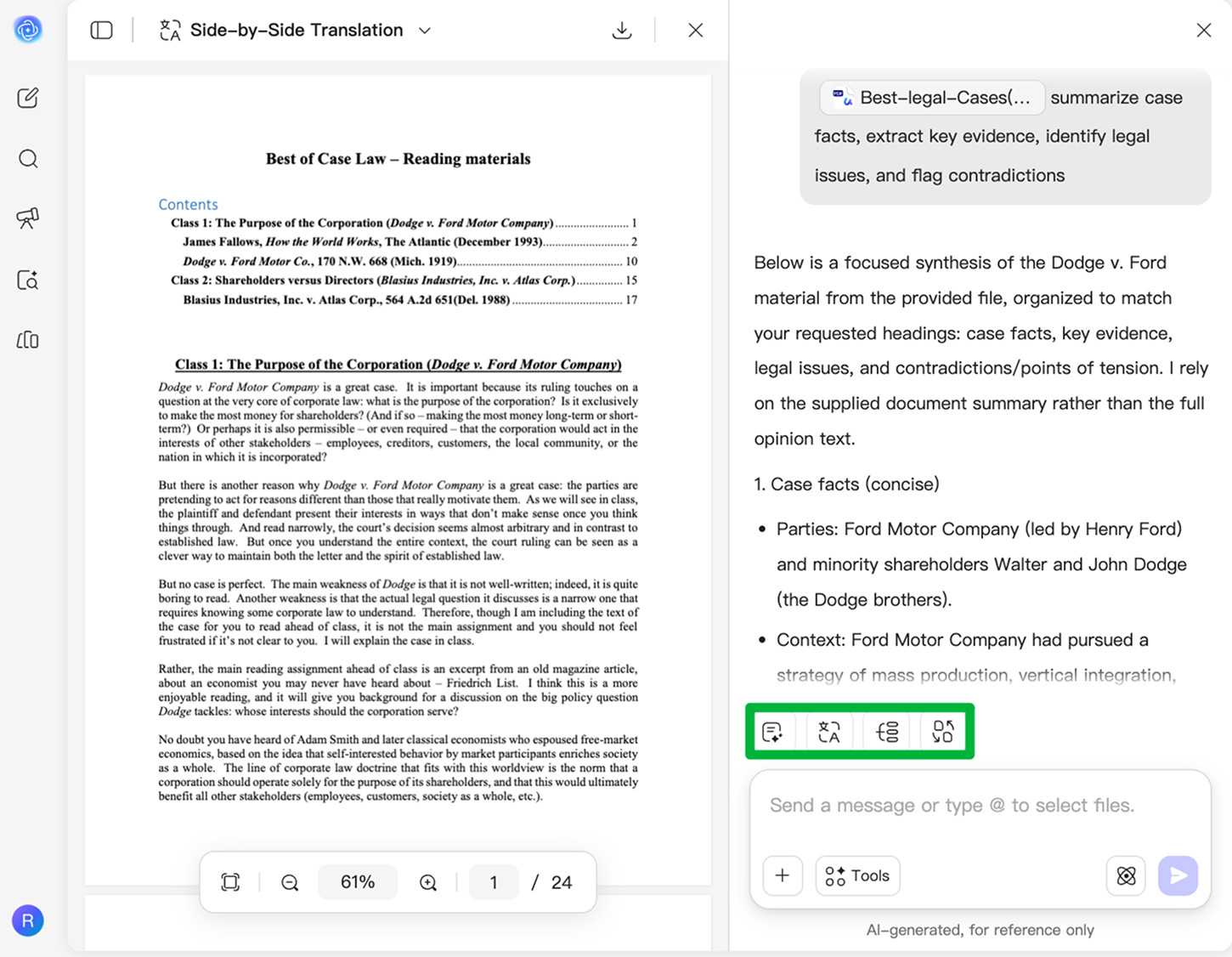
Nahrajte své spisy
Spojte rozsudky, podání, svědecké výpovědi, smlouvy a PDF soubory s důkazy v UPDF AI. Analyzujte stovky stran najednou bez přeskakování mezi dokumenty. -
Veďte AI jasnými pokyny
Zadejte pokyny jako „shrň fakta případu, extrahuj klíčové důkazy, identifikuj právní otázky a označ rozpory“ a @vaše dokumenty, aby vám UPDF AI pomohla rychle odhalit nejdůležitější detaily napříč vašimi spisy. -
Přeměňte složité dokumenty na jasné poznatky
Okamžitě porozumějte rozsáhlým právním materiálům pomocí stručných shrnutí, myšlenkových map, překladů, a analýzy více dokumentů - pomáhá paralegalům a právním týmům připravovat případy efektivněji.

Proč UPDF AI jako AI paralegal
Kontrolujte spisy rychleji
Procházení stovek stran rozsudků, podání a důkazů může být vyčerpávající a náchylné k chybám. UPDF AI vám pomůže rychle identifikovat klíčová fakta, důležitá data a zásadní otázky - abyste se mohli soustředit na poznatky, na kterých záleží nejvíce.

Extrahujte klíčová fakta a důkazy
Ruční hledání rozporů nebo přehlédnutých detailů ve spisech vás zpomaluje. UPDF AI zvýrazňuje podstatná fakta, svědecké výpovědi a podpůrné důkazy, díky čemuž jsou složité dokumenty snazší k pochopení.

Okamžitě generujte strukturované stručné přehledy případů
Přeměňte rozsáhlé rozsudky, podání a PDF soubory s důkazy na jasné, strukturované stručné přehledy případů pomocí UPDF AI Case Brief Generator. Automaticky uspořádá fakta, otázky, argumenty a rozhodnutí do stručného formátu - pomůže vám rychleji se připravit na kontroly, schůzky nebo prezentace u soudu.

Udělejte právní kontrolu chytřejší a jednodušší
Bez specializované právní podpory může kontrola smluv nebo spisů působit zahlcujícím dojmem. UPDF AI používá sémantické vyhledávání, aby porozuměla významu spíše než přesnému znění, takže i když je stejný problém v různých dokumentech vyjádřen různými způsoby, můžete rychle najít relevantní ustanovení, určit rizika a s jistotou extrahovat klíčové informace, které potřebujete.

UPDF AI vs. jiné AI nástroje
UPDF AI
Jiné AI nástroje
Zdarma

Nahrávání souborů
Analýza skenovaných spisů

Kontrola případu z více souborů
Tvorba právních časových os
Převod spisů na myšlenkové mapy
Podporované platformy
Online, Windows, macOS, iOS, Android
Online
Časté otázky k UPDF AI jako AI paralegal
1. Co je AI paralegal?
2. Nahradí AI paralegaly?
3. Může AI kontrolovat právní dokumenty?
4. Jaký je rozdíl mezi bezplatným a placeným plánem?
Další oblíbené nástroje UPDF AI