 UPDF
UPDF
 UPDF voor Windows
 UPDF voor Mac
 UPDF voor iPhone/iPad
 UPDF voor Android
 Nomostar
 UPDF AI Online
 UPDF Sign
 IvyCraft
 PDF bewerken
 PDF annoteren
 PDF maken
 PDF-formulier
 Links bewerken
 PDF converteren
 OCR
OCR PDF naar Word
 PDF naar afbeelding
 PDF naar Excel
 PDF organiseren
 PDF samenvoegen
 PDF splitsen
 PDF bijsnijden
 PDF roteren
 PDF beveiligen
 PDF ondertekenen
 PDF bewerken
 PDF opschonen
 Beveiliging verwijderen
 Lees PDF
 UPDF Cloud
 PDF comprimeren
 PDF afdrukken
 Batch Process
 Over UPDF AI
 UPDF AI-oplossingen
 AI Gebruikersgids
 FAQ over UPDF AI
 PDF samenvatten
 PDF vertalen
 Chatten met PDF
 Chatten met afbeelding
 PDF naar Mindmap
 PDF uitleggen
 PDF AI-tools
 Afbeeldings-AI-tools
 AI-chattools
 AI-schrijftools
 AI-studietools
 AI-werktools
 Overige AI-tools
 AI Bladwijzer Generatie
 AI Bladwijzer Samenvatting
 AI Watermerk Generatie
 AI Achtergrond Generatie
 AI Sticker Generatie
 AI Stempel Generatie
 AI Schrijfsuite
 UPDF Copilot
 AI Paginabeheer
 AI Semantisch Zoeken
 PDF naar Word
 PDF naar Excel
 PDF naar PowerPoint
 Enterprise Oplossing
 Enterprise Plan
 Enterprise Gebruikershandleiding
 Zakelijk Webinar
 IT
IT Onderwijs
 Bouw
Bouw Financiële Diensten
 Gezondheidszorg
 Verzekeringen
 Juridisch
 Productie
 Overheid
 Oplossing voor Onderwijs
 Klantverhalen
 Gebruikershandleiding
 UPDF-trucs
 Veelgestelde Vragen
 UPDF Beoordelingen
 Downloadcentrum
 Blog
Blog Nieuwsruimte
 Technische Specificaties
 Updates
 UPDF versus Adobe Acrobat
 UPDF versus Foxit
 UPDF versus PDF Expert

Bewerk PDF
Bewerk tekst, afbeeldingen, links, pagina's, kopteksten & voetteksten en meer in PDF.
 Meer AI-tools >>
Feedback
UPDF 2.5 is een door GPT-5 aangedreven editor die meer doet dan alleen bewerken en OCR. Het is uw AI-copiloot om te chatten, samen te vatten en te vertalen – nu geüpgraded om lay-outs te corrigeren en op intentie te zoeken.
Gebruik op:

Gebruik op:

Eenmalige betaling, levenslange toegang
UPDF Levenslang Plan + AI Jaarlijks Plan
Gratis DownloadenVolledige toegang tot alle PDF-tools in UPDF:
 Gebruik UPDF op maximaal 4 apparaten op Windows, Mac, iOS en Android.
Bewerk, annoteer, converteer en organiseer PDF's
Maak, vul in en onderteken formulieren
OCR om tekst uit afbeeldingen te halen
Gebruik UPDF op maximaal 4 apparaten op Windows, Mac, iOS en Android.
Bewerk, annoteer, converteer en organiseer PDF's
Maak, vul in en onderteken formulieren
OCR om tekst uit afbeeldingen te halen

Jaarplan. Automatische verlenging tegen /jaar
Samenvatten, vertalen en chatten met PDF-bestanden
Onbeperkt PDF-bestanden analyseren en vragen beantwoorden
Krijg antwoorden op onbeperkt vragen
Zoeken in kranten + Wetenschappelijk onderzoek (online)
10 AI-agenten voor het automatiseren van pagina's en content (app)
Full DeepSeek (R1) is beschikbaar
110GB cloudopslag
Gebruik op:
Automatische verlenging, jaarlijks gefactureerd. Annuleer op elk moment
Automatische verlenging, per kwartaal gefactureerd. Annuleer op elk moment
Probeer AI gratisJaarlijks
Kwartaal
Onbeperkt gebruik van AI-functies Samenvatten, vertalen en uitleggen van PDF's. Tekst extraheren, inhoud genereren en vragen beantwoorden op basis van de afbeelding in enkele seconden. Converteer tekstrijke PDF naar beknopte mindmaps in seconden. Geef directe antwoorden op alle vragen. Vind, vat samen, bespreek en bewaar snel academische artikelen. Zoek en vat automatisch artikelen samen om overzichtelijke, inzichtelijke literatuurstudies te maken. Automatiseer semantisch zoeken, generatie en samenvatting van bladwijzers, paginabeheer en creatief ontwerpen in één werkruimte.
 UPDF AI
 Chatten met PDF
 Chatten met Afbeelding
 PDF naar Mindmap
 Chatten met AI
 Papieren zoekopdracht (online)
 Diepgaand onderzoek (online)
 10 AI Agents
Samenvatten, vertalen en chatten met PDF-bestanden
Onbeperkt PDF-bestanden analyseren en vragen beantwoorden
Krijg antwoorden op onbeperkt vragen
Zoeken in kranten + Wetenschappelijk onderzoek (online)
10 AI-agenten voor het automatiseren van pagina's en content (app)
Full DeepSeek (R1) is beschikbaar
110GB cloudopslag


Verminder werkstress door eenvoudig te werken aan complexe documenten met UPDF.


Bewerk tekst, afbeeldingen, links, pagina's, kopteksten & voetteksten en meer in PDF.
Markeer en markeer PDF's gemakkelijk. Ervaar naadloos PDF-lezen op verschillende apparaten.
Draai, verwijder, extraheer, voeg in, splits en snijd pagina's in PDF.
Maak PDF van afbeeldingen, Office-formaten of blanco.
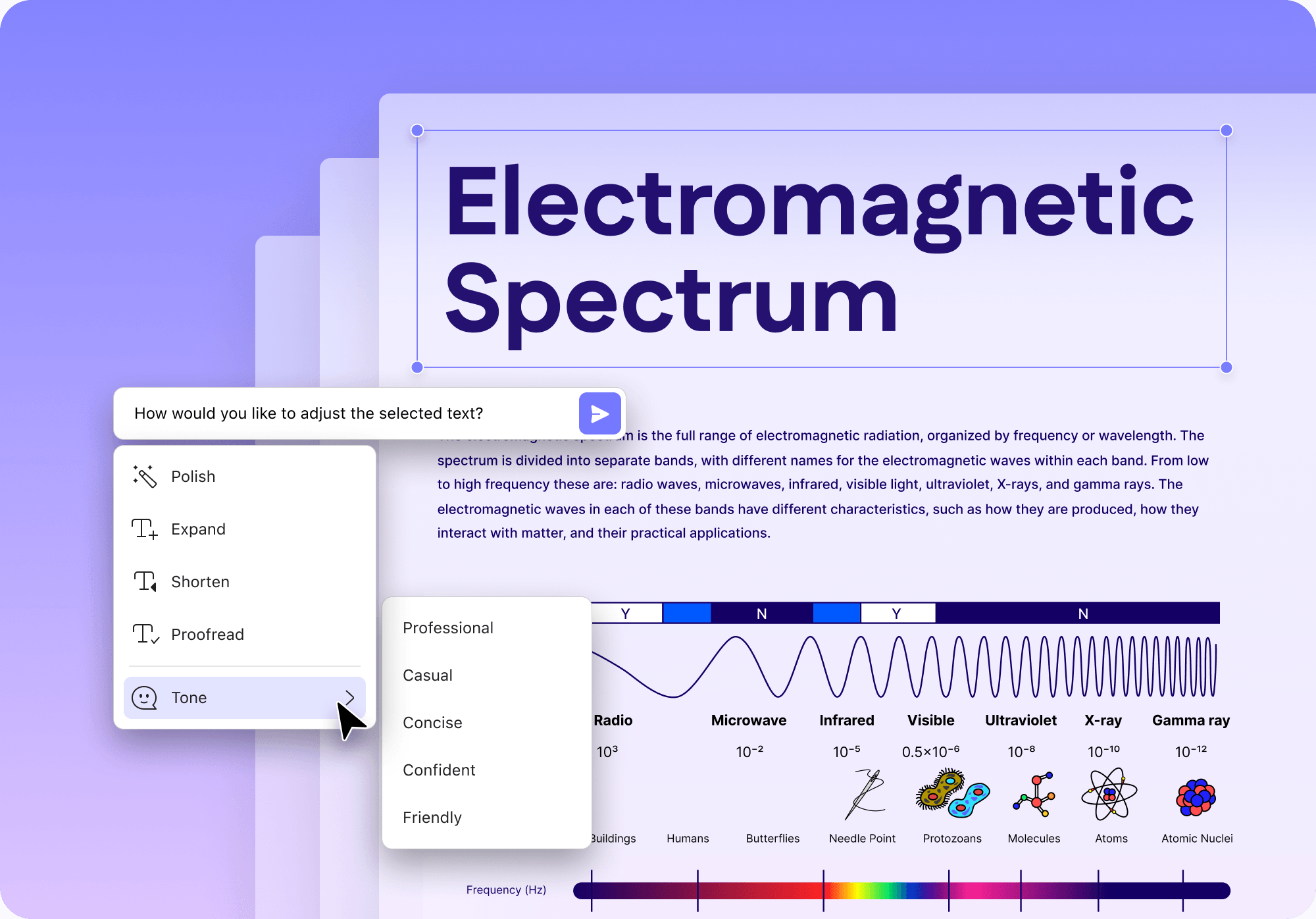
AI PDF bewerkenNIEUW
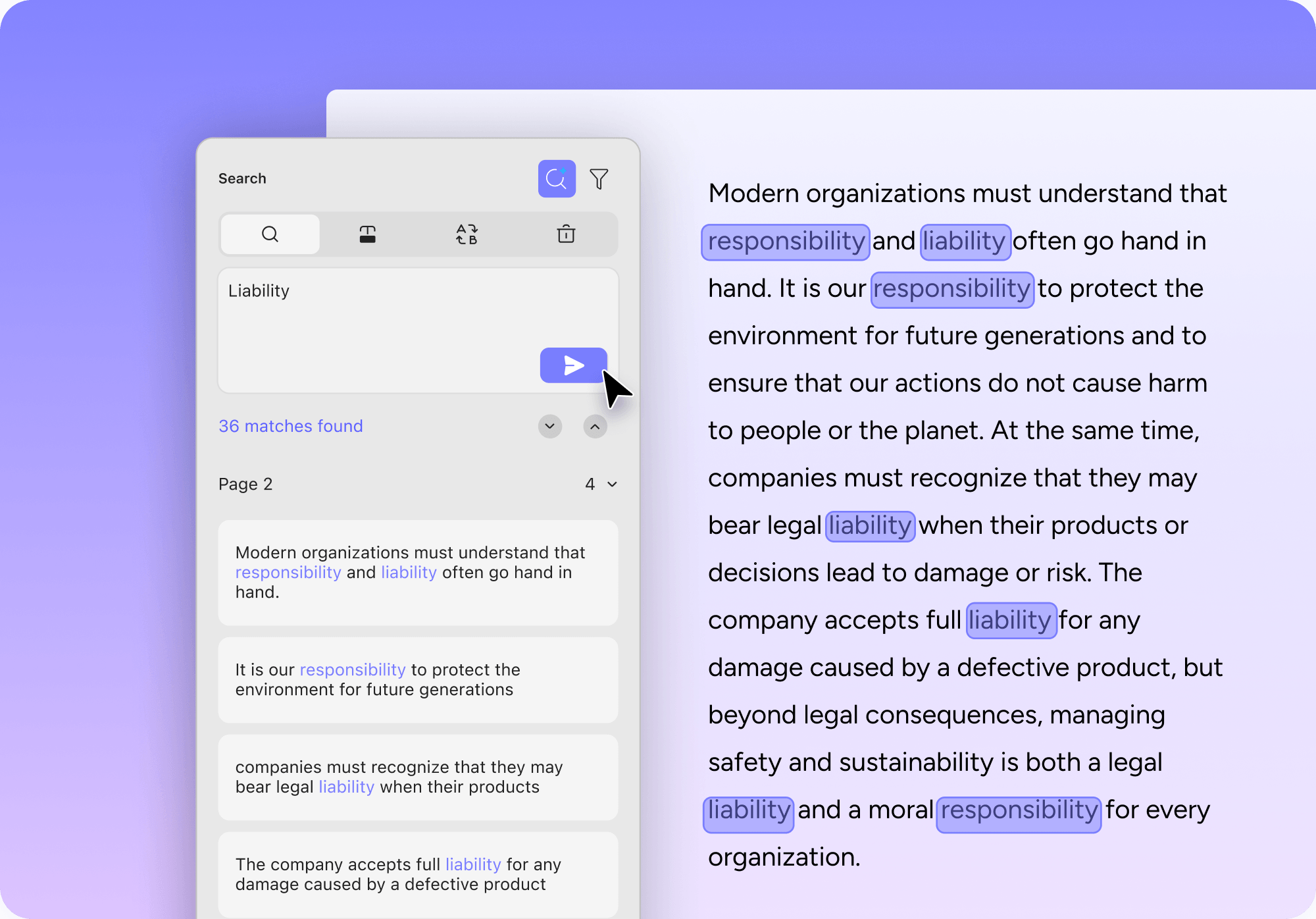
Semantisch zoekenNIEUW
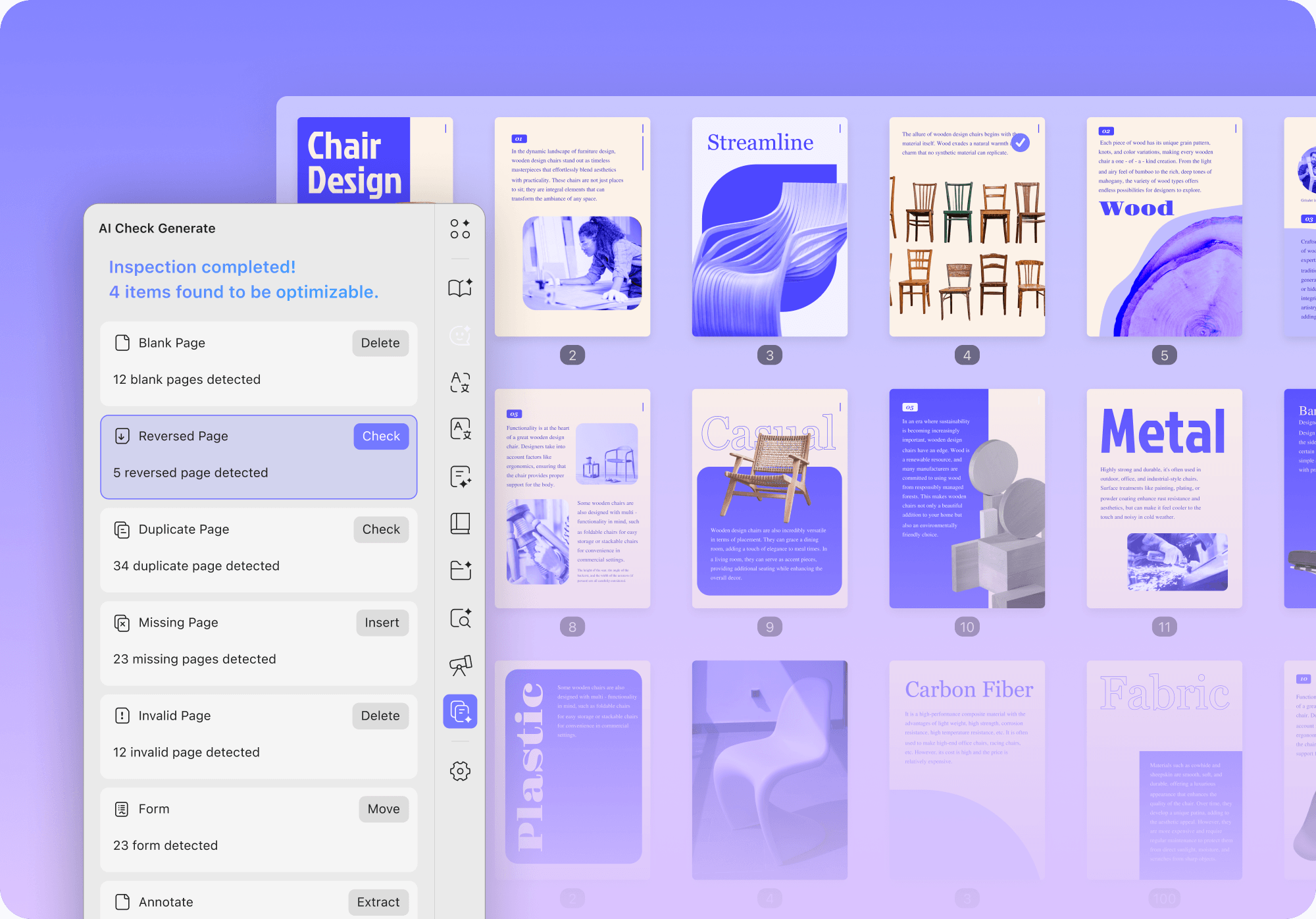
AI-pagina-organizerNIEUW
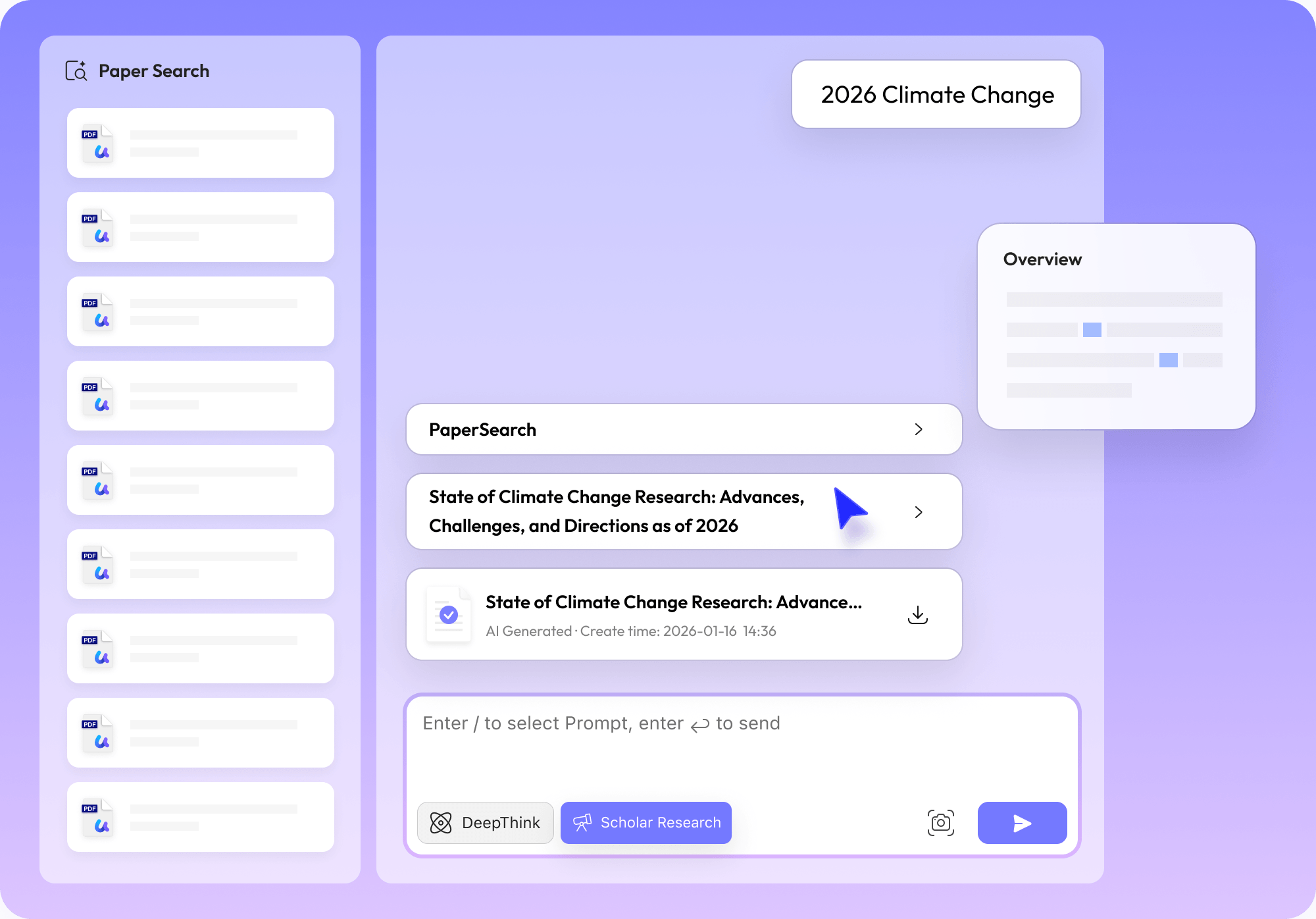
Wetenschappelijk onderzoekNIEUW
Chatten met PDF
Chatten met Afbeelding
PDF naar Mindmap


UPDF heeft feedback en beoordelingen ontvangen van onze gewaardeerde klanten en invloedrijke leiders over de hele wereld, en we zijn vastbesloten om onze diensten in de toekomst te verbeteren.

Samir Burzić

UPDF is een krachtige PDF-software die verschillende functies biedt. Het laat je PDF-documenten bekijken, bewerken, converteren en maken op een eenvoudige en gebruiksvriendelijke manier.

Ayu Divine
Ik ben student en werk ook parttime. Voornamelijk studeer ik voor examens om ambtenaar te worden in de administratie van mijn land.AI is ongelooflijk nuttig geweest voor mijn studie en leren. Het heeft mijn afhankelijkheid van externe leraren verminderd en mijn studiesessies sneller en efficiënter gemaakt. Ik kan hele onderwerpen opsplitsen in een reeks logische vragen en antwoorden, waarbij ik vragen stel en de AI antwoorden geeft. Deze methode helpt me onderwerpen proactief en interactief te begrijpen. Grote PDF-bestanden lezen is een fluitje van een cent met UPDF AI. Het helpt bij het definiëren en uitleggen van complexe en technische termen, het verduidelijken van de context en het samenvatten van paragrafen indien nodig. Dit heeft mijn studies slimmer en intuïtiever gemaakt.Ik raad iedereen aan om de AI-assistent van UPDF te gebruiken, omdat het taken vereenvoudigt, lastige of repetitieve taken afhandelt, en gebruikers in staat stelt zich te concentreren op de belangrijkste aspecten, waardoor tijd wordt bespaard en nauwkeurigheid wordt gegarandeerd.

Werner Mozek
Ik werk in de verkoop en veldservice en gebruik vaak de AI-assistent van UPDF voor persoonlijke taken. Als ik bijvoorbeeld een aanvraag in PDF-formaat ontvang en iets verduidelijking nodig heeft, vertrouw ik op de AI-assistent van UPDF om het uit te leggen. Ik ben tot nu toe zeer onder de indruk van zijn prestaties. Een verbetering die ik zou waarderen, is de mogelijkheid om PDF's te vertalen, zoals het omzetten van mijn CV van Duits naar Engels. Ik heb UPDF aan iedereen aanbevolen die ernaar heeft gevraagd, en het geprezen als het beste PDF-programma voor Mac, dat zelfs Adobe Acrobat overtreft in functionaliteit, vooral met zijn unieke AI-functies.

15,7M abonnees

471K abonnees

336K abonnees

9to5mac 12 april 2024
Volledig artikel
appleinsider 21 juni 2024
Volledig artikel
BGR 24 mei 2024
Volledig artikelWanneer je UPDF aanschaft, kun je het gebruiken op maximaal 4 apparaten: 2 desktops (ofwel 1 Windows en 1 Mac, 2 Windows, of 2 Macs) en 2 mobiele apparaten (1 iOS en 1 Android, 2 iOS, of 2 Android). Als je kiest voor de licentie met AI Assistant, kun je de AI-functies gebruiken op maximaal 6 apparaten: 2 desktops (1 Windows en 1 Mac, 2 Windows, of 2 Macs), 2 mobiele apparaten (1 iOS en 1 Android, 2 iOS, of 2 Android), en 2 web ( ai.updf.com). Je mag het ook opnieuw installeren op een nieuw apparaat bij het vervangen van een oud apparaat.
Voor een beter begrip van de verschillen tussen een jaarplan en een eeuwigdurend plan, moeten de volgende aspecten in gedachten worden gehouden:
1. Een jaarplan betekent dat het geselecteerde pakket automatisch jaarlijks verlengd wordt. Het eeuwigdurende plan is echter een eenmalige betaling.
2. Gebruikers die zich abonneren op het jaarplan hebben recht op onbeperkte gratis updates en upgrades gedurende de looptijd van hun jaarlijkse betaling. Daarentegen profiteren gebruikers die kiezen voor het eeuwigdurende plan van levenslange toegang tot alle toekomstige updates en upgrades.
3. Het jaarplan kan 10GB cloudopslag krijgen en het eeuwigdurende plan kan 2GB cloudopslag krijgen.
Als gratis gebruiker van UPDF kun je enkele beperkingen tegenkomen bij het gebruik van de proefversie:
1. De gratis versie voegt automatisch een proefwatermerk toe bij het opslaan van het document.
2. PDF-conversie is beperkt tot maximaal 2 keer per dag.
3. Batchverwerking kan slechts twee bestanden verwerken in de gratis versie.
4. De proefversie beperkt OCR tot 5 keer gebruik.
5. Er kan slechts één sjabloon worden toegevoegd aan het watermerk, de koptekst en voettekst, en de achtergrond afzonderlijk.
6. De proefversie van UPDF Cloud bevat 1GB opslagruimte met een limiet van 10MB voor een enkel bestand. (Het premium account heeft 10GB opslagruimte met 2GB max per bestand voor uploaden.)
Als je de AI-assistent wilt testen, zijn er enkele specifieke beperkingen bij het gebruik van de proefversie, die als volgt worden vermeld:
1. Je kunt maximaal 5 PDF's uploaden en analyseren en een maximum van 100 pagina's per PDF.
2. De bestandsgrootte is beperkt tot 10 MB per PDF-bestand.
3. Gratis vragen zijn beperkt tot maximaal 100 keer.
4. Met de online AI kunnen gebruikers met meerdere PDF's chatten door collecties te maken. Een gratis gebruiker kan echter maximaal 5 PDF's in één collectie uploaden.
In het geval dat je alleen de AI-assistent koopt, blijf je een gratis gebruiker van UPDF, waardoor je toegang tot tools zoals bewerken, annoteren en converteren van PDF's beperkt is. Je kunt echter alle functies van UPDF proberen en gebruiken, maar met bepaalde beperkingen, zoals het toevoegen van proefwatermerken.
Als je alleen UPDF koopt zonder de AI-assistent, kun je slechts 5 PDF's analyseren met AI of 100 vragen stellen voor testen. Als je meer tokens nodig hebt, moet je de AI-assistent apart kopen.
Als je vragen hebt, raden we aan contact op te nemen met het klantenserviceteam door een e-mail te sturen naar [email protected]. Bovendien kun je de Gebruikershandleiding en de FAQ's pagina bezoeken om meer te leren over UPDF Pro en UPDF AI.
De AI-assistent is beschikbaar op Windows, Mac, iOS, Android en Web. Wanneer je de AI-assistent voor je UPDF-account koopt, krijg je toegang tot alle vijf platforms. Je kunt de AI-functie openen op Windows, Mac, iOS en Android-apparaten door het UPDF-programma te downloaden. Alternatief kun je AI-functies direct in je browser gebruiken door ai.updf.com te bezoeken.