UPDF
UPDF
 UPDF لـWindows
 UPDF لـMac
 UPDF لـiPhone/iPad
 UPDF لـAndroid
  Nomostar
 UPDF AI عبر الإنترنت
 UPDF Sign
 IvyCraft
 تحرير PDF
 تعليق على PDF
 إنشاء PDF
 نموذج PDF
 تحرير الروابط
 تحويل PDF
 OCR
OCR PDF إلى Word
 PDF إلى صورة
 PDF إلى Excel
 تنظيم PDF
 دمج PDF
 تقسيم PDF
 قص PDF
 تدوير PDF
 حماية PDF
 توقيع PDF
 تنقيح PDF
 تطهير PDF
 إزالة الأمان
 قراءة PDF
 UPDF Cloud
 ضغط PDF
 طباعة PDF
 معالجة الدُفعات
 حول UPDF AI
 حلول UPDF AI
 دليل مستخدم AI
 الأسئلة الشائعة حول UPDF AI
 تلخيص PDF
 ترجمة PDF
 الدردشة مع PDF
 الدردشة مع الصورة
 تحويل PDF إلى خريطة ذهنية
 الدردشة مع AI
 شرح PDF
 أدوات PDF بالـ AI
 أدوات صور AI
 أدوات دردشة AI
 أدوات كتابة AI
 أدوات دراسة AI
 أدوات عمل AI
 أدوات AI أخرى
 توليد الإشارات المرجعية AI
 تلخيص الإشارات المرجعية AI
 توليد العلامة المائية AI
 توليد الخلفيات AI
 توليد الملصقات AI
 توليد الأختام AI
 مجموعة الكتابة AI
 UPDF Copilot
 إدارة الصفحات AI
 البحث الدلالي AI
 PDF إلى Word
 PDF إلى Excel
 PDF إلى PowerPoint
 الحلول المؤسسية
 علامة المؤسسة
 الذكاء الاصطناعي للمؤسسات
 خطة المؤسسة
 دليل مستخدم المؤسسة
 ويبينار للشركات
 تكنولوجيا المعلومات
 التعليمية
 البناء
 الخدمات المالية
 الرعاية الصحية
 التأمين
 قانوني
 التصنيع
 الحكومة
 الباحثون وطلاب الدكتوراه
 رواد الأعمال المستقلون
 المحامون ومكاتب المحاماة
 العاملون في العقارات
 حلول التعليم
 قصص العملاء
 دليل المستخدم
 حيل UPDF
 الأسئلة الشائعة
 مراجعات UPDF
 مركز التنزيل
 مدونة
مدونة غرفة الأخبار
 المواصفات التقنية
 التحديثات
 UPDF مقابل Adobe Acrobat
 UPDF مقابل Foxit
 UPDF مقابل PDF Expert

 UPDF AI
مولّد عروض العطاءات بالذكاء الاصطناعي مجاناً عبر الإنترنت
يستفيد مُنشئ عروض العطاءات من UPDF AI من تقنيات GPT-5 وDeepSeek R1، وهو مُحسّن لتلبية متطلبات المناقصات وطلبات تقديم العروض (RFP). أدخل متطلبات المناقصة وتفاصيل المشروع، واحصل على مقترحات عطاء مُولّدة بالذكاء الاصطناعي بهيكل احترافي وصياغة قياسية.
مدعوم بواسطة
 GPT-5 |
 DeepSeek R1
5000+ مراجعة
 4.8
4.8
يتوفر UPDF AI على


 تطبيق سطح المكتب والهاتف

4M+ مستخدم، 18M+ مقترح عطاء مُولَّد، موثوق به من وسائل إعلام رائدة:






كيفية استخدام UPDF AI لكتابة عروض العطاءات؟
-
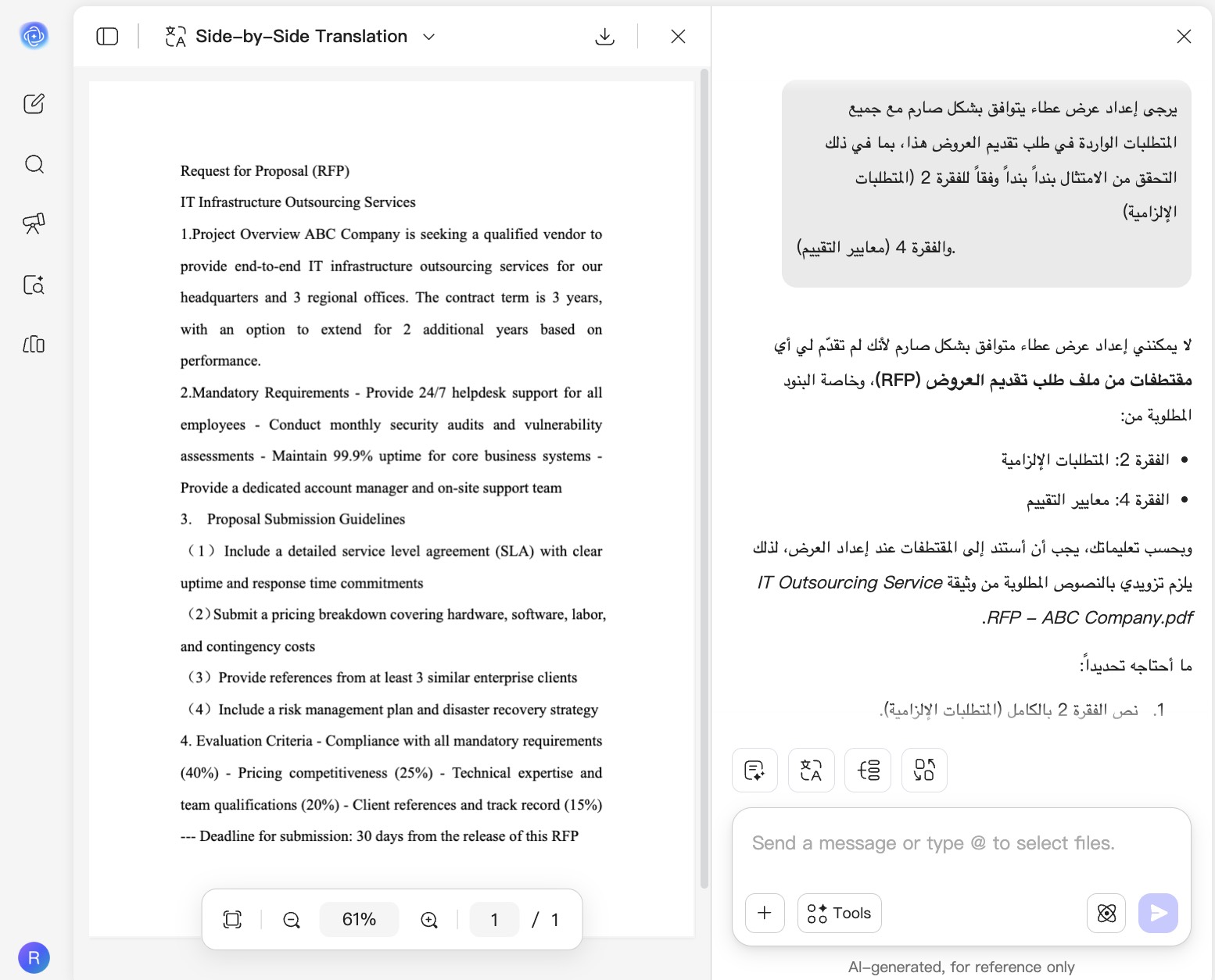
قم بتحميل ملف المتطلبات الخاص بك أو تحدث مع الذكاء الاصطناعي مباشرة: قم بتحميل ملف طلب تقديم العروض (RFP) أو مستندات العطاء (PDF/Word)، ثم أشر إلى الملف داخل طلبك باستخدام @. أو يمكنك وصف احتياجاتك مباشرة (مثل: "عرض مقترح لخدمات تكنولوجيا المعلومات").
-
اختر نموذج الذكاء الاصطناعي: اختر GPT-5 للصياغة العامة المدركة للسوق، أو DeepSeek R1 للتحقق الصارم من الامتثال البنود في طلب تقديم العروض.
-
احصل على النتائج المُصاغة: يقوم الذكاء الاصطناعي بصياغة عرض عطاء بناءً على متطلباتك، مع دعم التحسين التكراري عبر تعليمات إضافية، أو يمكنك حفظ النتائج مباشرة.

لماذا تختار UPDF AI لكتابة عروض العطاءات الخاصة بك؟
الحفظ عبر الأجهزة مع UPDF Cloud: لا تفقد سير عملك أبدًا
هل أنجزت نصف العرض على جهاز الكمبيوتر ثم اضطررت لمغادرة المكتب بدون الحاسوب المحمول — هل يعني ذلك أن تقدمك ضاع؟ يقوم UPDF Cloud بحفظ ومزامنة جميع مسوداتك تلقائيًا عبر الأجهزة، بحيث يمكنك البدء على سطح المكتب ثم المتابعة بسلاسة على الحاسوب المحمول أو الجهاز اللوحي دون فقدان عملك أو تعطيل سير عملك.

دعم إدخال متعدد الصيغ: لا مزيد من مشاكل التنسيق
طلب تقديم العروض لديك عبارة عن صورة ممسوحة ضوئيًا، وأنت عالق في تحويل الملفات فقط لاستخدام الأداة — لماذا يجب أن يعيقك تنسيق الملف عن إعداد عرضك؟ يدعم UPDF رفع ملفات RFP بصيغة PDF أو الصور مباشرة، أو يمكنك ببساطة وصف متطلباتك للذكاء الاصطناعي بلغة طبيعية، لتتجاوز مشاكل التنسيق وتبدأ صياغة عرضك فورًا.

قلق المواعيد النهائية: آخر 24 ساعة من الارتباك
مع بقاء 10 ساعات فقط قبل الموعد النهائي لتقديم العطاء، كيف يمكنك اكتشاف الثغرات الحرجة المخفية داخل مئات الصفحات من مستندات RFP دون قراءة كل سطر؟ يقدم UPDF AI ملخصًا فوريًا وكشفًا للمخاطر، ويستخرج المواعيد النهائية والبنود الجزائية من ملف PDF خلال ثوانٍ، حتى تتمكن من تجنب المخاطر في اللحظات الأخيرة ومنع الفوضى.

UPDF AI مقابل أدوات الذكاء الاصطناعي الأخرى
UPDF AI
أدوات الذكاء الاصطناعي الأخرى
تجربة مجانية
100 طلب مجاني للمستخدمين الجدد
5-10 طلبات مجانية أو بدون تجربة مجانية
رفع المستندات وتحليلها


المزامنة بين الأجهزة
UPDF Cloud – حفظ تلقائي ومزامنة عبر Windows وMac وiOS وAndroid والويب
لا يوجد مزامنة سحابية؛ يتطلب نقل الملفات يدويًا
وضع الذكاء الاصطناعي المزدوج
GPT-5 للصياغة الاستراتيجية + DeepSeek R1 للتحقق من الامتثال
نموذج ذكاء اصطناعي واحد بدون اختيار وضع
تخصيص متقدم
المنصات المدعومة
عبر الإنترنت، Windows، macOS، iOS، Android
عبر الإنترنت فقط
دعم اللغات
أكثر من 100 لغة
عادةً أقل من 20 لغة
الأسئلة الشائعة حول كاتب عروض المناقصات في UPDF AI
1. كيف يمكنني التأكد من أن عروض المناقصات التي يكتبها UPDF AI متوافقة مع متطلبات طلب العروض (RFP)؟
2. أيهما أفضل: كتابة العروض يدويًا أم باستخدام أدوات الذكاء الاصطناعي؟
3. هل يوفر كاتب عروض المناقصات في UPDF AI رصيدًا مجانيًا لتوليد العروض؟
4. هل يمكنني حفظ مسودات العروض والوصول إليها من أجهزة مختلفة؟
أدوات الشائعة الأخرى لـUPDF AI