UPDF
UPDF
- ProduktyNOWOŚĆ
- Funkcje
-
UPDF AIPOPULARNE
 O UPDF AI
 Rozwiązania UPDF AI
 Podręcznik użytkownika AI
 FAQ dotyczące UPDF AI
Bezpłatny okres próbny
FAQ dotyczące UPDF AI
Bezpłatny okres próbny

UPDF AI
 Podsumuj PDF
 Przetłumacz PDF
 Porozmawiaj z PDF-em
 Porozmawiaj z AI
 Porozmawiaj z obrazem
 PDF do mapy myśli
 Wyjaśnij PDF
- Więcej narzędzi AI >>
- Naukowcy
- Studenci
- Umowy
- Biznes
- Finanse
- HR
- Inżynieria / Techniczne
- Agenty AI
- PDF online
- Rozwiązania
- Zasoby
- Cennik
 UPDF na Windows
 UPDF na Mac
 UPDF na iPhone/iPad
 UPDF na Android
 UPDF AI Online
 UPDF Sign
 Edytuj PDF
 Zaznacz PDF
 Utwórz PDF
 Formularz PDF
 Edytuj linki
 Przekonwertuj PDF
 OCR
OCR PDF do Word
 PDF do obrazu
 PDF do Excel
 Zarządzaj PDF
 Scalać PDF
 Podziel PDF
 Przytnij PDF
 Obróć PDF
 Zabezpiecz PDF
 Podpisz PDF
 Redaguj PDF
 Oczyść PDF
 Usuń ochronę
 Otwórz PDF
 UPDF Chmura
 Skompresuj PDF
 Drukuj PDF
 Przetwarzanie wsadowe
 Narzędzia PDF AI
 Narzędzia obrazu AI
 Czat AI
 Pisanie AI
 Nauka z AI
 Praca z AI
 Inne narzędzia AI
 Generowanie Zakładek AI
 Podsumowanie Zakładek AI
 Generowanie Znaku Wodnego AI
 Generowanie Tła AI
 Generowanie Naklejek AI
 Generowanie Pieczęci AI
 Pakiet do Pisania AI
 UPDF Copilot
 Zarządzanie Stronami AI
 Semantyczne Wyszukiwanie AI
 PDF to Word
 PDF to Excel
 PDF do PowerPoint
 Rozwiązania dla przedsiębiorstw
 Plan dla przedsiębiorstw
 Przewodnik użytkownika dla przedsiębiorstw
 Webinar Korporacyjny
 Bankowość
 Opieka zdrowotna
 Ubezpieczenia
 Prawo
Prawo Produkcja
 Rząd
Rząd Rozwiązania dla edukacji
 Historie klientów
 Przewodnik użytkownika
 Sztuczki UPDF
 FAQs
FAQs Recenzje UPDF
 Centrum pobierania
 Blog
Blog Sala prasowa
 Specyfikacja techniczna
 Aktualizacje
 UPDF a Adobe Acrobat
 UPDF a Foxit
 UPDF a PDF Expert

Opinie
 UPDF AI
Inteligentne narzędzie AI do selekcji CV online za darmo
Łatwo selekcjonuj i oceniaj CV online za pomocą narzędzia UPDF AI CV Screen. Prześlij CV i pozwól sztucznej inteligencji szybko przeanalizować życiorysy, wyodrębnić dane kandydatów i zidentyfikować najlepszych aplikantów, oszczędzając czas i poprawiając decyzje rekrutacyjne – wszystko za darmo i online.
Zasilane przez
 GPT-5 |
 DeepSeek R1
5000+ recenzji
 4,8
4,8
UPDF AI dostępne na


 Aplikacja desktopowa & mobilna

4M+ użytkowników, 2,5M+ sprawdzonych CV, zaufanie wiodących mediów:






Jak używać UPDF AI do bezpłatnej selekcji CV online?
-
1. Przesłanie CV:
Kliknij przycisk „Kliknij, przeciągnij lub wklej PDF/obraz tutaj“, a następnie wybierz i przesyłaj wsadowo wszystkie zebrane CV do UPDF AI. -
2. Przygotowanie kryteriów pracy:
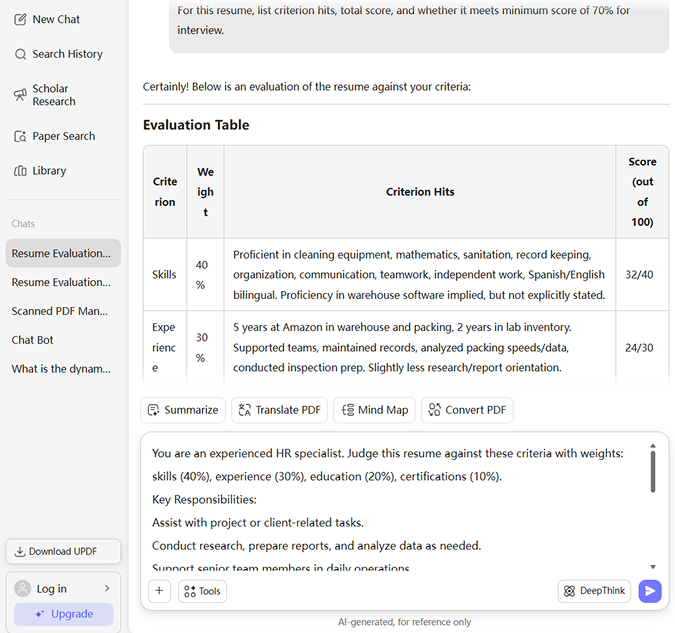
Jasno zdefiniuj wymagania zawodowe (obowiązkowe umiejętności, preferowane umiejętności, poziom doświadczenia, wykształcenie itp.), aby AI wiedziało, co ma dopasować. Następnie wprowadź polecenie np.: „[Wklej opis stanowiska] Dla każdego CV wymień spełnione kryteria, łączną ocenę i czy spełnia minimalny próg 70% do rozmowy kwalifikacyjnej.“ -
3. Wybór modelu AI:
ChatGPT-5 jest domyślnie wybrany. Aby przełączyć się na DeepSeek R1, kliknij przycisk „DeepThink“ dla alternatywnego stylu rozumowania i wyników. -
4. Generowanie strukturalnego wyniku dla każdego CV:
Kliknij „Wyślij“, a UPDF AI wygeneruje przejrzysty, strukturalny podsumowanie dopasowania dla każdego CV, pokazując, ile kryteriów zostało spełnionych, łączną ocenę dopasowania i prostą decyzję.

Dlaczego warto wybrać UPDF AI do selekcji CV?
Usprawnienie procesu selekcji CV
UPDF AI oszczędza specjalistom HR i rekruterom godziny ręcznej pracy, automatyzując selekcję życiorysów. Mogą przesyłać CV hurtowo, a UPDF AI automatycznie wyodrębnia kluczowe informacje o kandydatach i tworzy profile. Oszczędza to godziny ręcznej ekstrakcji danych i przyspiesza cały proces rekrutacji.

Inteligentne dopasowywanie kandydatów
UPDF AI potrafi analizować zarówno opis stanowiska, jak i CV kandydatów, dopasowując ich do idealnych ról za pomocą zaawansowanych algorytmów. Jest to znacznie precyzyjniejsze niż dopasowywanie ręczne i pozwala rekruterom łatwiej identyfikować najlepszych aplikantów.

Tworzenie idealnych profili kandydatów
UPDF AI potrafi wygenerować „idealny profil kandydata“ na podstawie opisu stanowiska, który zespół rekrutacyjny może w razie potrzeby dostosować. Dobrze zdefiniowany profil zapewnia zgodność rekruterów co do wymaganych kwalifikacji, doświadczenia i dopasowania kulturowego. Minimalizuje to uprzedzenia i subiektywne decyzje przy wyborze kandydatów.

Szybszy proces rekrutacji
Automatyzując zadania takie jak wstępna selekcja, UPDF AI przyspiesza proces rekrutacji. Zmniejsza to opóźnienia, pozwala firmom zdobyć najlepsze talenty przed konkurencją i umożliwia zespołom HR skupienie się na zaangażowaniu i utrzymaniu pracowników.
Narzędzie do preselekcji CV UPDF AI vs. inne narzędzia AI
UPDF AI
Inne narzędzia AI
Przesyłanie i parsowanie CV
 (PDF i obraz)
Kopiowanie i wklejanie tekstu
Screening słów kluczowych
Ranking/punktacja AI

Strukturalny eksport (Markdown)
(100 pytań)
Dopasowanie do opisu stanowiska
(wskazuje problemy)
Przesyłanie zbiorcze
(5 PDF za darmo)
Opcje modeli AI
ChatGPT-5 & DeepSeek R1
Ograniczone do jednego modelu AI
Obsługiwane języki
100+
Mniej niż 20
Obsługiwane platformy
Online, Windows, Mac, Android, iOS
Online
Najczęstsze pytania dotyczące narzędzia UPDF AI CV Screen
Q1. Jak narzędzie UPDF AI CV Screen wypada w porównaniu z ręcznym przeglądaniem CV przez ludzi?
Q2. Czy narzędzie UPDF AI CV Screen potrafi odczytywać wszystkie formaty życiorysów?
Q3. Czy narzędzie UPDF AI CV Screen może zastąpić ludzkich rekruterów?
Q4. Jak UPDF AI obchodzi się z prywatnością i poufnością danych?
Q5. Co się dzieje po etapie selekcji przez AI?
Inne popularne narzędzia UPDF AI